Manage Claim Financials and Resolve Claims
Learning Objectives
After completing this unit, you’ll be able to:
- Describe the sequence of financial records.
- Explain how product attribute scopes are automatically applied during calculation.
- Execute financial actions in the Claims Financials Workspace.
- Explain how Insurance Policy Limit Tracking ensures financial controls are maintained across the policy term.
Move from Intake to Financial Execution
After a claim is captured, the work shifts from intake to financial handling. What exposure does this loss create? What should be reserved? What can be paid?
When those decisions depend on spreadsheets or manual calculations, the process becomes complex. Claims Management brings financial handling into the same framework established throughout this badge. Product configuration defines structure, policy terms, and scope rules. Run-time operations apply those definitions consistently.
In this unit, you follow a claim from financial activation through settlement and explore how Digital Insurance turns policy terms into governed financial execution.
Track Financial Records
In the previous unit, intake activated the applicable claim coverage. That record makes the claim financially actionable by anchoring reserves, payments, and limit consumption. With claim coverage in place, Digital Insurance creates the records that support exposure tracking, calculation, and auditability.
This data model highlights the records used to manage reserves, payments, adjustments, policy limits, and limit tracking.
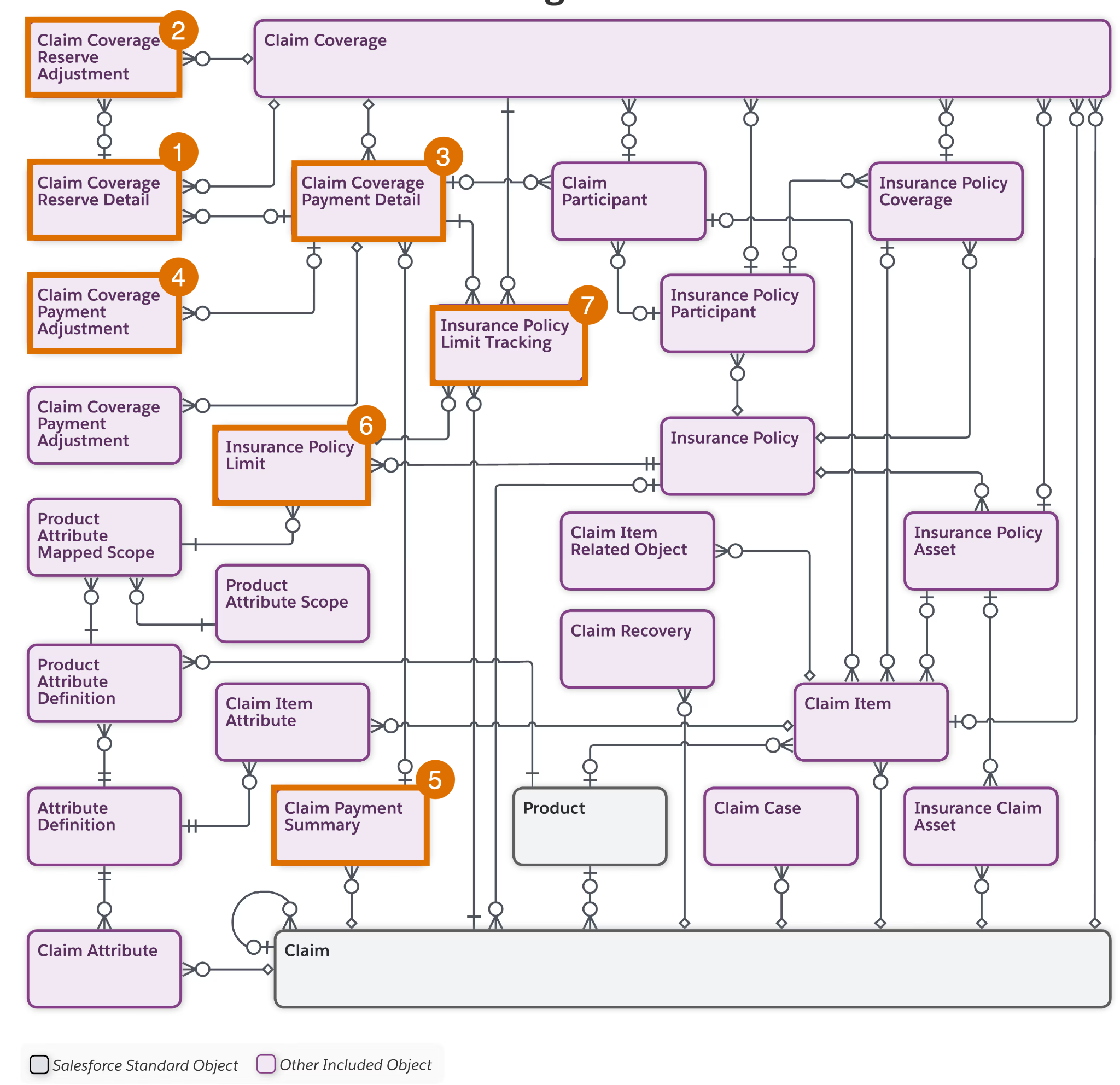
Here’s what each highlighted object represents in the data model.
-
Claim Coverage Reserve Detail (1) stores the current reserve position for a coverage.
-
Claim Coverage Reserve Adjustment (2) tracks each change to the reserve amount over time.
-
Claim Coverage Payment Detail (3) represents a single loss or expense line item under a coverage.
-
Claim Coverage Payment Adjustment (4) tracks deductions such as deductible or coinsurance applied to a payment detail.
-
Claim Payment Summary (5) groups payment details into a single disbursement.
-
Insurance Policy Limit (6) stores the policy term, such as a deductible or coverage limit, that financial calculations and limit tracking reference during claim handling.
-
Insurance Policy Limit Tracking (7) tracks limit consumption and reversals across claims so future claims reflect what has already been paid.
Together, these records tell the financial story of the claim. Reserves estimate exposure, payment details capture financial items, adjustments explain payable amounts, and limit tracking shows what remains available.
Manage Records in the Claims Financials Workspace
Adjusters manage claim activity across two key workspaces. The Claim Participant Lightning web component (LWC) provides a hierarchical view of claim participants and related claim items.
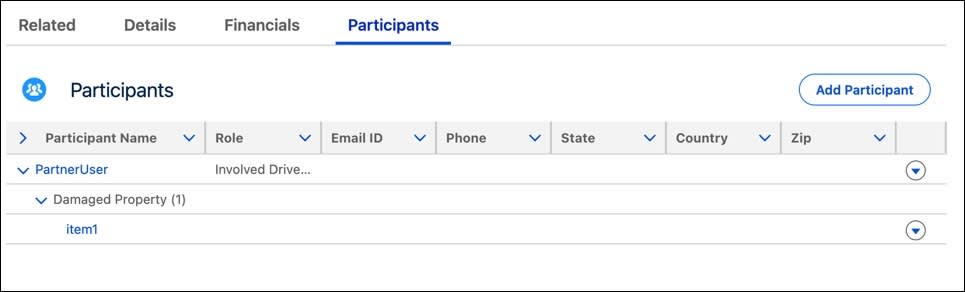
From this component, adjusters can manage participants, add damage and injury items, and review item attributes in the side panel.
The Claim Financials Lightning web component is the central workspace for managing claim financials. Its hierarchical grid groups loss and expense activity by coverage and claim item.
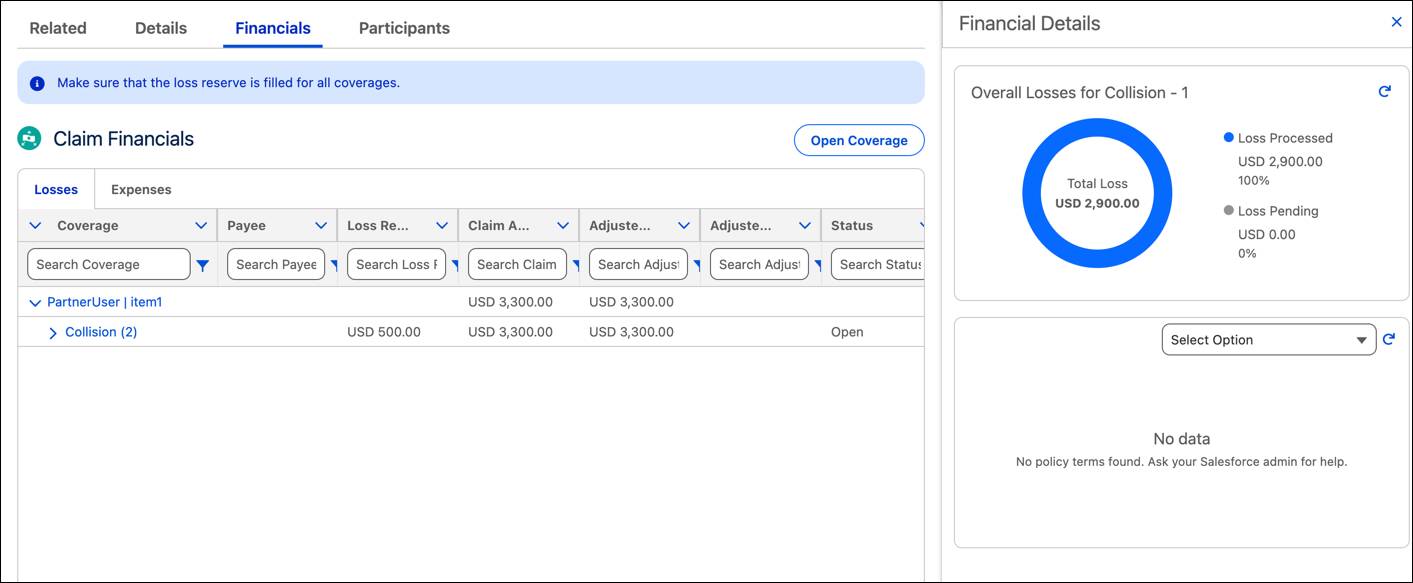
From here, adjusters can search, sort, and filter data. They can also open coverages, manage payment details, and monitor policy limits, payment progress, and overall financial status through the dashboard.
Salesforce admins can tailor the fields and available actions so the workspace reflects the insurer’s handling process while keeping financial activity aligned to the claim and policy structure.
Implement Policy Terms
Each action in the Claims Financials workspace triggers a specific financial operation. Here are the key actions and what they do.
-
Get Current Standings returns reserved, paid, and remaining amounts against limits.
-
Create Claim Coverage Payment Detail captures a loss or expense line item and establishes the calculation context.
-
Edit Claim Coverage Payment Detail updates an existing payment detail and, for loss items, recalculates adjustments and limit usage while preserving audit history.
-
Calculate Adjustments applies scoped policy terms, such as deductible and stores the breakdown.
-
Pay Claim Coverage Payment Detail validates limits and finalizes payment consumption.
-
Pay Exgratia pays a loss item even when limits are exceeded, while capping tracked limit consumption at the remaining available amount.
-
Cancel Claim Coverage Payment Detail reverses a paid item and restores limit consumption.
-
Delete Claim Coverage Payment Detail removes an unpaid item cleanly without leaving a false pending record.
Together, these operations track financial status, process payments, and correct transactions.
Manage the Claim
Now explore how the records, workspace, and operations work together in practice. In the previous unit, Claims Intake Specialist Natalie Wilson captured an auto collision claim and opened the relevant claim coverage during intake. With eligibility verified and coverage linked to the policy, the claim moves into financial handling.
First, the adjuster confirms that all relevant participants and roles are in place in the Claim Participant component. The adjuster then opens Claim Financials, where any coverages opened during intake already appear and additional coverages can be opened if needed.
Establish Exposure with Reserves
With the Collision claim coverage in place, the adjuster at Cumulus Insurance begins estimating exposure by setting a loss reserve of $3,000 and an expense reserve of $1,000 for the collision coverage.
These entries establish the reserve position for the claim coverage. As repair estimates arrive and additional damage is discovered, the reserve can be updated. Each revision creates a Claim Coverage Reserve Adjustment record, preserving a timestamped history of how expected exposure changes over time.
Capture Loss and Expense Items
With reserves in place and documentation in hand, the adjuster begins turning reported costs into structured payment items in Claim Financials.
On the Losses tab, the adjuster adds a loss item for the repair invoice, enters the claimed amount, and calculates the item. The platform applies the configured adjustment logic and returns the adjusted amount and adjustment reason.
On the Expenses tab, the adjuster adds a separate expense item for the towing bill under the same coverage. Expense items follow a similar flow, but capture the expense amount directly rather than going through the same adjustment path.
When the items are saved, Digital Insurance creates Claim Coverage Payment Detail records under the selected Claim Coverage. For the loss item, the calculation step also creates the related Claim Coverage Payment Adjustment record.
At this stage, the claim has governed financial records ready for review and payment, but no disbursement has been issued.
Process Payment Details
With the payment details in place, the adjuster returns to the repair item to decide the next step.
At first, the body shop estimate was incomplete, so the item remains in draft. When a supplemental estimate adds newly discovered damage, the adjuster selects Edit.
This action recalculates the adjusted amount, replaces the earlier Claim Coverage Payment Adjustment records, and updates the payment detail.
After the estimate is complete, the adjuster selects Pay.
This action updates the Claim Coverage Payment Detail status, validates the applicable policy limits, tracks consumption in Insurance Policy Limit Tracking, and updates the payment summary. If the payment exceeds an allowed limit, the adjuster receives an error message.
If the approved repair amount exceeds the remaining limit, but the insurer decides to cover the excess as an exception, the adjuster can use Pay Exgratia for the draft loss item. This action issues payment while recording tracked consumption only up to the permitted amount.
If the paid repair item needs to be reversed later, the adjuster selects Cancel. If an unpaid repair item should no longer move forward, the adjuster selects Delete. In each case, the platform updates the status and keeps the underlying financial records aligned by reversing tracked consumption and deactivating prior adjustment records where needed.
When no pending payment details remain and reserves reflect the final exposure, the claim is financially resolved.
Wrap Up
For Cumulus Insurance, the collision claim is now coverage-verified, financially resolved, and traceable to the policy terms that governed every decision. Together, product administrator Justus Pardo, intake specialist Natalie Wilson, and a Cumulus adjuster give the policyholder a faster, clearer path to resolution.
Across this badge, you explored how Claims Management turns product and policy design into governed claim execution. You learned how to model claim structure and policy terms, capture losses through guided intake, and manage reserves, payments, and limits. You also learned how one shared foundation keeps claims consistent, explainable, and auditable from first notice through resolution.
Use the Resources sections in each unit to continue exploring the concepts and capabilities introduced here.