Get to Know the Unified Catalog
Learning Objectives
After completing this unit, you’ll be able to:
- Describe the challenges that IT teams encounter when managing services.
- Explain how the Unified Catalog simplifies service management and requests.
- Describe the key components of the Unified Catalog.
Scattered Services

Before You Start
Before you start this module, consider completing this recommended content.
When employees need new hardware, software installation, system access, or permissions, they reach out to their trusted IT support members to solve the problem. These services are an integral part of an IT ecosystem, and the key to keeping business operations running smoothly.
With the right system, IT employees can quickly coordinate the provisioning of assets and set up users with the tools they need to do their jobs with minimal downtime.
The problem is that many IT teams don’t have the right system. Instead, IT services and offerings are scattered across legacy applications or difficult-to-navigate portals.
Different systems, different forms, and different queues mean that employees spend too much time digging for the correct request form or searching for the correct team to contact about a particular service. They might need to reach out to one team to request a new laptop and then a completely different team to get the software installed on the new computer.
These inefficiencies lead to bottlenecks and frustration that only get worse as your organization grows.
With Agentforce IT Service, your service catalog is unified; in fact, it’s called the Unified Catalog–and for good reason!
In this badge, you explore how a comprehensive, fully integrated, and AI-ready service catalog helps you enhance your IT operations and the employee experience.
The Unified Catalog
In Agentforce IT Service, the Unified Catalog provides a single, organized view of all your IT services and requestable assets that employees can access through the Agentic IT Service portal.

They can browse and search the catalog for what they need and quickly request services through one of several channels without interrupting their flow of work.
Powered with your catalog data, an Agentforce agent can also help employees identify and request the services they need through a Slack or Microsoft Teams conversation.
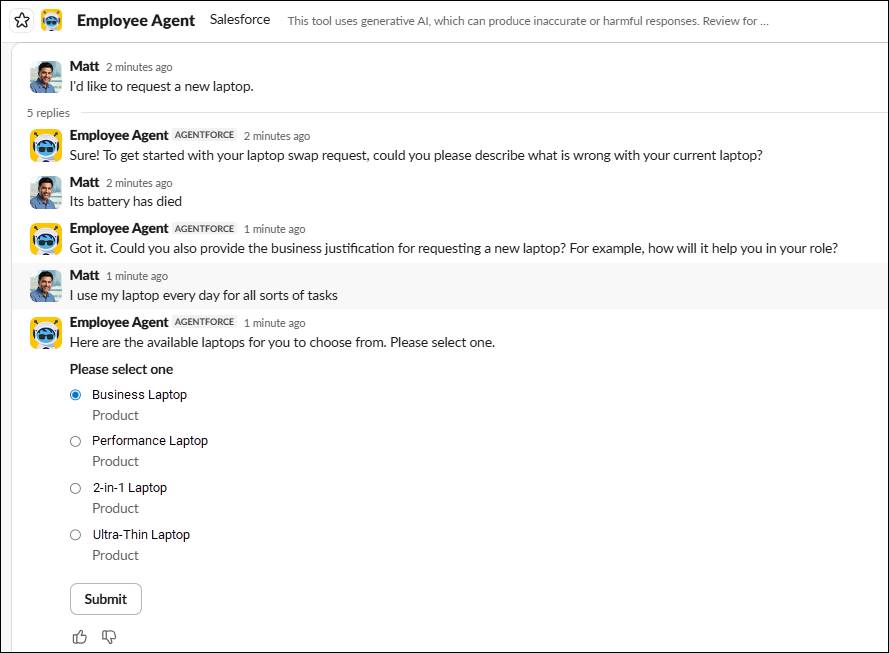
The agent asks the necessary questions, provides options, and launches the next steps to complete the request.
The Unified Catalog is built upon the Product Catalog Management (PCM) architecture to support both humans and AI. In essence, PCM helps you define, organize, and manage products, services, and bundles in a centralized catalog. This catalog powers request management processes across any business or organization that relies on IT.
Your custom catalog includes all of your available IT software, hardware, and system access services. You can also use the catalog to capture and triage incidents, standardize routine HR interactions, or even manage non-IT related services, such as ordering office supplies or specialized furniture.
The items in your catalog aren’t just static components. Rather, they encompass the entire lifecycle of underlying service processes, from intake to fulfillment to post-fulfillment operations. This close integration helps IT staff seamlessly execute every step of delivery and resolve requests.
Here are some ways that dynamic catalog items support employee and IT team experiences.
-
Intake forms automatically prefill the requesting user’s information, and this captured data is stored in Salesforce records that you define.
-
Eligibility rules control which catalog items are available to employees or roles.
-
Fulfillment flows automate routing, approvals, task creation, and closure to ensure faster and more efficient resolutions, even when cross-department collaboration is necessary.
And there’s the simplified setup. You can build each of your catalog items declaratively, configure intake forms directly from data attributes, and publish your catalog without any help from a developer.
Best of all, you don’t need to build your catalog from scratch. Agentforce IT Service includes several customizable templates that you can install and activate to make your services available in a matter of minutes.
One Catalog, Every Channel
After you build out your catalog, you can deploy it wherever your employees and IT teams already work. Add the catalog to your Employee Services Portal so employees can search or browse for the services they need and submit requests. Or, embed this powerful self-service tool into your existing employee portal using a Lightning Web Component.
Employees can submit requests directly from a conversation with Agentforce in either Slack or Microsoft Teams. The agent automatically identifies the right catalog item, collects the necessary information, and submits the request on the employee’s behalf.
You can also link your catalog items directly to associated knowledge articles so that employees can both understand and then resolve IT-related issues through a self-service workflow.
Key Components of the Unified Catalog
To get a better understanding of how the catalog works, it helps to understand its interconnected pieces. Here’s a preview of the components you explore further in this badge.
Component |
Definition |
|---|---|
Catalog Items |
The front-facing services that employees can request, such as Request a Laptop or Reset My Password |
Products |
The underlying records that support versioning and attributes for your catalog items |
Categories and Subcategories |
Organizational groupings that make catalog items easier to find in the portal, such as Hardware Request | Peripherals or Software Requests | Productivity Apps |
Service Processes |
Workflows that define how catalog items are fulfilled, including the logic and steps that happen after an employee submits a request |
Intake Forms |
Screen flows, Omniscripts, or autogenerated forms that collect requester information at the time of submission, such as device preferences or software license details |
Anchor Entities |
Salesforce records created when a request is submitted to help track the request through resolution |
Fulfillment Flows |
Automation that kicks off after a request is submitted to route approvals, create tasks for IT, provision items, and close requests |
Agentforce Actions |
AI actions that execute service processes autonomously, extracting parameters in conversations with employees, routing approvals, and triggering fulfillment |
These components all work together as a cohesive system. A catalog item connects to a service process, which uses an intake form to collect information. An anchor entity is then created to track the request, and a fulfillment flow is triggered to carry out the work.
This tight cohesion simplifies catalog setup, and eliminates the need for separate intake and fulfillment systems.
Wrap It Up
In this unit, you learned how the Unified Catalog helps employees easily find and request needed services, and provides IT reps with a system to efficiently manage and fulfill those requests.
Next, you dive deeper into the catalog components and discover the steps for creating an elite service solution for your organization.