Explore Event-Triggered Flows in Marketing Cloud Next
Learning Objectives
After completing this unit, you’ll be able to:
- Describe the value of event-triggered flows in Marketing Cloud Next.
- List the types of events in Marketing Cloud Next.
- Explain where events are used across flow elements.
- Provide examples of event-triggered flows across industries.
Before You Start
Before you start this badge, consider completing this recommended content.
The Right Message at the Right Moment
A customer books a flight, lands on the confirmation page, and closes the tab before finishing setup. They leave their seat unpicked, meal preference blank, and miss the upgrade offer. That’s a middle seat just waiting to happen.
A few minutes later, a friendly email lands in their inbox: Your trip is all set, but your seat isn’t. Finish setting up your journey.
That’s not magic, that’s an event-triggered flow doing its job. It responds to what customers actually do and delivers the right message at exactly the right moment.
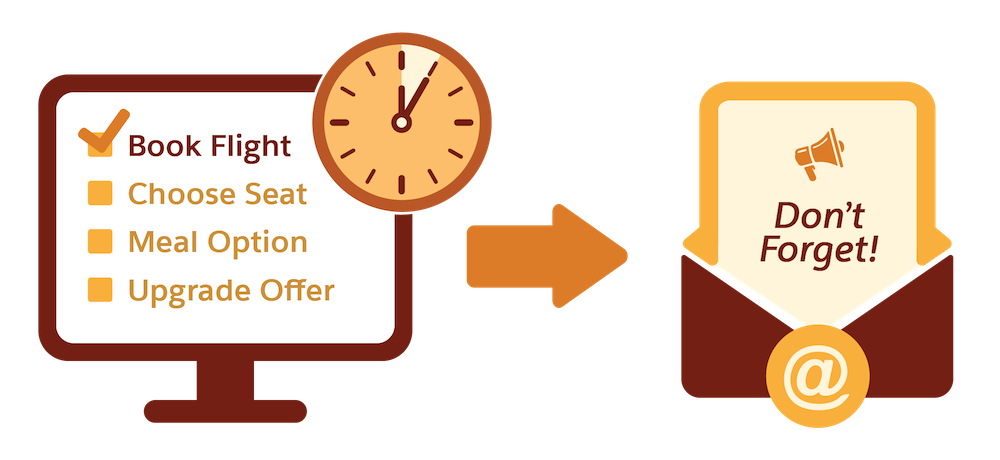
Traditionally, marketers have relied on batch messaging. They pick a date, build a segment, send an email, and hope the timing feels relevant. The challenge is, customer behavior doesn’t follow a calendar.
How Marketing Cloud Next Helps
Marketing Cloud Next is built for near real time, responsive marketing. It connects customer data, segmentation, and campaign execution in one platform, so when a customer does something meaningful, Marketing Cloud Next can act on it right away.
A key part of that capability is automation event-triggered flows that launch the moment a defined event occurs, without manual scheduling or batch processing. To make that work, Marketing Cloud Next needs to know what event to watch for and what data comes with it. That starts with understanding the types of events available in Marketing Cloud Next.

Event Types in Marketing Cloud Next
Marketing Cloud Next supports a few different event types, and the one to use depends on where the trigger data comes from.
Standard Events
They’re built in and ready to use. They represent common customer interactions that Marketing Cloud Next already knows how to recognize. For example, a flow launches when a contact clicks a link in an email, submits a Marketing Cloud Next form, or opts in to SMS.
Custom Events
Not every meaningful customer action happens inside an email or form. Contacts may visit a website, click a button in an app, or interact with content on an external platform. These actions can be valuable signals worth acting on.
Use a custom event built with an Engagement Signal to bring those behaviors into Marketing Cloud Next and trigger flows. To create a custom event using an Engagement Signal, you select a source data model object (DMO) from the Engagement or Profile category in Data 360, define the condition to monitor, and save the signal. The signal then appears in the Automation Event Library in Flow Builder and can be used as a flow trigger.
The DMO category you select determines what behavior the signal can track.
-
Engagement DMO: Use this for customer activity data such as website visits, email clicks, app interactions, and product browsing. Choose this category when you want to trigger a flow based on something a contact did.
-
Profile DMO: Use this for changes to a contact's stored data, such as a lead being converted, a field being updated, or a new record being created. Choose this category when you want to trigger a flow based on something that changed about a contact.
Custom events depend on having the right data available in Marketing Cloud Next. Engagement Signals are built on Engagement or Profile DMOs that store customer activity such as website visits, email engagement, and product browsing. When this data is connected and mapped in Data 360, you can create custom events from it.
Custom Real-Time Data Graph Events
Sometimes the trigger you need is not a single interaction but a change in a contact’s broader data profile. Use custom real-time data graph events to launch a flow when a meaningful update occurs in a data graph.
In Data 360, a data graph connects a contact to related data from multiple DMOs. When data in the graph changes, such as a loyalty tier update, a lifetime value crossing a threshold, or an opportunity being marked closed-won, Marketing Cloud Next detects the change and starts the flow.
These events work well when structured data drives the trigger rather than a contact action. To use an event, select it as the entry trigger in Flow Builder and define the graph changes that qualify.
Custom CRM Events
Custom CRM events let you trigger a flow based on changes to records in Salesforce. If a contact’s account status changes, a case gets updated, or a custom object record is created, a custom CRM event can detect that and kick off a flow.
Like custom events built on Engagement Signals, custom CRM events require the right data to be connected. They rely on CRM-category DMOs in Data 360, which store and surface Salesforce record data. As long as you have the CRM data mapped and available in the data space, any record change can serve as the trigger.
Custom CRM events are well-suited for flows that bridge marketing and sales or service. For example, when a contact’s opportunity stage changes or a service case closes, Marketing Cloud Next can automatically send the right follow-up.
So far, you’ve learned how events start a flow. Next, learn how events can also control what happens to contacts after they enter one.
Where Events Are Used in Flows
Events do more than start a flow. They can also guide a contact's journey after entry.
Exits
Use events as exit rules to remove contacts from a flow when a specified event occurs. For example, a contact enters a reengagement flow. When they open an email and click a link, Marketing Cloud Next detects the event and removes them from the flow. They don’t receive any further reengagement messages.
Waits
Use the Wait Until Event element to pause a contact until a specific event occurs or a timeout expires. For example, a flow sends an email and waits up to 24 hours for the contact to click a link. If the contact clicks the link, the flow delivers a follow-up offer. If 24 hours pass without a click, the flow follows a timeout path and sends a reminder instead. The event determines which path the contact takes.
Experiments
Use events to measure success in Path Experiments. Select an event as the success metric, and Marketing Cloud Next tracks which path generates more of that event. For example, you can test two email subject lines and measure which one drives more Email Link Clicked events. Marketing Cloud Next identifies the winning path and automatically routes remaining contacts to it.
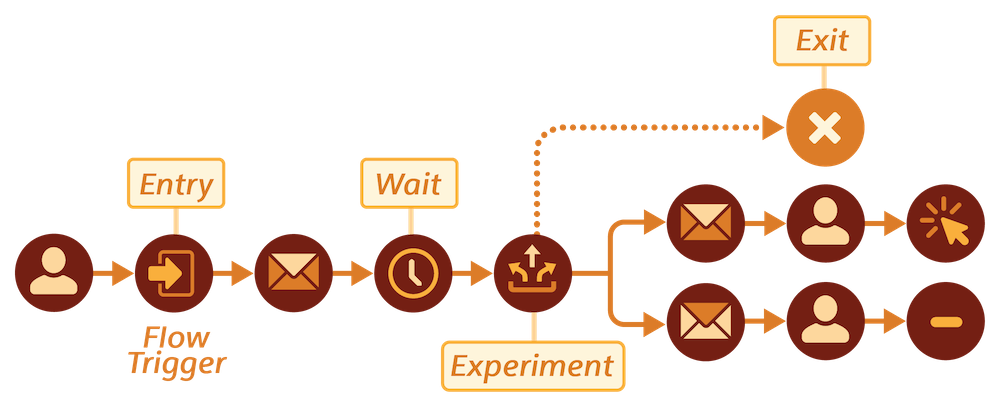
Now that you know where events appear in a flow, let’s explore how marketers across industries use them.
Event-Triggered Flows in Action
Event triggers work across industries and interaction types. Here are a few examples of how different businesses use them.
Industry |
Event Type |
Use Case |
|---|---|---|
Retail and ecommerce |
Standard |
A customer submits a loyalty program sign-up form. Marketing Cloud Next detects the Form Submission event and launches a welcome flow with a confirmation email and onboarding journey. |
Travel and hospitality |
Custom (Engagement Signal) |
A known contact visits a hotel’s Rates and Availability page but does not complete a booking. An Engagement Signal detects the activity and triggers a personalized email encouraging the contact to complete the reservation. |
Health and wellness |
Custom real-time data graph |
A gym member’s engagement score falls below a defined threshold. A real-time data graph event detects the change and triggers a reengagement flow with a personalized message and workout recommendation. |
Financial services |
Custom CRM |
A Salesforce opportunity moves to the Proposal Sent stage. A custom CRM event detects the change and launches a flow that sends supporting materials and encourages the contact to schedule a follow-up conversation. |
The common thread across all these examples is that the flow responds to what the customer actually does, not what the marketer hoped they would do by a certain date.
What’s Next
Batch messaging still has its place; it’s great for reaching a broad audience with a timely promotion. But event-triggered flows are how you follow up in the moments that matter. In Marketing Cloud Next, a campaign can include different types of events so you can cover a wide range of customer behaviors. In the next unit, you follow along with Coral Cloud Resorts to learn how all the pieces behind an event-triggered flow fit together.