Use Meeting Concierge for a Client Meeting
Learning Objectives
After completing this unit, you'll be able to:
- Describe the pre-meeting tools in Meeting Concierge.
- Explain how to capture notes and stay on-task during a meeting.
- Describe how to generate meeting summaries and post-meeting actions, and complete follow-up checklists.
Meeting Management
In the previous unit, you learned the basics of Meeting Concierge. In this unit, follow along with an example to explore how Meeting Concierge helps client-facing professionals.
So, meet Ryan Dobson, a financial advisor at Cumulus Wealth, an advisory firm that’s part of a larger financial institution. Ryan is an experienced advisor who has sadly spent more of his career on meeting administration than on working with clients.
In the past, before each meeting, Ryan manually pulled client financial data. He then reviewed portfolio performance in a custodian portal and sorted through past emails and text messages. All of this work was just to piece together a coherent picture of a client’s situation and needs. During meetings, he took handwritten notes and later spent hours translating those notes into follow-up actions. These tedious tasks limited his capacity, produced inconsistent meeting preparation, and often led to missed opportunities.
Now, however, Ryan and Cumulus Wealth use Agentforce Financial Services and Meeting Concierge. These tools dramatically reduce the time that he spends preparing for and following up on each meeting.
Let’s find out how Ryan works throughout a full client meeting, starting with pre-meeting preparation.
Pre-Meeting Preparation
Ryan is preparing to meet with a client in a few hours. To get started, he opens the Meeting Concierge home page and selects the upcoming meeting playbook record. A flow automatically created the meeting playbook record because Ryan had a meeting with the client on his calendar. You learn more about that flow in the next unit.
On the Pre Meeting tab, Ryan reviews the AI-generated Client Summary. The summary covers details about the client, including their:
- Financial health
- Relationship health
- Goal progress
- Portfolio performance
- Past interactions
- Life events
Cumulus Wealth’s admin can configure the prompt to include information from other objects, as well.

Ryan also checks the Meeting Preparation Brief for a summary of recent changes and a suggested meeting agenda.
If Ryan uploads a document to the pre-meeting step, he can ask Agentforce to summarize it automatically and add the new information to his pre-meeting summaries. He does, and the Meeting Preparation Brief regenerates to include the new client details.
Agentforce assembles both the Client Summary and Meeting Preparation Brief from household data and related records in seconds, not hours.
But Ryan doesn’t simply accept the Meeting Preparation Brief’s automatically generated output. He can select Edit and then either type changes manually or direct Agentforce to revise the brief by entering a description of what he wants to change.
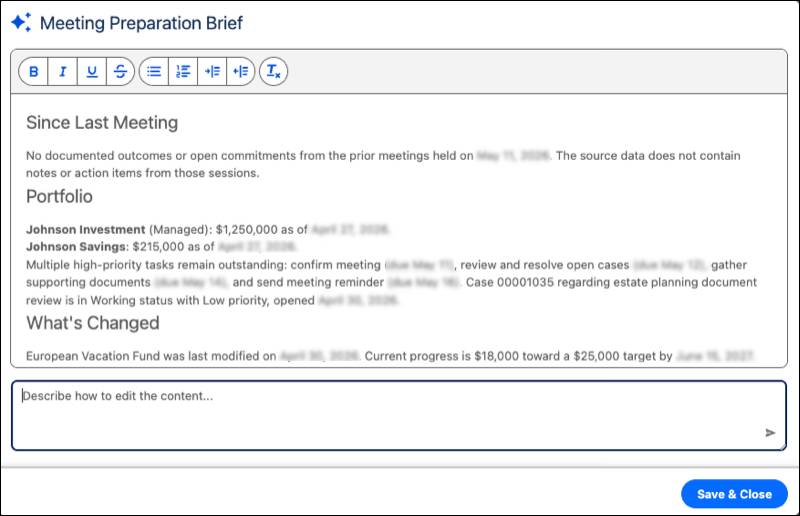
When Ryan’s satisfied with the summaries, he saves his work.
Finally, Ryan closes any open items in the Meeting Preparation Tasks checklist. The Action Plans feature, configured by his admin, powers this checklist. Each checklist item maps to a task record in Salesforce to keep preparation trackable and reportable across the team. He can add more tasks to the checklist as needed.
As he closes his last task, Ryan has a clear understanding of the client’s priorities in a fraction of the time it used to take him to gather this information manually. He clicks Generate Meeting Discussion Guide to have Agentforce create a summary and agenda that he can follow during the meeting.
In-Meeting Facilitation
During Ryan’s meeting with the client, he uses the AI-generated Meeting Discussion Guide on the In Session tab to stay focused on the agenda and critical client decisions. As with the Meeting Preparation Brief, he can edit this guide before the meeting by manually making changes or by asking Agentforce to revise the output.

Ryan types his notes directly into the meeting session and uploads reference documents, as well. He can also upload any handwritten notes from the session.
The system captures the conversation's full context—written notes, audio summaries, and uploaded materials—in the meeting playbook.

As the meeting ends, Ryan is confident he captured every important client detail without sacrificing his attention and engagement during the conversation. He clicks Generate Meeting Follow-Up to move to the Post Meeting tab and generate follow-up notes.
Post-Meeting Follow-Up
After the meeting, Ryan uses the Meeting Follow-Up Summary to coordinate his next steps. Agentforce uses Ryan’s notes, audio summaries, and other in-meeting content with the rest of the client’s information to generate a structured summary. It covers the topics discussed, decisions made, and any next steps.

Ryan can again edit the meeting follow-up summary manually or provide written instructions to Agentforce to refine it. The generated summary becomes part of Salesforce records only after Ryan reviews, accepts, and saves it, keeping him in control of what’s tracked in his firm’s single source of truth.
Ryan also reviews the post-meeting Agentforce actions. The actions that appear are based on the content of his meeting. That means that only the most-applicable actions are in the meeting playbook, helping Ryan and his team focus on the best next step.
Here are three examples of actions that he can take.
-
Create Email drafts a personalized email to the client summarizing key discussion points and next steps.
-
Suggest Action Items creates a prioritized task list for Ryan and his team based on meeting content. For example, the action can create a task to schedule a follow-up meeting about a client need that was mentioned in the meeting.
-
Update Life Event or Goals uses meeting notes to add or update a life event or a financial goal. For example, if the client mentions they’re expecting a new child, the action can suggest a new life event and a goal for a college savings account.
Finally, Ryan works through the Meeting Follow-Up Tasks checklist. No task is forgotten, which boosts client confidence in both Ryan and Cumulus Wealth. More client confidence means more assets under management. That’s a win for Ryan and the firm.
What's Next?
In this unit, you followed a financial advisor through all three stages of a client meeting and explored how Meeting Concierge transforms each step. Ryan went into his meeting prepared, stayed present during the conversation, and finished with a complete follow-up plan, all without the hours of manual work that it used to take for the same outcome.
You now understand how Meeting Concierge helps users, so it’s time to explore the admin side of the feature. In the next unit, you discover how admins create meeting playbook definitions, connect AI prompts and action plans, and automatically create meeting playbook records from calendar events.