Design the Platform Consent Data Model for General Consent
Learning Objectives
After completing this unit, you’ll be able to:
- Configure the core objects for general consent for data processing actions.
- Compare general consent with consent collected for marketing purposes.
- Explain the rationale for bypassing engagement channel consent and contact point consent for a specific use case.
The Platform Consent Model
In the Platform Salesforce Consent Data Model, there are four different types of consent.
General Consent
You track general consent on the Individual or Party Consent objects. This consent focuses primarily on data processing actions (which includes things like the sharing of customer data with partners, marketing to customers, and so forth) and other types of general consent that are a binary signal (for example, when a customer states that they do not want you to contact them).

Engagement Channel Consent
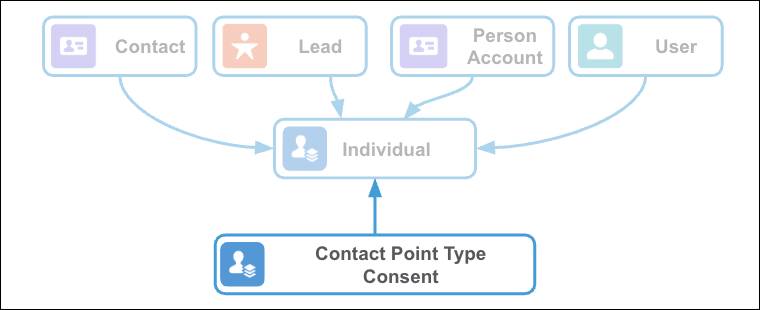
You track engagement channel consent on the Contact Point Type Consent object. This consent focuses on the preferred communication channels where a data subject wants to be contacted. For example, a customer might be OK with you contacting them through their email address, but they don’t want you to call them on their phone.
Contact Point Consent
You track contact point consent on the Contact Point Consent object. This consent focuses on which specific contact points a data subject prefers to be contacted on for a given data use purpose. For example, a customer might consent to receiving marketing email to their work email address but not to their personal email address.

Communication Subscription Consent
You track communication subscription consent on the Communication Subscription Consent object. This consent focuses on which specific types of communications the data subject prefers to receive on a specific contact point. For example, a customer might consent to receiving the Kicks Club newsletter, but not product updates, at their personal email address.

Every company has specific requirements based on how they handle contact points for their customers and how they plan data processing actions and marketing outreach. The Salesforce Platform Consent Data Model is designed to meet a company where it is in its consent management journey, and provides the flexibility to extend that model as business needs and regulatory requirements evolve.
A Multilevel Approach
Linda Rosenberg, the system administrator at Cloud Kicks, knows that building customer trust requires more than just collecting a general opt-in. Since Cloud Kicks is a global brand that operates multiple subbrands (Kids Kicks, Sneakers Kicks, and Trail Kicks) and engages in complex data processing like personalization and data sharing, its consent model needs to be highly granular. She elects to focus on general consent and communication subscription consent.
You might be thinking: Why is Linda Rosenberg using only two of the consent levels? Shouldn’t she use all of them?
The Salesforce Platform Consent Data Model offers four levels of communication consent. For this specific implementation, Linda strategically focuses on the highest and lowest levels: general consent (via the Party Consent object) and communication subscription consent.
Linda intentionally bypasses engagement channel consent and contact point consent for the following reasons.
-
Precise and granular control: Cloud Kicks’s goal is to track a customer’s consent for a specific communication publication (for example, the Kicks Club newsletter) as opposed to all communication on a channel (for example, all email). Because a communication subscription is, by definition, associated with both an engagement channel (like email or SMS text messaging) and an individual contact point, the communication subscription consent level offers the most precise level of control for the customer.
-
Consent management level: Contact point type consent and contact point consent focus on managing consent for a data use purpose (DUP), specifically for a type of engagement channel (contact point type consent) or a specific contact point (contact point consent). Because Cloud Kicks is using newsletters and subscriptions, it must use communication subscription consent. Consent for a newsletter cannot be managed at the contact point type or contact point level—those levels are designed for managing consent for the DUP itself (like all marketing email) rather than for a specific publication under that DUP.
-
Single marketing data use purpose: Cloud Kicks’s marketing activities are all centered around a single high-level purpose: marketing communications. If Cloud Kicks had distinct marketing data use purposes–for example, distinct DUPs for product updates, for upsell, and for crossell–then contact point type consent would be more useful to track consent for the specific engagement channel and DUP combination. Because Cloud Kicks has only one broad marketing DUP, jumping straight to communication subscription consent provides greater customer control without adding unnecessary layers of complexity.
Hands-on Challenge: Part 1
In this hands-on challenge, you help Linda design a consent data model that manages two distinct permission levels for every customer. This challenge requires you to configure the core consent objects to manage both general data processing consent and granular, brand-specific marketing subscription consent for the Cloud Kicks sub-brands: Kids Kicks, Sneakers Kicks, and Trail Kicks.
To complete this challenge, you must satisfy requirements in four distinct design areas. In Part 1 of this hands-on challenge, you address two of these design areas: data use purpose (and legal basis), and general consent setup.
Sign Up for a Developer Edition Org with Platform Consent Data Model permissions
To complete this module, you need a special Developer Edition org with Platform Consent Data Model permissions. Get the free Developer Edition and connect it to Trailhead now so you can complete the challenges in this module. Note that this Developer Edition is designed to work with the challenges in this badge, and may not work for other badges. Always check that you’re using the special Developer Edition org that we recommend.
- Sign up for a free Developer Edition org with Platform Consent Data Model permissions.
- Fill out the form.
- For Email, enter an active email address.
- For Username, enter a username that looks like an email address and is unique, but it doesn’t need to be a valid email account (for example, yourname@example.com).
- For Email, enter an active email address.
- After you fill out the form, click Sign me up. A confirmation message appears.
- When you receive the activation email (this might take a few minutes), open it and click Verify Account.
- Complete your registration by setting your password and answering the challenge question. Tip: Save your username, password, and login URL in a secure place—such as a password manager—for easy access later. Also, note the org creation date.
- You’re logged in to your Developer Edition Org.
Now connect your new Developer Edition org to Trailhead.
- Make sure you’re logged in to your Trailhead account.
- In the Challenge section at the bottom of this page, click the playground name and then click Connect Org.
- On the login screen, enter the username and password for the Developer Edition you just set up.
- On the Allow Access? screen, click Allow.
- On the Want to connect this org for hands-on challenges? screen, click Yes! Save it. You’re redirected back to the challenge page and ready to use your new Developer Edition to earn this badge.
Follow along with these steps in your Trailhead Playground to configure the multilevel consent model for Cloud Kicks.
Define a Legal Basis and a Data Use Purpose (DUP)
The Legal Basis object provides you with a mechanism to explicitly record why you store a customer’s personally identifiable information (PII) in your Salesforce org. This mechanism is important for managing data that falls outside of explicit consent—for example, data that you retain to fulfill contractual obligations. During a right to be forgotten request, the recorded legal basis acts as a clear identifier and enables you to quickly and accurately determine whether the data must be retained (due to a contract or regulation) or if it can be removed following the revocation of consent.
The Data Use Purpose object defines the specific reason for collecting, processing, or using a customer’s data. A Data Use Purpose record might link to a Legal Basis record in order to associate a specific data processing activity with the regulatory justification that authorizes it.
In this unit, you create a single Legal Basis record and link it to multiple Data Use Purpose records. A full-scale consent data model would likely include multiple Legal Basis records, such as legitimate interest, contractual purposes, public interest, and so forth. An organization must use consent as the legal basis if it can’t use another valid legal basis for processing personally identifiable information.
- In the App Launcher, search for and select Data Use Legal Basis.
- Click New.
- For Name, enter
Consent.
- For Description, enter
Explicit consent provided by a data subject.
- Click Save.
- In the App Launcher, search for and select Data Use Purpose.
- Click New.
- Create four new Data Use Purpose records. Use the information in this table. Be sure to save your work as you go.
Name
Description
Can Data Subject Opt Out (Checkbox)
Legal Basis (Picklist)
Marketing CommunicationsConsent to receive marketing, promotional, and advertising communications via all consented channels and subscriptions.True
Consent
Personalization and ProfilingConsent to analyze PII data for the use of purchase history, browsing activity, and behavioral patterns to personalize offers, product recommendations, and content.True
Consent
Data Sharing with PartnersConsent to disclose PII data to our external partners, vendors, and affiliates to enable bundled offers and operational efficiency.True
Consent
Analytics and ResearchConsent to PII data collection, processing, and examination to study outdoor activity trends, product performance, or to improve services.True
Consent
Configure General Consent for Data Processing Actions Using Party Consent
The Party Consent object tracks a broad, high-level consent decision for a specific data use purpose related to an Individual record. Party consent is a general type of consent used for a specific data processing action–it is unrelated to communication or marketing types of consent. Cloud Kicks does not make a brand-specific distinction for this type of consent, so in this challenge, you do not define a business brand for this general level of consent (although you will for marketing consent). Just know that the data model is designed to enable you to define business brands at this level if your organization does require consent to be segmented this way.
In this scenario, you associate the Individual record for Sofia Diaz with three new Party Consent records, a record for each of the three general data processing action data use purposes: Personalization and Profiling, Data Sharing with Partners, and Analytics and Research.
Assume that Sofia Diaz has previously updated a preference management form, where they have elected to opt into Marketing Communications, Personalization and Profiling, and Analytics and Research, but they have elected to opt out of Data Sharing with Partners.
You won’t define an Effective To and Double Consent Capture Date Time for Party Consent objects in this scenario. These fields can be required, however, depending on your business requirements and geo-specific data privacy regulations.
- In the App Launcher, search for and select Party Consent.
- Click New.
- Create three new Party Consent objects, using this information. Be sure to save your work as you go.
Personalization and Profiling
Field |
Value |
|---|---|
Name |
Personalization and Profiling |
Party |
Sofia Diaz |
Data Use Purpose |
Personalization and Profiling |
Action |
Target |
Consent Captured Source |
Preference Management Form |
Consent Captured Contact Point Type |
Web |
Privacy Consent Status |
Opt In |
Consent Captured Date Time |
Select any time and date in the past |
Effective From |
Select the same date that you selected for Consent Captured Date Time |
Data Sharing with Partners
Field |
Value |
|---|---|
Name |
Data Sharing with Partners |
Party |
Sofia Diaz |
Data Use Purpose |
Data Sharing with Partners |
Action |
Share Data |
Consent Captured Source |
Preference Management Form |
Consent Captured Contact Point Type |
Web |
Privacy Consent Status |
Opt Out |
Consent Captured Date Time |
Set this to any time and date in the past |
Effective From |
The same date that you selected for Consent Captured Date Time |
Analytics and Research
Field |
Value |
|---|---|
Name |
Analytics and Research |
Party |
Sofia Diaz |
Data Use Purpose |
Analytics and Research |
Action |
Data Collection |
Consent Captured Source |
Preference Management Form |
Consent Captured Contact Point Type |
Web |
Privacy Consent Status |
Opt In |
Consent Captured Date Time |
Set this to any time and date in the past |
Effective From |
The same date that you selected for Consent Captured Date Time |