Explore Einstein Product Recommendations
Learning Objectives
After completing this unit, you’ll be able to:
- Explain the difference between explicit product recommendations and B2C Commerce Einstein Product Recommendations.
- Outline the four phases required to implement Einstein Product Recommendations.
- Define the roles and responsibilities of the Salesforce admin, merchandiser, and developer in the implementation of Einstein Product Recommendations.
- Describe how Einstein Product Recommenders use data and strategies to generate product suggestions.

Digital-first shoppers expect engaging personalized online shopping experiences. Part of that experience includes receiving product recommendations based on their interests and browsing actions. Most ecommerce sites offer explicit product recommendations. Explicit recommendations are links connecting a source object to a target object. For example, when a shopper looks at a pair of red high-top sneakers on a storefront, they see a link to a T-shirt and red shorts recommendation. The link shows in the You Might Also Like area on the page.
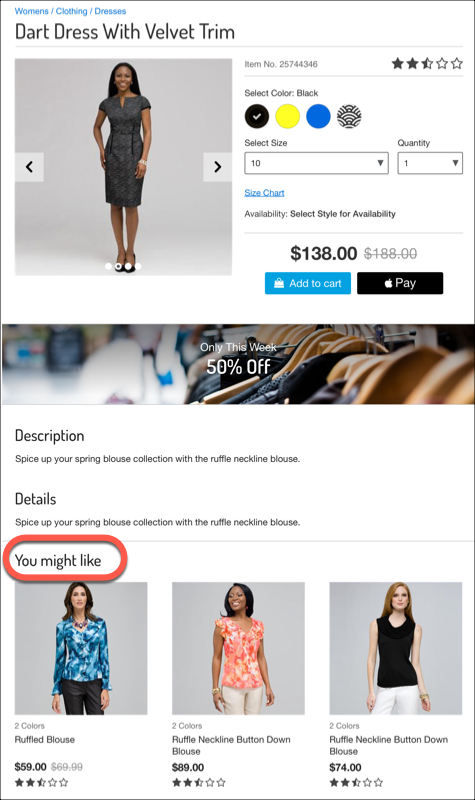
Explicit recommendations are based on a best guess (and sometimes wishful thinking). They’re what experienced merchandisers consider obvious connections. But without direct shopper input or feedback or live retail data, even the most experienced merchandiser can wonder if they’re missing sales opportunities.
Abandon Explicit Links for Einstein-Powered Recommendations
B2C Commerce Einstein Product Recommendations personalizes product suggestions for shoppers. It analyzes real-time customer interactions, including browsing history, purchase behavior, and search queries, to remove the guesswork from recommendations. The Einstein Product Recommender identifies patterns in customer data. This process predicts shopper preferences and interests, offering personalized suggestions that increase purchases. Your customers get products that they want, and your business maximizes conversion rates and increases average order value.
Agentforce Commerce Einstein Product Recommendations dynamically generates product recommendations by using historical and live data from:
-
Product catalog: Product information collected via a catalog feed.
-
Orders: Order information collected via an order feed.
-
Clickstream: Pixel tracking automatically collects real-time data via pixel tracking. Clickstream data includes activities like Product View, Add To Cart, Finish Checkout, and View Recommendation.
The more data that Einstein Product Recommendations uses, the better informed its recommendations are for your shoppers.
Implement Product Recommendations
Implementation of Einstein Product Recommendations happens in four phases.
-
Phase 1: Turn on Einstein Product Recommendations in your Salesforce B2C Commerce environment.
-
Phase 2: Train the AI model with historical data to make sure that it returns accurate and relevant recommendations.
-
Phase 3: Configure recommendation strategies and their placement on the storefront.
-
Phase 4: Monitor and optimize the performance of the recommendations.
The implementation of B2C Commerce Einstein Product Recommendations is a collaborative effort. Here’s a breakdown of the roles and responsibilities.
Role |
Primary Responsibilities |
Key Contribution |
|---|---|---|
|
Salesforce admin Phase 2 |
Turn on Einstein Product Recommendations: Activate Einstein Product Recommendations in the Salesforce B2C Commerce environment. This action involves enabling the relevant features and ensuring proper integration with the system including the Einstein Product Recommendations Configurator tool.
Configure data feeds: Configure catalog and order feeds against the production instance to make sure that the necessary data is available for the Einstein Product Recommender to generate accurate product recommendations. |
Establish the foundation required for Einstein Product Recommendations to function effectively. Configure the system to support recommendations. Prepare data feeds for use in production. |
Merchandiser |
Configure recommendation strategies: Use the Einstein Product Recommendations Configurator tool to define business rules that control the composition of recommended product lists, such as which products to promote, demote, or exclude. Placement on storefront: Set up content slots with templates and recommenders to show product recommendations on the storefront. |
Focus on the strategic and business aspects of recommendations, ensuring alignment with merchandising goals and customer experience. |
Developer |
Create or modify templates (SFRA): Create recommendation content slots within templates to render product recommendations on the storefront. Integrate Einstein APIs (Composable): Extend intelligent capabilities beyond templates and integrate them into a composable storefront, mobile app, clienteling tool, and much more. Implement configurations: Apply the appropriate templates and business rules for showing recommendations. |
Handle the technical implementation. Make sure that the storefront can render recommendations as per the defined configurations. |
Explore how the admin completes Phase 1 and Phase 2 in the Agentforce Commerce Einstein Implementation and Smarter Search with Commerce Cloud Einstein badges. In this module, you learn how to complete Phase 3 and Phase 4.
Let’s start on Phase 3, configuring recommenders. Recommenders provide the link between what the shopper views on the storefront and a list of recommended products.
Start with a Plan
Before you configure a recommender, it’s important to plan your strategy. To help you plan, answer these questions.
- Where will the recommendations live on a page?
- What types of pages will offer recommendations?
- What type of products will show?
Where you place recommendations is important. You want them in a location that grabs shoppers’ attention, for example, beneath product details or in a left frame on the home page. Plan for the placement to enhance what the shopper is viewing. Remember, you’re linking what the shopper is viewing to products that also interest them.
You can configure recommenders for just one page type or for all pages.
The best pages for recommending products:
- Product Details
- Category
- Home
- My Account
- My Recommendations
- Cart
- Wishlist
- Checkout
Plan to use recommendations to pique shopper interest or offer a broader solution or selection. Here are some examples.
On this page... |
The shopper sees a list of... |
|---|---|
Cart |
Complementary products from the same or other brands. |
Category |
Products in the same category as the product viewed. |
Wishlist |
Other products they’ve viewed. |
Learn How Recommenders Work
You use Einstein Product Recommenders to enhance customer experiences with personalized product recommendations. Recommenders analyze customer behavior, preferences, and historical data to suggest relevant products in real time. Tailored recommendations that engage shoppers at the right moment with relevant products can lead to higher conversion rates.
Use Product Recommenders to control the approach, or algorithm, that generates the list of recommended products. Modify the list of recommended products by removing products or changing their order, before passing the list to the storefront. This flexibility makes sure that the recommendations presented to customers are both relevant and aligned with your business objectives.
Data Analysis and Pattern Recognition
Einstein Product Recommenders analyze historical and real-time customer interactions, such as browsing history, purchase behavior, and search queries. By identifying patterns in this data, the algorithm predicts customer preferences and interests.
Contextual Relevance
Match recommendations to the specific context of the customer’s journey. For example, if a shopper views a product page, Einstein Product Recommendations suggests complementary or similar products. If the customer is in the checkout process, it can recommend items frequently purchased together.
Types
Product recommender types refer to the specific algorithms or models used to generate recommendations based on predefined criteria. These types are designed to address distinct customer behaviors or contexts.
Dynamic Learning
The system continuously learns and adapts based on new data. As customer behavior evolves, the recommendations become more accurate and personalized.
Predefined Strategies
A recommender configuration includes one or more strategies that determine what approach the system uses to generate a list of recommended products. Salesforce provides predefined recommendation strategies, such as Customers Also Viewed, Frequently Bought Together, and Recommended for You. You can customize these strategies to align with your business goals and shopper demographics.
Rules
You can configure one or more rules that manipulate the recommendation list, by controlling its composition and order. More about recommender strategies and rules in the next unit.
This illustration shows a Product to Product recommender that’s configured with two strategies and two rules.

You can assign up to three strategies and up to 30 rules per recommender.
Next
In this unit, you learned how Einstein Product Recommendations can help improve the shopper experience with personalized product recommendations. You also explored how to plan for and implement recommenders and how product recommendations work. Next, learn more about recommenders and how to use the Configurator tool to create them.
Resources