Implement Caching in the Web-Server Layer
Learning Objectives
After completing this unit, you’ll be able to:
- List the Agentforce Commerce for B2C architectural layers.
- Describe the general logic for when a page contains markers for remote includes.
- Describe a scenario on a web server where you combine static and dynamic data.
- Explain why the script API is preferable to templates for caching.
Strategize Caching
The more quickly your site loads, the more likely it is to keep a shopper engaged and lead to a sale. As seconds tick past, other sites and activities clamor for their attention. Each step through an implementation’s architectural layers costs time. An effective caching strategy moves content delivery closer to the shopper, which makes for a faster and more reliable website.
In the Agentforce Commerce for B2C world, you want to show data as fast as possible. When a shopper clicks a product tile, for example, the product details must come all the way from the server. The page layout, however, is the same from product to product. If you save the layout in cache on the client, at least part of the page serves fast. Every little bit counts.
Cache is a reserved storage location that collects data to help websites, browsers, and apps load faster. Caching affects all layers of an application’s architecture. The more layers an application traverses, the slower the response time and the lower the scalability of the app.
Setting up caching with Agentforce Commerce for B2C means a lot more than adding <iscache> tags to a few templates. Five distinct architectural layers handle caching in Agentforce Commerce for B2C.
Layer |
Caching Method |
|---|---|
Browser |
Browser cache (local static assets) |
CDN |
Embedded CDN / Cloudflare (edge-cached static files and page responses) |
Web server |
Page Cache and Static Content Cache |
App server |
Custom Caches ( |
Storage |
Custom Attributes or Custom Objects |
An efficient caching strategy moves cached content as far up this ladder as possible. The more layers a request traverses, the slower the response and the lower your site’s throughput.
Caching is so important that every contributor adopts a mindset of automatically considering how their piece impacts the whole. Take a simple application change as an example.
A marketing team wants to show a heart icon with a red outline for each product on a search result, with a solid red heart for items on the shopper’s wishlist.
Your first instinct is probably to update the search results page to render HTML that represents the wishlist state of a given product. That approach is functionally correct, but the application generates separate search results for each shopper who searches for a product. That means the application dynamically calculates the information for each product tile, traversing all architectural layers—for every shopper.
Wishlist contents don’t change a lot, so a better approach is to:
- Expose the wishlist contents, such as shopper information or login state in the header, as an HTML data attribute in a preexisting dynamic include.
- Update the heart icon status using client-side JavaScript.
On the server side, this approach adds almost no cost, and the operation on the client side is relatively minor. It uses the available layers to achieve great performance and better scalability compared to the original, server-side solution.
Web-Server Layer
Page caching happens in the topmost platform layer, the web-server layer. Server-side includes (SSI) are placeholders in the page for which the web adapter issues new requests. Each request has its own cache policy. For example, on a static content page that’s entirely cacheable, include dynamic information—such as the shopper’s login state—using a remote include.
While the main request is cached for a few days, another request retrieves the shopper information to show in the header. The sub-request isn’t cached. The web adapter inserts the dynamically computed piece of the page into the cached frame, resulting in a page that contains both cached and uncached elements.
The page cache is a key-value store, which is a table with references. The key is the full URL, including the query string, while the value is a reference to the cached page. The page can contain markers for remote includes that are resolved the same way using this general logic.
- The client makes the request.
- The web adapter checks if the cache entry for the request URL exists.
- If it does exist, the web adapter uses the cached response and processes remote include markers. For each marker, the web adapter restarts at step 1.
- If it doesn’t, the web adapter calls the application server to generate a response.
- The web adapter checks if the response is marked for caching.
- If it is, the web adapter stores the response in the page cache.
- The web adapter returns the response.
Dynamic Parameters in Includes
Avoid adding dynamic parameters to includes, which are likely to change frequently but don’t impact the response. These URLs create different cache entries, with the results computed first, before the cache entry is created. This adds more time, and can (involuntarily) contribute to excessively high cache entries and a lower cache-hit rate.
https://www.domain.com/path?param1=1 https://www.domain.com/path?param1=2 (change in parameter) https://www.domain.com/path?param1=1¶m2=abc (additional parameter) https://www.domain.com/path?param2=abc¶m1=1 (change in parameter order) https://www.domain.de/path?param1=1 (different domain) https://www.domain.com/otherpath?param1=1 (different path)
Use a Position Parameter
Adding a position parameter to product tile URLs forces the system to generate a unique cache entry for every position where a product appears. This is redundant, as it stores multiple identical versions of the same product rather than caching it once. When the shopper navigates search results on the product detail page (PDP), the app passes search information using the product detail page URL. A better approach is to implement a client-side solution, which drastically increases search page throughput.
Ignore URL Parameters with No Meaning
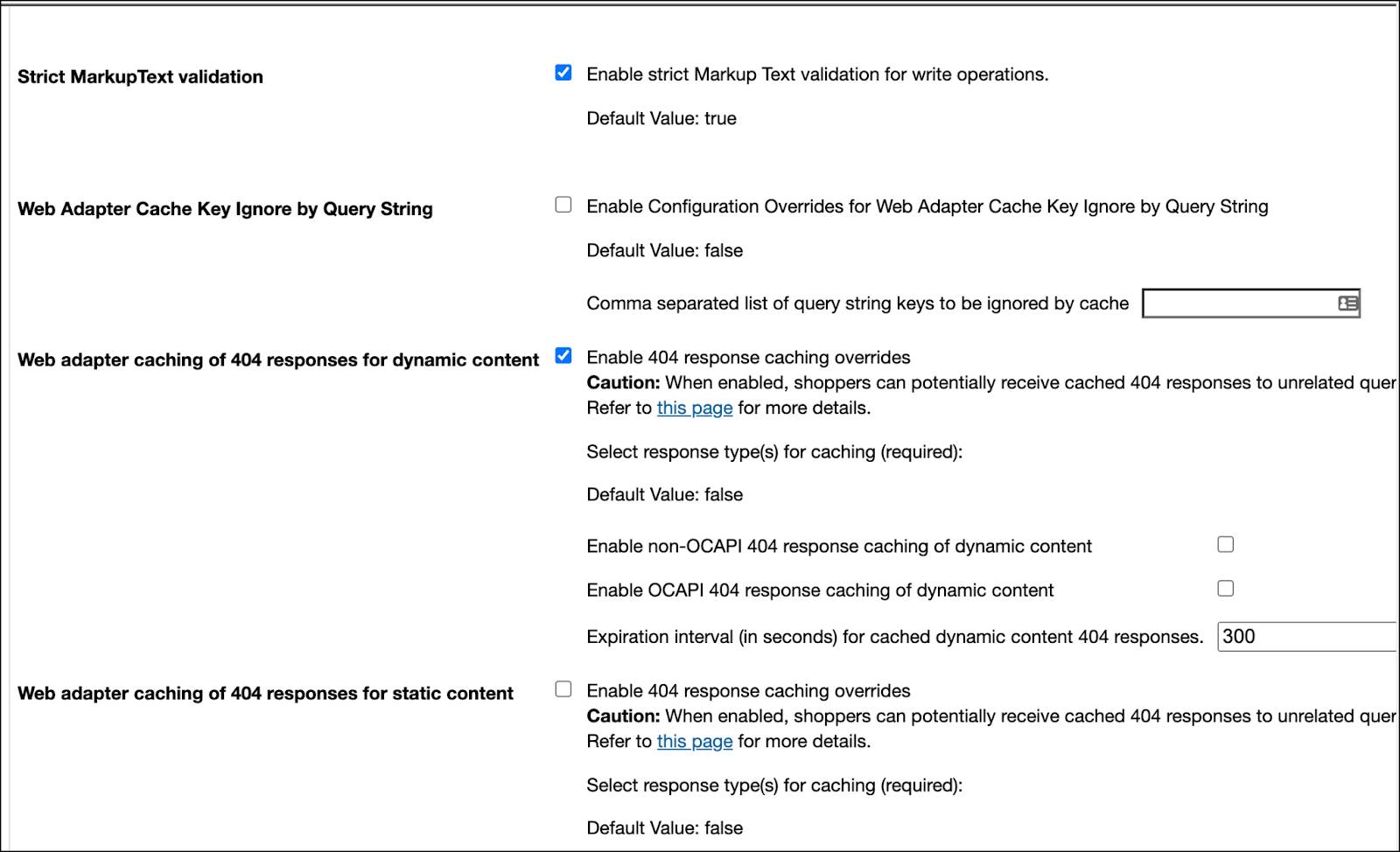
B2C Commerce sometimes appends parameters with no meaning to URLs on the page, such as the campaign ID parameter of a newsletter campaign. For caching purposes, configure B2C Commerce to ignore these parameters using the Business Manager feature switch, Web Adapter Cache Key Ignore by Query String.
This module assumes you’re aAgentforce Commerce for B2C admin with the proper permissions to perform these tasks. If you don’t have admin access, read along to see how an admin takes these steps in a staging instance. B2C Commerce isn’t available in the Trailhead Playground. If you have a development instance, follow these steps there.
Enable Caching of 404 Responses
To make your site more scalable, cache 404 responses with these steps.
- In Business Manager, click Administration | Global Preferences | Feature Switches.
- Scroll down, and select Enable 404 response caching overrides.

Personalized Caching
B2C Commerce provides out-of-the-box personalized caching, which amends the cache key according to the currently active price books and applicable promotions. For example, imagine two shoppers are viewing the same page through the same URL. Shopper A uses price book X, while shopper B uses price book Y. In this case, the same product with the same URL is cached twice. The application serves the shoppers who use price book X a respective cache entry the same way as the application does for shoppers who use price book Y.
Depending on the number of price books and promotions, this scenario can lead to a large increase in cache entries, even if each entry’s product price is different. Use personalized caching only when necessary, for example, when you want to serve different cached content to different parts of your audience.
Scripts and Templates
Use the script API instead of the <iscache> tag. The dw.system.Response#setExpires(milliseconds) script API controls the response caching behavior. While both approaches control the caching of the entire response—not individual templates—using the ISML tag presents these challenges.
- Using the
<iscache>tag can be confusing, because it suggests you’re caching only a template, not the entire response.
- It can be difficult to figure out which template defines the caching behavior of a response, because templates can be nested with each one having its own
<iscache>tag, where the lowest defined cache time is applied.
- A template can be used in different contexts that require different cache policies, making the implementation complex.
There’s also an SFRA-specific technical constraint. If you use dw.util.Template.render() to produce markup, as SFRA does, don’t use <iscache> in the template. The dw.util.Template class is designed for string and markup generation only, not response modification. In this context, response.setExpires() is the only correct approach.
Here are some examples of script API calls.
// SFRA controller cached via middleware
server.get(’Show’, cache.applyDefaultCache, function (req, res, next) {} );
// Set cache time directly at the response (doesn’t rely on SFRA)
response.setExpires(new Date().getTime() + durationInMinutes * 60 * 1000);
// Apply personalized caching
response.setVaryBy(’price_promotion’);
// Cache times don’t have to be constants. Get creative!
// Apply layered caching times by product availability levels
var availabilityModel = product.getAvailabilityModel();
if (availabilityModel.isOrderable(50)) {
  // Cache 5 days when >= 50 orderable
  response.setExpires(new Date().getTime() + 120 * 60 * 60 * 1000);
} else if (availabilityModel.isOrderable(20)) {
  // Cache 4 1 day when >= 20 orderable
  response.setExpires(new Date().getTime() + 4 24 * 60 * 60 * 1000);
} else if (availabilityModel.isOrderable(5)) {
  // Cache 4 hours when >= 5 orderable
  response.setExpires(new Date().getTime() + 4 * 60 * 60 * 1000);
} else {
  // Cache 30 minutes when < 5 orderable
  response.setExpires(new Date().getTime() + 30 * 60 * 1000);
}Next
In this unit, you learned why paying attention to caching at every architectural layer is critical for optimal site performance. You also explored caching in the web-server layer. Next, take a deeper look into caching in the application-server and storage layers.
Resources
- Salesforce Help: Content Cache
- Salesforce Help: Page Caching
- Trailhead: Headless Implementation Strategies for Salesforce B2C Commerce (See the Implement a Content Delivery Network and Caching unit.)