Get Started with Microsoft Teams for IT Services
Learning Objectives
After completing this unit, you’ll be able to:
- Explain the common challenges associated with disconnected IT service systems.
- Describe how Agentforce IT Service works alongside Microsoft Teams.
- Explain the purpose of the Agentforce IT Service apps in Microsoft Teams.
Connecting Employees and IT Teams
An important consideration of IT service is making your systems and tools easily accessible to both your employees and IT teams. When employees need to get answers to questions, request resources, or report problems, they shouldn’t need to rummage through different platforms, especially if an issue is time-sensitive and affects their work. Meanwhile, IT representatives need to collaborate with each other to resolve issues and requests, and often lack a system that helps them work together.
That’s why Agentforce IT Service integrates directly with workplace collaboration platforms, including Slack and Microsoft Teams. This way, your IT system is available right where your employees and IT teams already work.
Salesforce prides itself on being a Slack-first workplace. But if you use Microsoft Teams, you can get the same integrated IT experience, including helpful features, AI agents, and tools for managing your technology services.

In this badge, you discover how this integration greatly simplifies your IT workflows, enhances collaboration for IT staff, and provides seamless experiences for your employees. You also learn the steps for integrating Agentforce IT Service with Microsoft Teams.
Agentforce IT Service and Microsoft Teams
By integrating Microsoft Teams with Agentforce IT Service, you create an AI-powered collaborative workspace for all your users. Employees and IT teams have a single source of truth to communicate and coordinate throughout the entire IT service lifecycle, without having to leave their primary communication tool.
After you’ve integrated Agentforce IT Service with Microsoft Teams, two apps are available to assist IT teams and employees.
- The Salesforce IT Service App helps employees access IT support in multiple ways.
- The Salesforce IT Desk App gives IT representatives a unified workspace to collaborate as they resolve requests and issues and manage their assigned work.
Let’s dig deeper into how each of these apps make your IT processes more efficient. Along the way, you follow an employee and an IT rep at Orivian, a fictional holding company.
Salesforce IT Service App
With the Salesforce IT Service app, employees can browse the Unified Catalog, and request permissions or access to software or hardware. They can also create and manage incidents and problems to report issues, track the real-time status of their request in the My Tickets view, and review ticket details and follow-up comments.
Best of all, employees can ask an AI agent to help them get the information or services they need even more quickly. In the Ask Agentforce tab, they can chat with the agent using natural language, which can help them troubleshoot simple issues, get status updates, or create tickets on their behalf.
For example, an employee has trouble completing an order through an internal online store, so they ask the agent for assistance.
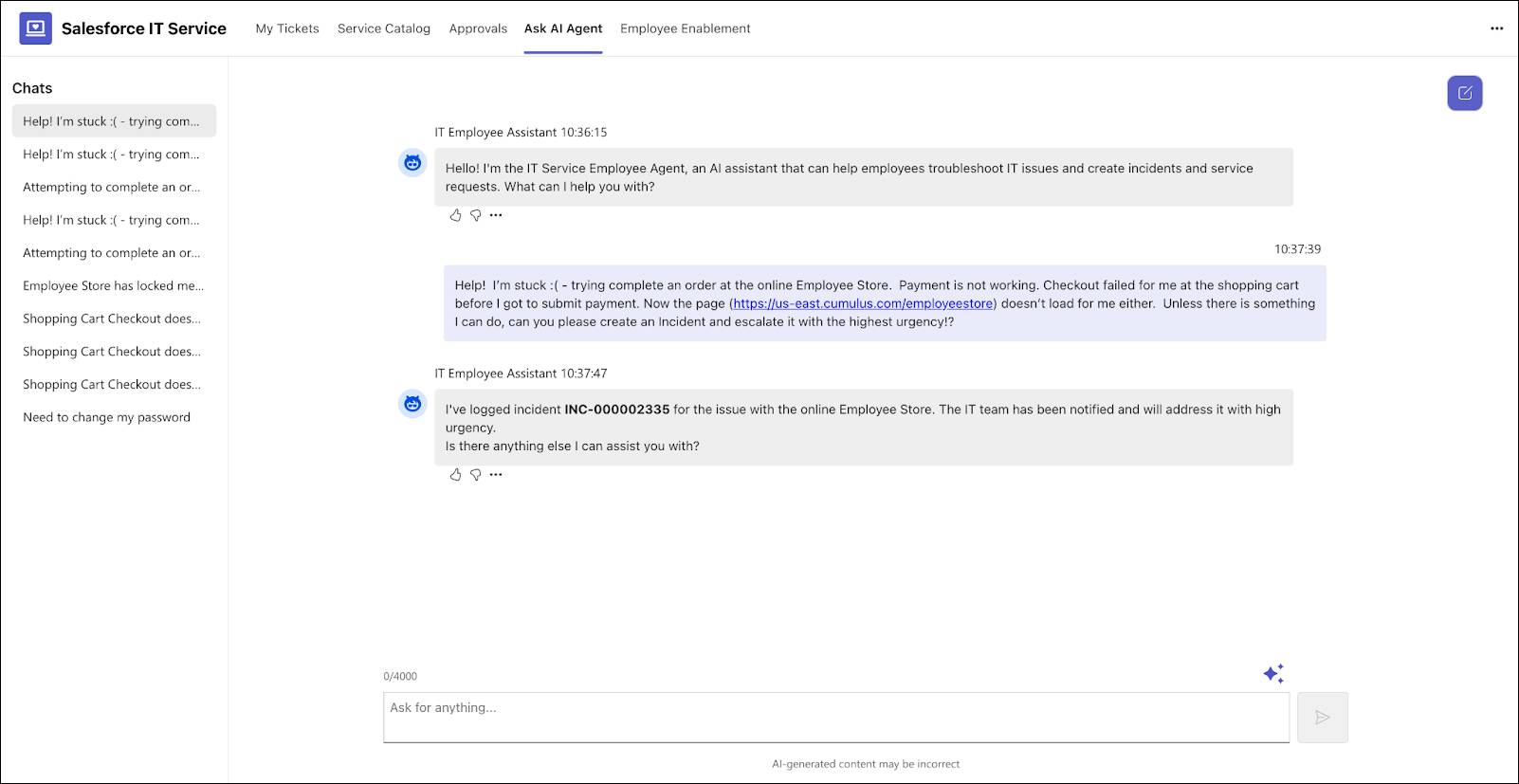
In response, the agent automatically logs a high-priority incident related to the system.
AI agents are grounded in Data 360, which gives them the ability to analyze relevant historical data, knowledge articles, and service level agreement (SLA) milestones. With this comprehensive source of information, every response is contextual and intelligent.
For example, an Orivian employee needs a new monitor, so she clicks the Ask Agentforce tab and interacts with the agent to submit her request. The agent automatically creates a ticket and launches a service process to route the request to the right IT and fulfillment teams. As she waits for her new monitor, the employee can keep track of the status of her request right from Teams. Alternatively, she can browse or search for available monitors in the Unified Catalog and request the hardware.
Salesforce IT Desk App
The Salesforce IT Desk app in Microsoft Teams gives IT reps all the tools they need to manage their workloads. Support team members and IT fulfillers can use a centralized ticket view to navigate between different ticket types, such as incidents, problems, cases, or change requests. The app also makes it easy to communicate with other team members to troubleshoot issues and coordinate resolutions. An IT rep can initiate a Teams swarm directly from a ticket by creating a dedicated Teams channel and pulling in relevant experts to share knowledge and resolve complex issues faster.
They can also use AI to inform and enhance their work. By interacting with AI assistants, support reps can get case summaries, investigation data, and suggestions for resolving active tickets.
For example, the Orivian support rep views the employee’s request for a new monitor, and then follows the related support process to fulfill the asset request. When he has a question about the monitor provisioning process, he quickly gets the information he needs by asking the AI assistant.
In this unit, you learned how connecting Agentforce IT Service to Microsoft Teams provides a single source of truth for your IT services, and got an overview of the two apps that power your IT services. Next, you explore the steps to integrate these two platforms and review the basics for managing IT support through Teams.