Explore Learning Data Model Objects
Learning Objectives
After completing this unit, you’ll be able to:
- List and describe the objects for structuring your institution curriculum.
- Describe the relationships among learning objects.
Structuring Your Curriculum
Earlier, you discovered how the Learning Data Model is divided into two categories of objects, learning objects and learner objects. To refresh your memory, learning objects define what curriculum your institution offers, including the curriculum structure, requirements, and outcomes, while learner objects track how a student navigates and progresses through those offerings.
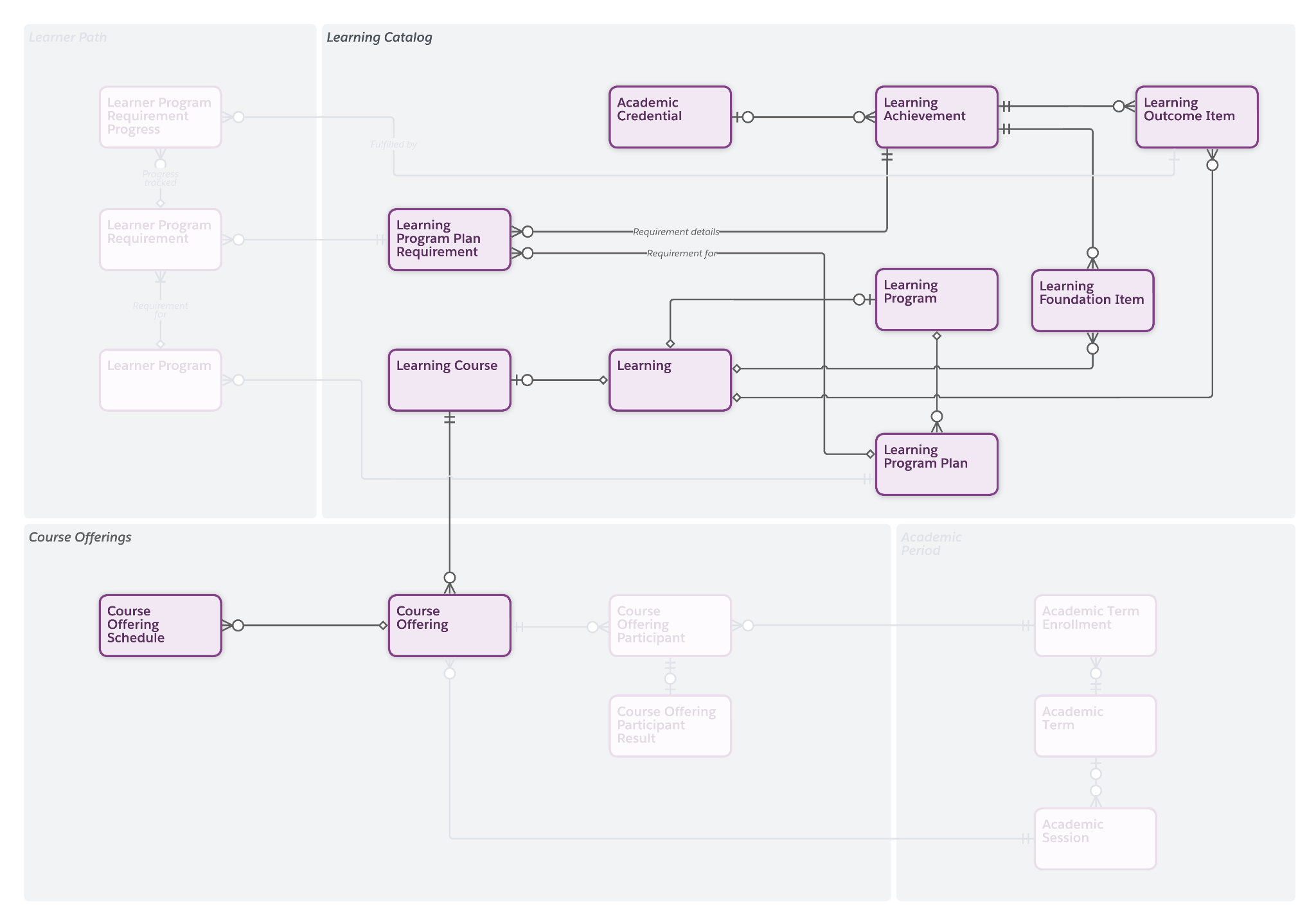
In this unit, you explore the learning objects for modeling learning programs, courses, and program plans.
Learning Data Model Objects
Let’s break down each learning object, starting with learning programs and learning courses. You follow Juan, the Astro University registrar, as he sets up programs and courses for his institution.
Learning Programs and Learning Courses
The learning program object is the overarching framework for a curriculum or academic path, such as a major, minor, or concentration. It includes the scope of study, expected outcomes, and areas of specialization. When you create a learning program, you include the total credits or requirements needed to complete the program and details about the accreditation that students earn on completion. As you learned earlier, each learning program maps to an underlying learning record, which stores shared data that might apply to courses or subprograms within the program.
A learning course represents an individual course that your institution offers but isn’t tied to a particular term or instructor. A learning course constitutes a component of the broader curriculum and includes the course description, course number, and active dates. Just like a learning program, this record connects to a learning record, which stores important metadata.

Juan, the Astro University registrar, creates the following.
- A learning program called Bachelor of Science (BS) in Computer Science, an undergraduate degree program
- Generic Computer Science (CS) 101 and CS 102, CS Lab 101, and CS Lab 102 learning course records
A corresponding learning record is also created for each program and course.
Later, you discover how the Learning Wizard helps you quickly create or modify learning programs and learning courses and define prerequisites, corequisites, and recommendations for enrollment.
Learning programs and learning courses act as blueprints for learner programs and course offerings.
Learning Foundation Items
The learning foundation item captures relationships among courses, such as prerequisites, corequisites, and recommended sequences for learning. This object ensures academic integrity and helps students navigate the curriculum in a logical order. It also helps to automate registration checks and gives students real-time insights into their eligibility for a course when planning their learning pathway.
With the Learning Wizard, Juan sets prerequisites and corequisites to establish course relationships and dependencies.
- Students must pass Computer Science 101 (CS 101) before taking Computer Science 102 (CS 102).
- CS 103 is a corequisite for CS 101, and CS 104 is a corequisite for CS 102.
The wizard automatically creates learning foundation items to capture these dependencies and form a connection between learning records and learning achievements.
Learning Achievements and Outcomes
When you are setting up a learning program or course, you define overall learning achievements that each student earns by completing the program or course. These achievements can include a course credit or competency, or an accreditation that students earn at the end of a learning program, such as a professional certificate, digital badge, or full degree. When creating a learning achievement, you can set the type of achievement, the award issuance date, and the awarding entity. You can also connect an academic credential to the learning achievement.
Like many learning objects, the achievement maps to the learning record associated with the course or program, and not directly to course or program records. This way, you can add achievements at any time without reconfiguring the underlying data structure.
By using the learning outcome item, you can evaluate the results of a learner’s attempt to earn an achievement from a learning. This junction object connects one learning to one learning achievement though you can create multiple outcome items for the same learning. Use learning outcome items to map a default learning achievement, or more granular achievements, such as milestones, badges, certificates, or other accomplishments that students earn when they complete a learning. When you create a course by using the Learning Wizard, learning outcome items are created automatically.
For example, Juan connects a learning achievement through learning outcome items to CS 101 and CS 102. Juan also includes outcome items that are unique to each course, such as Basic Data Structures in CS 101 and Advanced Data Structures in CS 102.
To give students options for how they complete a requirement, you can use learning outcome items to connect several learning records to a single learning achievement with an Achievement Group record type. To learn more about creating reusable collections of learning achievements, view the Reusable Collections Help article.

Juan creates a learning achievement for the BS Computer Science degree. He also creates a learning outcome item to connect the achievement to the learning records of both a full-time BS Computer Science program and a part-time BS Computer Science program. This way, students can earn the achievement through different paths.

Learning Program Plan Objects
Use the learning program plan object to model variations of a learning program with unique requirements, courses, and electives. With each iteration of a learning program plan, you can introduce changes to the structure and requirements of a program while also maintaining established constructs for students who’ve already enrolled into or started past versions of the program. Use a learning program plan to define specific program tracks, concentrations, or iterations to match your accreditation cycles.
The learning program plan serves as a primary reference for advisors and students as they collaborate to map out degree paths and desired outcomes.
You can create different versions of a learning program plan to preserve historical data and previous enrollments. This ensures a consistent set of requirements for currently enrolled learners while also giving you the ability to introduce updated requirements at the start of the catalog year for new students.
A learning program plan includes individual building blocks called learning program plan requirements. These are required and elective coursework that students complete as part of a program plan. You can also include reusable groups of requirements, such as general education requirements common to all degrees or majors. When you include requirements, a learning program plan becomes a structured outline of all the essential coursework required for a specific learning program achievement, such as a degree.

To create a Fall 2025 Program Plan for the BS in Computer Science learning program, Juan starts by adding a reusable group of general education learning requirements that are necessary for all program plans. He then creates additional requirements, including Computer Science 101 and Computer Science 102, and other required courses and electives, and sequences them to follow the recommended order of completion.
To create, manage, and visualize learning program plans and associated requirements, you use the Program Plan Builder, which you’ll explore later.
Juan connects an outcome to each requirement, including the credit hours awarded for each course and the overall learning achievement for the program, a BS in Computer Science degree that students earn at the end of the program.
When you are creating iterations of a learning program plan, you can clone a plan, set the plan to Draft, and make modifications. When you’re ready to roll out the new plan, select Publish to make it active. You can have only one active learning program plan per learning program, but older versions are still valid for currently enrolled students, who are still bound by the original requirements. As a best practice, use naming conventions to indicate the term for which that plan is available, such as Fall 2026 Computer Science Learning Program Plan.
Course Offerings and Schedules
A learning course can have several course offerings, which are the scheduled instances of the course, often called sections. Each course offering references a learning course record and a term session, which rolls up to the academic year. A course offering record also includes the primary instructor, start date, and maximum enrollment count. An associated course offering schedule defines the timing and location for the section.
You don’t have to use course offerings or schedules though they are necessary for course registration and certain Student Success features.
Juan creates three course offerings for the three Computer Science 101 sections available during the Fall 2026 term: Sections 01, 02, and 03. Students can register for the course offering that matches their availability.
Before moving on, review this table that recaps each learning object you just learned about.
Object |
Definition |
|---|---|
Learning Program |
A framework for curriculum or an academic path |
Learning Course |
A course that an institution offers without a defined instructor or academic term |
Learning Program Plan |
An outline of the courses and requirements for a learning program |
Course Offering |
A scheduled instance of a learning course section, specific to a term or session |
Learning Achievement |
The end result of completing a learning program or course |
Learning Outcome Item |
The outcome of a learner’s attempt to earn an achievement by completing a learning |
Learning Foundation Item |
Defines the relationships among courses, such as prerequisites or corequisites |
You’ve uncovered the different learning objects for structuring curriculum at your institution. By combining these entities, you can create a comprehensive blueprint of all your institution’s offerings, ensure students complete coursework in the intended order, and give them visibility into requirements and progress.
In the next unit, you discover how a combination of learner objects helps you to track student progress at the individual level.