Connect Applicants to Loan Products
Learning Objectives
After completing this unit, you’ll be able to:
- Describe how loan products are defined and organized in Digital Origination for Lending in India.
- Explain how the Loan Product Assistance agent guides potential loan applicants to loan options.
- Describe how the Loan Calculator helps applicants refine loan options and understand payment details.
Get Started with Loan Products
Your Digital Origination for Lending in India journey starts with defining your products in the system.
Mapping your products to Salesforce objects gives your organization the foundational data it needs to connect potential applicants to the loans that meet their needs. Doing this also gives your team the information to automate processes before, during, and after your organization receives a loan application.
In this unit, explore how to define and structure your loan products and then use this information to help potential loan applicants understand their options.
Define Your Products
In Digital Origination for Lending in India, your team defines loan products by using the Product object. Create one product record for each loan your organization offers, such as one each for a fixed-rate mortgage, a variable rate auto loan, and a personal loan. Use the Product Family picklist field on each product to define groups of products. For example, create a Home Loan product family value to group similar mortgage products.
Other objects store terms and conditions, which connect to each product. The Terms object defines the conditions and expectations that an applicant must fulfill during a loan’s tenure. For example, if your organization doesn’t want borrowers to repay or refinance an entire loan amount within the first 3 years or the loan, create a term record with a lock-in period of 3 years. The Term Related Object connects a term to a product and tracks whether the term is active. A term record can be connected to multiple products, so you can set a term once and apply it to the necessary products.
Three other related objects manage pricing and here’s what each does.
-
Product list rates define the standard, advertised interest rate for a product.
-
Index rates define a reference point for adjustable rate loans.
-
Product fees define charges such as processing and underwriting fees related to a product.
For example, a fixed-rate mortgage product could relate to a product list rate record that tracks the standard interest rate, plus a product fees record that tracks origination fees.
Finally, the Deviations object stores information about the rules and anomalies for a product. For example, deviations for a home loan include standards for loan-to-value ratios, property age, applicant age, and so on. These deviations help underwriters review an applicant's profile and make better offers based on their situation.
These objects all work together to provide the data your organization needs about its products, and empower other Digital Origination for Lending in India features. For example, Business Rules Engine uses the data model to automate decision-making and calculations, such as categorizing risk profiles, determining maximum eligible loan amounts for secured and unsecured loans, and presenting relevant offers.
Now that you understand how product data works, let’s explore how to use this data to connect customers with the correct loans.
Connect Applicants to the Best Product
After your organization defines its products, it needs to present them to your potential applicants to help them decide which option best meets their needs.
Relationship managers and other members of your team can guide potential applicants to the best product. To provide loan information around the clock, however, use Agentforce to automate routine loan product inquiries with an AI-powered agent.
To create this agent, start with the Loan Product Assistance Agentforce template. The template provides prebuilt skills your Salesforce admins use to quickly create a customer-facing agent that guides potential applicants through relevant loan options. After your organization defines products with list rates and fees, the agent can retrieve loan product categories and details to match them with a potential applicant’s needs.
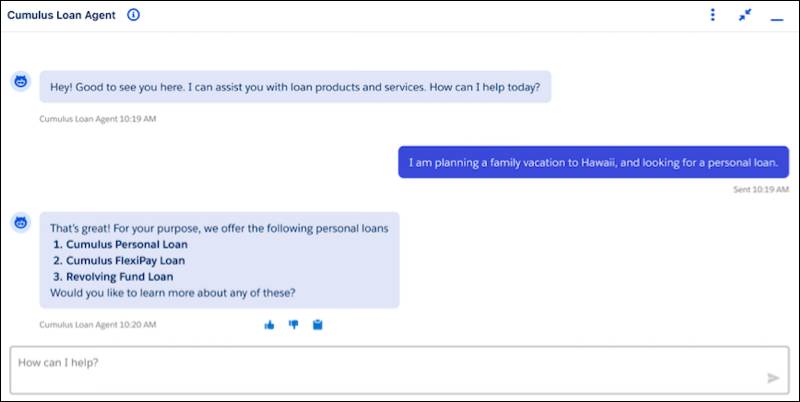
With this conversational agent, potential applicants can identify the best products and terms for themselves—and your relationship managers spend less time providing basic information and more time working with potential applicants closing business.
Deploy this agent to the channels that make the most sense for your institution, such as your website. To build a site, use Experience Cloud to create a beautifully branded digital experience connected to Salesforce, and then add Loan Product Assistance to help potential applicants.
The automation tools included with Digital Origination for Lending in India help potential applicants not only in discovering loans but also in quickly estimating payment amounts.
Provide Loan Estimates
If a potential applicant wants even more details, they can use information from their conversations with the Agentforce Loan Product Assistance agent to refine their options by using the Loan Calculator component on your site.
The Loan Calculator is a flexible, educational tool for applicants to understand loan details as they explore loan products. The tool helps applicants determine how much to borrow based on loan amount, tenure, repayment schedule option, and extra payments.

With the calculator, potential applicants determine estimated loan payments and view potential amortization schedules, payment schedules, and interest rates. They can even calculate how additional one-time or recurring extra payments factor into shorter loan terms or reduced monthly payments. The calculator also supports complex repayment options such as step-up, step-down, bullet, and balloon structures.
The Loan Calculator component isn’t only for potential applicants, though. Add the calculator to Salesforce records pages so that your relationship managers can use it for quick estimates while working with applicants.
What’s Next?
In this unit, you learned that loan products are defined in Digital Origination for Lending in India with the help of the Product object and related objects for terms, pricing, and deviations. These objects work together to support automation in Business Rules Engine.
You also learned that potential applicants can find the best product for their needs by using the Agentforce Loan Product Assistance agent. They can also refine their options and understand payment details, amortization schedules, and interest rates by using the Loan Calculator component.
When a potential applicant wants to apply for a loan, your organization collects their information in a guided application form. That’s the topic of the next unit.