Profile Data Assets
Learning Objectives
After completing this unit, you’ll be able to:
- Explore the data profiling view for a technical asset.
- Interpret profiling statistics such as null percentage, value frequency, distinct values, and data patterns.
- Describe how profiling results inform data quality decisions.
The Business Scenario
When you work with data every day, you need confidence that the data you're using is trustworthy, properly labeled, and fit for your needs. Cloud Data Governance and Catalog (CDGC) gives you the tools to understand what a dataset contains, how complete it is, whether it meets your organization's quality standards, and how sensitive its contents are—all from a single asset page.
For example, Infiwave, a communications and media company, uses CDGC to evaluate customer data before teams act on it. In this badge, you follow Angela Duran, a business analyst at Infiwave, and her colleague Arif Setiawan, a sales associate preparing for an upcoming outreach campaign. Angela builds reports and analyzes customer trends. Arif needs to pull the right contact data confidently and quickly. Arif asks Angela for help. He wants to use a dataset called Customer_Details for his campaign, but first needs to know whether the data is complete, meets quality standards, and contains sensitive information. Angela opens CDGC and reviews everything with him, starting with data profiling.
What Is Data Profiling?
Data profiling tells you the shape of that data—what's there, what's missing, and whether values follow expected patterns.
When Metadata Command Center runs a catalog source job with profiling enabled, it analyzes the source data and generates column-level statistics. You can find these statistics on the technical asset page in Cloud Data Governance and Catalog (CDGC). They help users like Angela understand the structure and completeness of a dataset before making decisions about it.
Angela has been asked to assess the Employees table before it's used in a new monthly revenue report. She opens the asset and navigates to the Data Profiling tab.
The Data Profiling View
On the Data Profiling tab, Angela reviews a profile results table. Each row represents a column in the dataset and includes:
- The date and time the profile last ran
- The number of profiled rows and the sampling type used
- The number of columns and rules associated with the profile
She can sort and search the column list, and select any column name to open a detailed view in the preview pane on the right—which shows richer statistics and visualizations for that specific column.
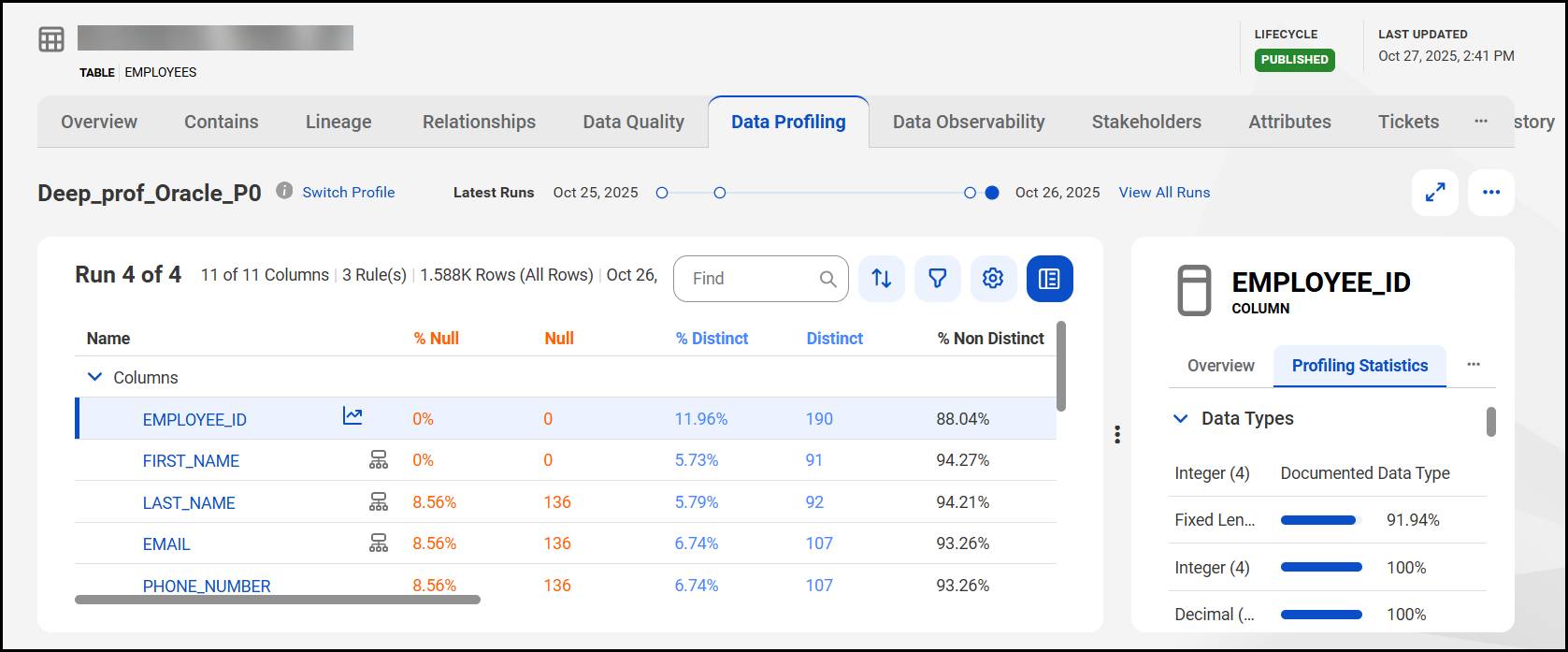
Key Profiling Statistics
After a profile runs, CDGC displays the following statistics for each column.
Statistic |
Description |
|---|---|
Null % |
The percentage of rows with empty or missing values |
Distinct |
The number of unique values in the column |
# Patterns |
The number of distinct value structures detected |
Min / Max |
The smallest and largest values found |
Inferred Type |
The data type CDGC detected from actual values |
Angela examines the Offer_Code column.
-
Null %: 0%—no missing values
-
Distinct: 9 out of 46 rows—most codes repeat, unexpected for a field that should hold unique offer codes per customer
-
# Patterns: 9—but only 6 valid patterns should exist for an offer code
Without profiling, Angela would miss issues—until they caused errors in the revenue report downstream.
Value Frequency
The Value Frequency section includes a bar chart of null, distinct, and non-distinct values for a column. Angela selects a specific value to filter the raw data preview. This helps her review exactly which rows match. She uses this to confirm that a small number of offer codes appear far more frequently than expected—a sign that something in the source data collection process might need further review.
Inferred Data Types and Patterns
CDGC infers the data type for each column from its actual values, not just the schema declared in the source system. If there's a mismatch, profiling surfaces it.
Angela opens the Transaction_Date column. The source system declares it as a String, but CDGC infers a Date data type for 98% of rows—and a String for the remaining 2%. That 2% represents rows with malformed date entries that won't sort or filter correctly in the report.
Patterns tell a similar story. CDGC uses pattern characters to represent value structure:
- 9 = a digit
- X = an alphabetic character
- B = a blank space
The Transaction_Date column shows two patterns—9/99/9999 and 99/99/9999. Some dates use a single-digit month, while others use two digits. That inconsistency could affect date-range filtering in the report.
How Profiling Informs Data Quality Decisions
Angela compiles her findings into a list of columns that need attention before the report goes live. The Offer_Code and Transaction_Date columns are her first priorities. She adds a comment on the Employees asset and tags the data owner to flag the issues.
Here’s what profiling reveals.
-
Where data is incomplete: High null percentages flag columns that might need mandatory field enforcement
-
Where values deviate from expected formats: Multiple patterns in a structured field signal inconsistent data entry
-
Where uniqueness is expected but not delivered: High non-distinct counts in ID or key columns indicate duplicates that can corrupt joins and aggregations
Profiling doesn't tell Angela whether a value is valid by a business standard—that's the job of data quality rules, which you explore in the next unit.
Resources
- Informatica Documentation: Introduction to Data Profiling (login required)
- Informatica Documentation: Data Profiling Components (login required)
- Informatica Documentation: Viewing Profiling Results (login required)