Compare Customer Profile Unification Approaches
Learning Objectives
After completing this unit, you’ll be able to:
- Describe common solution patterns for customer profile unification.
- Compare duplicate management, Data 360 unified profiles, and master data management (MDM) approaches.
- Explain why an organization might choose different unification approaches for different use cases.
Know the Problem Before You Choose a Solution
Organizations unify customer profiles to better recognize customers, reduce duplicate records, and support service, marketing, and reporting. But there isn’t one single approach that works for every organization.
Teams choose different solutions based on factors such as:
- The number of systems and channels they use.
- Their data accuracy requirements.
- Governance and compliance needs.
- Whether they must maintain separate records.
- The cost and effort they can support.
Even with these differences, many organizations tend to choose from a few common approaches.
Customer Profile Unification Approaches
There are a few common ways to unify customer data. Each one solves a different problem. The main difference comes down to how the data is handled: merged into one record, linked across records, or managed as a unified or golden record.
Duplicate Management and Match/Merge Tools (AgentExchange)
Duplicate management and match/merge tools work inside a system like a CRM. They look for records that appear to represent the same entity and help users fix them.
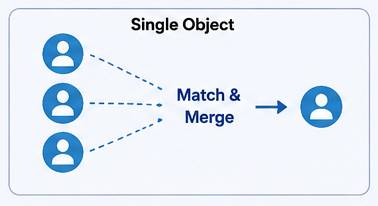
These tools can:
- Block duplicates when data is entered.
- Flag possible matches.
- Merge records into a single record.
When records are merged, one record is kept, and the others are combined into it. The goal is to have one clean record per customer in that system.
This approach works best when your data lives in a single system, and the main issue is duplicate records.
Data 360 Unified Profile and Key Ring Approach
The Data 360 approach does not merge records. Instead, it links records across systems using matching rules to create a unified view of the customer.
Each system keeps its own data. This is often called a key ring because records are connected rather than combined.
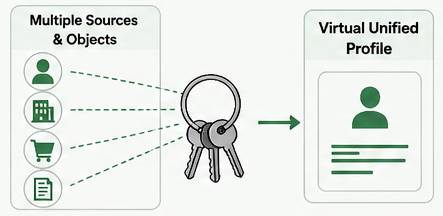
This means:
- No single record is forced to hold everything.
- Source data stays in place.
- Different views can exist based on context or permissions.
This approach works best when customer data is spread across systems and needs to be connected without losing detail or history.
Master Data Management Platforms
MDM platforms create a centralized record, a single, authoritative version of the customer.
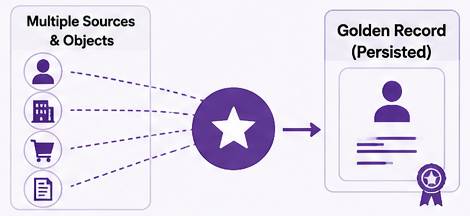
Data from different systems is:
- Brought together.
- Matched and cleaned.
- Stored as a single, trusted golden record.
This unified record is then used as the source of truth across systems.
This approach works best when an organization needs strong control, consistency, and governance across many systems.
When Each Approach Works Best
Duplicate management and match/merge tools (AgentExchange) are best when:
- Your primary challenge is unintentional duplicates inside CRM.
- Merges are appropriate for the process.
Data 360 unified profile and key ring approach are best when:
- Your challenge spans multiple sources.
- You need to preserve history.
- You need a consistent system of reference for activation.
MDM platforms (for example, Informatica) are best when:
- You need enterprisewide governance across many systems.
- You have the organizational readiness to operate a stewardship model.
Many organizations use more than one unification approach. The key is choosing the approach that fits the problem you’ve identified—without introducing unnecessary complexity. The table below summarizes how these approaches compare.
Approach |
Strengths |
Trade-Offs |
|---|---|---|
Duplicate management and match/merge |
Cleans up duplicate records within a single system. Quick to implement and align with existing CRM processes. |
Limited across multiple systems. Merges are not always appropriate and can result in data loss if done incorrectly. |
Data 360 unified profile and key ring |
Connects records across systems without merging. Preserves source data and supports flexible, context-aware views. |
Requires data readiness (profiling, normalization, and enrichment). Outcomes depend on matching rules and governance decisions. |
Master data management (MDM) |
Creates a single, governed record across systems. Strong control and consistency for enterprise use cases. |
More complex to implement and operate. Might not fit scenarios where multiple views or contexts must be preserved. |

NTO Balances Security, Speed, and Simplicity
NTO needs a unified understanding across both consumer and business channels, including digital experiences and service operations. At the same time, it must:
- Preserve intentional separation where required (for example, Experience Cloud users and business relationships).
- Maintain historical contact points for identity resolution.
- Present appropriate, contextually relevant, and compliant views to different personas.
Because of these needs, NTO selects Data 360 as the unification layer. It uses data spaces to ensure each stakeholder can access the right profile context without overexposing data, breaking governance rules, or forcing inappropriate merges.
Sum It Up
You followed Luna on her journey to assess and prepare her data for profile unification. You explored different approaches to unify customer data and how to choose the right one based on your needs.
Ready to learn more? Take the Explore Data Quality Fundamentals trail.
Resources
- Salesforce Help: Manage Duplicate Records
- AgentExchange: Duplicate Management Solutions
- Trailhead: Data and Identity in Data 360
- Salesforce Ben: A Guide to Salesforce Duplicate Management in the Age of Data Cloud
- Salesforce Blog: Rethinking the Golden Record: The Advantages of Data Cloud’s Unified Profile