Optimize Your Virtual Meeting Setup
Learning Objectives
After completing this unit, you’ll be able to:
- Optimize your setup for virtual meetings.
- Download the C.L.A.S.S.Y. tips sheet.
Discover the C.L.A.S.S.Y. Framework
Now that working remotely and virtual meetings are part of many people’s “new normal,” representing yourself in the best possible way is more important than ever—especially when you’re meeting with your customers and prospects. But it doesn’t take a sophisticated setup to look like a pro. All you need to do is keep it C.L.A.S.S.Y.
The C.L.A.S.S.Y. framework is brought to you by the Salesforce Office of Innovation. Check out this short video that summarizes their helpful tips, then read on to learn all about the framework.
C Is for Camera
Your camera is the foundation of your digital image. While your built-in laptop camera is convenient, the quality can be improved. There are various apps available that allow you use your mobile phone as an HD webcam. That gives you a far superior image than your built-in laptop camera, with minimal fuss. For even better results, you can use a regular HD webcam, or if you want to go for maximum impact, use a mirrorless or DSLR camera.
L Is for Lights
No matter what type of camera you choose, you always want to put yourself in the best light. Ideally, your light source should be in front of you, or just off to the side. A desktop lamp can work well, and an inexpensive ring light is even better. Lighting yourself from behind, top, or bottom can cause undesirable results, unless you’re telling ghost stories around a campfire. Remember, your laptop screen is also a source of light, so keep that in mind when setting up your front-facing lighting so that you don’t overexpose yourself.
A Is for Audio
Of course you want to look your best, but you also need to be heard, loud and clear. Your laptop mic and speakers might do in a pinch, but for important calls, they can subject your audience to background noise. You might also sound like you’re far away, or your voice may echo (the dreaded “echo chamber” effect). Using a pair of earphones or earbuds with a built-in microphone is the easiest, cheapest, and most effective way to make sure you’re heard clearly.
For an upgrade, consider a USB or condenser microphone, but make sure you use these with headphones, or you’ll get high-pitched speaker feedback. If you can, have your calls in a room that has a rug and furniture, as these can help prevent echoes. Finally, make sure you mute your app notifications before the meeting starts, as constant pings from your email and collaboration tools can break the flow of conversation.
S Is for Setup
And in this case, “S” is also for “scrappy,” because if you’re like most folks, you probably don’t have a professional recording studio at home. And that’s OK. Just make the most of what you have.
Set up your camera so that it’s at eye level, by placing your camera on a stack of books or a tripod, if you have one. When you turn on your webcam, the top of your head should be just under the top of the frame, and you should be able to look right into the camera.
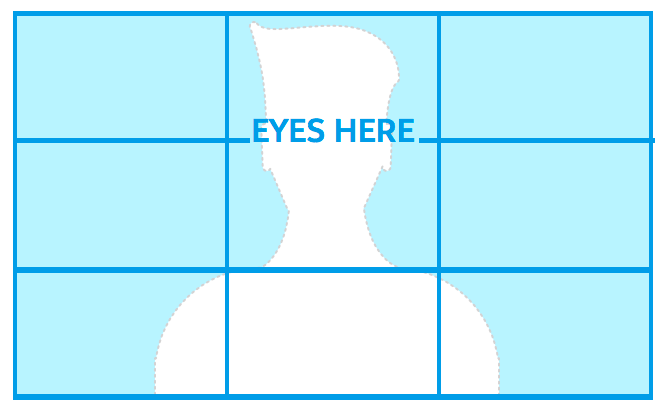
Make sure to avoid anyone on your network doing bandwidth-hogging activities like streaming, gaming, and device syncing during your important calls. If your Wi-Fi is limited, consider using an ethernet adapter to connect directly to your router for the most reliable internet connection.
S Is for Stage
Whether you’re working from a home office, the corner of your bedroom, your garage, or any space you’re repurposing, what surrounds you on screen is now your digital stage. Setting your stage is an opportunity to express yourself and show your humanity, but try to keep visual distractions to a minimum so your audience can focus on what you’re saying. Before your call, take a few minutes to remove any clutter, double-check your camera and lighting, and get ready to participate fully.
Y Is for You
Once you join the meeting, assume that all eyes are on you. Speak with confidence, and look straight into the camera lens as if it were the eyes of your customer. Reading from a script is much more noticeable on screen and can come off as insincere; avoid that practice, and focus on being your authentic self. The more genuine you are, the more your audience will be engaged and the more impactful your virtual meeting will be.
Don’t be afraid to dress up a bit for your virtual customer meetings. Looking put-together and professional sends the message that even though you’re working remotely, you’re working as hard (if not harder) than ever, and that you respect your audience’s time.
Finally, keep in mind that we’re all experiencing this unprecedented time together. So if your cat walks across the screen, your child bursts into the room, or your connection freezes, take it in stride. Remember, we’re in this together, and by keeping it C.L.A.S.S.Y., you can be confident you’re delivering the best possible virtual experience.
Download the C.L.A.S.S.Y. Tips Sheet
Want to share the C.L.A.S.S.Y. framework? Download the Keep It C.L.A.S.S.Y. Tips sheet, brought to you by the Salesforce Office of Innovation.
Resources