Get Started with Agentforce Manufacturing
Learning Objectives
After completing this unit, you’ll be able to:
- Describe how to use Agentforce Manufacturing to better manage your run-rate business.
- List the typical challenges of sales and operations faced by manufacturing companies.
- Assign permissions for Agentforce Manufacturing to users.
Why Choose Agentforce Manufacturing?
The manufacturing industry is undergoing massive digital transformation. Companies must innovate so their businesses can succeed. To provide a seamless customer experience, manufacturers need a solution that helps them better understand customer needs while improving visibility across the entire value chain. With consolidated information and actionable insights, account managers can build deeper and more trusted relationships with their customers.
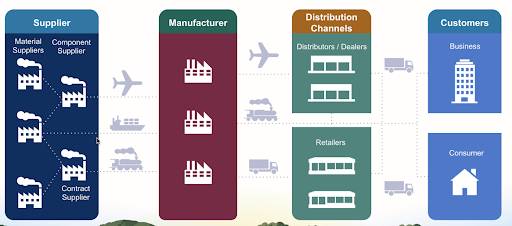
Let’s find out how Rayler Parts can use Agentforce Manufacturing to do this.

Sales and Operations Planning at Rayler Parts
Rayler Parts designs, manufactures, sells, and services construction equipment, and diesel and alternative-fueled generators. Rayler Parts serves customers through a network of distributors worldwide.
Cindy Jones is the admin at Rayler Parts. Rayler Parts currently uses Sales Cloud, and Cindy is well versed in the Salesforce ecosystem. But as Rayler Parts grows rapidly, account executives are looking for a more robust planning framework. Multiple account managers have expressed their unhappiness with the disconnected and siloed solutions that they currently use to negotiate sales. Sales and operation teams don’t have visibility into long-term purchase negotiations with distributors and suppliers. Account managers find it difficult to get a demand forecast that takes all historical data for individual products and accounts into consideration.
Before seeking a solution, Cindy wants to find out the specific issues account managers face. She enlists Vance Park, a young and enterprising account manager, to draw up a report on the challenges his department faces.
Vance surveys his team to understand the challenges they face and come up with possible solutions.
What’s Missing? |
What’s the Solution? |
|---|---|
At-a-glance comparison of planned and actual product revenues and quantities |
A single view of agreement terms and its compliance for product quantities and revenues |
Flexibility to change sales plans based on factors such as production issues, customer requests, and recession |
The ability to edit planned quantities, sales prices, and discounts with ease |
Visibility into product inventory levels |
Metrics for inventory similar to the existing pricing and quantity metrics |
Automatic updates to the actual product quantities based on fulfilled orders |
An invisible force that pulls information from orders and updates sales plans regularly |
Information on product performance across accounts so that the team can make market-driven decisions |
Account-level product quantity and revenue projections that take market growth into consideration |
Ability to track changes to quantity and revenue numbers made by colleagues during the company’s quarterly planning period |
The ability to collaborate on forecast data and track manual edits |
Ability for manufacturers and partners to collaborate in real time |
An online portal that channel partners can use to collaborate with manufacturers |
Cindy looks at the report and knows that she has a significant job to do. She reaches out to the Rayler Parts’s Salesforce account executive to check if Salesforce has a product that can help Vance and his team.
Meet Agentforce Manufacturing
Cindy is in luck—her account executive tells her about Agentforce Manufacturing. Agentforce Manufacturing includes features that Rayler Parts can benefit from, such as sales agreements, account-level forecasting, partner site features, and more.
Cindy starts researching how she can implement Agentforce Manufacturing to meet her company’s requirements. She purchases an Agentforce Manufacturing license for Vance. The next step is to enable the product in her org and assign the required permissions to Vance.
Want to Get Hands-On with Agentforce Manufacturing?
In this module, we show you the steps to configure sales agreements, account forecasts, and partner site settings in Agentforce Manufacturing. We don’t have any hands-on challenges in this module, but if you want to practice and try out the steps, you need a special Developer Edition org that contains Agentforce Manufacturing and our sample data. A regular Trailhead Playground doesn’t have Agentforce Manufacturing or our sample data. Here’s how to get the free Developer Edition now.
- Sign up for a free Developer Edition org with Manufacturing Cloud.
- Fill out the form.
- For Email, enter an active email address.
- For Username, enter a username that looks like an email address and is unique, but it doesn't need to be a valid email account (for example, yourname@test.com).
- After you fill out the form, click Sign me up. A confirmation message appears.
- When you receive the activation email (this might take a few minutes), open it, and click Verify Account.
- Complete your registration by setting your password and challenge question.
Tip: Write down your username, password, and login URL for easy access later.
- You are logged in to your Developer Edition.
First, Cindy enables the features for Agentforce Manufacturing. She must do this even before she can assign the permission sets to Vance and others.
- Click
 , and select Setup.
- In the Quick Find box, enter Manufacturing.
- Click Sales Agreements and turn on the feature.
- Click Account Forecasting and turn on the feature.
Next, Cindy assigns the Agentforce Manufacturing permission sets to Vance so that he can get started creating sales agreements and account forecasts, and interacting with partners.
Here’s what the permission sets look like.
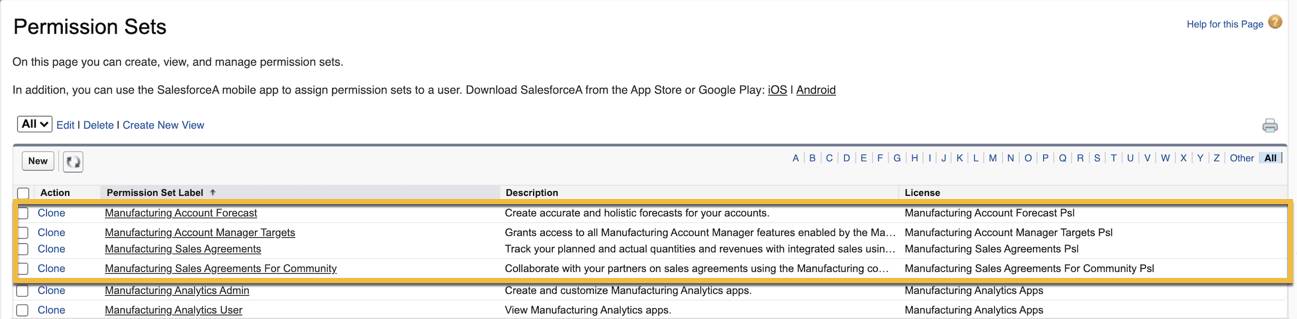
The permission sets include:
- Manufacturing Sales Agreements
- Manufacturing Account Forecast
- Manufacturing Sales Agreements For Community
Cindy grants Vance the level of access he requires on standard objects to manage his own accounts and sales agreements but nobody else’s. Cindy then asks Vance if he can access the shiny new objects that come as part of Agentforce Manufacturing so that he can help her test some of the functionality.
Resources
- Salesforce Help: Get Started with Manufacturing Cloud for Sales
- Salesforce Help: Permission Sets
- Salesforce Website: Agentforce Manufacturing