Discover Learner Objects
Learning Objectives
After completing this unit, you’ll be able to:
- Describe the data model objects for tracking each student’s academic progress.
- Explain the relationships among learner objects.
- Define the Intelligent Degree Planner and Learner Progress components.
Tracking Student Progress
Until now, you’ve explored how the Learning Data Model helps you build a comprehensive framework to organize and manage your academic catalog. But that’s just the beginning. Agentforce Education also includes a series of objects and intuitive tools designed to help you track how each student engages with your curriculum.
With learner objects, you can follow each student’s academic journey, monitor their progress toward meeting requirements, and keep a record of their earned achievements.
Learner Data Model Objects
You know the drill! Let’s dig into each learner object and explore how they combine to form a full view of each student’s academic endeavors.
Learner Program
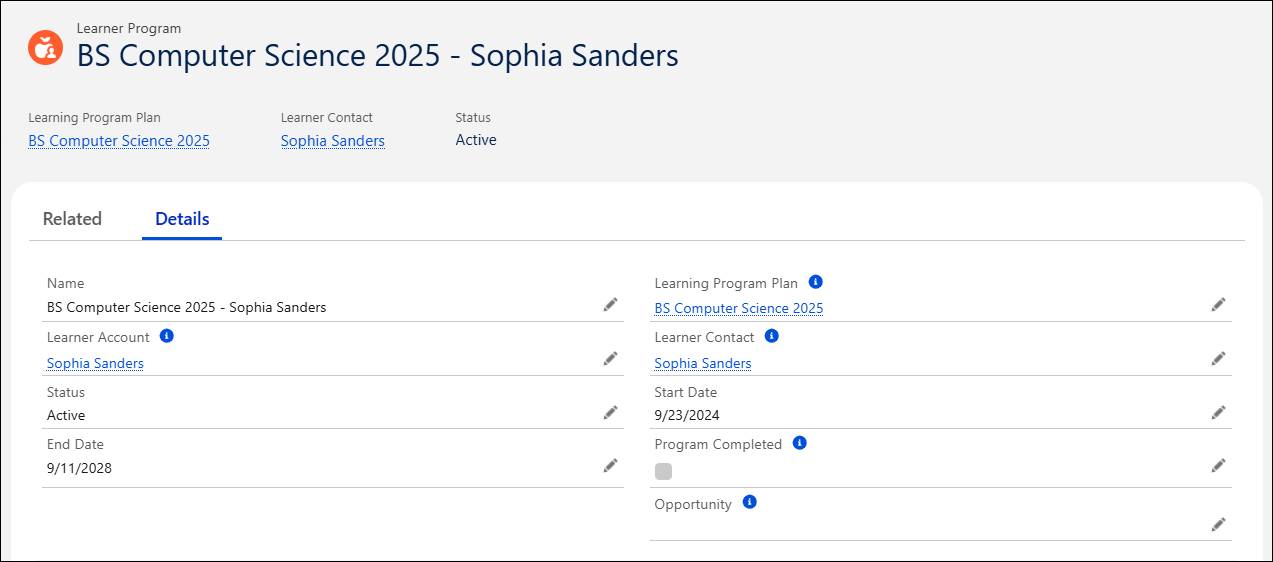
The learner program connects an individual student to a learning program plan, which also links to the learning program record. A learner program is a unique record that’s created for each learner when they enroll in a program, which might include a major, minor, or concentration in higher education, or a certificate or a series of workshops at non-traditional learning institutions. This record contains details about the student’s academic journey, such as their enrollment date and anticipated graduation term.
For example, Sophia is a student who’s working toward her undergraduate degree at Astro University. Here’s a learner program record that connects Sophia to the BS Computer Science 2025 learning program plan.
As you’ll learn in a moment, each learner program includes the associated program plan requirements that the learner must fulfill to complete the program.
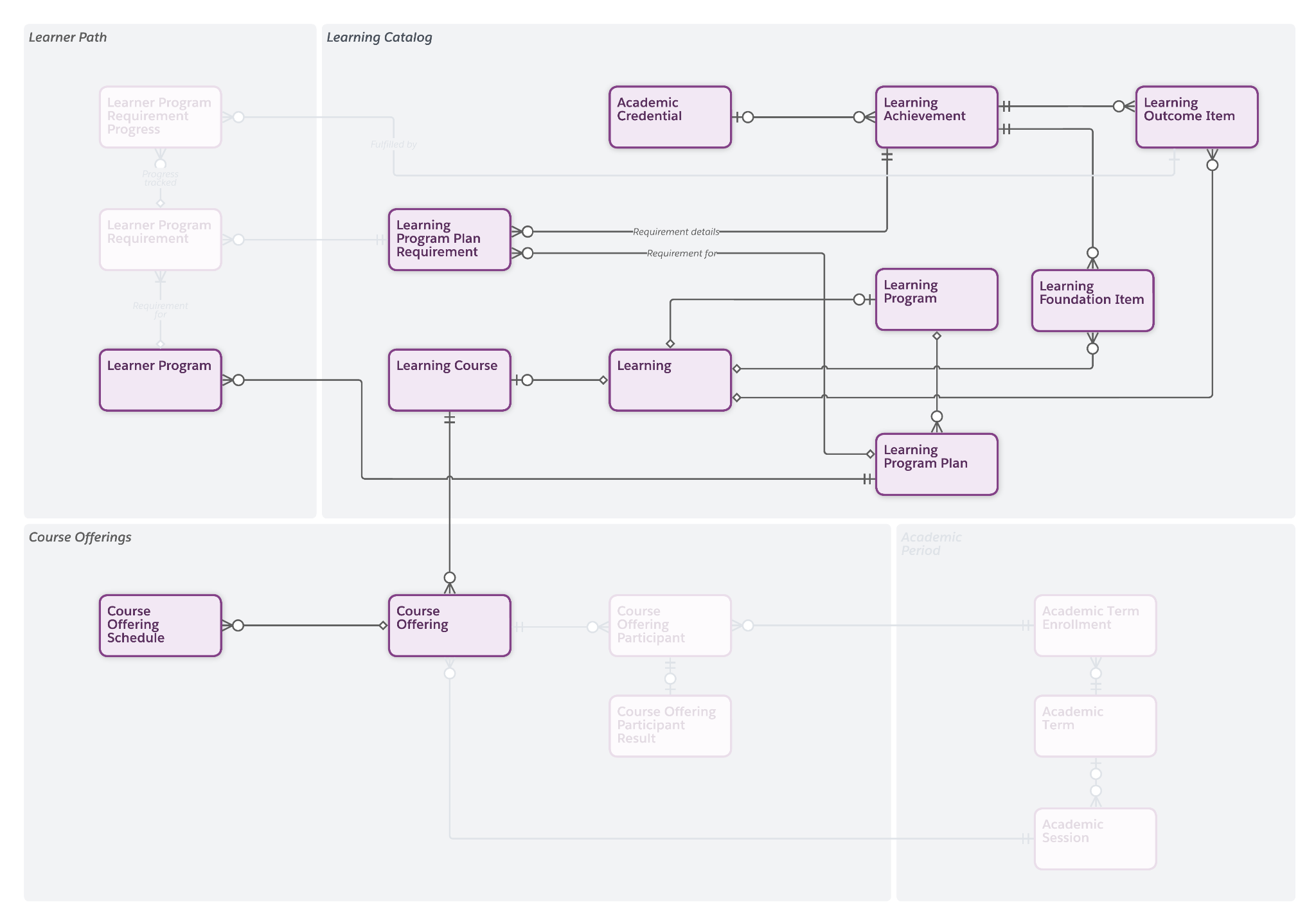
One student can be associated with multiple learner programs. For example, when Sophia, an Astro University student, enrolls in the BS Computer Science 2025 program and Environmental Studies minor program, two learner program records are created to capture her registrations.
Learner Program Requirements and Progress
Similar to learning programs, each learner program contains a set of learner program requirements, which form a connection between a student and the requirements they need to complete as part of their enrolled program. A requirement can be mandatory, such as core curriculum, or optional, such as elective courses. Program requirements can represent a course, a credit, or a skill set that the student has earned through their education.
On the Learner Progress tab of Sophia’s case record, her academic advisor can view Sophia’s learner program requirements and track her progress toward completing the program.
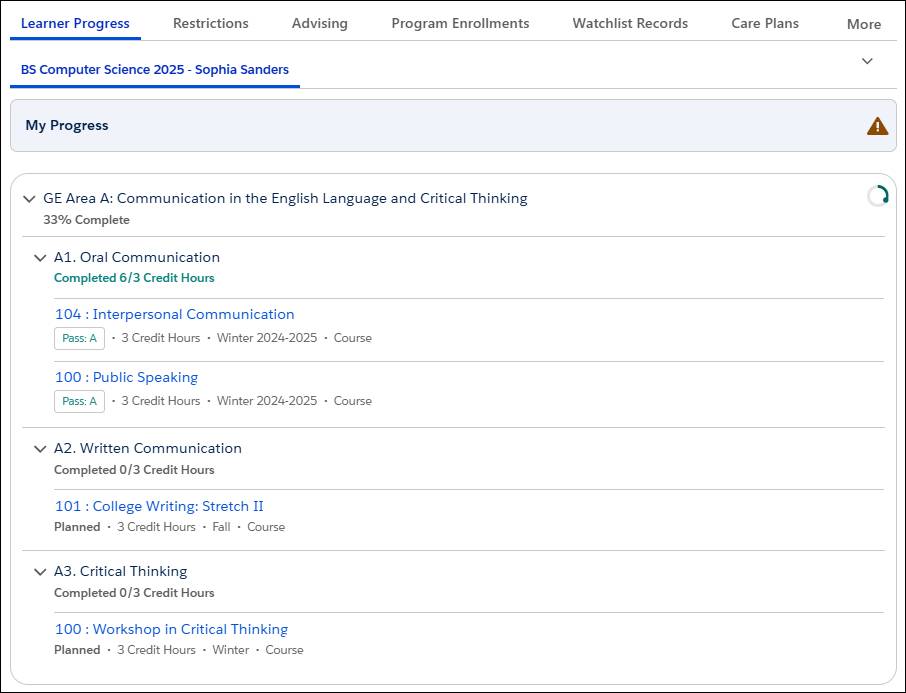
Because learner program requirements are the building blocks of a learner program plan, advisors and students can track progress toward enrolled programs and quickly determine eligibility during course enrollment. A learner program requirement progress record documents the status of the student’s work toward completing a requirement.
This diagram shows how the learner program requirement and learner program requirement progress objects fit within the data model.
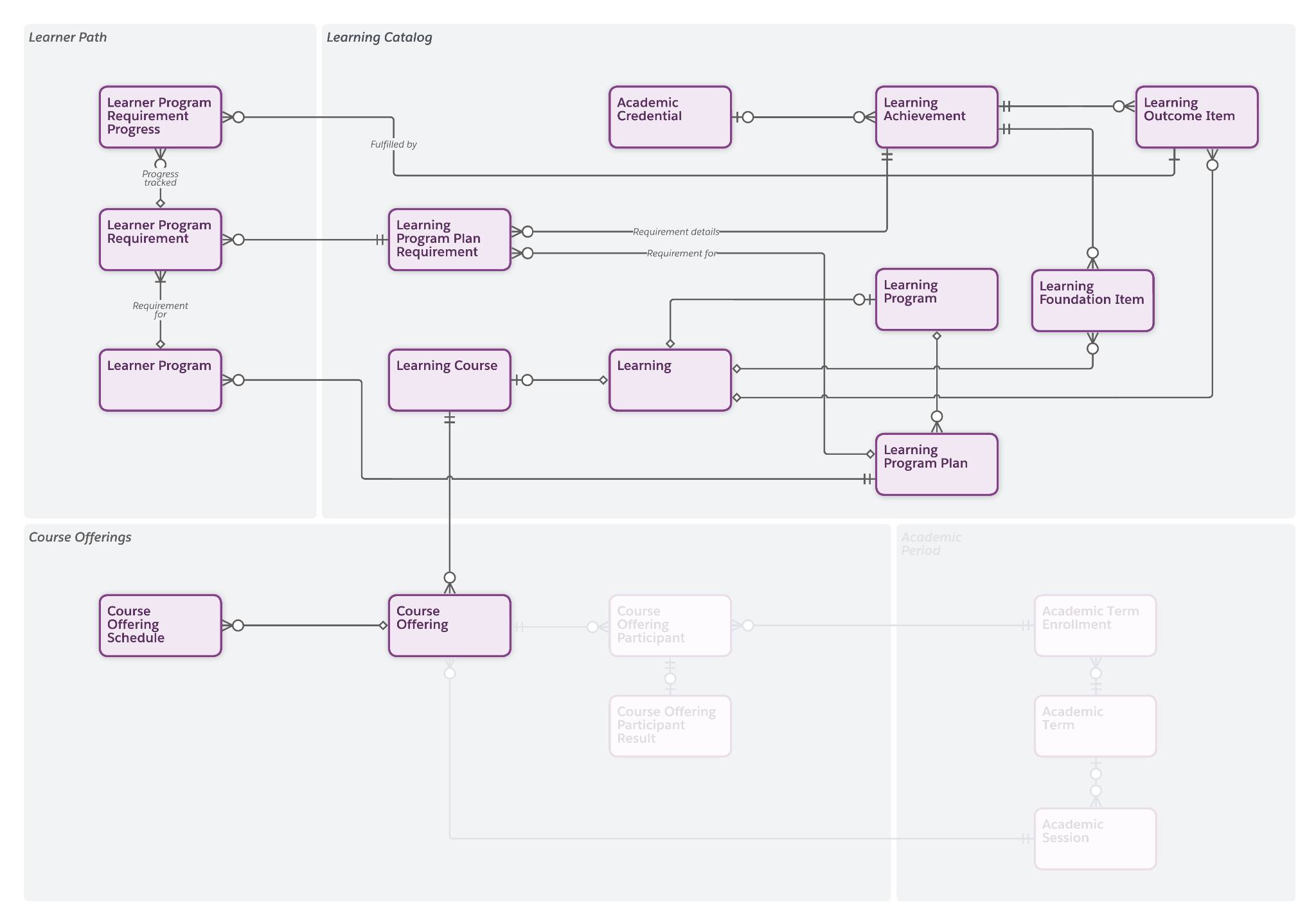
Notice that, by connecting learner program requirement progress to a learning outcome item, you can form a bridge between the learner program requirement and the associated learning record.
Sophia’s BS in Computer Science learner program requires the completion of 40 courses, each represented by a learner program requirement. So far, she’s completed 10 of the courses, and this completion is tracked through learner program requirement progress records.
Other Learner Objects
When a student enrolls in a learning program, an academic term enrollment record is created by the admin, registrar, or an automated workflow to capture the student’s engagement during a specific semester, quarter, or other academic period. This record maps to an academic term, which you create along with academic years and academic sessions when modeling your academic calendar. To learn more about setting up your academic calendar, visit the Model Your Academic Calendar article in Salesforce Help.
Academic term enrollment records also track a student’s enrollment history across terms. For example, by reviewing academic term enrollment records, Juan can see that Sophia was enrolled in an Undeclared program during her freshman terms but is now enrolled in the BS Computer Science program for her sophomore terms.
There are also a couple of learner objects related to course offerings. A course offering participant represents a student’s enrollment in a specific course offering, while a course offering participant result stores the outcome of their participation, such as their grade for the course.
This course offering participant and result information supports helpful features, such as the Intelligent Degree Planner, which guides students with a real-time list of the requirements they’ve completed or have yet to fulfill. It also stores information that feeds into the Learner Progress component, which students can use to check their progress toward completing their coursework. You learn more about both of these tools in a moment.
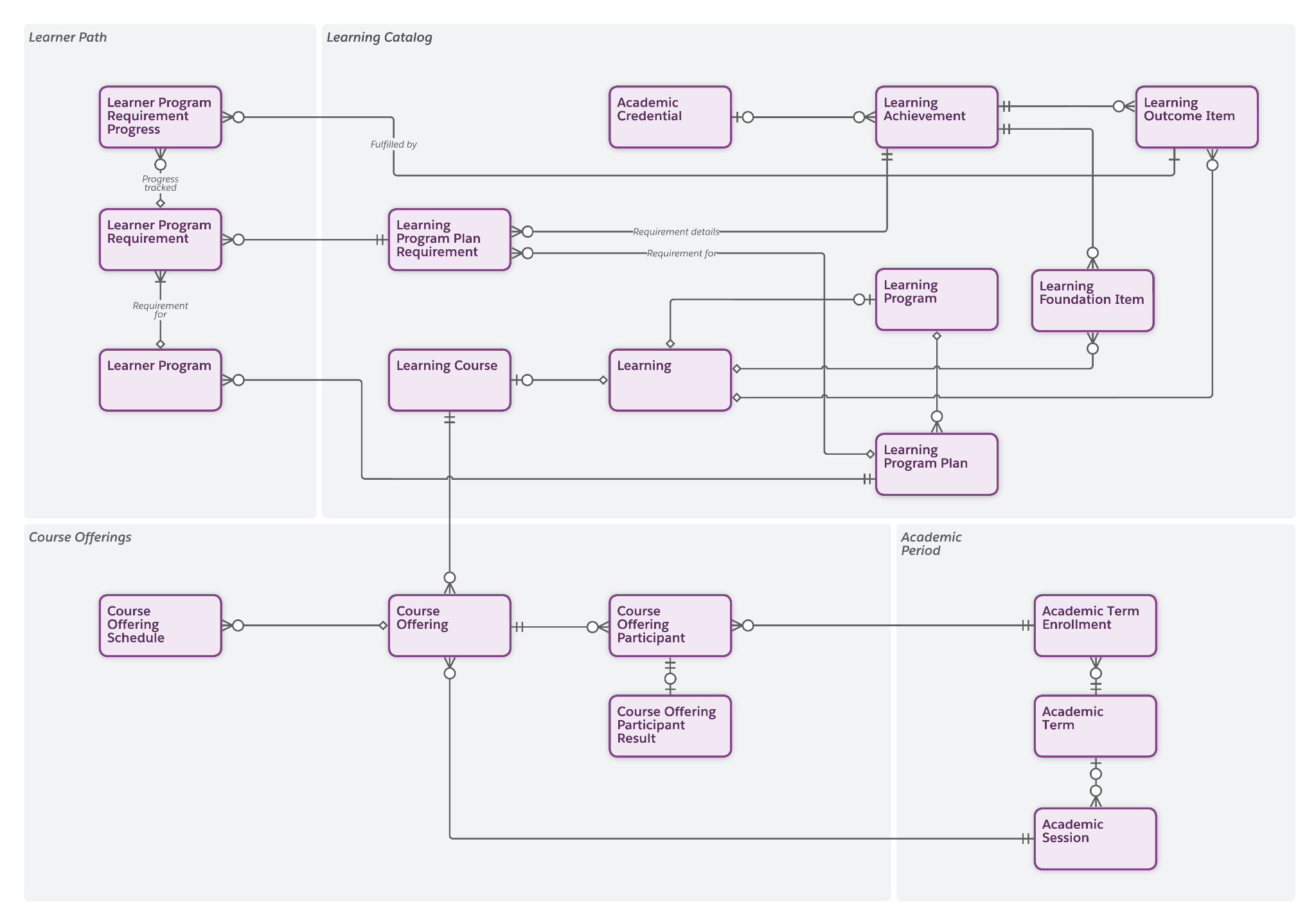
To make sure that you’ve got a good understanding of the learner objects, review this table, which lists each object and its corresponding definition. You explore the learner pathway and learner pathway item objects in more detail momentarily.
Object |
Definition |
|---|---|
Learner Program |
Relates an individual student to a learning program plan |
Learner Program Requirement |
Connects a learner program to a learning program plan requirement |
Learner Pathway |
Represents a learner’s planned path to the completion of their enrolled programs |
Learner Pathway Item |
Defines a step along a learner pathway |
Academic Term Enrollment |
Tracks a student’s engagement during an academic period |
Course Offering Participant |
Records an individual student’s enrollment status in a course offering |
Course Offering Participant Result |
Stores the grade that a student receives at the end of a course |
So, besides providing a unified system for managing all your academic data and tracking student progress, what else does this model do for you? Well, plenty!
Intelligent Degree Planner and Learner Progress
The information stored in Learning Data Model objects provides essential information for several Agentforce Education features. Let’s take a moment to explore two of these powerful tools.
Intelligent Degree Planner
The Intelligent Degree Planner, which is accessible from the Learner Portal or a learner’s case record page, is an intuitive interface for mapping out a student’s academic journey. By connecting to learner pathways, learner program requirements, and a few other objects, the planner simplifies the degree planning experience for students and advisors.
Users can drag and drop courses to arrange them on a canvas and sequence the courses across academic terms. For undecided courses, such as electives, users can insert placeholders to fill in gaps until they’ve decided on courses to fulfill the requirements.
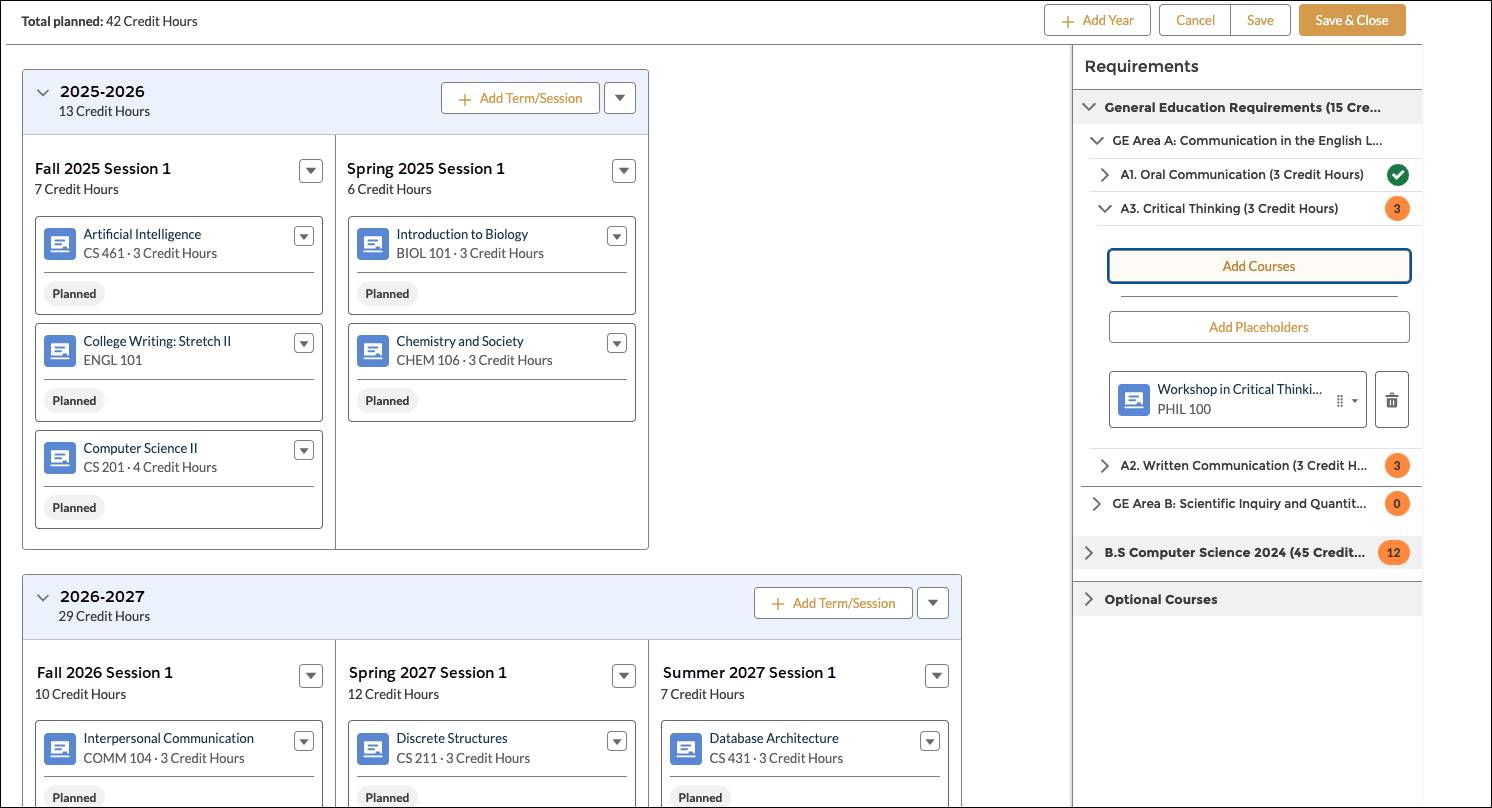
The planner calculates the number of planned, unplanned, and required units, helping students and advisors to quickly determine whether a plan meets the requirements of the program plan. It also alerts the user when a course is planned without its associated prerequisites or corequisites. Students can submit their drafted degree plans for advisor review and approval directly from the planner.
The degree plan data is saved in a learner pathway record, with each individual course stored as a learner pathway item. A learner pathway is a student’s planned path toward completing their enrolled learning program. It contains all the data related to the learner’s personal degree plan and helps advisors visualize possible paths toward satisfying the requirements of the program. Advisors and students can use a learner pathway template to jumpstart the creation of a learner pathway, or they can build a pathway from scratch. As you learn in a moment, the Intelligent Degree Planner uses this dynamic, individualized pathway to help students plan their coursework for each academic term.
Each pathway contains a set of learner pathway items, which define requirements or courses within the context of the learner’s unique pathway. These pathway items include details about the planned requirement, the completion status, and other details.
Learner Progress
The Learner Progress component helps students and advisors quickly understand what academic requirements the student has fulfilled and what remains to be completed along their learning path. From the Learner Portal or learner’s case record page, Learner Progress provides a quick reference to the student’s enrolled learning programs along with the status of each requirement, such as planned, enrolled, or completed.
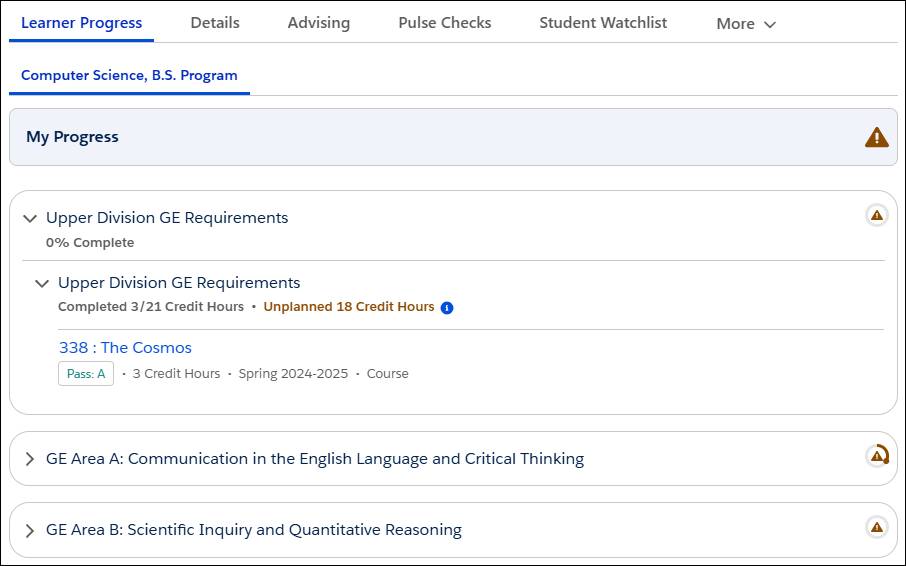
Additionally, Learner Progress lists any unplanned requirements, and repeated courses and the term in which they were last attempted. It also displays messages about unplanned or failed learning requirements that need attention.
Learner Progress uses data from many objects, including academic year, academic term, course offering participant, learner pathway, and learner program. Because it works alongside the Intelligent Degree Planner, changes a user makes in the planner reflect in the Learner Progress view.
Look at you! You now understand how all the objects in the Learning Data Model provide a single, logical structure for your institution’s academic data. That means you’re ready to check out all the ways you can model your curriculum, which you explore in the next unit.