Model Group Benefits Products
Learning Objectives
After completing this unit, you’ll be able to:
- Explain how the group product hierarchy extends product modeling.
- Describe how attributes, classifications, and bundle structure work together in a group product model.
- Build a reusable group plan that supports quoting, eligibility, and enrollment.
Design Products for Group Populations
Individual insurance products usually support one policyholder and their selected coverages. Group products work differently. They model an employer or other sponsoring organization’s offering, which can later issue coverage to many members, often organized by benefit class. At quote time, the insurer has not issued member policies yet. They’ve only defined the plan structure that enrollment later applies across a covered population.
The same product modeling foundations from Product Administration for Digital Insurance still apply here: attributes, classifications, and product structure. Group Benefits for Digital Insurance extends that familiar pattern by adding layers between the root plan and its coverages. One layer supports summary and class-level context. Another supports members and dependents. Together, those layers give the product model the population structure needed for group quoting, rating, and enrollment.
In this unit, you learn how those layers come together in a reusable group product model.
Review the Group Product Hierarchy
Group products use a deeper hierarchy than many individual insurance products. The model defines a plan and its benefits, plus supports the group and member-level structure that quoting, rating, and enrollment depend on.
This hierarchy has four main layers, as shown in this diagram.

This table introduces the function of each layer.
Layer |
Role in the Hierarchy |
Purpose |
|---|---|---|
Root Product (1) |
The bundled plan that anchors the offering |
Defines the overall plan structure referenced in quoting, contracting, and enrollment |
Group Summary (2) |
The bundled layer that represents group or class-level structure |
Holds summary values used for rating, contributions, and plan governance |
Group Member (3) |
The bundled layer that represents employees and dependents within the plan structure |
Carries member-level demographic and enrollment context |
Coverage (4) |
Non-bundled products that represent benefits and terms, such as preventive care or surgery |
Defines the benefits and terms members can elect and receive |
This structure keeps plan design separate from population data. The root product and coverages define the offering. The summary and member layers provide the context needed to quote that offering and later enroll it across a real population.
Model a Reusable Group Medical Plan
Explore how a product administrator applies this structure in practice.
Justus Pardo is a product administrator at Cumulus Insurance, and he plans to model a new group product called Medical Platinum. He is building a plan, but also establishing a reusable framework for a broader group portfolio. The model supports multiple classes, many members within each class, and a consistent way to carry coverage terms through quoting and enrollment.
That is the design goal in group insurance. Insurers don’t want to rebuild each plan from scratch. They want a reusable structure across medical, dental, vision, and other offerings while changing only the terms, coverages, or eligibility logic that make each plan distinct.
Define Product Attributes for Rating and Enrollment
Justus first defines the data that the product model uses during quoting and enrollment. He creates picklists for controlled values such as relationship type, tobacco-use status, and standard deductible options.
Next, Justus creates the attribute definitions themselves, setting the data type, default and available values, and a unique attribute code for each one. Some attributes capture coverage terms, such as deductible or coinsurance. Others capture member-level facts, such as age or smoker status. This model also depends on summary attributes that describe the covered population through totals and counts.
After he creates the core attributes, Justus groups them into attribute categories. This helps him assign complete sets of attributes when building classifications. For example, he creates a Summary Data category that groups census-derived measures used in rating and contribution logic, including Full Time Member Count, Member With Spouse Count, Total Dependents, and Total Members.

When values come from census and summary records, Justus configures them as extended attributes. This allows the product model to use current counts and demographics without duplicating that data. That distinction matters in a group context where pricing and eligibility often depend on the current population rather than on static plan terms alone.
Organize Plan Logic with Classifications
With the core attributes defined, Justus creates the product classifications that standardize what each layer of the hierarchy carries. He uses Group Summary for class-level containers and aggregates, Member for group census member containers and demographics, and Coverage for coverage components and benefit terms.
Next, he assigns the appropriate attribute categories to each classification. These categories do most of the standardizing work because they apply governed sets of attributes consistently wherever the classification is reused.
This approach makes the model easier to scale. When Cumulus adds another plan later, Justus can reuse the same classifications and category assignments, then override only what truly differs.
Assemble the Group Product Structure
Now Justus assembles the structure that makes Medical Platinum executable in group quoting and enrollment. The pattern is simple: the root plan expands to a summary layer, the summary layer expands to members, and each member carries the available coverages.
Justus creates the Medical Platinum root product and assembles the product structure on the product’s Structure tab. The root plan is a bundle, but it does not directly contain members or coverages. Instead, it contains a single component group that points to the summary layer. Justus adds a Group Summary component group and associates it with the Group Summary product classification.
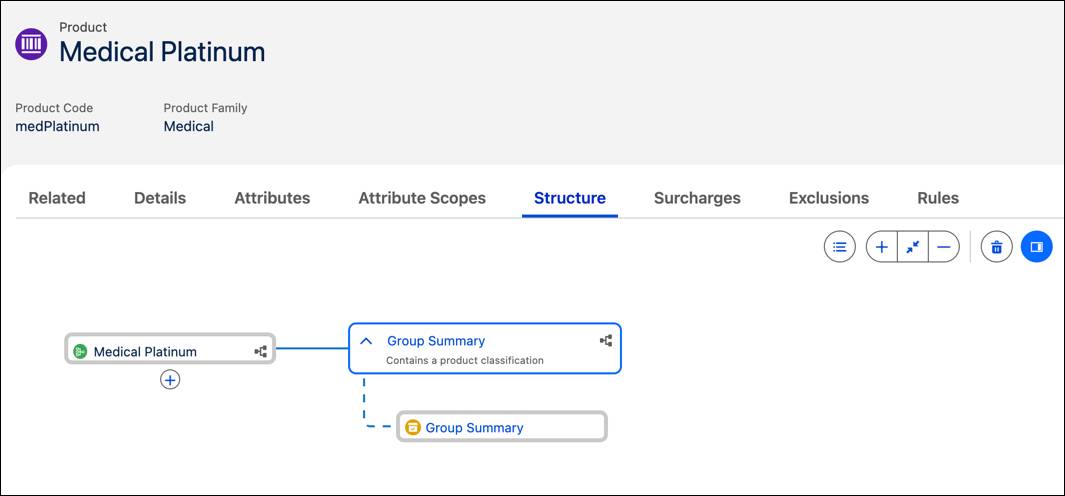
Next, Justus creates the Group Census Classification Summary bundle, which acts as the blueprint for the summary layer. It contains a single component group for members. He adds a Group Member Product component group and associates it with the Member product classification.

Finally, Justus creates the Member bundle for Medical Platinum, which acts as the blueprint for each census member instance. To the bundle, he adds a Coverages component group and the coverage products that members can select under the plan. These products include Preventive Care and Wellness, Out Patient, and Annual Health Checkup.

These coverage products inherit standardized terms from the Coverage classification, so Cumulus can reuse the same coverage patterns across plans and adjust only what differs, such as default cost share values or limits. This approach turns one configured product into a reusable modeling pattern.
Scale from One Product to a Portfolio
With the shared picklists, attributes, categories, and classifications in place, building new plans becomes much faster. Justus can create a new root product, reuse the same summary and member layers, adjust the included coverages and any plan-specific term overrides, and preserve the same underlying modeling logic.
That same pattern supports additional medical options as well as dental, vision, and supplemental offerings. Instead of rebuilding the hierarchy for each product, Cumulus can reuse a governed framework and vary only the pieces that make each offering distinct. This is how one well-designed plan becomes the foundation for a scalable group portfolio.
Make Plans Available for Quoting
After modeling Medical Platinum, Justus adds it to the Medical category in the Group Benefits catalog so it appears during plan selection. As Cumulus expands the portfolio, the same catalog can organize additional medical, dental, and vision offerings.

The catalog helps users find plans during quoting and plan selection.
Justus then adds product qualification rules to Medical Platinum to manage which employer groups can access and select it. These rules evaluate employer and quote context and return a qualified result. During group quoting, the platform uses that result to filter the available plans.
For example, Medical Gold is available only when the quote meets criteria related to employer location, such as state or ZIP code, or to group size, such as number of employees.
As the portfolio grows, qualification rules keep plan selection focused and prevent groups from selecting options they aren’t eligible to select.
What’s Next?
In this unit, you learned how group products are modeled for population-based coverage. Attributes, categories, and classifications define the structure, while the product hierarchy connects the root plan to summary, member, and coverage layers. Qualification rules keep plan selection focused, so each group sees only the plans it's eligible for during quoting.
But a modeled plan is only half the picture. Before an insurer can price an employer offering, it needs a clean population snapshot that tells the platform who the plan applies to and what values rating uses.
In the next unit, you follow that shift from product structure to population data as you prepare the employer population data used for group quoting.