Set Up Search Recommendations
Learning Objectives
After completing this unit, you’ll be able to:
- Describe how Einstein Search Recommendations lets you personalize type-ahead search.
- Explain the customizations you need to make to implement each Einstein Search Recommendations feature.
- Explain how Einstein Search Recommendations improves a shopper's experience.
- List the testing tools you can use for Einstein Search Recommendations.
Improve Search with Search Suggestions
As a merchandiser, you want to make sure that your shoppers find exactly what they’re looking for. Search suggestions are a great way to guide shoppers to products they want and products you want them to see. Agentforce Commerce for B2C provides built-in search suggestions on:
-
Additional phrases: Search can suggest alternative or related phrases based on the shopper's input.
-
Categories: Search suggestions include category-based results, helping shoppers to go directly to specific product categories.
-
Brand names: Shoppers can receive suggestions based on brand names, helping them to locate products from specific brands quickly.
-
Products: Search can provide direct product suggestions, which are often the most relevant matches to the user's search query.
-
Content: In addition to products, search can suggest relevant content, such as articles, guides, or other informational resources.
Type-Ahead Search
When a shopper starts to type in the search field, the storefront shows them terms that can help them complete the search. These terms include suggestions, spelling corrections, and completed terms specific to the category or subcategory they are in.
To improve search results, you can configure suggestions to list by group—such as category, brand, or content—that you then link to specific pages, such as a category landing page or the search results from a phrase. You can also show suggestions with images, a product category, or a price.
Einstein Search Recommendations
Einstein Search Recommendations improve a shopper’s search experience by showing the most relevant search suggestions available. With Einstein Search Recommendations, you can:
- Lower the abandonment rate on the search results page.
- Minimize the likelihood of zero search results.
- Increase shopper satisfaction with storefront search.
Einstein Search Recommendations helps you personalize type-ahead search suggestions. It applies AI algorithms to the internal search activities that it receives from your site and from specific shopper searches. The algorithms identify the search phrases that are the most relevant to a shopper and produce recommendations.
Einstein Search Recommendations updates search results in real time. The updates are based on the site-wide search activity for the shopper’s location and device type. For example, if the shopper types “swe” and they haven’t searched for sweater or sweat pants in this session, Einstein Search Recommendations looks for phrases that start with swe for the device and location. If there’s enough data at the device location level, Einstein Search returns a phrase. If there isn’t enough data, Einstein Search searches across a larger data pool and devices until it finds a result.

Feature Versus Effort
How you implement Search Recommendations depends on which feature you want to use. Here’s what you need to do (and who you need help from) to implement the Search Recommendations features.
Feature |
Customize? |
Level |
Details |
Role |
|---|---|---|---|---|
Search term autocompletion and autocorrection |
No |
None |
Activate via a search preference. |
Merchandiser |
Autosuggest of additional search phrases |
Yes |
Low |
Customize existing search type-ahead flyout menu to render multiple search phrase suggestions. |
Developer |
Recent search phrases |
Yes |
Medium |
Customize existing search type-ahead flyout menu to retrieve and render Einstein-generated recent search phrases. |
Developer |
Popular search phrases |
Yes |
Low |
Customize existing search type-ahead flyout menu to retrieve and render Einstein-generated popular search phrases. Base it on the recent search phrases. |
Developer |
You can start with the easier features that require no or a low level of storefront customization. These can quickly improve the relevancy of your search suggestions. To improve search suggestion relevancy to each shopper, implement all the features.
Implementation Approach
If you’re following along with your own Agentforce Commerce for B2C sandbox instance, make sure that you’ve completed these prerequisites before you start.
- Deploy Agentforce Commerce Einstein Search in your production instance.
- Turn on the catalog and order feed jobs in your production instance.
- Turn on activity tracking.
Implementing Einstein Search Recommendations requires assistance from a developer and Salesforce system admin.
Here’s the implementation plan by role.
Merchandiser
- Enables Einstein Search Recommendations in Business Manager.
System admin
- Replicates the search settings from staging to production and development.
Developer
- Extends the search suggestions tile to render multiple suggestions.
- Implements recent search phrases.
- Implement popular search phrases.
Turn On Search Recommendations in Business Manager
Before you start the steps to turn on search recommendations:
- Make sure that type-ahead search is active for your storefront. Activating type-ahead search provides an immediate effect for Einstein Search Recommendations.
- Perform a search on your storefront and record the results. You compare these results with another test after you turn on Search Recommendations.
To turn on Search Recommendations:
- In Business Manager, click Apps Launcher and select Merchant Tools | Site | Search | Search Preferences.
- Select Einstein Search Recommendations.
- Click Apply.
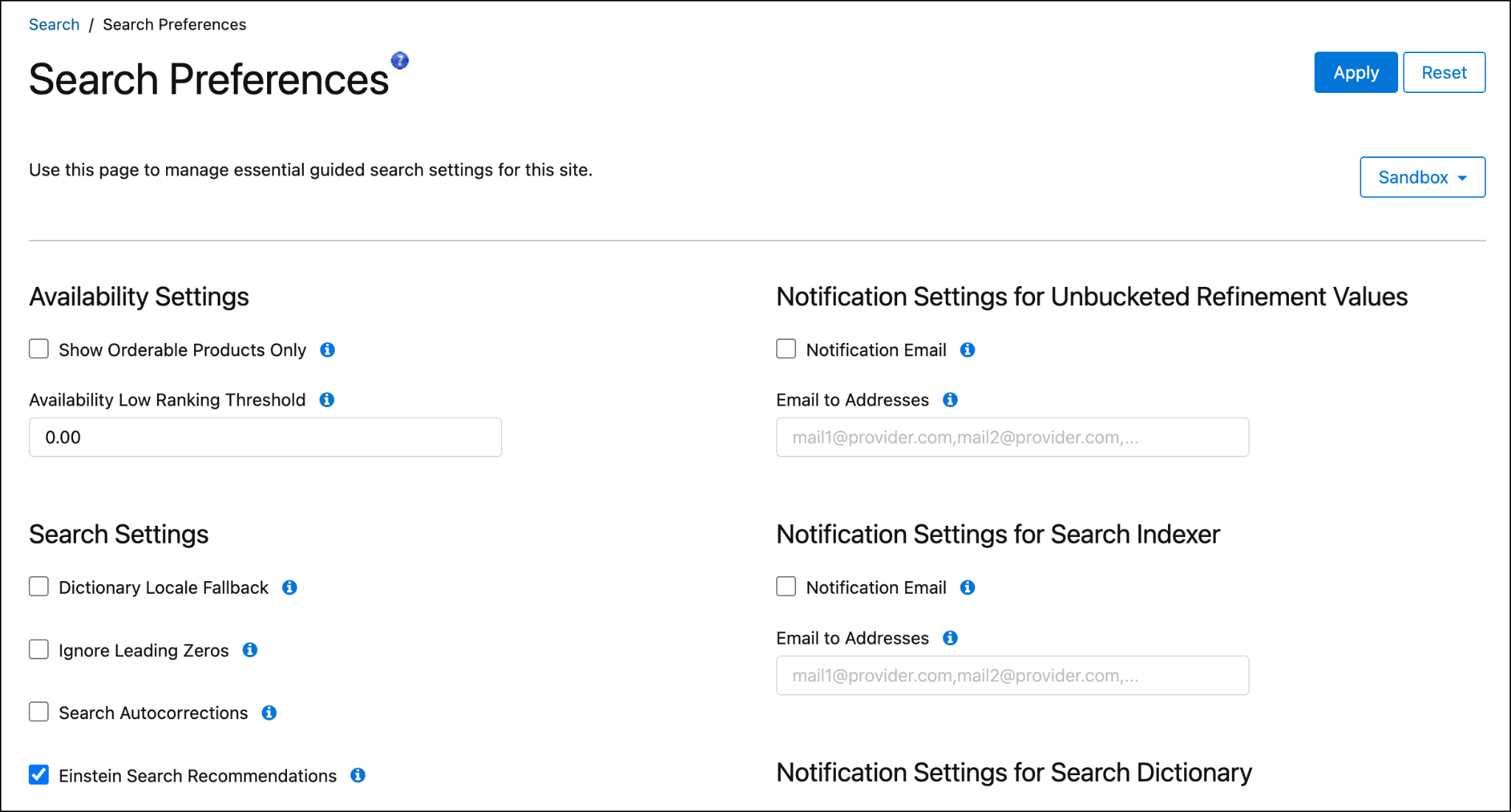
After applying the Einstein Search Recommendations setting, reindex the search indexes. Reindexing is necessary to update the search functionality with the new configurations. Reindexing makes sure that the search results are accurate and reflect the enhanced capabilities provided by Einstein Search Recommendations. This process optimizes the search functionality to use AI recommendations and improvements.
To re-index the search indexes:
- In Business Manager, click App Launcher and select Merchant Tools | Site | Search | Search Indexes.
- Select your index type. This selection selects all the search indexes.
- Click Rebuild.
After Business Manager rebuilds the search indexes, your system admin can replicate the search settings from the staging instance to production and development. Now, your shoppers start to see more personalized recommendations. Do a search and compare the results against your earlier test.
Extend the Search Suggestions Tile
For this example, the storefront uses a type-ahead search flyout menu (expanding search box). This search flyout includes “Search for” or “Did you mean” functions directly below the search bar. The flyout is turned on when you select Einstein Search Recommendations in Search Preferences.
You can validate that Search Recommendations is working by comparing the search results for a specific three-character search before checking the box and then after checking the box and re-indexing.
Implement Recent and Popular Searches
To use the recent and popular search features, add these API methods to the type-ahead flyout menu.
- getRecentSearchPhrases(): Returns phrases fueled by shopper’s recent searches.
- getPopularSearchPhrases(): Returns phrases fueled by the most popular on site.
Search Index Query Testing Tool
To assess Einstein’s effect on autocomplete and search term corrections, you can use the Search Index Query Testing Tool. Here's how.
- In Business Manager, click App Launcher and select Merchant Tools | Site | Search | Search Index Query Testing.
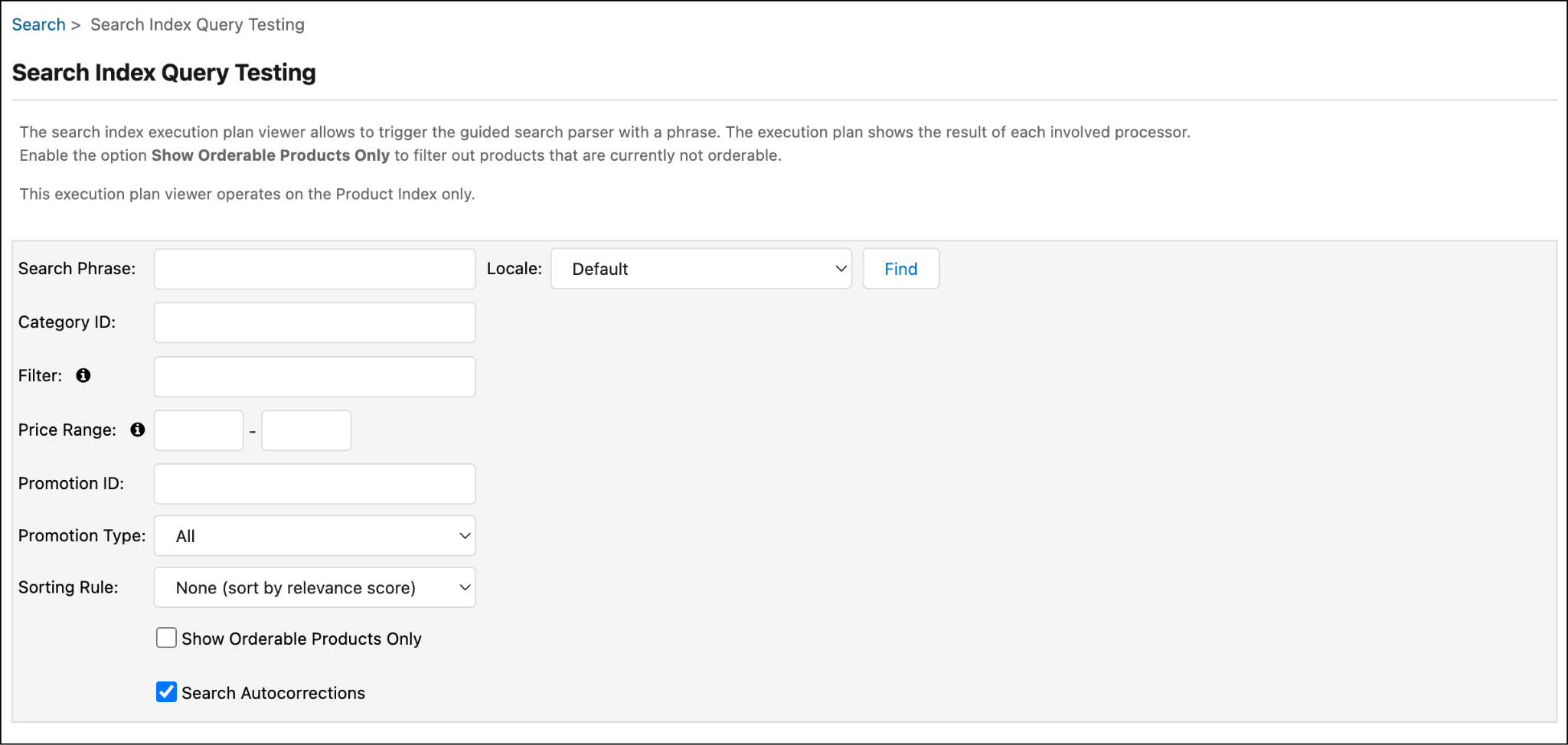
- Enter a search phrase, such as “shoes”.
- Enable Search Autocorrections.
- Click Find.
- Review the results shown by the index query testing tool and compare them to the storefront to validate experience consistency.
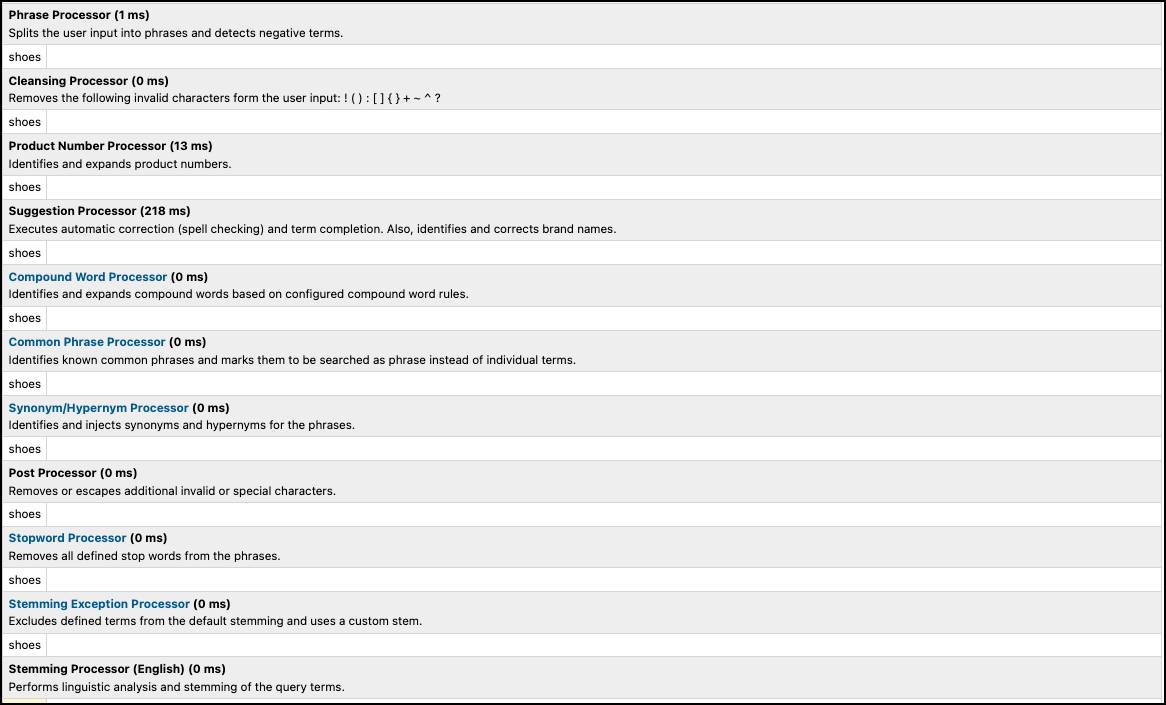
This tool documents the performance and results of the various processors that Agentforce Commerce for B2C storefront search uses. When you enable Search Recommendations, autocorrections made by Einstein display in the processing results.
At the bottom of the query testing tool is a list of products that match the search phrase. Above the list, there’s a “Did you mean” label that includes the search suggestions generated by Einstein. The suggestions also include what shows in the type-ahead search flyout menu. The suggestions are listed from highest to lowest relevance.
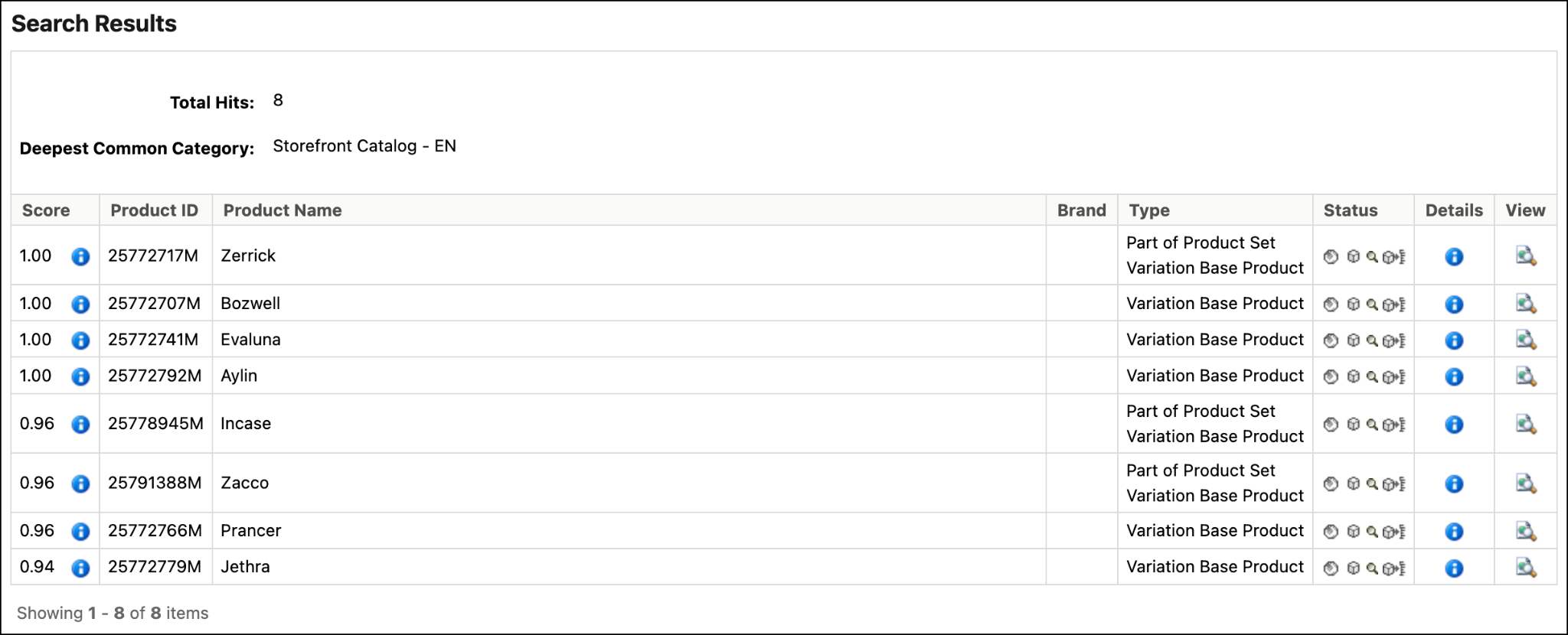
Run a test with Search Recommendations turned on and another with it turned off, and compare the results. To mimic the storefront experience you need to set the value from the storefronts Personalization Cookie (cqcid). The cookie value taken from a storefront session identifies the user for search personalization. It's required for the Einstein Search Recommendation processing.
A/B Test
Run A/B testing on Search Recommendations using a third-party A/B testing tool. The Agentforce Commerce for B2C native A/B testing tool doesn’t currently support the A/B testing of Einstein Search Recommendations.
Recommendation Validator
Inspect Search Recommendations results in the Commerce Cloud Recommendations Validator. This tool is designed to validate recommendation activities and sorting rules on your site that use Einstein features. The tool ensures that recommendation functionalities are operating as expected by detecting and registering specific events during shopper interactions on the storefront. To learn more, see Agentforce Commerce Recommendations Validator.
Next Up
In this unit, you learned about the Agentforce Commerce for B2C built-in search recommendations. You also explored Commerce Cloud Einstein Search Recommendations, which gives your shoppers personalized recommendations based on real-time data. Next, learn about predictive sort.
Resources