Prioritize Advisor Work with Run My Day
Learning Objectives
After completing this unit, you’ll be able to:
- Describe Run My Day and the problem it solves for wealth advisors.
- Explain the configuration options available to customize Run My Day.
- Describe how the Top Priorities component organizes a wealth advisor’s daily work.
An Advisor’s Daily Problem
In the previous unit, you learned the basics of Agentic Advisor. Now, explore how it simplifies and accelerates the work of one financial advisor.
Meet Ryan Dobson, an experienced financial advisor at Cumulus Wealth, a division of the large financial services institution Cumulus Cloud Bank.
For most of his career, Ryan often arrived at his desk at a loss for where to start. After all, he has more than 100 clients to manage, open service cases, compliance deadlines, and a pipeline of referral opportunities. He sifted through information scattered across his calendar, the CRM lead queue, portfolio risk reports, and a compliance dashboard.
It was a hassle to keep track of even the most pressing matter. He burned the first hour of his day before he accomplished anything. Plus, even after spending all of that time and effort, he was never confident he prioritized the right clients. He knows that he lost clients in the past because they felt ignored.
Now, that’s changed. Ryan and Cumulus use Agentic Advisor and Run My Day. Ryan’s gone from fragmented, reactive prioritization to proactive, high-touch service.
As Ryan starts his day, he opens the Agentic Advisor app from the App Launcher and browses Run My Day to find insights and actions waiting for him with no manual aggregation required. This single view pulls together signals from across his book of business into one prioritized workspace. It surfaces clients at the right moment with context and clear next actions.
In this unit, you follow Ryan as he uses Run My Day to manage his work. First, though, learn the basics of the feature.
How Run My Day Works
Run My Day aggregates data and signals from Data 360 and Salesforce into a list of priorities for advisors. Data 360 Calculated Insights, a tool that builds metrics from your unified data, processes household data, financial accounts, portfolio signals, and event history to find clients’ needs.
Run My Day gathers insights into two key components. Check them out.

- The Calendar shows an advisor’s daily schedule, with events that link directly to Meeting Concierge meeting prep tools.
-
Top Priorities shows ranked priorities organized into category groups, with insights and detail cards.
The Top Priorities component organizes each priority into three levels.
-
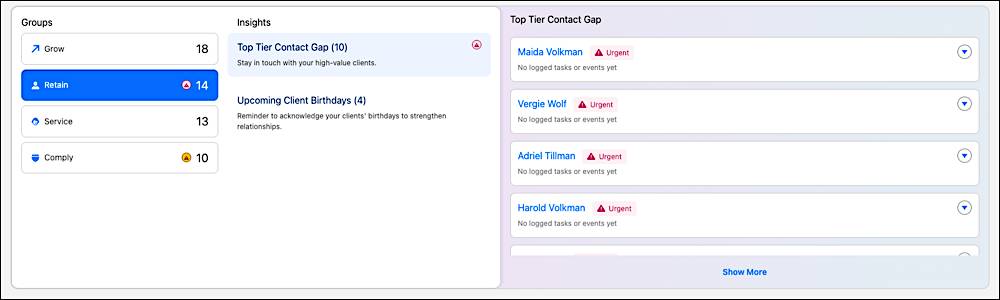
Groups collect individual priorities into business needs, such as Retain, Service, Grow, and Comply. Ryan selects the Retain group to explore all of those related signals in one place.
-
Insights collect data signals and prioritize insights within each group. Within Ryan’s Retain group, there are insights for clients not contacted recently and upcoming client birthdays.
-
Details are individual priority cards that explain the client’s situation. They include context fields and one-click actions such as Draft Email, Schedule Meeting, and Create Task. Ryan reviews a card for a client who hasn’t been contacted recently, and selects an Agentforce action to draft an email to the client.
Salesforce admins configure these components in Setup. They decide which groups appear, which insights fire, what context shows on detail cards, and which actions are available. Each group is a distinct configuration workstream.
To better understand how Run My Day helps an advisor, follow along with Ryan as he uses it to start his day.
Prioritized Meetings
First, Ryan reviews his calendar to prepare for his scheduled meetings for the day.

Each meeting detail card includes a readiness indicator linked to Meeting Concierge. With Meeting Concierge, he quickly prepares for each client conversation. He has meetings to prepare for, and you learn more about that in a later unit when you explore Meeting Concierge.
Top Priorities at Work
Next, Ryan works through each of the groups in the Top Priorities component.
Follow along to explore each group.
Grow
The Grow group includes referral leads from Intelligent Referral Management and proactive opportunity signals, such as life events. Ryan selects the group and reviews the AI-generated summaries on each card. These summaries help Ryan quickly prioritize his outreach. You learn more about referrals in the final unit of this badge.
Retain
Ryan’s Retain group shows details of at-risk clients, each surfaced by urgency signals from their account. Insights include clients at risk of attrition, clients not contacted recently, and recent large withdrawals. Detail cards show assets under management and the signals driving the flag.
Ryan selects a client without a recent interaction, reviews their client detail page, and decides to send them a note. He starts from a Draft Email one-click action on the detail card. Agentforce generates the email, and Ryan reviews and edits it before he sends it to the client.
Service
Next, Ryan selects the Service group, which includes insights about open cases, follow-ups, and pending tasks that require advisor action. These cards are ranked by urgency and proximity to upcoming meetings. Ryan learns that he has a client with a pending beneficiary change, so he contacts them to close the case.
Comply
The Comply group collects time-sensitive and regulatory obligations. For example, Ryan’s detail cards include expiring Know Your Customer details and required minimum distributions not yet processed. He can work on any of these detail cards with one-click actions including Create Task and View Client Record.
This is Ryan’s configuration, but your company can customize your groups, insights, and details to fit your business.
What’s Next?
In this unit, you explored the basics of Run My Day. Ryan knows his priorities, but he wants the full client picture. That fuller picture comes from Enhanced Client Detail Pages, which you explore in the next unit.