Set Up Marketing Cloud Advertising
Learning Objectives
After completing this unit, you’ll be able to:
- Navigate Marketing Cloud Advertising and describe its capabilities.
- Complete the steps to configure Marketing Cloud Advertising.
- Follow best practices for a successful implementation.
Get to Know Marketing Cloud Advertising
Marketing Cloud Advertising helps companies coordinate campaigns across social, mobile, sales, and customer service. Let's follow along as Cloud Kicks gets started with Marketing Cloud Advertising.

Marketing Cloud Engagement Account Configuration
Meet Linda Rosenberg. She is the Marketing Cloud Engagement admin for the shoe retailer, Cloud Kicks.

Cloud Kicks is excited about using Marketing Cloud Advertising, and Linda has been asked to lead the implementation project. Linda’s first step is to confirm who in her company, as well as any vendors, should have access to Marketing Cloud Advertising. She came up with the following list.
- Linda Rosenberg, Marketing Cloud Engagement admin
- Elliott Jones, Advertising Manager
- Joe Schmitt, agency partner
- Todd Moore, Graphic Designer
Next, she reviews what level of access they need.
Marketing Cloud Engagement (MC) Account Users: Roles & Permissions Chart
Actions |
MC Admin/ Admin |
MC Channel Manager/ Channel Manager |
MC Viewer |
MC Content Editor/ Publisher |
|---|---|---|---|---|
Add Users |
✓ |
X |
⦿ |
⦿ |
Add Social Accounts |
✓ |
X |
⦿ |
⦿ |
Add Ad Accounts |
✓ |
X |
⦿ |
⦿ |
Create, Edit, and Publish Audiences |
✓ |
✓ |
⦿ |
⦿ |
Create Lookalikes |
✓ |
✓ |
⦿ |
⦿ |
Refresh Existing Audiences |
✓ |
✓ |
⦿ |
⦿ |
Modify Refresh Schedules |
✓ |
✓ |
⦿ |
⦿ |
Delete Existing Audiences |
✓ |
X |
⦿ |
⦿ |
View Dashboard & Audience Details |
✓ |
✓ |
⦿ |
⦿ |
Add or Modify Email Notifications |
✓ |
✓ |
⦿ |
⦿ |
✓ Permission granted X Permission denied ⦿ Permission not granted or denied
Based on what she knows about her team’s responsibilities, Linda documents the changes to be made in Marketing Cloud Engagement.
Name |
Title |
MC Account? |
Needed Role |
Changes Needed |
|---|---|---|---|---|
Linda Rosenberg |
Salesforce Admin |
Yes |
Marketing Cloud Engagement Admin |
No changes. |
Elliott Jones |
Advertising Manager |
Yes |
Marketing Cloud Engagement Admin |
Change role from Viewer to MC Admin. |
Joe Schmitt |
Advertising Executive |
No |
Marketing Cloud Engagement Channel Manager |
Create a new user and select the needed role. |
Todd Moore |
Graphic Designer |
Yes |
Marketing Cloud Engagement Content Editor/ Publisher |
The role is correct. Grant permissions for Marketing Cloud Advertising. |
She navigates to Setup and Administration: Users. Next, Linda either checks her colleague’s access by clicking Manage Roles or she Creates a new user. Linda can then Edit Roles or Edit Permissions based on the changes needed. She updates Elliott’s role from Marketing Cloud Engagement Viewer to MC Admin.
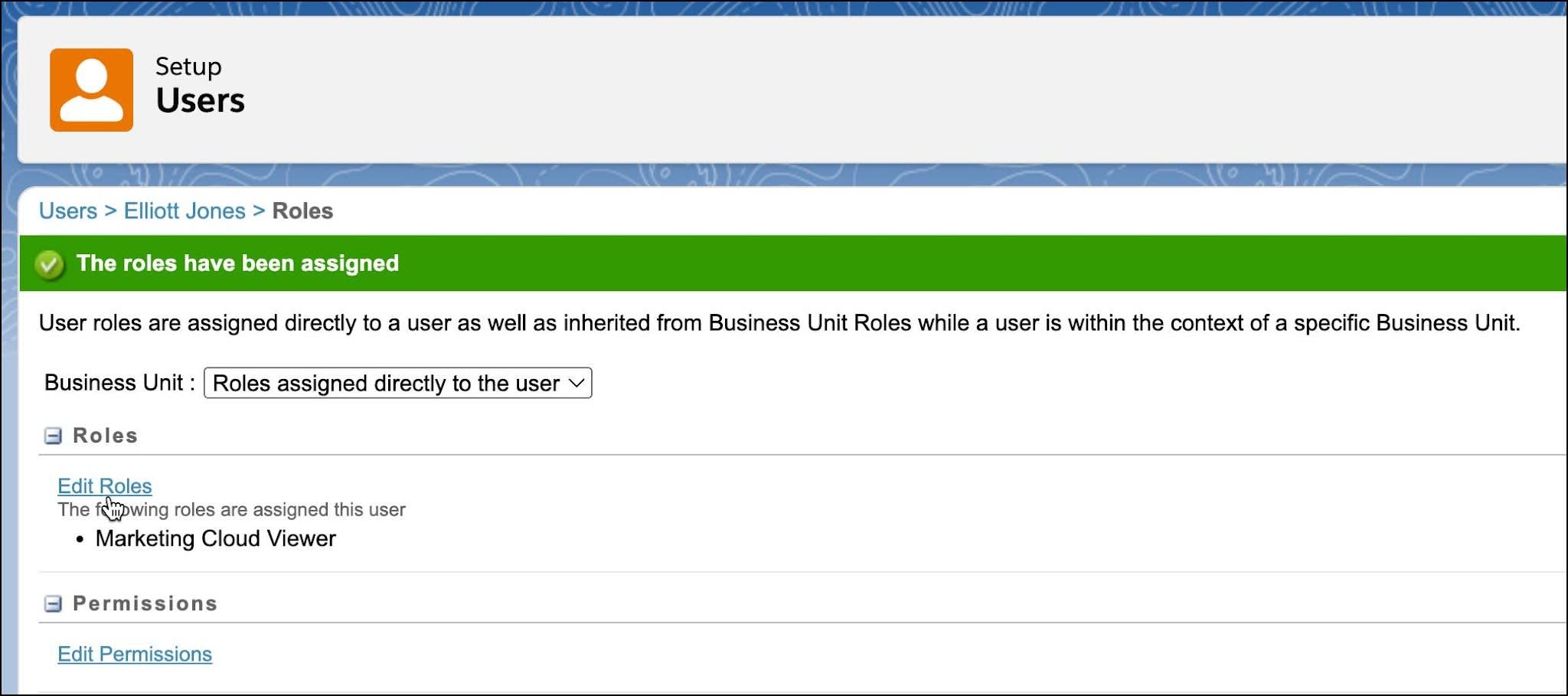
Since Elliott is responsible for the advertising accounts within Marketing Cloud Engagement, Linda also checks that he is enabled as an API User.
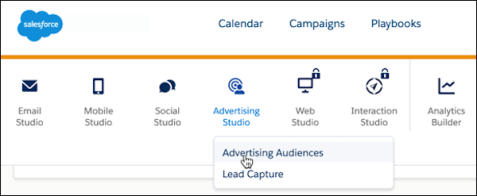
Now that she has reviewed roles and permissions, Linda confirms she has the following Marketing Cloud Advertising features enabled.
- Advertising Audiences
- Lead Capture
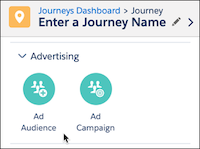
Since Cloud Kicks has Journey Builder, Linda also checks to make sure she has access to the Advertising options Ad Audience and Ad Campaign within the Journeys Dashboard.
Advertising Account Set Up
Cloud Kicks has existing advertising accounts established, but in case you don’t, refer to the chart for information for creating each social media account type.
Platform |
Tips |
|---|---|
|
|
|
|
|
|
|
|
|
|
Add Ad Accounts
Linda asks Elliott Jones, the Advertising Manager, to connect their accounts within Marketing Cloud Engagement. For this task, Elliott reaches out to Joe Schmitt from their advertising agency. He requests admin access to Facebook, X, and Google AdWords. Elliott is a bit exhausted from all this coordination, but he’s gathered all the required login details.
Navigate Marketing Cloud Advertising
Armed with this information, Elliott navigates to the Advertising Audiences’ Overview tab.
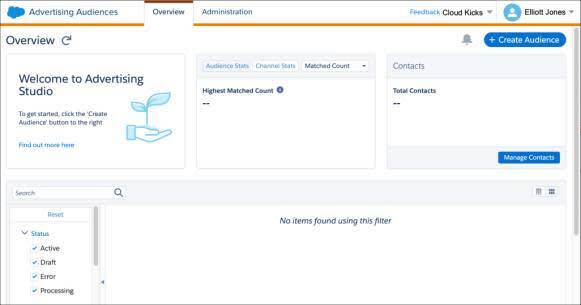
He will use the overview page to create new audiences and manage the performance of existing audiences. However, before he can begin creating audiences, accounts need to be configured. Elliott navigates to the Administration tab to begin adding accounts.
Elliott logs out of his personal X account and then clicks the X icon within Administration to log in and follow on-screen prompts. He enters his username and password and then authorizes the Marketing Cloud Advertising application. Once completed, he repeats the process for each account he wants to connect.
Data Is Boss
Forget royalty, data is truly a marketer’s boss. So while Elliott has been adding accounts, Linda has been reviewing Cloud Kicks’ data with their cross-functional teams. She knows the secret to great marketing and advertising starts with data. Cloud Kicks has some useful audience data already in MC, like a data extension of their top customers, but she is also considering other ways their data can be used. Linda reviews existing data extensions, as well as Salesforce CRM data, and existing journeys to determine what audiences might be most receptive to targeted ads. The team narrows down their initial list to five key audiences: top customers, recent purchasers, social media influencers, unengaged email subscribers, and holiday spenders.
Checklist for Success
With both of their tasks completed, Linda and Elliott meet to review the following checklist to confirm they haven’t missed any steps.

-
Confirm Marketing Cloud Engagement Features are Enabled
-
Review Advertising User Roles & Permissions
-
Create Advertising Accounts (if not already established)
-
Gather Login Credentials: Ensure you or your agency have login details for the ad accounts with which you want to build audiences.
-
Enable an Onboarding Partner (if using)
-
Connect Your Ad Accounts
-
Review Your Data: Identify what data already resides within the Marketing Cloud Engagement and what data needs to be created.
-
Identify your Audiences: Decide who you want to target with advertising.
With all steps completed, Linda is excited that all the hard work is over! Well for the most part. Next, she creates her first audience, in order to start making and not spending the big bucks.
Resources
- Salesforce AgentExchange: Lead Capture for Marketing Cloud Engagement
- Salesforce Help: Advertising Audiences Roles and Permissions
- Salesforce Help: Add, Re-Authorize, or Remove Ad Accounts
- Salesforce Knowledge Article: Lead Capture Not Available in Marketing Cloud Engagement