Navigate Catalog Requests and Ticket Tracking
Learning Objectives
After completing this unit, you’ll be able to:
- Request hardware, software, and facility services directly from the Employee Services Portal.
- Report issues directly from your assigned assets.
- Track the real-time status of your tickets and manager approvals.
Your One-Stop Shop for IT Services
In the previous unit, you learned how to get instant answers and troubleshoot issues using AI within the Employee Services Portal. But what if nothing is broken, and you just need to request something completely new?
Imagine you’re assigned to a massive new project and realize you need a second monitor. Or maybe you’re a developer who requires access to specialized modeling software. Instead of sending an email to a generic IT inbox and waiting days for a response, the Employee Services Portal provides a consumer-grade storefront.
In this unit, you explore how the portal helps you request new services, report issues with your current devices, and track your tickets as easily and transparently as ordering a package online.
Browse the Unified Catalog
When you need a new tool to do your job—like a larger monitor, a software license, or even a conference room reservation—the Unified Catalog powers your self-service experience. Think of it as a central, user-friendly hub that acts like an internal storefront for all your workplace needs. Instead of filling out complex, technical IT forms, you can browse through dozens of ready-to-use options designed for your most frequent requests.
You simply select the hardware, software, or facility service you need and provide a few basic details in a clean intake form. The portal handles the rest. Because the catalog acts as a single source of truth for all your company's services, it completely eliminates the need to switch between multiple applications that silo data. Whether you request IT equipment, software, or a facilities service, everything is consolidated into one seamless, organized menu that your team has already set up for you.
Manage My Assets
Have you ever had an issue with your laptop, only to realize you have no idea what its serial number is right when a required field on the IT help ticket demands it? The portal eliminates that roadblock with the My Assets view. This personalized, self-service inventory dashboard gives you a complete, centralized look at all the hardware and software currently assigned to you, putting crucial details—like your exact serial numbers and asset tags—right at your fingertips.
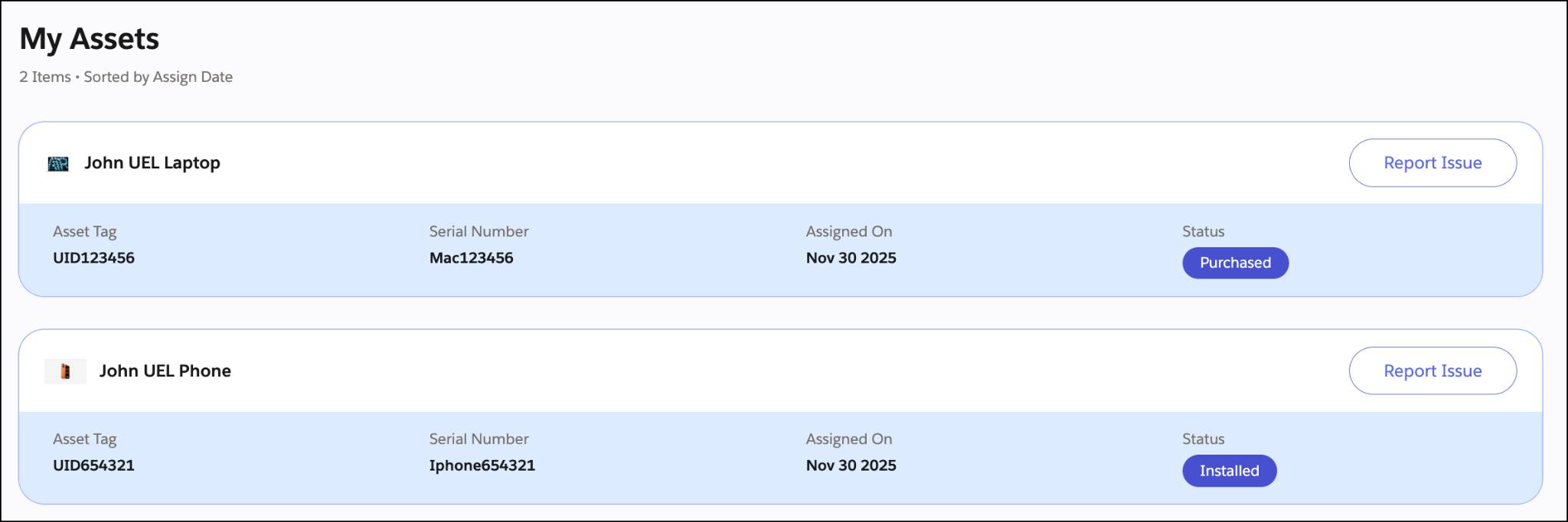
But it gets even better! If your device breaks, you don't need to navigate to a separate support page. You can simply click the Report Issue button directly on the asset card. The portal automatically links the new incident to that specific device and prefills all the complex technical data, such as the serial number and asset tag. As you know, manually typing a long, complex serial number is a recipe for a typo. By instantly pulling accurate information that is already stored in the system, this single-click process eliminates error-prone data entry and ensures the IT team has exactly what they need to fix it fast.
Track My Tickets and My Approvals
Once you submit a request or report a broken device, you never have to send a follow-up email asking, “Is anyone working on this?” The My Tickets view gives you a single place to track the real-time status of all your incidents, service requests, and cases. This centralized dashboard eliminates the uncertainty of not knowing whether your request is being handled by giving you complete visibility into its progress.
On top of that, Agentforce pushes proactive, automated notifications directly to your preferred channels. You’re kept informed when your ticket is updated. The portal also features a My Approvals section, so when your request requires an approval, the built-in workflow routes it directly to your manager for a quick review.
What’s Next?
With the skills to browse the Unified Catalog, report issues via your personalized My Assets view, and track tickets effortlessly, you’re ready to see these features in action. In the final unit, follow employees at Orivian Global Holdings as they put the portal to the test in real-world scenarios. Discover how Agentforce IT Service keeps a diverse, global workforce moving forward.