Get Started with Action Plans
Learning Objectives
After completing this unit, you’ll be able to:
- Explain action plans and how they work with tasks and document checklist items.
- Distinguish between action plan templates and action plans.
- Identify how action plans are used across multiple industries in Salesforce.
Meet Action Plans
In every organization and every industry, teams work through standard processes, regular sets of tasks completed over and over again. For those processes, you need a standard plan of action that everyone on your team can follow.
In Salesforce, the Action Plans feature helps you manage tasks to complete these types of repeatable business processes. For example, this action plan tracks the tasks and documents to open a new savings account for a client of a financial services institution.

You create action plans from action plan templates, which define repeatable tasks, their dependencies on each other, and the necessary documents to complete a process. Action plan templates help you automate task creation, enforce process compliance, help your team collaborate, and simplify monitoring and reporting on your work.
In this badge, you learn the basics of action plans and get hands-on to try them yourself. You follow an example to create an action plan template, use it to generate an action plan, and then manage the tasks in that action plan through completion. In this unit, you start with an overview of the feature.
Distinguish Between Action Plan Templates and Action Plans
To use the Action Plans feature, you first set up action plan templates. The Action Plan Template object is where you configure the repeatable sequence of tasks and documents necessary to complete a process. Each template is associated with a target object, such as an account or opportunity, to which individual action plans can be created from the template.
There are two objects that relate to action plan templates and define the work that your team does: Task and Document Checklist Item.
A task defines a fundamental, repeatable step in a business process, such as scheduling a meeting. Each task includes a priority, the number of days to complete the task, and a person assigned to complete the task. Your users follow their assigned tasks through task lists, action plan records, and related records, such as accounts and contacts. You can automatically assign tasks to a specific user, the action plan creator, or a queue.
A document checklist item defines a document necessary to complete a business process, such as a contract, proof of insurance, or identity verification.

After you set up an action plan template, you use it to create individual action plans. Each Action Plan object record is an individual instance related to a target record of the same object as the template's target object. It contains instances of all of the template tasks and document checklist items.
Target objects for action plans include Account, Case, Contact, Lead, Opportunity, other standard objects for Salesforce Industries products, and custom objects with Activities enabled. Review the full list on the Action Plans Data Model in Salesforce Help.
Here’s a simple example of how the different components work together. The action plan template provides the information to create action plans, tasks, and document checklist items related to two different contacts.
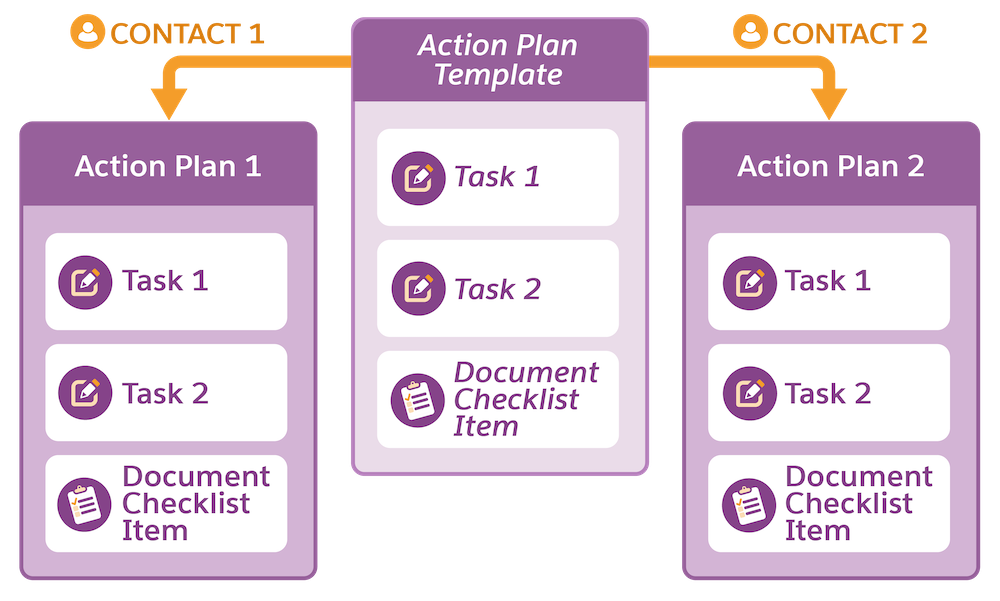
Each contact is related to an action plan that’s a distinct instance of the action plan template, including new, unique records for the tasks and document checklist items in the template. This example is simple, with only two tasks and one document checklist item, but you can track any kind of process with many more tasks and document checklist items.
Action plans can also assign tasks to and create document checklist items for external users. Set up a community user profile and permission set to give Experience Cloud site users access to action plans and their related records.
For action plans that your users repeatedly complete, create a recurring schedule for an action plan by using an orchestration flow.
Apply Action Plans to Your Industry
What kinds of processes can action plans help your team manage? Here are a few examples of how action plans are used in different industries.
Industry |
Example use |
|---|---|
Financial services |
Manage tasks for financial plan review meetings and loan application reviews. |
Healthcare |
Assist care coordination, schedule follow-up appointments, and ensure patients complete required health assessments. |
Automotive |
Streamline vehicle delivery, vehicle parts inspections, ownership detail updates, and fleet management. |
Consumer goods |
Support distributor onboarding, update registration details, and verify shipping addresses for account managers. |
Manufacturing |
Manage asset milestone follow-ups and order delivery. |
Public sector |
Automate task creation in processes such as application reviews, document collection, due diligence, and site inspections. |
Social services nonprofits |
Track program management requirements and support care plans. |
These examples are just the beginning. Think of the standardized processes that your users follow and the documents they regularly collect. An action plan template can support each of those workflows.
What’s Next?
In this unit, you learned the basics of action plans. You know the difference between action plan templates and action plans, and understand the roles that tasks and document checklist items play in each action plan.
In the next unit, you get hands-on by following a scenario to set up an action plan template.