Get Started with Service Process Studio
Learning Objectives
After completing this unit, you’ll be able to:
- Describe the importance of services in the banking industry.
- Explain how Service Process Studio helps you design and run service processes.
- Identify how different personas work with Service Process Studio.
Before You Start
Before you start this badge, consider completing this recommended content.

The Importance of Services in Banking
Services have a huge impact in the banking industry. Customers expect their service interactions to be easy and consistent across email, mobile phone, and apps. Customer experience governs the products a customer buys, determines the level of customer retention, and ultimately decides a bank’s success.
Recent research backs that up. More than 75% of people choose their bank based on positive customer experience. Plus, 90% of all interactions with a bank are service-oriented and 55% of customers leave their bank due to poor customer service. Only 16% of customers say that they’re satisfied with their bank’s digital experience.

So your institution can go far by delivering a great customer experience. Fortunately, financial institutions can use technology to consolidate and streamline processes, save time and money, and—most importantly—delight customers.
But how can financial institutions use technology to improve customer service? One answer is Service Process Studio.
Service Process Studio Basics
Service Process Studio is a framework to help your service reps provide consistent and effective customer service experiences through smart intake forms and real-time integration with core banking functions and data.
Salesforce admins and developers use Service Process Studio to create customer service process definitions quickly and efficiently. Service reps then use Action Launcher on a record page to start processes and perform all types of activities, such as customer address updates, check book orders, request for statement copies, and more.
A Service Process Studio experience guides service reps through a set of steps, starting with providing the basic details through to associating a fulfillment flow. Admins use several different tools to make this a reality.
Let’s review how you can use these tools in a service process workflow.
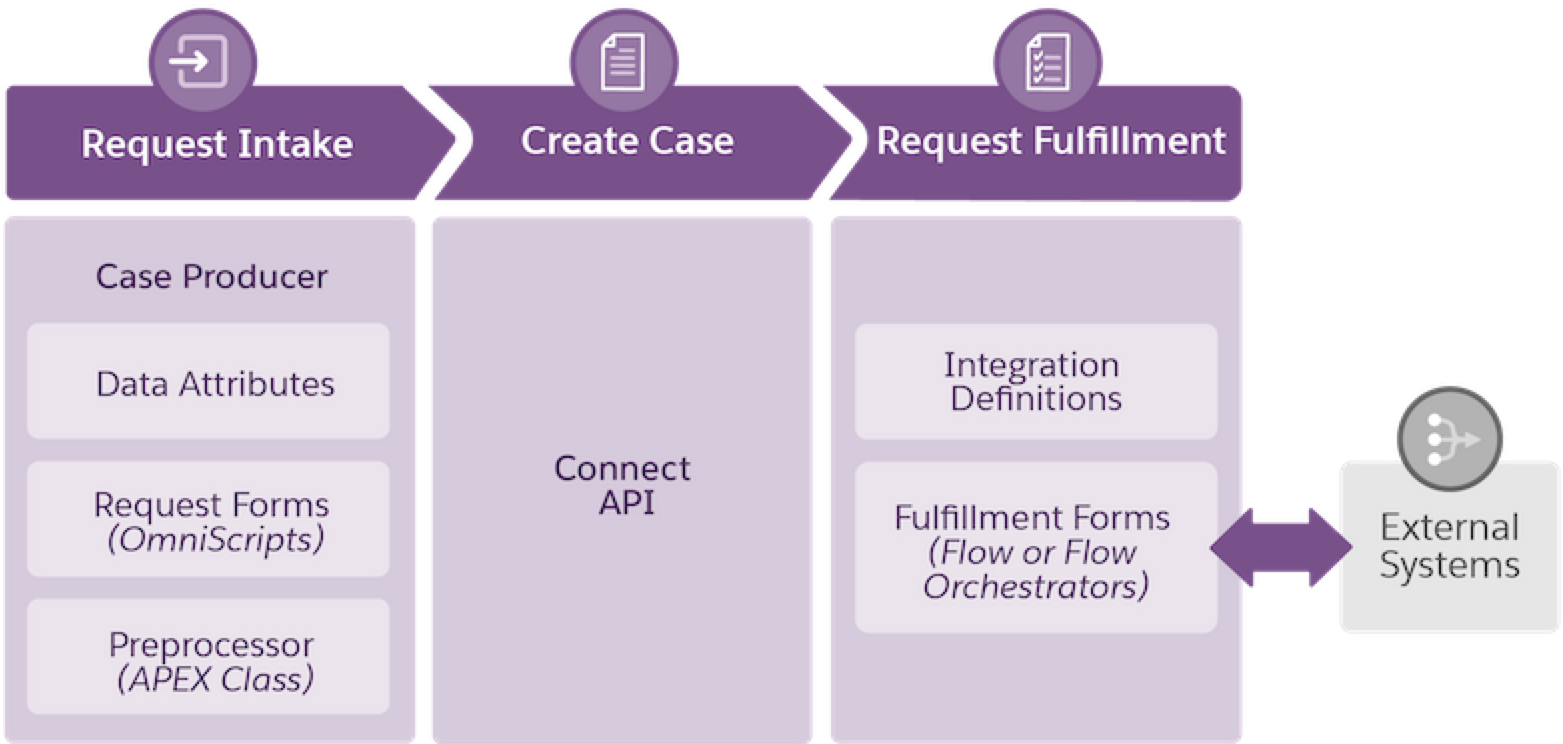
The main steps of a service process workflow are:
-
Request intake: Collect information from customers with a streamlined request intake process powered by data attributes, Omniscripts, screen flows, and Apex preprocessors.
-
Create case: Create a case with the Connect API.
-
Request fulfillment: Automate the fulfillment of a service request with integration definitions or a fulfillment form (a fulfillment flow or a flow orchestration) that connects to external systems.
Fortunately, you don’t always have to start building all of your service processes from scratch. Agentforce Financial Services provides prebuilt service process definitions and service process templates that you can customize.
For example, there are service processes for retail banking to update addresses, change card billing cycles, reverse fees, and more. Wealth managers can use an estate planning process and insurers can use prebuilt processes that include reporting a first notice of a loss. Check the Service Process Automation section of Agentforce Financial Services documentation in Salesforce Help for a full list of prebuilt processes.
Let’s explore an example to better understand how all of the building blocks of a Service Process Studio process come together.
A Business Scenario
Imagine that you’re a Salesforce admin at Cumulus Bank, a large financial services provider. As the bank expands its business and operations, the number of service requests and associated service processes grows exponentially. The team at Cumulus identifies gaps between service delivery and customer expectations.
To retain customers and maintain a competitive edge, Cumulus wants to design customer service processes quickly and automate fulfillment.
That task falls to you, the admin.
In this example, you automate one process—check book order requests—using Service Process Studio. You learn how each component works together by starting from a new service process definition, but you don’t have to do that in your own org. The prebuilt Order Checkbook Service Process gives you a headstart on launching a solution for your institution.
While this badge focuses on retail banking, Service Process Studio works equally well with other Agentforce Financial Services-supported verticals, such as insurance, wealth management, and commercial banking.
What’s Next?
Now that you understand the basics of how Service Process Studio works, it’s time to dive into the example. In the next unit, you get started setting up a check book request.
Resources
- Trailhead: Service Excellence with Agentforce Financial Services
- Salesforce Help: Service Process Studio
- Salesforce Help: Service Process Automation
- Salesforce Help: Standard Retail Banking Service Processes for Agentforce Financial Services