Dispatch Smarter with the Scheduling Console
Learning Objectives
After completing this unit, you’ll be able to:
- Describe the three workspaces that make up the Scheduling Console.
- List the key features of the Scheduling Console and what each one does.
- Explain how the Scheduling Console helps your dispatch team work more effectively.
Discover the Scheduling Console
Managing a dispatch operation means making fast decisions with a lot of moving parts. Your dispatchers are tracking open appointments across multiple territories, in a schedule that never stops changing. When something goes wrong, the plan from an hour ago no longer reflects reality. And by the time you manually check every view and refresh every list, something else has already changed.
That gap between what’s on the screen and what’s actually happening is where things go wrong. Outdated information leads to poor assignments. Poor assignments lead to delays. And delays have a direct impact on your customers.
The Scheduling Console is built to close that gap. It gives you a single hub where your schedule, your resources, and your appointments all live together. Changes surface automatically, so your dispatchers always have an accurate picture of your operation. No cross-referencing separate views, and no guesswork. The result is a tool that’s fast to learn, easy to use, and built to keep up with even the most demanding operations.

One Console, Three Powerful Views
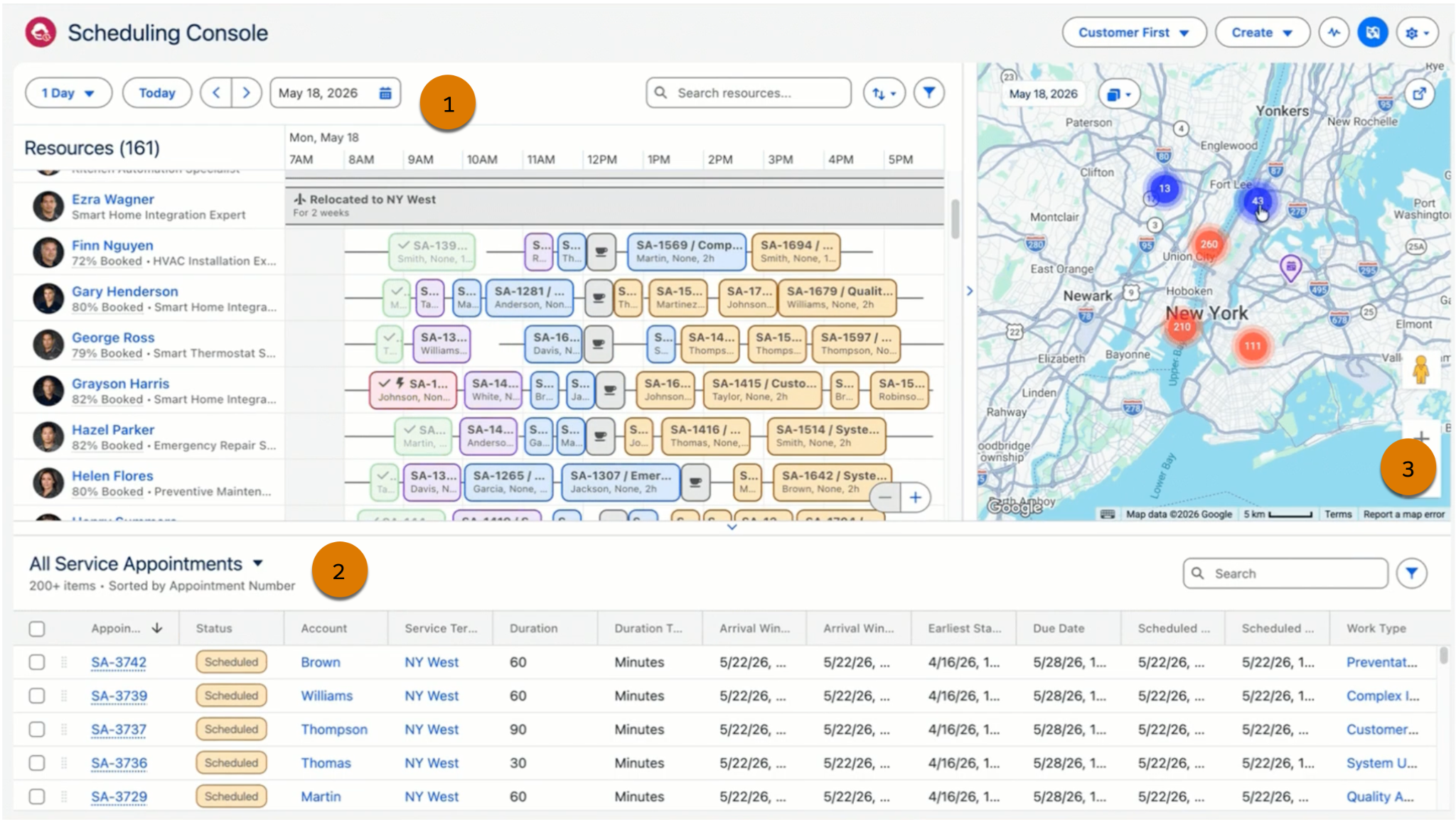
When you open the Scheduling Console, you’re looking at three side-by-side views that work together to give you a complete picture of your dispatch operation.
-
The Gantt: The Gantt is your timeline view. It shows your service resources and their scheduled appointments side by side, so you can see who’s working, when, and where. From here, you can search, sort, and filter resources by name, type, or skills. You can also adjust the date range, jump to a specific date, or manage resource absences—all without leaving the view.
-
The service appointment list: The service appointment list sits alongside the Gantt and shows your open and scheduled appointments in a standard Salesforce list view. You can customize it to display the columns and filters that matter most to you.
-
The map: The map gives you a real-time geographical view of your resources and appointments. It stays fully synchronized with the Gantt and the service appointment list, so what you see on the map always reflects what’s in your queue.
Smarter Features for Faster Decisions
The Scheduling Console comes with a set of enhanced features that address the real friction points in dispatching. Here’s what you get and how each one helps.
Feature |
How It Helps |
Why It Matters |
|---|---|---|
Drag-and-drop scheduling |
You can schedule appointments by dragging them from the service appointment list directly onto the Gantt. |
You eliminate the need to open records and fill out forms for routine scheduling tasks. It even works across dual monitors, with the Gantt on one screen and the appointment list on the other. |
Find candidates with AI reasoning |
You get suggestions for the best time slots and resources for an appointment, with clear labels and reasoning highlighted. |
Instead of numeric grades, you see human-readable recommendations. Clicking Why? next to any candidate gives an AI-generated explanation of why that slot was suggested—giving you full transparency and more confidence in every decision. |
Global search |
You can search all service appointments across your entire org from within the console. |
You’re not limited to what’s visible in your current list view. Search cuts across service territories, date ranges, and list filters to surface appointments in a temporary list of up to 50 records. |
Hover popovers |
You can hover over any appointment, resource, or absence tile to see key details and available actions. |
No more clicking into records just to check a resource’s skills or an appointment’s status. The information comes to you, right where you’re working |
Enhanced live updates |
The console automatically stays current with real-time schedule changes. |
When your appointment list is synced with the Gantt’s service territories, updates push through automatically. This lets your team stay current without manual refreshes. |
What Changes for Your Team
When dispatchers have the right information at the right time in a tool that’s built around the way they work, the whole operation runs better. Less time spent chasing updates means more time spent on decisions that matter. Here’s what that looks like for your team.
-
Faster decisions. With AI-powered candidate suggestions, global search, and live-updating data, you spend less time hunting for information and more time acting on it.
-
Accurate data. Real-time updates and synchronized workspaces mean you’re always working with reliable information. There’s less risk of double-booking a resource or missing a change made by a colleague.
-
Easier onboarding. The console is built on an intuitive, clean UI that reduces cognitive load. New dispatchers can get up to speed quickly, and experienced ones can work faster with fewer clicks.
-
Low-risk migration. Any customizations you applied to the Classic Dispatch Console continue to work in the Scheduling Console. Your existing Gantt state and user settings carry over without changes, so the transition doesn’t disrupt your current setup.
Taking a step back, you can see that the Scheduling Console brings together everything a modern dispatch operation needs—a side-by-side view of your schedule, smart tools that surface the right information, and a workspace that keeps up with the pace of your day. And as you start working with the console, you’ll find that the time you used to spend managing your tools is now time you can spend on your customers. That’s what the Scheduling Console is built for.