Explore Sales Cloud in Claude
Learning Objectives
After completing this unit, you’ll be able to:
- Explain the power and ROI of the strategic partnership between Salesforce and Anthropic.
- Describe how Sales Cloud in Claude grounds AI in trusted, deterministic business context.
- Identify key skills across the seller lifecycle and how approval-gated, human-in-the-loop controls function.
The Power of Sales Cloud in Claude
What is Claude Cowork—and where does Sales Cloud in Claude fit?
Claude Cowork is an agentic workspace in the Claude desktop app. Instead of responding to one prompt at a time, Cowork can take on an entire job. It gathers information from connected tools, reasons across multiple sources, creates a plan, and completes a series of actions. For example, it can prepare you for a customer call, review a deal, or organize follow-up work. You set the goal and remain in control, while Claude handles the steps in between.
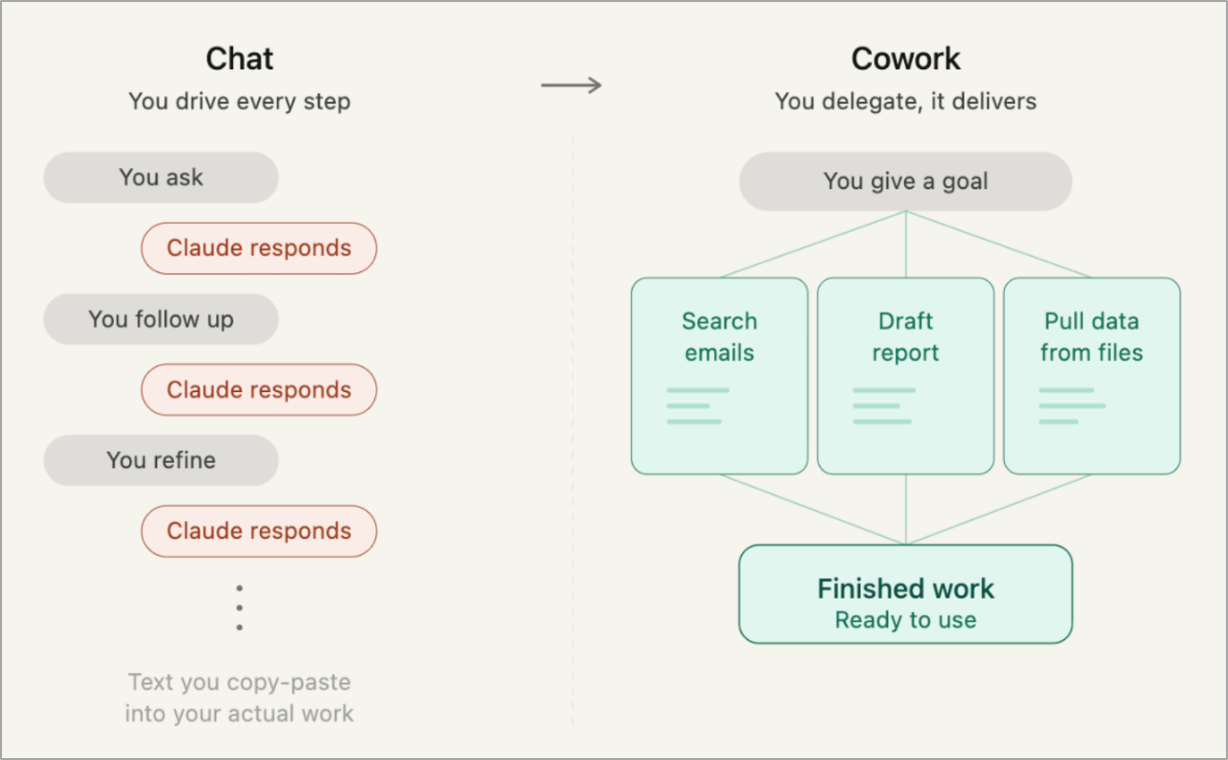
Sales Cloud in Claude brings this way of working to Salesforce sellers. It connects Claude Cowork with trusted Salesforce context so reps can complete sales work, such as researching an account, reviewing an opportunity, assessing account context, or building a close plan, giving you back time you’d normally spend piecing together information across records and tools.
Here’s how Cowork fits alongside Anthropic’s other Claude experiences.
-
Claude: A conversational, trusted teammate to answer questions, develop ideas, and work with information in a simple chat interface.
-
Claude Cowork: An agentic workspace for everyday business work that can complete multistep tasks with your direction. For example, give Cowork a goal, and it searches email, drafts reports, pulls data from files, and gives you finished work that’s ready to use.
-
Claude Code: A developer-focused agent you can use to build, debug, and maintain software.
-
Sales Cloud in Claude: The Salesforce sales experience built on these agentic capabilities, grounded in CRM context and seller workflows.
How It Works
Sales Cloud in Claude uses the Headless 360 for Sales plugin, powered by the Headless 360 Model Context Protocol (MCP) server, which gives you and your AI agents secure, real-time access to the full Salesforce data ecosystem.
Once configured, the Headless 360 for Sales plugin securely bridges Claude Cowork with the primary surfaces you use every day.
- Salesforce CRM
- Gmail
- Google Calendar
- Google Drive
- Slack
Once connected, prebuilt skills—packaged prompts that automatically know what data to pull and what actions to take—call on Gmail, Google Calendar, or Google Drive. You authorize each workspace first to activate this integration.
Opening Claude Cowork automatically loads the plugin. Instead of requiring you to open Salesforce in a separate tab, the Headless 360 MCP server brings Salesforce directly to wherever your work is happening. Because data flows securely through your existing user permissions, Sales Cloud in Claude keeps Claude reasoning over live CRM context without requiring extra logins.
Under the hood, the Headless 360 MCP server connects probabilistic artificial intelligence with deterministic truth. This grounds your model’s reasoning in live customer data, metadata, workflows, business logic, and permissions. To keep operations fast, the server presents four stable tools to the workspace instead of exposing thousands of individual CRM features.
-
Discover: Runs a semantic search across a vector index of skills to find the correct candidate action.
-
Describe: Inspects the technical contract, parameters, and ordered steps of a skill.
-
Dispatch: Invokes the skill, routes to the endpoint, and enforces user access guards.
-
Dispatch Read Only: Processes read-only actions safely.
With your surfaces active, you ask questions in plain language to review account context, analyze forecast metrics, and prepare for briefings. Sales Cloud in Claude comes preloaded with skills designed specifically for sellers. It understands your entire revenue cycle from first prospect to closed deal, recommends data-backed next steps, and executes multistep workflows in Claude Cowork. These five skills cover the most common pain points in a seller’s workflow. Here’s what changes when you use them.
Sales Skill |
Without Sales Cloud in Claude |
With Sales Cloud in Claude |
|---|---|---|
account-tiering |
You manually navigate multiple tabs and account records to cross-reference customer details against your ideal customer profile (ICP). |
Sales Cloud in Claude reviews your accounts, opportunities, synced call transcripts, and emails to tier your book automatically. You get an instant snapshot of your high-value opportunities so you can focus on what increases revenue. |
pipeline-review |
You review your pipeline to check deal age, track close dates, and identify at-risk opportunities. Going between individual records and pipeline views slows down your weekly review. |
You get a clean, stage-by-stage visual of your coverage, aging, and at-risk deals in one workspace. This visual surfaces hidden gaps instantly, and gives you selling time back in your day. |
call-prep |
Before a customer meeting, you search activity timelines, read past emails, and check calendar notes to piece together account history. Gathering this context takes prep time before every call. |
You go into every meeting with an automated brief that rolls up attendee roles, stakeholder sentiment, account history, and suggested discovery questions. |
call-follow-up |
After a customer call, you write your follow-up emails, draft updates for your deal team, and log your meeting notes. |
Sales Cloud in Claude translates call transcripts into polished, ready-to-send follow-up emails. It also drafts a structured summary for your internal Slack channels automatically. |
account-plan |
You gather information from records, search public business registries, and compile the details into a formal account plan document. |
Sales Cloud in Claude builds a complete, formal close plan grounded in live CRM records and web research. It presents a drafted artifact for you to review and confirm before it syncs to Salesforce. |
Instead of manually opening Salesforce in a separate tab, switching tabs, or searching through spreadsheets, you use natural language to call these prebuilt skills. By combining Anthropic’s frontier reasoning with 27 years of deterministic Salesforce logic, Sales Cloud in Claude shifts sales execution from manual tab-switching to seamless desktop automation.