Define Compliance Controls
Learning Objectives
After completing this unit, you’ll be able to:
- Identify the difference between validation and non-validation compliance controls.
- Explain the tools to implement controls in Salesforce.
- Describe how to monitor control effectiveness.
Put Compliance into Action
Knowing your industry’s regulations and your organization’s policies is a big step toward compliance, but it doesn’t make sure that your team follows them.
To do that, you need the controls, processes, and mechanisms that implement regulations and policies.
Control managers lead the process. They first work with compliance officers to understand regulations and policies, then they define the controls that help your team comply. Finally, control managers work with Salesforce and IT admins, who implement controls using the Salesforce suite of low-code and no-code tools.
With controls implemented into your system, anyone on your team can easily comply with regulations and policies in their daily work flow.
In this unit, you learn about the types of controls, plus how your team uses Process Compliance Navigator and Salesforce to implement them. Then, you learn how to monitor your controls to make sure they’re effective.
Define Controls
There are two types of controls your team can implement in Process Compliance Navigator.
-
Non-validation compliance controls make sure your reps take the correct actions at the correct time. These controls also log the business process so you can confirm a process is followed. For example, a checklist of all required documents and tasks in a standardized process are both non-validation compliance controls.
-
Validation compliance controls make sure that a process is compliant, and apply the rules. They can generally be answered with a yes-or-no question. For example, did you verify the customer’s identity to regulatory standards? Or, does this applicant’s supporting documents comply with your organization’s policies? In short: Is this compliant?
Use Compliance Control and Compliance Control Version objects to track both types of controls. Control managers create these records to describe what checks are needed to comply with regulations and policies. Relate compliance control versions to regulation clause versions and compliance policy clause versions to track how you implement compliance.
You apply each non-validation and validation compliance controls with specific Salesforce tools. You explore those tools in the next two sections.
Set Up Non-Validation Compliance Controls
Non-validation compliance controls dictate your reps’ compliant processes. These controls track and log processes in both Salesforce and external systems.
Several Salesforce tools manage these types of controls.
-
Compliant Data Sharing controls access to sensitive data and supports compliance with data sharing regulations and policies.
-
Action Plans manage tasks so that reps follow the same steps each time they complete a business process.
-
Document Checklists make sure reps collect all necessary documents for applications or processes.
-
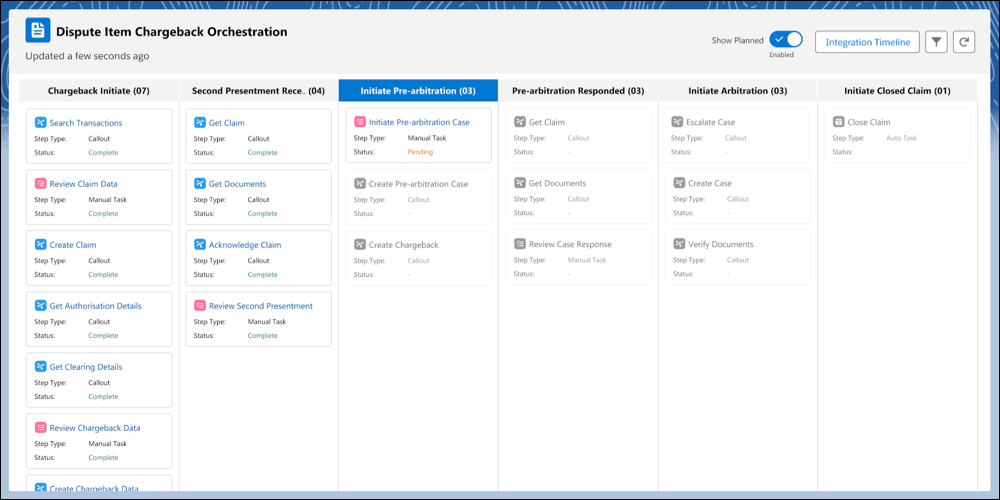
Stage Management coordinates complex processes that include both manual and automated tasks completed by your team and external services.
Here’s a Stage Management example for a financial services disputed charge that includes manual tasks and callouts to external systems.
To track and report these processes, a control manager creates a compliance control record and a related compliance control version record. On the compliance control version record, the compliance manager describes the control and selects the tool used in the Implementer Type field, such as Action Plans or Stage Management.
Define Validation Compliance Controls
To apply regulations and policies, use tools for validation compliance controls, which require more configuration than non-validation compliance controls.
To start, a control manager creates a compliance control and selects Is Validation Control on the record. A control manager then describes the control in a compliance control version. An IT admin then picks up the task to implement the control.
You implement these controls with business rules engine (BRE) expression sets and Apex classes.
BRE expression sets, the calculation engine of business rules, define validations and automate complex decisions using your criteria to quickly check whether a record is compliant. Here are a few industry-specific examples.
- Lenders use expression sets for loan applications to determine if a customer is eligible for a product based on a company’s credit score policies.
- Healthcare providers use expression sets for telehealth calls to make sure that a patient is located where a provider is licensed to practice by regulatory authorities.
- Banks use expression sets to determine if a transaction satisfies know your customer (KYC) regulations and policies.

For more advanced validation controls not possible with low-code tools, IT admins and developers can use Apex. Apex is a programming language that helps Salesforce developers add business logic to events such as updates of related records.
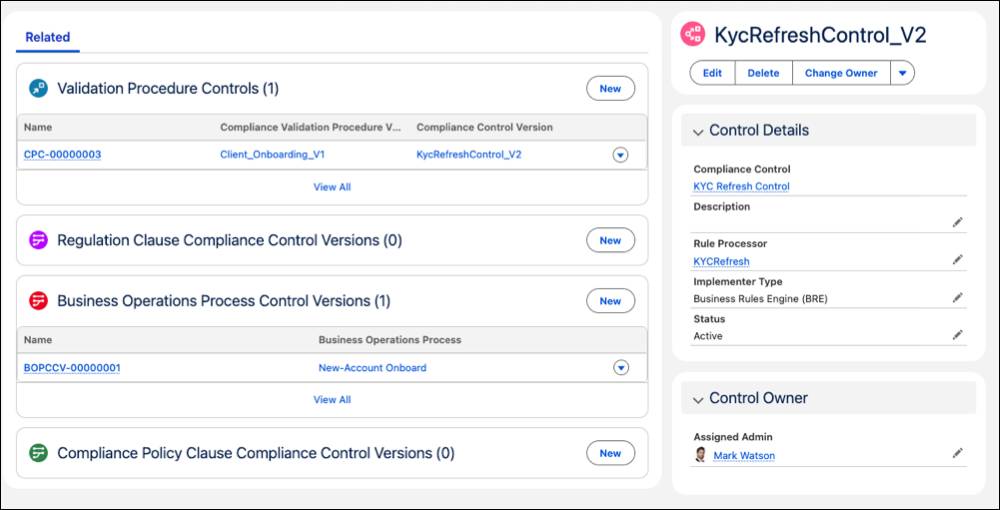
After your IT admin configures one of these tools, you connect the BRE expression set or Apex class to a compliance control version using the record’s Rule Processor field. Update the Implementation Context field, too, to reflect which tool you used. The compliance control version here was implemented with a BRE expression set.
Next, add validation compliance controls to a validation procedure using a Validation Procedure Version object.
Validation procedure versions group compliance controls versions to run during a business process and ensure compliance. Your IT admin adds control versions to a validation procedure version, defines the business context for the controls, maps input variables, reviews the procedure, and activates it. In this screenshot of the Configure Procedure page, one control version is added to a procedure.

Finally, your Salesforce developer or IT admin uses the invocable action or connect API in your organization's processes to invoke the validation procedure and evaluate the compliance.
When a compliance control uses a context ID, the validation procedure can be invoked using Apex or flows.
Check out Validation Compliance Controls and Validation Procedure in Salesforce Help for complete details about the process.
Measure Compliance and Control Success
With your controls defined in Process Compliance Navigator, your team has all it needs to work compliantly.
But how do you know that you’re actually staying compliant? Are your controls effective? Is your team staying within the bounds of regulations and policies?
Add a few custom objects to set up reports to monitor the coverage and effectiveness of your regulations and policies. For example, a control effectiveness report analyzes audit logs of controls across your business to prove those controls are preventing compliance violations.
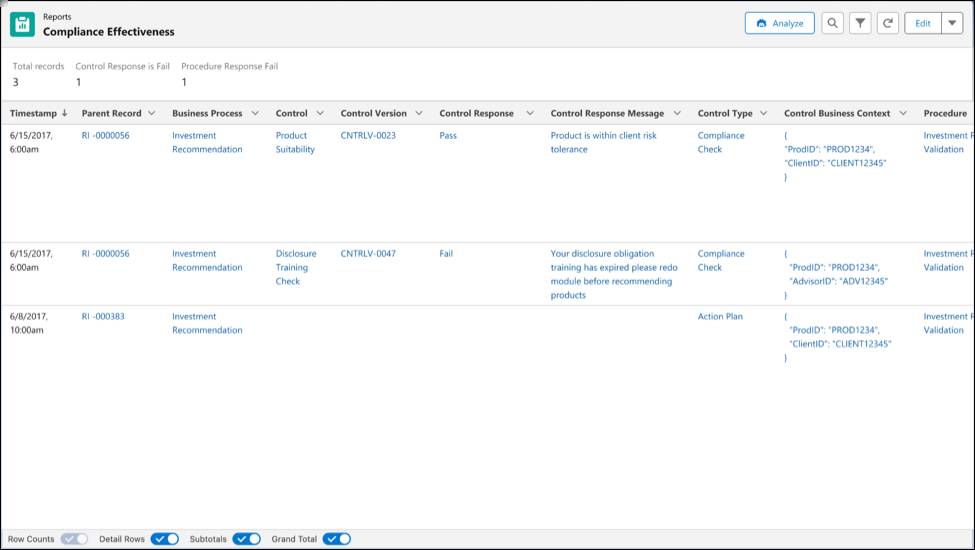
Review the example setup in Demonstrate Compliance Effectiveness in Salesforce Help, then work with your Salesforce developer to set up the custom objects, Apex classes, and reports you need.
Wrap Up
In this unit, you learned about the controls, processes, and mechanisms that implement regulations and policies in Salesforce.
You now know that non-validation compliance controls guide business processes, and validation compliance controls check compliance. Plus, you learned how to monitor if your controls are effective with custom objects and reports.
You explored the basics of Process Compliance Navigator, a unified solution for managing compliance and mitigating risk in highly regulated industries. You also learned how to track regulations and policies, and define controls.
Now it’s time to use Process Compliance Navigator to automate regulatory compliance and prevent violations in your own organization.
Resources
- Salesforce Help: Business Operations Processes
- Salesforce Help: Validation Compliance Controls
- Salesforce Help: Non-Validation Compliance Controls
- Salesforce Help: Validation Procedure
- Trailhead: Explore Business Rules Engine
- Salesforce Help: Compliant Data Sharing
- Trailhead: Apex Basics & Database
- Salesforce Help: Action Plans
- Salesforce Help: Validate Documents in Document Checklist Items
- Salesforce Help: Stage Management
- Salesforce Help: Demonstrate Compliance Effectiveness