Build and Manage Client Relationships
Learning Objectives
After completing this unit, you’ll be able to:
- Identify Agentforce Financial Services features that simplify onboarding.
- Explain how Agentforce Financial Services helps you track and build client relationships.
- Describe the tools for improving customer service.
Meet Agentforce Financial Services Solutions
No matter which part of the financial services industry you work in, your teams share some common goals: get customers started smoothly, build trust over time, and deliver fast, effective service.
This unit explores the core Agentforce Financial Services features that support those goals across your entire organization. You learn how these capabilities align with the key stages of the client journey: onboarding, relationship management, and service. These features are the foundation that other specialized processes build on.
This module covers only some of the helpful features in Agentforce Financial Services. For a complete list, read Learn About Agentforce Financial Services and Explore and Common Capabilities in Agentforce Financial Services in Salesforce Help.
Onboard Financial Clients
Make a great first impression by reducing the time to onboard customers, one of the most complex financial-services processes. Streamline onboarding activities with features to gather customer information, screen for risk, collect consent, and so on.
Discovery Framework
Use Discovery Framework to create assessments and digital forms that collect and validate data, reducing time-consuming manual data entry. Here’s a simple example form that collects customer details.
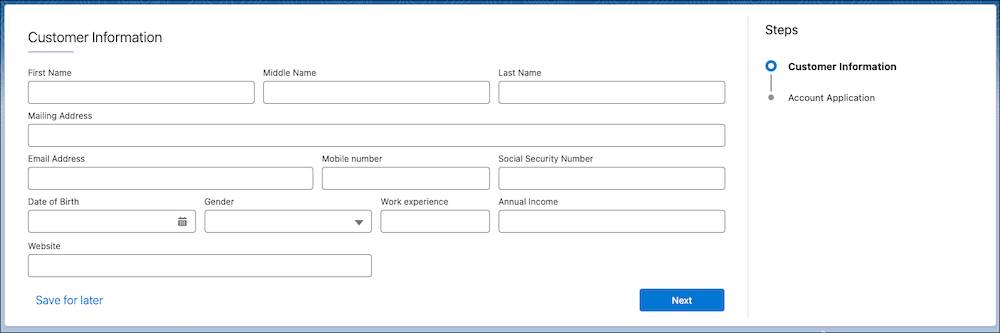
Combine Discovery Framework with Omnistudio to manage every aspect of questionnaire-driven data collection in compliance with your policies. These tools, for example, provide the foundation for lending, retail deposit account, and business deposit account origination form templates included in the Digital Origination product.
Know Your Customer Data Model
Use the Know Your Customer (KYC) data model to perform identity verification, risk assessment, and screening checks of accounts, contacts, and leads with ease.
Document Checklist, Document Matrix, and Validate Documents
Define document requirements with Document Matrix, track document submissions with Document Checklist Items, and efficiently verify submitted files with Validate Documents. Together, these three features provide an automated solution for collecting and verifying documents. For example, define which form of income verification you need from customers, make sure that your team collects the right data, and then compare the information against customers’ KYC records in a single view.
Intelligent Document Automation and Disclosures and Consent
Use Intelligent Document Automation to manage consent and disclosure documents and generate authorization request forms. Track whether a person has seen, signed, or rejected an authorization request form, and how and when they gave their response. You can also use the Disclosures and Consent feature to deliver annual privacy statements to customers.
The screenshot here shows authorization requests for a mortgage initiation.
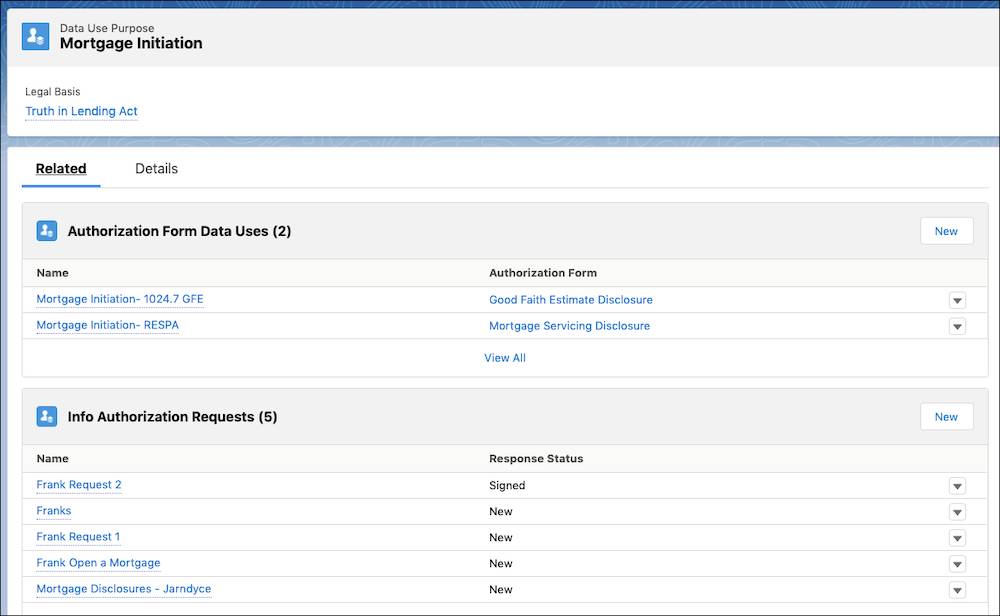
This data use purpose record defines the reason for collecting and using a customer's data. It relates to records that track authorization forms and requests for information from a client.
Stage Management and Integration Orchestration
Define process stages, required information, callouts to external systems, and stage transitionswith Stage Management and Integration Orchestration. Stage Management simplifies complex processes by giving you control over each step. With Integration Orchestration, you can complete callouts to external services.
How do they work together? Stage Management can define an onboarding workflow, transitioning an object through Applied, Risk Screening, and Approval stages. Integration Orchestration can make calls to external services for identity verification when a process hits a particular stage.
Nurture Client Relationships
If customers trust their financial institution, they’re more likely to recommend it to others, add products and services, and share more about themselves. Explore some of the tools for building trusted relationships.
Group Membership, Households, and Actionable Relationship Center
Track your clients’ households, personal relationships, and professional connections by using person accounts and the Group Membership data model. For example, connect a client to their family members, households, lawyers, and accountants with a standard set of objects.
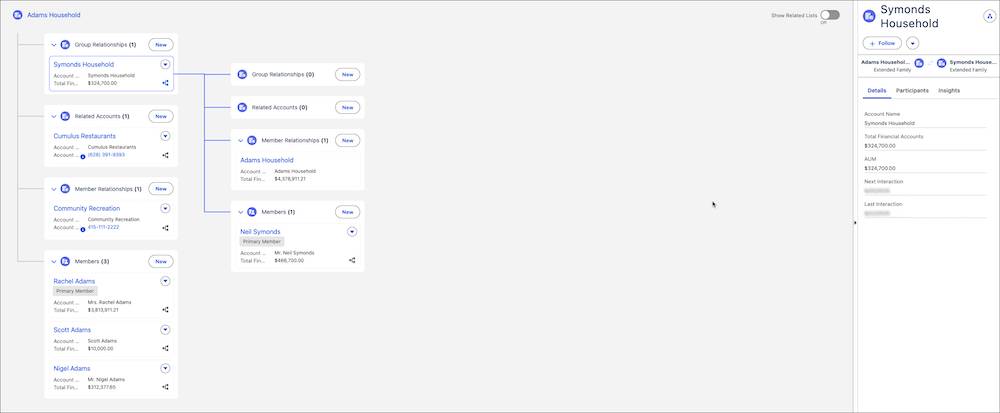
Then, use Actionable Relationship Center (ARC) to explore these connections through an interactive component to get to know your customers.

See Client Management with Agentforce Financial Services for details about how to track people, businesses, and households in Agentforce Financial Services.
Life Events, Business Milestones, and Interest Tags
To better understand your clients, use the Life Events, Business Milestones, and Interest Tags features. Life events and business milestones track significant events in a customer's personal life or a business's journey. They give you a quick view of these important moments so you can anticipate needs, educate clients about their financial plans, and act at pivotal times.
Similarly, Interest Tags help you add custom tags to client records to capture preferences, interests, and opportunities.
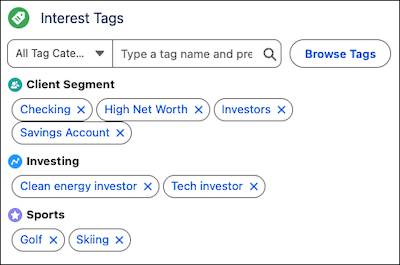
Your team can review a client's interests for a quick look at what matters most to them before a meeting or during a call.
Contextual Alerts
Get just-in-time updates about your clients’ financial situations with data from Salesforce and Data 360. Contextual Alerts bring your team timely information about what customers want and possible opportunities. They use the Record Alerts feature to deliver actionable insights based on changes in client financial data and behaviors, just in time for you to act.
Financial Accounts
Get a picture of your customer’s financial standing with standard Salesforce objects for tracking financial accounts. For example, this screenshot shows a financial summary page component with related lists for different types of accounts.
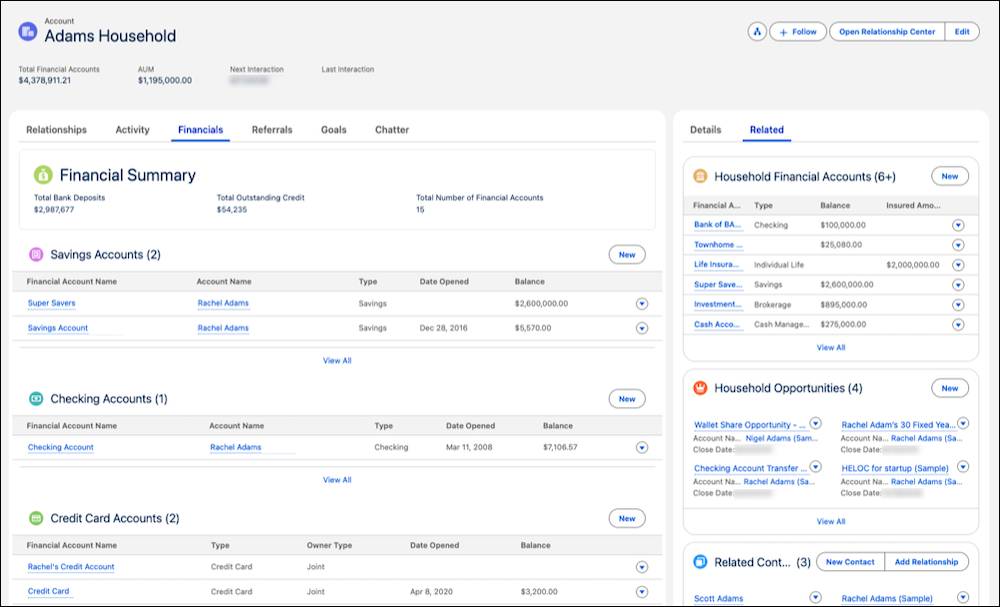
These industry-specific data models reduce the need for customization. To learn more about Agentforce Financial Services data models, complete the Agentforce Financial Services Data Modeling badge on Trailhead.
Summary Documents and Interaction Summaries
Prepare your team for meetings with formatted account summaries that compile information about customer accounts. For example, a banker can create a tear sheet before a client meeting to have all their customer’s business information on hand for a more meaningful conversation.
Your team can also capture notes about any meeting or interaction by using interaction summaries, and then coordinate follow-up activities. To make these tasks even easier, use the Banking Relationship Assistance template in Agentforce to organize notes and summarize takeaways after a meeting.
Offer Efficient Customer Service
Customers expect timely, efficient, and personalized service from their financial institutions across all channels, including self-service, mobile, and chat. Use Agentforce Financial Services to improve service with a single view of data from your systems and use automation and Agentforce agents to speed up customer service.
Service Process Studio
Create end-to-end service processes for your reps quickly and efficiently by using Service Process Studio. For instance, automate customer data updates, overdraft protection, and accounting reconciliation. Agentforce Financial Services includes several prebuilt service processes that customers can use in self-service channels or that service reps can open from Salesforce. You can start with the prebuilt Fee Reversal, Address Change, Dispute Transaction, and File Complaint processes, or build your own.
Complaint Management and Transaction Dispute Management
Complaint Management provides a streamlined process for service reps to capture and track client complaints directly from a Person Account record. Case agents can also track and monitor submitted complaints with the Public Complaint and Case Participant objects, both related to a case record.
Here’s an example complaint form in the Retail Banking app.
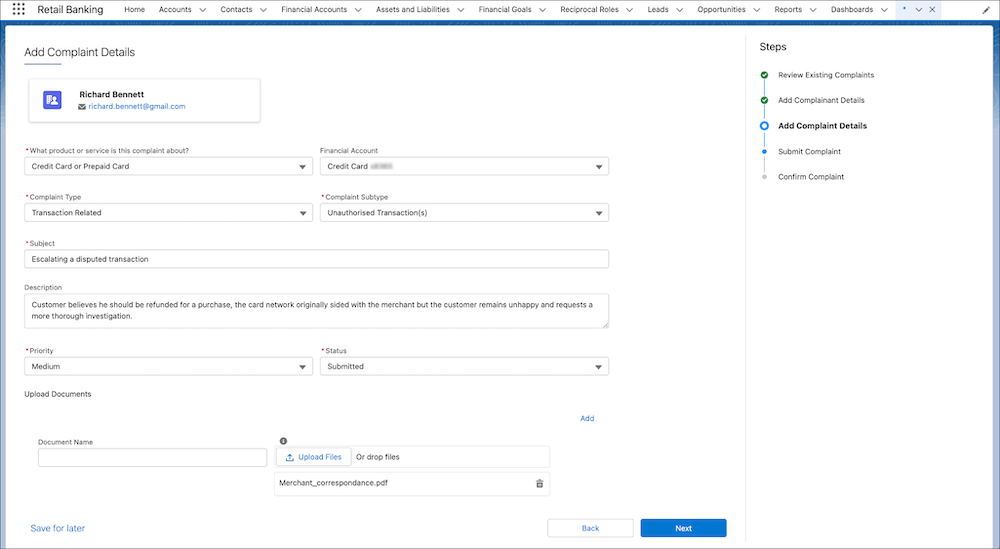
Transaction Dispute Management also helps service reps collect and submit customer disputes related to financial transactions. Then they manage dispute resolution by using the Case object and related objects specific to transaction disputes.
Banking Service Assistance with Agentforce
Prebuilt Agentforce template skills help you quickly provide automated help to customers and employees.Use Banking Service Customer Assistance to divert service requests from your banking customers across multiple channels. With this skill, an automated agent securely verifies the customer’s identity, then helps them complete tasks or create cases themselves.
The Banking Service Employee Assistance skill helps your reps complete automated tasks for faster service. The agent assists reps with balance inquiries, transaction reviews, lost card reports, fee reversals, stop check payments, and travel notifications by using data from your core banking system and Salesforce.
Timeline and Record Alerts
Help your reps stay customer-focused with Timeline, a comprehensive and chronological view of customer interactions that shows key events in one place.
Use Record Alerts to notify reps when it’s time to act and advise them how best to help customers. For example, use record alerts to notify a rep of a low balance, so they can advise the client to transfer funds and avoid overdrafts.
What’s Next?
Now that you’ve seen how Agentforce Financial Services supports onboarding, relationship-building, and service across your business, it’s time to explore how you can use the features in specific lines of business.
In the next unit, learn how Agentforce Financial Services powers sector-specific workflows for retail banking, wealth management, commercial banking, and debt collections.
Resources
- Salesforce Help: Common Capabilities in Agentforce Financial Services
- Trailhead: Customer Onboarding in Agentforce Financial Services
- Salesforce Help: Financial Services Cloud Data Models
- Trailhead: Agentforce Financial Services Data Modeling
- Trailhead: Client Management with Agentforce Financial Services
- Trailhead: Client Relationships in Agentforce Financial Services
- Trailhead: Service Excellence with Agentforce Financial Services