Explore Data Lineage
Learning Objectives
After completing this unit, you’ll be able to:
- Describe the importance and purpose of data lineage.
- Navigate lineage diagrams to identify source and target systems.
- Use lineage tools like overlays and hop settings to customize your view.
Before You Start
Before you start this badge, make sure you complete this content. The work you do here builds on the concepts and work you do in that content.
The Journey to Trusted Data
After a massive data migration, Infiwave’s customer and product records now live in a modern analytics platform—but the real work is just beginning. Business analyst Angela Duran has one pressing task: Confirm that every record arrived intact and that clear lines of accountability are in place. To do that, she turns to Cloud Data Governance and Catalog (CDGC)—a purpose-built command center that traces data flows and manages asset relationships.
In this badge, you follow Angela’s journey as she uses CDGC to map where data originates, where it lands, and who is responsible for maintaining its integrity. Along the way, you untangle complex asset connections and build the skills to do the same in your own org.
The Family Tree of Your Data
Angela stares at the ORDERDETAILS table in the report. The data looks fine. But her manager wants to know: Where did this data come from? Has it been transformed along the way? Does any policy govern it?
Without data lineage, Angela has to dig through spreadsheets, ask five different people, and still isn’t sure of the answers. With lineage in CDGC, Angela can answer them in minutes.
Data lineage is a visual representation of the flow of data across systems in your organization. It shows how data travels from the system where it originates to the system where it is used—and every transformation in between. Data lineage lets you:
- Review changes to data as it moves between systems.
- Check whether any processes or policies apply to the data through overlays.
- Explore data at the dataset level or the data element level.
- Understand which systems access the data and the scale of its use.
Data governance teams, analysts, IT specialists, and compliance officers all rely on lineage to answer questions about data quality, regulatory compliance, and system impact when changes are planned.
Beyond tracing origin, lineage also helps Angela spot data quality issues. If the ORDERDETAILS table had values dropped or reformatted during a transformation—for example, an order amount field standardized from a string to a decimal—Angela can identify exactly where that happened in the lineage view and know who to contact. This makes lineage a powerful tool not just for traceability, but to identify distortions or discrepancies in data as it moves between systems.
Types of Lineage in CDGC
CDGC supports multiple types of lineage. Based on the asset type you are working with, you can access Business and Technical—each designed for a different perspective on how data flows and connects across your organization.
Business Lineage
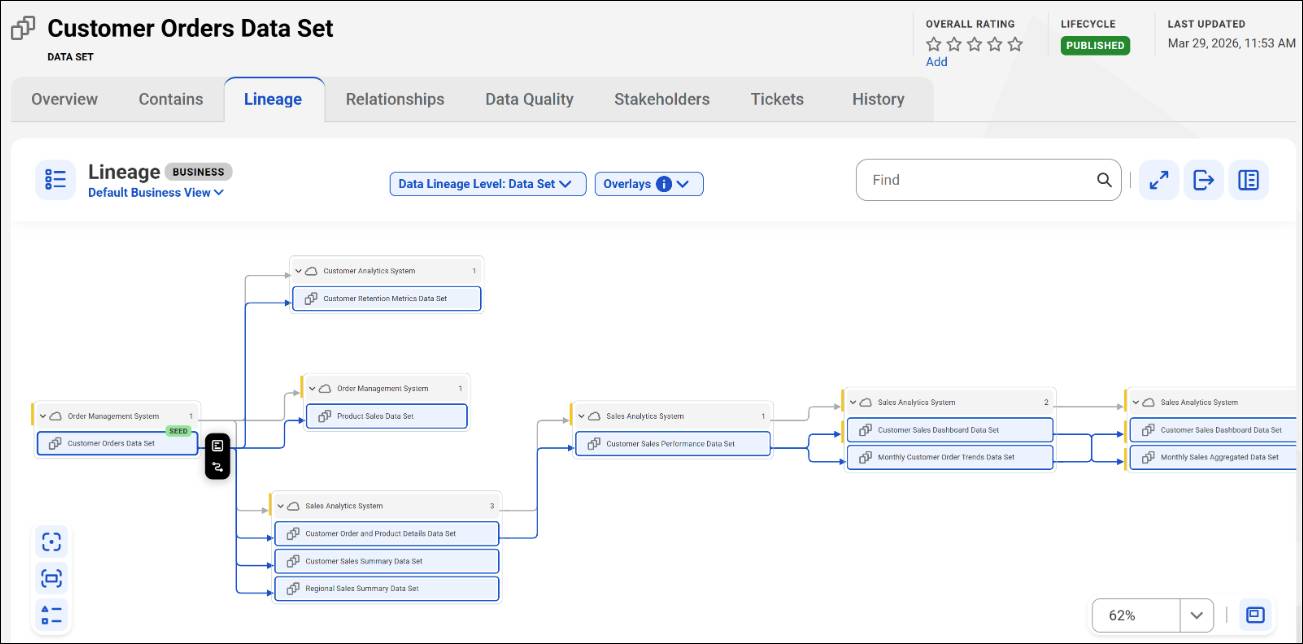
Business lineage is created when business datasets are linked to technical datasets through the Relationships tab (which you explore in detail in the next unit). It shows data flow at the system and dataset level, giving business analysts a high-level view of where data originates and which downstream systems consume it.
Business analysts typically use business lineage to understand the source of the data and to ensure that it is coming from a trusted source. For example, if Angela is viewing the lineage for a business data set, she can trace how data flows between data sets and their associated parent system assets.
Technical Lineage
Technical lineage is derived automatically when the catalog source is scanned. Connection assignments link datasets and data elements together at the file, dataset, and data element level.
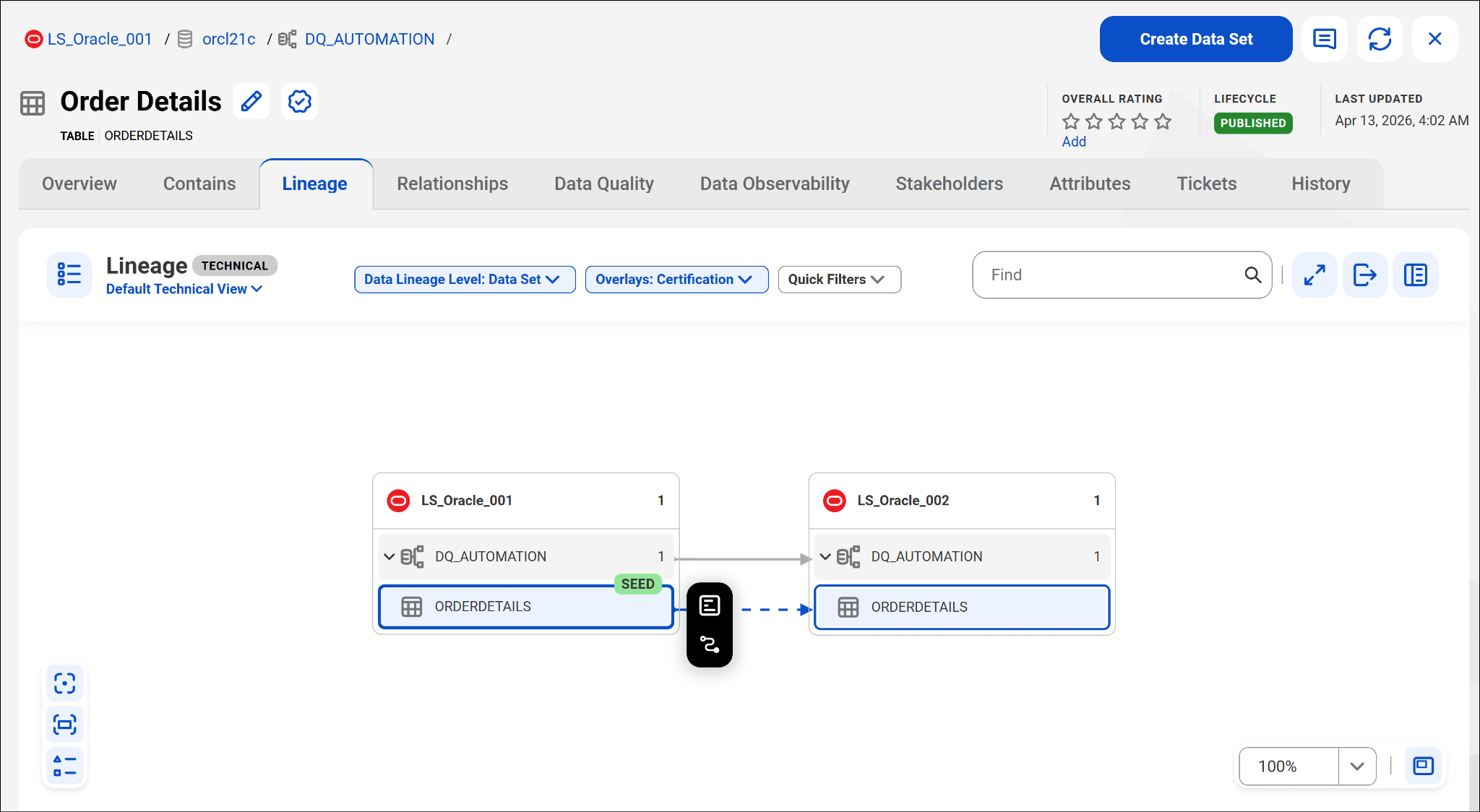
Technical lineage lets data architects and analysts explore down to the smallest unit of data, navigate the full journey from source to destination, and view data transformations along the way. For example, when Angela opens the OrderDetails table and selects the Lineage tab, CDGC displays a Technical lineage diagram showing OrderDetails in LS_Oracle_001 (marked as SEED) flowing downstream to OrderDetails in LS_Oracle_002.
Navigate the Interface Canvas
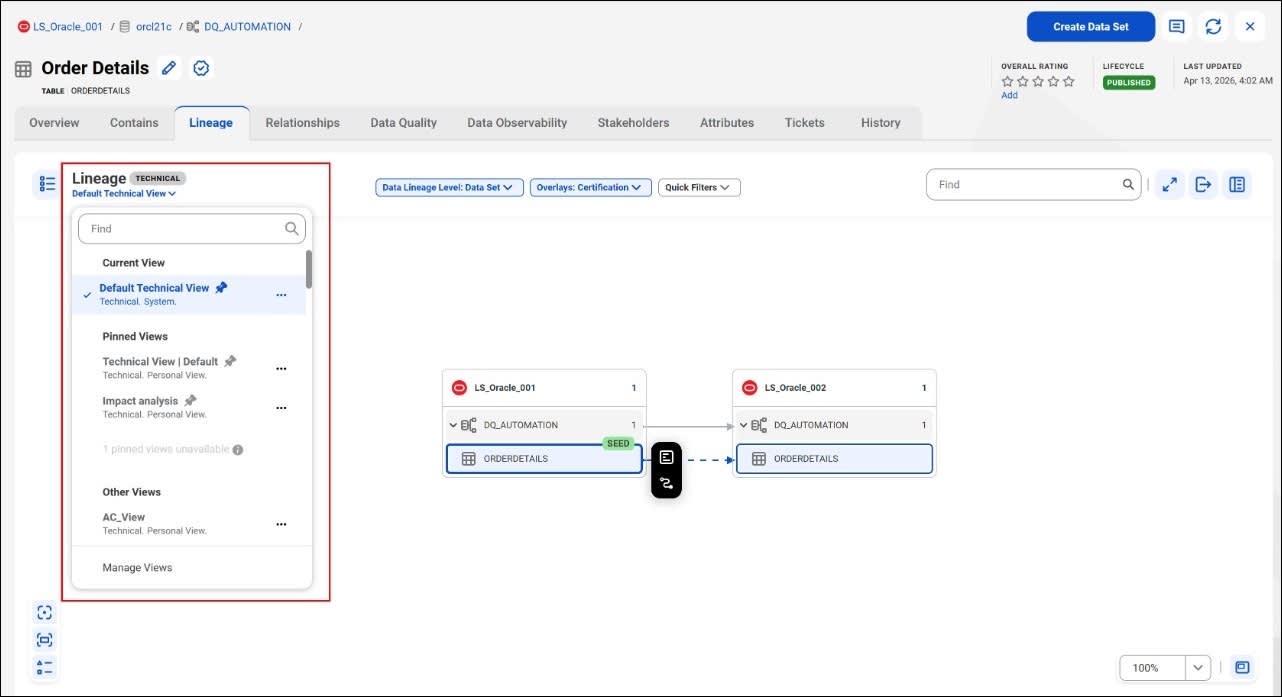
When Angela opens the ORDERDETAILS table asset in CDGC, she selects the Lineage tab. The lineage view opens showing Technical lineage by default. The interface canvas displays a visual map of how data flows between systems.
Here are the key components of the lineage view.
-
Views Sidebar: A panel shows your saved lineage views—including Current View, Pinned Views, and Other Views. You can select, pin, or manage views using the Manage Views option. The active view appears with a checkmark (for example, Default Technical View).
-
Data Lineage Level: A dropdown in the toolbar lets you switch between Data Set level and Data Element Level.
-
Overlays: A dropdown in the toolbar lets you layer additional context onto the diagram. Options include Business Term, Business Name, Policy, and Certification.
-
Quick Filters: You can filter the lineage diagram to show specific asset types or connection types.
-
Asset Search Bar: Search for a specific asset within the lineage diagram by name.
-
Navigation Controls: Zoom in, zoom out, centralize, and use full-screen mode to navigate the diagram.
-
Interface Canvas: The visual area where the lineage flow is displayed.
Angela zooms in to the diagram and sees that ORDERDETAILS in LS_Oracle_001 is marked as SEED—the origin point of the data. It flows downstream to ORDERDETAILS in LS_Oracle_002. She now has her answer: The data originated in LS_Oracle_001 and was replicated to LS_Oracle_002.
Expand Your View with Lineage Hops
To keep things clean, CDGC usually only shows immediate neighbors. Connections that are further upstream or downstream are called hops. Angela can move her view forward or backward by selecting 1, 3, or 5 levels—or by choosing All Hops to see every level.

Export the Evidence
In the lineage canvas, the Action Menu (represented by three dots or a gear icon) gives you options to export, share, and configure your lineage view. When documentation is required for a meeting, Angela doesn’t just press Print Screen. She uses the Action Menu to generate high-resolution SVG, PDF, or PNG files, providing professional-grade maps for her stakeholders.
Watch the video to explore how to trace data lineage end-to-end and surface policy overlays for sensitive fields in CDGC.
What’s Next?
You explored how CDGC captures and displays data lineage—from high-level business flows to granular technical connections. You also learned how to customize your view using hops and overlays. In the next unit, you discover how assets connect to each other and who is responsible for that data’s governance.