Configure Storefront Search Redirects
Learning Objectives
After completing this unit, you’ll be able to:
- Explain how search redirects work behind the scenes.
- Identify the four match types for Agentforce Commerce for B2C search keywords.
- Write search redirect keywords using the correct syntax for Exact, Phrase, and Negative match types.
- Configure a search driven redirect.
What About Search Redirects?
Search redirects provide you with guided search control over what the shopper sees. When shoppers enter a search term, you can configure a redirect to take them to a particular page or URL. The redirect enhances their buying experience and the likelihood that they place an order. When they search for running shoes, for example, the redirect returns a Special High-End Running Shoe page, showing an athlete wearing a featured brand of running shoes in a road race. The experience is engaging, and the shoes are just what the shopper was looking for.

What’s even better is that each search redirect can be triggered by multiple, comma-separated keywords. That’s a lot of control!
How Search Redirects Work
Behind the scenes, Salesforce Agentforce Commerce for B2C uses the SearchRedirectURL pipelet to integrate redirect evaluation into the storefront search flow. A pipelet is an Agentforce Commerce for B2C code snippet that performs a specific business function, in this case a URL redirect.
You turn on search redirects in Business Manager, Search Preferences by selecting Search Redirect Key Word Rules. Agentforce Commerce for B2C integrates the redirect evaluation directly into the storefront search flow.
If the term that a shopper enters matches a search redirect, the Search Redirect URL capability calculates the fully qualified target URL based on the configured redirect action. An internet store markup language (ISML) template (software component that processes what shows on the browser) uses the calculated URL to issue the actual HTTP redirect to the client browser.

Make a Match
When you turn on search redirect for your storefront, Agentforce Commerce for B2C processes keywords by using any or all of these match types.
-
Exact: An exact match of the search term or phrase.
-
Phrase: Search terms with 2–5 words that are next to each other in a specific order. The phrase match type decreases the noise in the search results by producing more targeted results for multiword searches.
-
Broad: Search terms with multiple words. The broad match type finds products or content with one or more of the terms, in any order. For example, when a shopper enters running shoes with no quotation marks, the results include both running and shoes in any order. It also finds singular and plural forms based on stemming for the specific language.
-
Negative: Exclude search results that include the exact phrase in the exact order.
When you identify the keywords or phrases that trigger a redirect, you enter the keywords as one of the four match types. The system identifies each match type by a special syntax. The search redirect syntax options give you fine-grained control over how Agentforce Commerce for B2C triggers search redirects.
Merchandisers typically use all the keyword match types. Here’s how they work.
Exact Match
Syntax: [keyword]
Enclose the keyword or phrase in brackets, for example, [mens shoes]. The redirect rule triggers when the shopper enters the specific phrase, for example, mens shoes. The phrase must be in that order, with no other words entered, and no variations. For example the phrase, mens red shoe doesn’t trigger the rule.
Here are some other examples.
|
Search Keywords
|
Agentforce Commerce for B2C finds this...
|
It doesn’t find this...
|
|---|---|---|
[red shoes] |
red shoes |
red kids shoes Red kid’s shoes |
[sandal] |
sandal |
red sandal kids sandal sandals |
Phrase Match
Syntax: “keyword”
Enclose the keyword phrase in quotation marks, for example, “mens shoes”. The redirect rule triggers when the customer enters mens shoes, with the words in that specific order. It also triggers when the shopper enters other text as long as what they enter includes the exact phrase specified.
Here are some examples.
|
Search Keyword
|
Agentforce Commerce for B2C finds this...
|
It doesn’t find this...
|
|---|---|---|
“red shoes” |
womens red shoes red kids shoes mens large red shoes |
shoes womens kids shoes men's shoes |
“sandals” |
sandals red sandals mens sandals |
sandal sandale |
Broad Match
Syntax: keyword
Enter the keyword or phrase without brackets or quotation marks, for example mens shoes. The rule triggers when the shopper enters text that includes the words mens and shoes in any order. The rule also triggers for both singular or plural forms based on stemming for the specific language involved. It doesn’t consider synonyms or other variations.
Here are some examples.
|
Search Keyword
|
Agentforce Commerce for B2C finds this...
|
It doesn’t find this...
|
|---|---|---|
red shoes |
mens red large shoes cheap red kids shoes buy red shoes |
mens shoes cheap shoes |
sandal |
sandals red sandals sandales |
red mens |
Negative Match
Syntax: -“keyword”
Prefix the keyword or phrase with a hyphen, for example, the keywords mens shoes, -used triggers search redirects for mens shoes and cheap shoes for men, but not used shoes. You can only use negative keywords by pairing them with at least one positive keyword. The system doesn’t trigger a redirect when the search phrase only contains negative keywords.
Here are some examples.
Search Keyword |
Agentforce Commerce for B2C finds this... |
It doesn’t find this... |
|---|---|---|
mens shoes, -used, -“running shoes” -basketball shoes |
mens shoes shoes running buy mens shoes |
mens used shoes running shoes men mens basketball shoes |
-shoes |
none |
any |
Configure Search Redirects
Let’s say you want to configure a search-driven redirect for the key words womens shoes, -used. And set the redirect to go to the Womens Shoes category.
- In Business Manager, click App Launcher, and select Merchant Tools | Search | Search Driven Redirects.
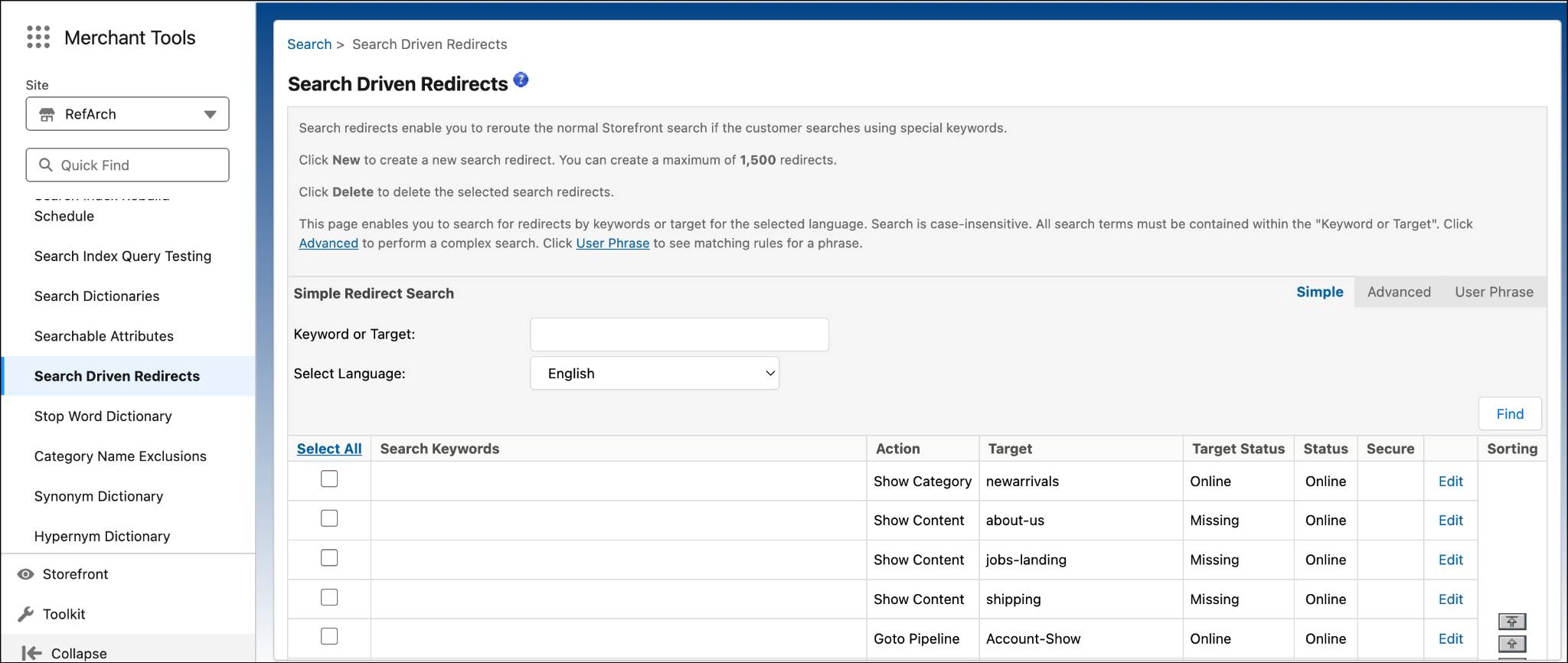
- Click New.
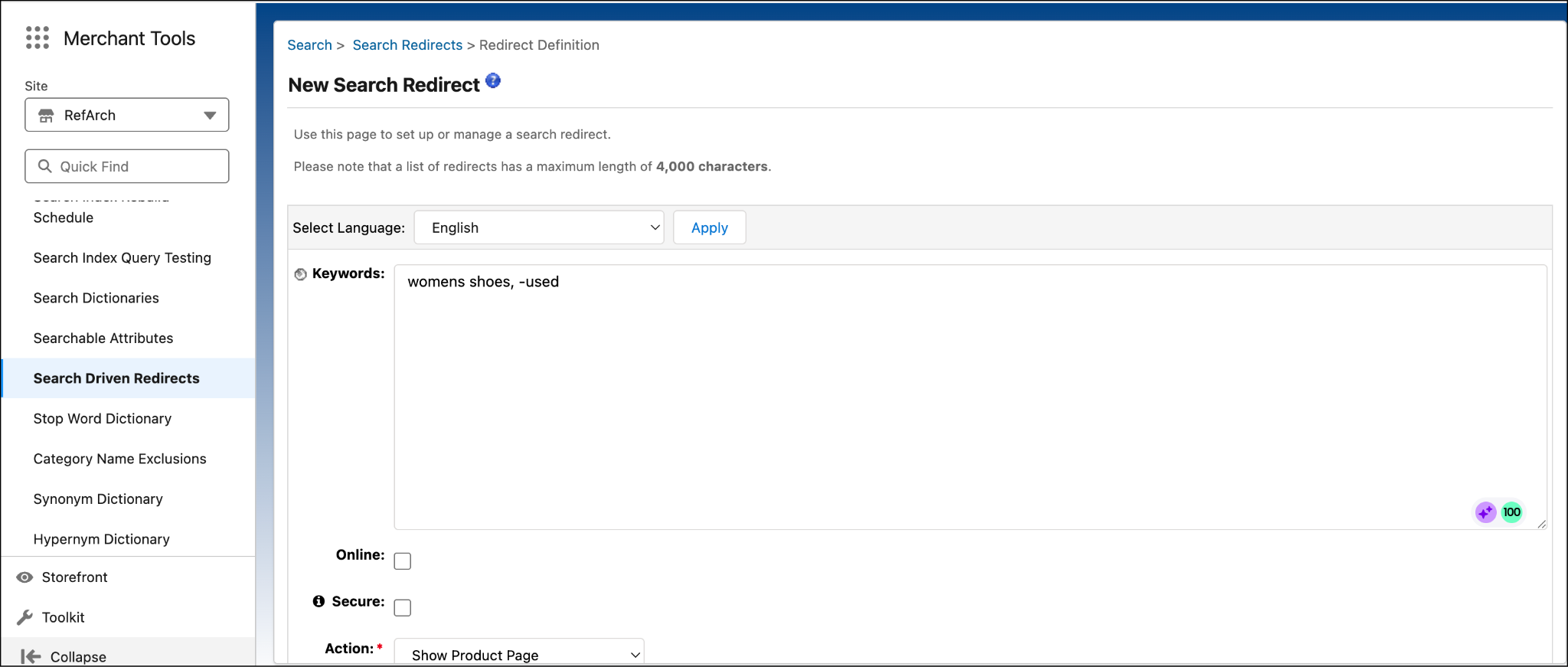
- (Optional) Change the default language.
- Select the language.
- Click Apply.
- Select the language.
- Enter one or more words, separated by commas, that you expect the shopper to enter for a search: womens shoes, -used
- To enable the redirect for use by the storefront, select Online.
To use HTTPS for the destination protocol, select Secure. Redirects to Agentforce Commerce for B2C URLs always use HTTPS regardless of the setting.
- Select the action that you want the redirect to take when a shopper enters the keyword in the search field: Show Category Page
- Select the Category ID: womens-shoes
- Click Apply.
Localization
Agentforce Commerce for B2C implementations that are global often specify certain keywords by locale for each search redirect. The locales that don't have keywords use the keywords provided via the fallback mechanism. That means that if a search redirect doesn’t have a keyword defined for a specific locale, the locale fallback mechanism applies.
This table shows some examples.
|
Locale
|
Keywords
|
|---|---|
de_DE |
Männerschuhe, Damenschuhe, -gebraucht |
de_AT |
|
de |
schuh |
es_ES |
“Zapatos de los hombres”, “Zapatos de mujer:”, -utilizado |
es |
zapatos |
When a shopper searches using the de_AT locale, Agentforce Commerce for B2C uses the de locale keywords. This fallback happens because de_AT defaults to de.
Here’s the fallback mechanism.
locale > country locale
de_AT > de
de_DE > de
When a shopper searches with the es_ES locale, Agentforce Commerce for B2C uses the es_ES keywords and no fallback. The es_ES locale use the default keywords: “Zapatos de los hombres”, “Zapatos de mujer”, -utilizado.
Here’s the fallback mechanism.
Locale > country locale
es_ES > es
Next Steps
In this unit, you learned how guided search gives you control over what the shopper sees, how matching works for search redirects, and how locale fallback works for search redirects. Next, learn about searchable product attributes.
Resources