Engage Buyers and Close Sales with B2B Commerce
Learning Objectives
After completing this unit, you’ll be able to:
- Explain how B2B Commerce templates improve site development and shorten time to value.
- Explain how new B2B components enhance the user experience.
- List the search components that differentiate the B2B Commerce search feature.
- Describe how merchandisers manage products in the Commerce app.
- Explain the relationship between buyers, buyer groups, entitlements, and price books.
- List the promotion types merchandisers can set up in the Commerce app, including how the Commerce Promotions feature applies them.
- Explain how buyers manage carts and request quotes in the Commerce app.
B2B Commerce Merchandising Tools
Salesforce B2B Commerce gives merchandisers easy-to-use tools to present the right products to the right buyers — at the right time and the right price. These tools help you deploy a store that adapts quickly to swiftly moving revenue streams and keeps buyers engaged.
The B2B Commerce merchandising tools help stores succeed in these areas of ecommerce specialization:
- User experience
- Commerce components
- Search and recommendations
- Cart and checkout services
- Quote management
- Buyer management
- Product Management
- Promotions
User Experience
To craft an easy-to-use and engaging online experience, merchandisers and administrators consider several elements. The customer experience includes everything from site branding, to how customers place orders, select shipping, and make payments.
Here are a few of the B2B Commerce UI tools and features that help you create highly engaging user experiences.
Page Templates
Commerce app page templates include:
Commerce Page Templates | |
|---|---|
Home |
Order Confirmation |
Cart |
Order Lookup |
Category |
Order Summary Details |
Checkout |
Order Summary List |
Login |
Payment Processing |
My Profile |
Search |
Split Shipment |
Quote Confirmation |
Quote Summary Details |
Quote Summary List |
Multiple Carts Detail |
Multiple Carts List |
Each template is intelligently designed and responsive, built on best practices with a set of standard components and customizable layouts. They're easy to customize, simplify page creation, and follow proven user experience patterns.
Site Branding
With B2B Commerce, site branding is automated. You provide the URL to your business website, and the Commerce app designs the store template pages to match your brand.
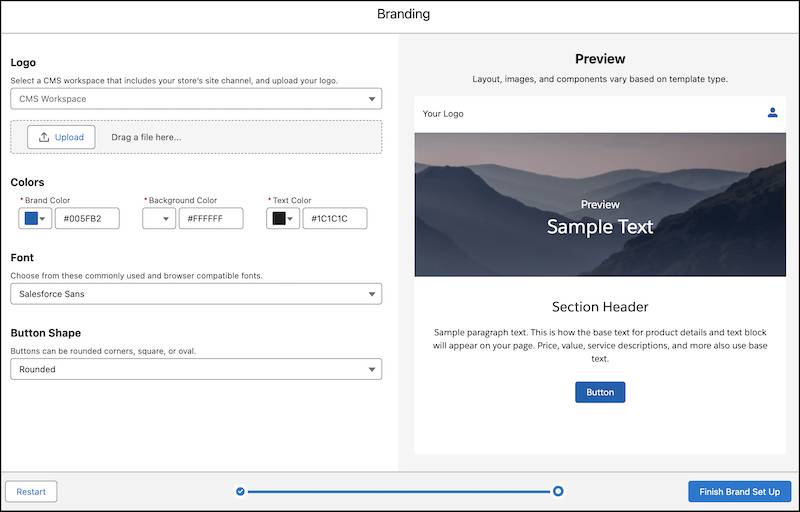
[Alt Text: A screenshot of the Commerce app site branding feature.]
Commerce Components
Components are custom HTML elements built for the Salesforce Lightning Platform, following modern web standards like HTML, CSS, and JavaScript. The efficiency of Commerce components comes from their lightweight framework, which leads to enhanced performance.
You can use components to drive user engagement and improve sales and transaction efficiency. Here's a look at the components available for B2B stores.
Component |
Description |
|---|---|
Cart Badge |
Shows a clickable icon that takes the customer to their cart. Shows the Mini Cart settings to customize a sliding mini cart preview. |
Commerce Footer |
Contains the components that you want to appear at the bottom of each page in your store. By default, this component includes the site logo and social links. |
Commerce Header |
Contains the components that you want to appear at the top of each page in your store. By default, this component includes the site logo, multilevel navigation menu, search input, profile menu, and cart badge. |
Cookie Consent |
Displays in a window at runtime, not in the footer. You can preview this component in Experience Builder to see how it appears to shoppers. |
Country Selector |
Shows a list of available countries based on the store's market configuration. The customer's selection determines which language, currency, prices, products, and promotions are shown. |
Currency Formatter |
Formats currency for the customer's country. |
List Badge |
Shows a clickable icon that takes the customer to their wishlist(s). |
Multilevel Navigation Menu |
Shows a customizable menu bar for navigating up to 5 nested levels. |
Multiple Carts Menu |
Shows a list of the default cart and four most recently saved carts, and also a list of all the saved carts for a buyer. Includes a customizable setting to show the total items in each cart or the number of unique products in each cart. |
Navigation List Menu |
Shows a list of pages in your store. Usually appears in the left column on desktop computers and at the top of some mobile devices. |
Order Date Filter |
Shows a dropdown to filter orders based on time. |
Order List |
Shows a list of previous orders. Customers can filter, sort, and reorder items. |
Order Summary |
Shows an order summary with order number, status, total cost, and date and time of order. |
Order Summary Products |
Shows a list of the products included in an order summary, grouped by delivery group. |
Product Card |
Shows product details and an optional quick view button. |
Profile Menu |
Shows a menu with options for registered users. |
Purchased Products |
Shows a list of products purchased by the customer. |
Quick Order |
Shows a simple form for customers to enter SKUs to add products to their cart. |
Shop By Category |
Shows a list of subcategories so customers can browse into a category. |
Social Links |
Displays links to your company's social media profiles. |
Top Sellers |
Shows products in a category that you specify. Enter the ID of the category to display. If you don't specify a top sellers category, the header text doesn't display on the page. |
Search and Recommendations
The primary goal of an effective search strategy is to make it easy for buyers and shoppers to find the products they want and the products they didn’t know they want by returning intelligent and relevant search results.
Salesforce Commerce search is more than just simple keyword matching. It incorporates advanced search capabilities that enable your customers to filter and refine their search results based on their criteria.
What makes Commerce search so effective? It’s configurable and it uses Einstein.
Configurable Search
Search filters enable buyers and shoppers to search for products based on their search criteria.
Commerce supports these configurable search entities.
-
Searchable fields: Product fields that are set as searchable.
-
Search results filters: Searchable product fields that are used to refine and narrow search results.
-
Sort rules: Rules that determine how search results are listed.
Einstein Search Suggestions
With Einstein search suggestions, customers see relevant search terms before they finish entering their own. Relevance is based on a customer’s recent search history and the popular search terms that similar customers used. Customers see search suggestions when they click the Search field and as they type in a search term.
Agentforce Commerce
Agentforce Commerce enhances merchandising tools that personalize the customer shopping experience by automating product discovery on your storefront. The autonomous Guided Shopping Agent handles real-time product discovery and gives personalized suggestions right on LWR storefront layouts, so buyers always find what they need faster.
Commerce Cart and Checkout Services
An easy checkout experience helps minimize the number of abandoned carts on your site and increases revenue. The commerce cart and checkout services do just that. You can quickly configure checkout services for a site and offer customers a streamlined checkout experience that includes precise pricing, a cart summary, and shipping details.

[Alt Text: Commerce app cart summary displaying itemized pricing, estimated shipping, tax, and total costs.]
The cart summary component gives buyers clear, real-time visibility into order pricing, promotion discounts, and shipping estimates before they proceed to checkout.
Here is a summary of the cart and checkout service features available in B2B stores.
Service |
Description |
|---|---|
Add-to-cart message |
Notify buyers when items are added to their cart so they can continue shopping seamlessly. |
Cart summary |
Display itemized pricing, taxes, and shipping estimates so buyers know exactly what they're paying for. |
Guided flow |
Help buyers complete purchases with a guided flow and dynamic cart summary displayed at checkout. |
Estimated delivery dates |
Keep buyers informed by displaying shipping options with estimated delivery dates. |
Cart recovery |
Enable customers to leave and log back into your store without losing their saved cart items. |
Split order shipments |
Allow buyers to split orders across multiple shipping locations or fulfill orders from different warehouses. |
Large orders |
Support high-volume order processing and complex bulk purchases without performance delays. |
Order templates |
Let buyers save frequently ordered items as a template to reorder quickly. |
Cart sharing |
Allow buyers to share carts with teammates so multiple people can review or add items before checkout. |
Quote Management
Buyers can request a quote directly from the storefront when they need a negotiated price instead of the standard listing price. Merchants review the request, edit line items or pricing, and approve the quote before sending it back to the buyer to complete the purchase.
Buyers, Buyer Groups, Entitlements, and Price Books
Successful B2B businesses develop targeted buyer engagement strategies. With B2B Commerce, you can set up relationships between Buyer, Buyer Group, Entitlement Policy, and Price Book objects to build a compelling strategy that attracts buyers and closes sales. For example, you can establish relationships to:
- Offer tiered pricing.
- Provide buyer-specific pricing.
- Limit access to specific products and prices based on negotiated contracts.
Together, these objects help businesses tailor the purchasing experience for different segments of their customer base.
Deliver a Personalized Customer Experience Using Data 360 Segments
A Data 360 segment in Salesforce is a collection of data grouped by specific criteria or attributes. Combine Data 360 segments with buyer groups in B2B Commerce to target shoppers and personalize their experience.
You can also use segment data to enhance the relevance and effectiveness of entitlement policies and promotions. Create buyer group profiles using customer data in Data 360 to deliver personalized shopping experiences, content, and promotions tailored to your buyer groups.
Product Management
B2B Commerce provides all the tools you need to organize and manage products. This includes support for simple products, products with variants, and bundle products, so you can manage a range of product structures within the same catalog.
-
Products editor: Edit product details, assign media, and manage related entities.
-
Categories editor: Manage categories, edit category details, and assign media and SEO URLs.
-
Product descriptions: Create and revise descriptions for products in English and other languages.
-
Product fields: Revise text fields for multiple products at once.
Use these tools to streamline product management processes, drive sales, and enhance revenue growth.
Promotions
Promotions help provide a steady stream of revenue for your business. They’re like a little jolt of energy that helps to fill buyer’s carts.
From discounts and bulk pricing to loyalty programs and bundled offers, B2B Commerce has click-based tools to set up and deploy promotions that engage customers and drive sales. The Commerce app enables marketers and merchandisers to manage campaigns, promotions, product catalogs, inventory, and pricing all in one place, at one time, across all your sites.
Here’s a list of the latest B2B Commerce promotion tools.
Promotion Tool |
Description |
|---|---|
Smart Promotions |
Use Agentforce Commerce to quickly create promotions. |
Promotion Template |
Save time setting up promotions with predesigned templates built for common sales scenarios. |
Shipping Promotions |
Offer shipping promotions in your store to encourage customers to complete their purchases. |
Flexible Promotion Segments |
Associate a promotion segment with either a store or a buyer group, with flexibility to update active, promotional, and automatic fields. |
Promotional Pricing Highlights |
Display promotional pricing highlights on the Product Card component and customize text styling to attract buyer attention. |
Next Steps
In this unit, you learned how B2B Commerce supports quick time-to-value and buyer engagement. Next, learn more about the Agentforce Commerce tools in B2B Commerce.
Resources
- Salesforce Help: LWR and Aura Store Templates
- Salesforce Help: Commerce Store Components
- Salesforce Help: Configure Checkout for a Commerce Store
- Salesforce Help: Store Search
- Salesforce Help: Products and Pricing
- Salesforce Help: Manage Quotes
- Salesforce Help: Manage Buyer Access to B2B Stores
- Salesforce Help: Commerce Promotions