Generate and Refine Content with Agentforce Content Agent
Learning Objectives
After completing this unit, you’ll be able to:
- Identify the components of an effective prompt.
- Distinguish between tasks the Agentforce Content Agent automates and decisions that require human review.
- Identify real-world marketing scenarios where the Agentforce Content Agent delivers the most value.
Craft an Effective Prompt
With your workspace configured, you’re ready to generate content. Your prompt tells the agent what to create and gives it enough context to produce relevant, on-brand results. The more specific your instructions, the better the generated content.
A well-written prompt describes the channel, audience, campaign goal, and any creative direction. For example, if you’re creating content for a campaign for your loyalty members that promotes free shipping during a summer sale, your prompt should look like this: “Generate email and SMS message content for our loyalty segment promoting free shipping on orders over $50. Use our summer brand assets and include a hero image from the approved product library.”
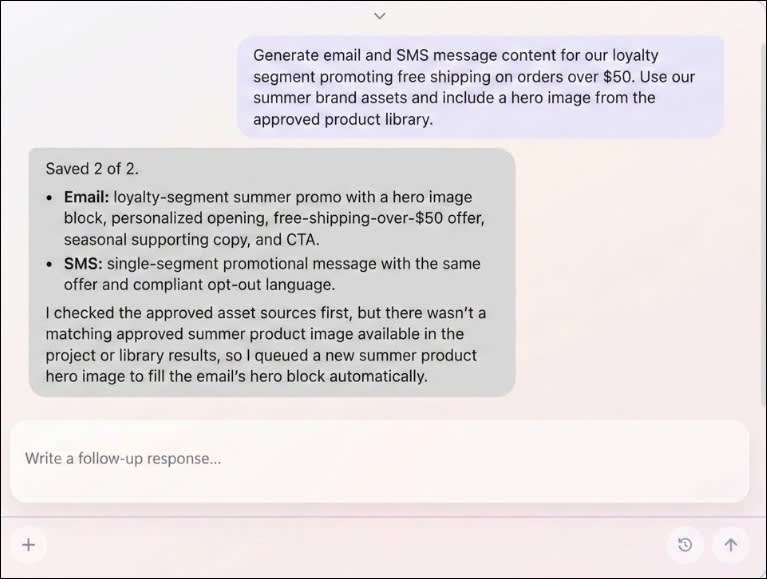
After you submit the prompt, the agent generates the content and places it on the design canvas. For each channel, you get draft text and images formatted and optimized for that channel’s specifications. You can also review the agent’s reasoning on how it applied your brand guidelines, interpreted your campaign brief, and inserted personalization tokens. This transparency helps you understand why the content looks the way it does, and gives you a clear starting point for refinement.
Use the Agent to Generate Campaign Content and Visuals
After you submit your prompt, the agent takes over the drafting process. It applies your brand voice and visual design from the Brand record, incorporates campaign goals and audience details from the Brief, and generates channel-specific content for email and messaging. Your content appears on the design canvas where you can pan, scroll, and zoom to see all your channel variants side by side.
For messaging content, it creates concise, action-oriented messages that fit the channel including images for visual messaging channels such as MMS and RCS.

For email campaigns, it generates the subject line, preview text, and body copy, selects or creates images in the optimal format, and assembles a complete layout.

The agent also personalizes content by referring to data from your customer preconfigured data sources in Marketing Cloud Next. For visuals, the agent can generate new images specific to your campaign, or use images you already imported into the workspace from your device or CMS library.
Generated images are created in the optimal format for each channel, applying your brand’s visual guidelines to produce on-brand assets without requiring a separate design tool. By combining your prompt with the campaign context and brand guidance, the agent creates a complete first draft that’s ready for collaboration and review. This saves you and your team time and effort when starting a campaign.
Review Draft Content and Images
The agent gives you a strong starting draft, but you’re always the final reviewer. Before publishing, check the content for accuracy, and verify promotional offers, product details, and URLs. Confirm that the messaging meets your organization’s legal, regulatory, and compliance requirements, including any required disclosures or opt-out language.
You should also evaluate whether the content reflects the intended brand voice and campaign objectives. While the Brand record provides consistent guidance, campaign-specific messaging or seasonal creative direction might require adjustments. Review every generated image to make sure it aligns with your brand standards.
Once you complete your initial review, share the workspace with your team for input. Click Share and invite colleagues by assigning them Editor or Viewer roles.

To add feedback, click Comment and drop a comment directly on the element it relates to. Tag colleagues with @mentions to direct specific feedback to the right person. All comments appear in the comments panel on the right, where you can filter by @mentioned comments and track what’s resolved. Once feedback is addressed, mark it resolved to keep the review moving forward.
Refine and Publish Content
The first draft provides a solid starting point. You can refine your content either by conversing with the agent or by taking direct manual control. Continue the conversation with the agent to refine and explore different creative directions. For example, ask it to shorten a message, translate content into another language, or generate new images. You can also generate variants to compare different message approaches before selecting the best option.
Because each request builds on the same prompt, campaign brief, and brand, every iteration remains aligned with your campaign objectives.
For precise control, you can click directly into an SMS message to make manual text changes.

For email, you have full design control with built-in editing tools. Use rich text formatting controls to adjust fonts, colors, and styles without touching code. You can also switch to the HTML editor for direct code access. It gives you section layout controls to restructure your email, quick access to add merge fields for personalization, and fields to update your internal message title, subject line, and preheader text. You can also edit images directly in the canvas, resizing, cropping, and adjusting filters within the workspace.

You maintain complete design control over your visuals. You can click an image to remove it or easily replace it with an approved image uploaded from your device or selected from your CMS assets.

The canvas also provides built-in declarative editing tools, letting you resize images, adjust the corner radius, and apply filter presets like brightness and saturation without needing a separate design tool.
When you’re satisfied with the content, publish the approved version to Salesforce CMS.
Explore Use Cases
Here are a few scenarios where you get the most out of the Agentforce Content Agent.
Small Teams, High Content Volume
If you’re a team of one or two managing dozens of campaigns, the agent shifts your role from writer to editor or guide. You describe the goal; the agent drafts the copy. You review and refine instead of starting from scratch every time.
Multichannel Content for Multiple Audiences
Some campaigns aren’t just one email to one audience. And multitouch journeys need a consistent tone across every message. The agent gives you a unified workspace where you can build, iterate, and refine content across all your channels and languages at once. Generate the English version first, then ask the agent to translate it into multiple languages while maintaining your brand voice.
The agent uses your brand and brief to align every message from the first welcome to the final call to action. You can also generate multiple image options with AI, create variants with different tones or offers, and compare them side by side before deciding which to publish. Instead of managing dozens of separate drafts, you’re working in one place where changes ripple across channels and variations stay coordinated.
Variant Testing and Creative Iteration
The agent makes it easy to test different subject lines, calls to action, or creative directions. Instead of rewriting your email or mobile messages manually, ask the agent for variants. Generate multiple options with different tones, images, or offers within the same workspace, and then publish the ones you want to test.
Personalized Customer Experiences
Different customers expect different messages. Agentforce Content Agent uses available customer data to tailor content for specific audiences. Preview the generated content with customer records before publishing to confirm the personalization.
Streamlined Approval Across Stakeholders
Getting a multichannel campaign approved means coordinating sign-off from brand leads, legal teams, and regional managers. The feedback is scattered across different tools leading to contradictory edits and revision cycles that never seem to end. Agentforce Content Agent brings all stakeholders directly to the content. Instead of routing PDFs or exporting files, your team leaves in-context comments, mentions the right people, and resolves feedback directly on the canvas. This keeps everyone aligned and shortens the review cycle.
Built-in Brand Governance
For campaigns operating under strict brand rules, the agent adheres to brand and compliance by automatically reasoning over uploaded brand documents, such as specific colors, typography, and tone of voice. It also utilizes verified, preapproved media assets from the Salesforce CMS. Every piece of generated content stays completely aligned with your organization’s standards.
Wrap Up
In this badge, you explored how the agent helps you create campaign content across multiple channels and audiences by generating a starting point with multiple options to choose from. By requesting agentic refinement and using flexible editing tools on the content canvas, you shape every piece of content before it goes out. The final call is always yours. And your judgment and insight are what makes the content great.