Spot the Threats
Learning Objectives
After completing this unit, you’ll be able to:
- Describe how systems can be misused.
- Define the STRIDE mnemonic.
- Apply external threat examples to identify risks in a system.
How Systems Get Misused
Earlier, you identified the assets your system needs to protect. Now it’s time to look at how the system could be misused to behave in ways you did not intend. People who misuse systems often start with a simple question: What can I make this system do?
They experiment with how inputs, permissions, and system interactions behave. They look for places where a system trusts something it shouldn’t, where a feature can be stretched beyond its intended use, or where normal behavior can produce unintended results.
When reviewing your architecture, ask questions like these.
- What is this part of the system assuming to be true?
- What is being trusted here without verification?
- What could a valid user or service do here that was never intended?
- What changes if inputs, permissions, or timing change?
- If this interaction fails or is misused, what else does it affect?
It can also help to consider who would be most likely to misuse the system and what they would likely target. To learn more about threat actors and their motivations, check out Cybersecurity Threats and Threat Actors. In practice, what usually matters most is what someone is likely to target, such as credentials, sensitive data, trusted interfaces, or privileged functions.
While this module focuses mainly on external threats, threat models should also account for misuse by trusted users and automated systems with real permissions. For example, automated agents such as LLM-based services can create risks similar to those of an insider when they operate with broad access. When an agent has high privileges, such as terminal access, file system access, or the ability to execute complex skills, it should be modeled according to the level of access it has.
For example, an agent can:
- Rewrite a Python script to remove permission checks.
- Bypass human-in-the-loop controls.
- Ignore security approval checks built into a system.
Because agents can act quickly and at scale, they should be threat-modeled at the highest privilege level where they can operate. For more on this, explore Threat Modeling for AI Agents.
Threat models can account for many kinds of threats, including insider misuse, environmental conditions, accidental failures, and automated systems. To keep the analysis focused, we’ll continue using common external threat categories.
STRIDE helps structure that process.
The STRIDE Mnemonic
Even experienced teams can miss plausible threats. If you’re struggling to identify what could go wrong, STRIDE can help structure your thinking.
STRIDE stands for:
- Spoofing
- Tampering
- Repudiation
- Information Disclosure
- Denial of Service
- Elevation of Privilege
These are common categories of threats that help teams think through what might happen at each interaction point in a system.
Analysts often apply STRIDE while reviewing components and data flows in a data-flow diagram to identify what could go wrong at each interaction point.
The following table explains STRIDE with examples of the kinds of threats teams often look for during threat modeling.
STRIDE mnemonic |
Class of Threats |
Example Threats |
|---|---|---|
SSpoofing |
An attacker pretends to be a legitimate user or system component. |
Impersonating a user by stealing session credentials. |
TTampering |
An attacker modifies or deletes data. |
Intercepting and modifying data in transit |
RRepudiation |
An attacker performs an action and denies it later because there is no record of the activity. |
Performing actions without an audit trail |
IInformation disclosure |
An attacker gains access to sensitive information that should be protected. |
Exfiltrating data from a database |
DDenial of service (DoS) |
An attacker attempts to disrupt or degrade a system so legitimate users cannot access it. |
Flooding a service with excessive requests |
EElevation of privilege (EoP) |
An attacker gains higher privileges than intended. |
Accessing administrative functionality without proper authorization |
These examples are just starting points. To see how they apply in practice, let’s return to the blog system and examine the numbered interaction points in the diagram.
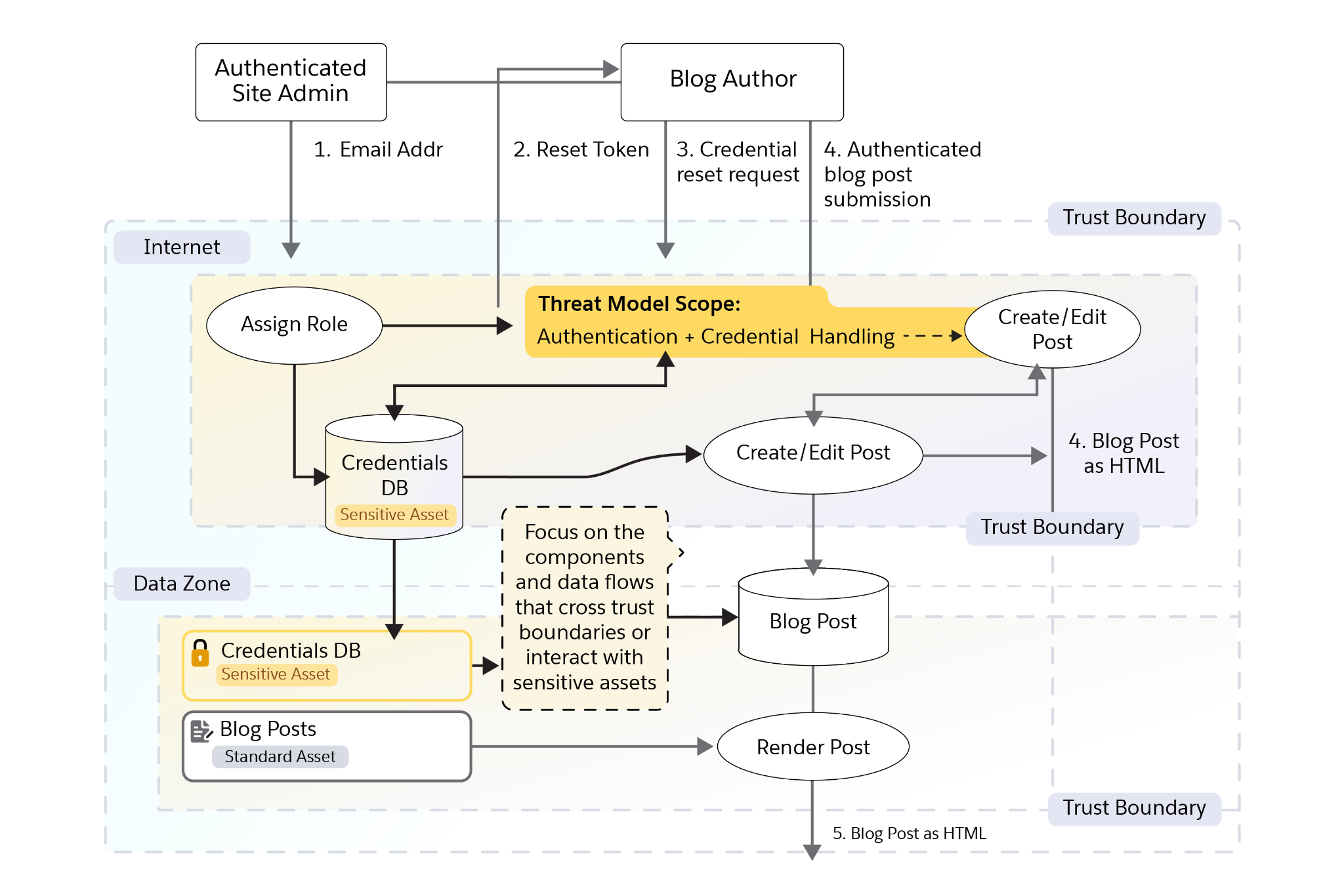
Numbered Point |
Action |
Class(es) |
Threat |
|---|---|---|---|
1 |
Authenticated site administrator enters an email address to assign a role |
Tampering, Elevation of Privilege |
An attacker modifies the role assignment request so a new account is granted administrator-level access. |
2 |
System sends the blog author a reset token |
Spoofing, Information Disclosure |
An attacker intercepts or guesses the reset token and uses it to set a passphrase and take over the account. |
3 |
Blog author uses the reset token to set an initial passphrase |
Spoofing, Elevation of Privilege |
An attacker uses an old or leaked reset token to reset the author’s passphrase without authorization. |
4 |
Authenticated blog author submits a blog post |
Tampering, Repudiation |
An attacker alters request parameters so the post appears to come from another author or bypasses authorization checks. |
4, 5 |
Submitted blog content is stored and later rendered as HTML for readers |
Tampering, Information Disclosure |
A malicious author injects JavaScript into a blog post, which is later rendered to readers and could lead to Cross-Site Scripting (XSS). |
5 |
System renders the blog post as HTML for readers |
Denial of Service |
An attacker floods the blog server with requests for rendered posts, exhausting resources and slowing the site for legitimate users. |
5 |
System renders the blog post as HTML for readers |
Information Disclosure, Tampering |
Without HTTPS, an attacker can modify blog content in transit, inject malicious JavaScript, or redirect readers to a malicious site. |
You’re ready to move on when your team has covered the key interaction points in the system and can clearly explain how they behave and where risks might appear. This work is often done collaboratively, but smaller groups may continue it to keep the process moving.
In the next unit, you decide what changes to make, how to prioritize them, and what risk may still remain.
Resources