Solve Business Challenges with Workflow Builder and Channels
Learning Objectives:
After completing this unit, you’ll be able to:
- Explain the different ways that clients can use Slack in their organization to improve productivity.
- Recommend Workflow Builder use cases that help clients achieve their goals with Slack.
Slack benefits organizations and members in many ways. Some of the most common “ways of working” in Slack include the following use cases.
- Internal communications
- Onboarding
- Project management
- Triage and support issue resolution
- External collaboration
For each of these use cases, you're introduced to examples intended to inspire you and your clients around how they might use channels to improve productivity.
Meet Workflow Builder
When helping clients get the most value from working in channels, be ready to help them use Workflow Builder. Workflow Builder offers a set of tools—no coding required—to help you automate routine processes into workflows in Slack.
This unit provides examples of common Workflow Builder use cases that you can add to your toolbelt.
Encourage Internal Communications
Internal communications can take many different forms depending on your client's company culture, policies and settings, channel strategy, and the purpose of a particular channel. Review the following example of how Slack can support an organization’s internal communications.
Imagine your client has set up an #all-hands channel for when leaders host all-hands calls. Your client wants to encourage engagement while organizing the engagement as possible. As an alternative to threads, they can feature a workflow that collects employee questions for the call.
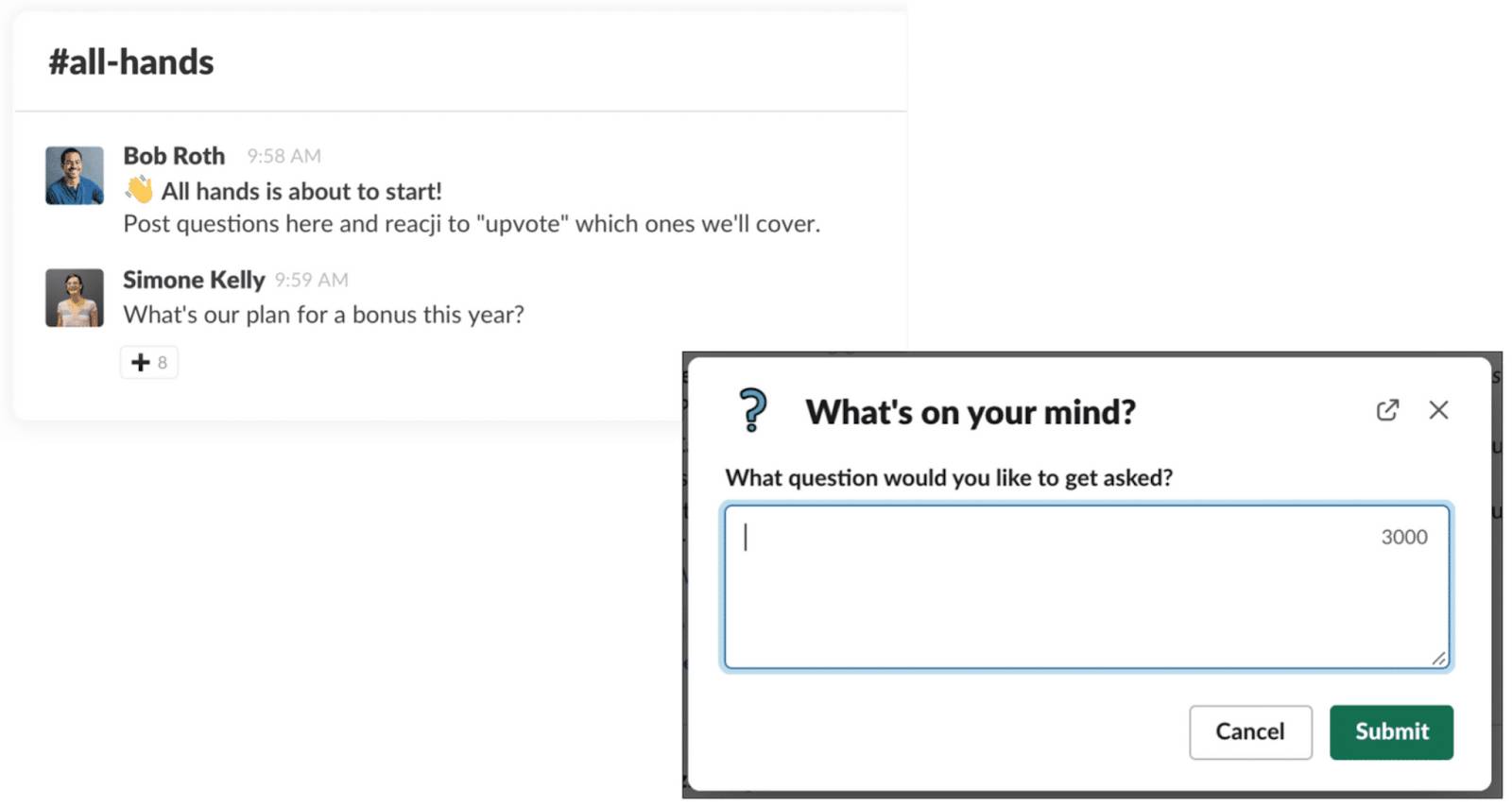
By using this workflow, the conversation is organized, focused, and less overwhelming than a long thread. This creates a more effective all-hands call experience.

Onboard Employees
With an automated welcome bot, your clients can make new team members feel welcome and a part of the team immediately. When a new member joins the channel, the welcome bot workflow greets them with an automated welcome message that might include helpful information and resources. Remind new members to review the pinned items in the channel so they can get up to speed on the types of conversations that occur in the channel. This automated workflow greeting creates a lasting and positive impression for new channel members.

Manage Projects
Project management is complicated and time-consuming. Consider running team syncs in channels using automated reminders to save time and keep updates regular and transparent. Keep the updates consistent by setting up a workflow for each team member to fill out when they receive the channel reminder.
If you’re collaborating with clients in a Slack Connect channel, demonstrate your project management rigor by setting up project reminders via a check-in workflow.
Here's an example of a project check-in, and how it would look in Slack.
Good afternoon, team! Don’t forget to post your daily update in the channel. Be sure to include the following details.
- What you worked on today
- What you have planned for tomorrow
- Any questions or blockers
Triage and Resolve Support Issues
Remember why using effective channel naming conventions is important? When thinking about triage and support issue resolution, consider the benefit of a public #help channel. These help channels are a dedicated space for requesting help from departments, such as IT or finance, and experts. This approach gives the users the ability to search in that channel to determine whether their question has been answered.
Over time, the history of questions and answers in these channels become a knowledge base for humans and agents. It also enables a search-first culture. When organized well, you ensure that your client’s employees can access all of this knowledge.

Collaborate with External Groups
Work faster and more effectively by setting up secure Slack Connect channels with external partners, such as the clients you’re supporting. Inviting external partners to Slack Connect channels provides many benefits. For example, you can create workflows to influence more efficient processes with collaborating partner organizations. Effective Slack Connect channel workflows could include welcome messages for new channel members and workflows for project management like weekly syncs. You might even use a Slack vision workflow to set the baseline vision and expectations for collaborating with your client.
In the following example, Acme Inc and Big Corp—two separate organizations—are working together in a Slack Connect channel. They've built an approval workflow to ensure that the necessary stakeholders approve all press related to their work together.

Wrap It Up
By understanding the Slack Maturity Framework and its five stages, you can better support clients in maximizing their ROI from Slack. The framework assesses client maturity across three categories: Utilization, maturity score, and success factors. Help clients explore the various ways of working in Slack—such as internal communications, onboarding, project management, triage and support issue resolution, and external collaboration. This way, you’re ready to recommend effective channel solutions and Workflow Builder use cases to help your client become more productive and efficient.
Resources
- Slack Blog Post: 5 ways to power up your internal comms with Slack
- Slack Help Article: Prioritize tasks quickly with triage channels
- Slack Blog Post: How Slack helps you onboard new employees
- Slack Solutions: Project management, directly in Slack
- Slack Solutions: Slack Connect: External Communication & Collaboration
- Slack Resources: Reimagine your service operations with Slack Connect