Learn About Partner Contact Center
Learning Objectives
After completing this unit, you’ll be able to:
- Explain what Partner Contact Center (formerly Salesforce Voice) is.
- Describe key benefits of Partner Contact Center.
- Explain the differences between Partner Contact Center and Computer Telephony Integration (CTI).
What Is Partner Contact Center?
Like most companies, Ursa Major Solar offers phone support to its customers. Even with the rise of digital engagement and the fact that customers use an average of 10 different channels to contact companies, 93% of customers pick up a phone to call for help.
With that in mind, Sita Nagappan-Alvarez, the CEO of Ursa Major Solar, wonders if there’s a way to improve the phone support experience for both her customers and service reps. According to PwC’s report on the Future of CX (Customer Experience), 80% of customers consider speed and convenience most important for good service. Sita wants a faster way to deliver better service over the phone. She’d also like to ensure that her reps have all the customer data and productivity tools they need to focus on customers—not technology—when customers call. To Sita, delivering exceptional service is as critical to her business as building extraordinary solar panels. Sita asks her rock star admin, Maria Jimenez, for help.
Maria has been hearing a lot about integrating a Partner Contact Center with Salesforce. Even though Maria set up Call Integration a while ago, she’s learned that Partner Contact Center is a feature for the Service Console that offers some advanced capabilities, such as:
- Gives supervisors real-time Omni-Channel visibility into phone calls, call analytics, and service rep performance.
- Integrates telephony, customer data, and digital channels all on one platform—the Agentforce Service platform.
- Boosts service rep productivity and shortens call times with fewer clicks and less data entry and wrap-up tasks.
- Implements a phone channel quickly without code.
- Offers choice in which telephony system to use.
- Uses voice transcription to surface next-step recommendations powered by artificial intelligence (AI).
All of these capabilities sound incredible to Sita. But she wonders how they work with her service team’s existing console and digital engagement tools.
Partner Contact Center and the Service Console
Partner Contact Center channels, including voice, appear in the Service Console so that service reps have a 360-degree view of each customer and their requests. The console is a virtual help desk that lets anyone on your service team, or anyone at your company, see a personalized view of each customer and their case, alongside any digital conversations. And that positions everyone to deliver a better customer experience.
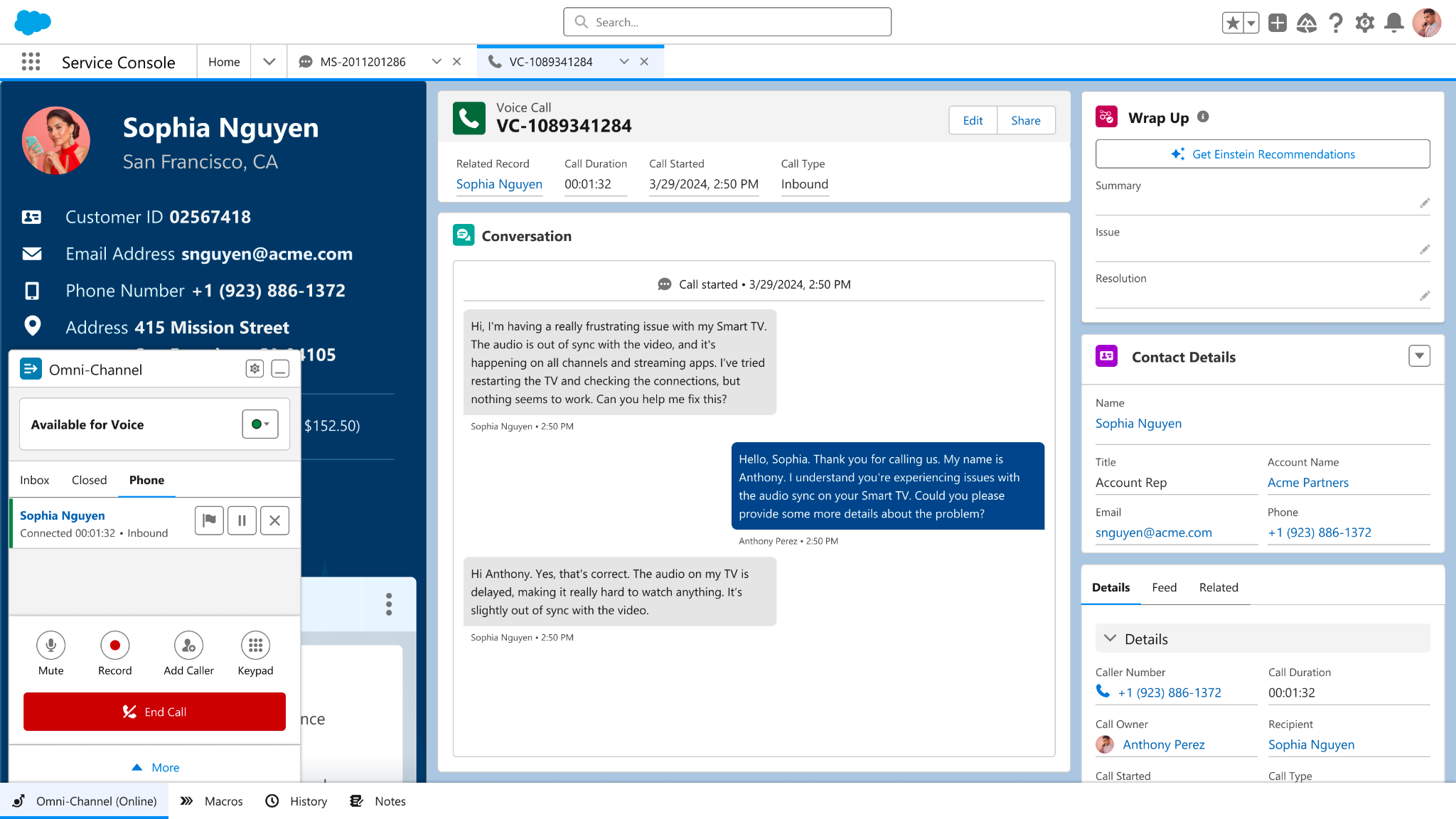
Service reps use Partner Contact Center to capture customer information from voice calls and other digital channels added to the console, such as email, chatbots, web chat, social media, online communities, SMS messaging, and more. Reps use this data to answer customers’ questions and deliver great customer experiences, no matter where customers are. Using real-time transcription, Einstein analyzes conversations to serve up the right knowledge articles and next actions for reps. Supervisors can see all conversations in real time to triage issues and offer hints and training. An admin like Maria can easily add or remove any digital engagement tools from the console at any time. Service reps can work on multiple channels and customer cases simultaneously to make everyone happy.
The combination of the console and Partner Contact Center gives reps an efficient, streamlined experience — bringing together telephony, digital conversations, AI, and customer relationship management (CRM) data all in one place.
Here's what a console with voice offers.
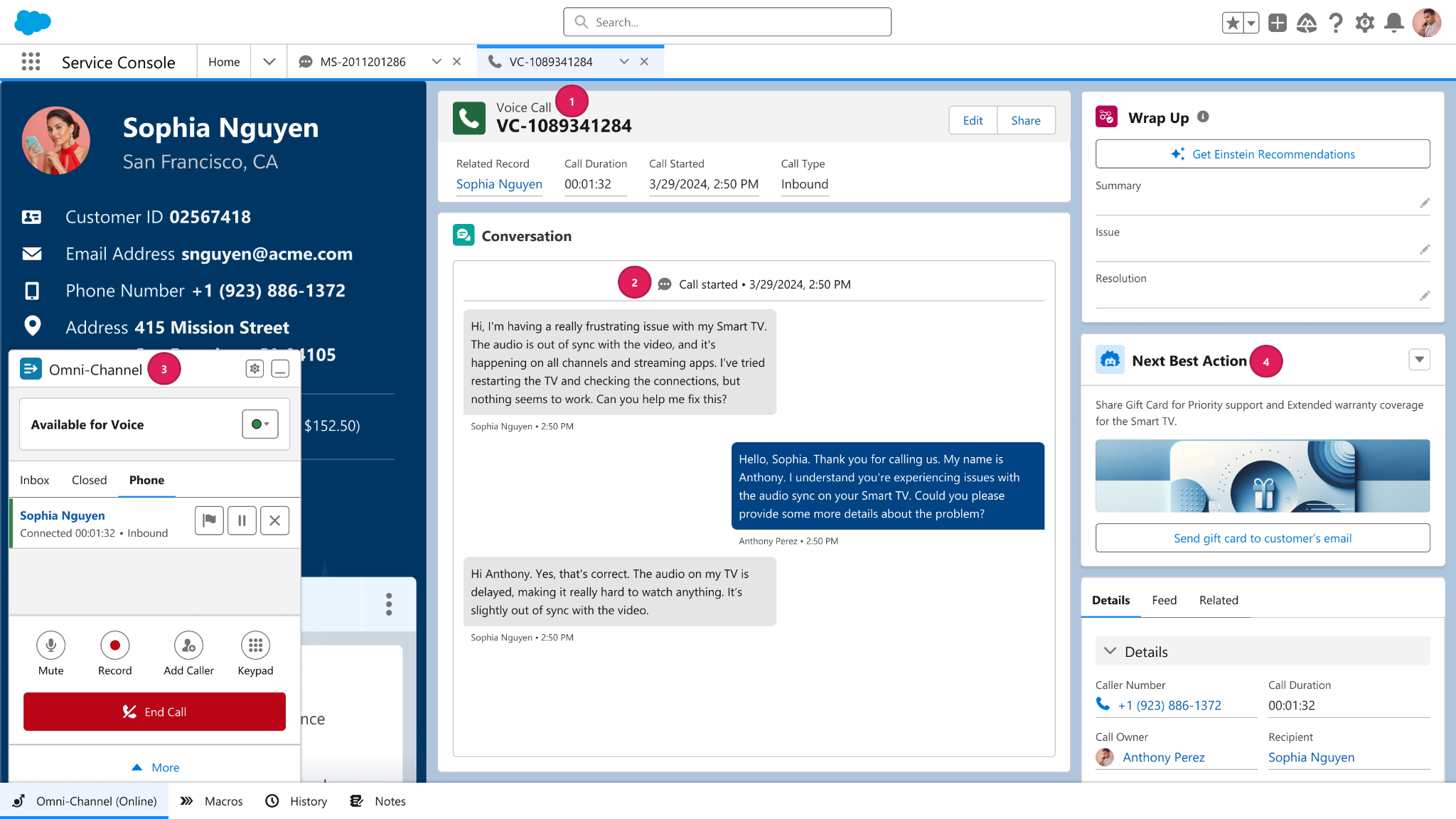
- Telephony inside of Salesforce—natively integrate phone conversations inside the console rather than screen pops to share one platform for easier data capture and a better call experience.
- Automatic voice transcription—convert human speech into text on cases and other records in real time with no typing or hassle.
- Omni-Channel to push calls to service reps and manage workloads alongside other channels—service reps access a single Omni-Channel widget for calls and any interaction with fewer screens, clicks, and distractions.
- AI assistance—next best actions and automated case wrap-up help service reps personalize calls and close cases quickly.
Key Differences Between Partner Contact Center and Computer Telephony Integration
Partner Contact Center sounds amazing to Sita, but since Ursa Major Solar already uses Computer Telephony Integration (CTI), she asks Maria to list some key differences.
Partner Contact Center |
Computer Telephony Integration (CTI) |
|---|---|
Natively built for the Agentforce Service platform and available preintegrated and out of the box with Amazon Connect or easily connect to partner solutions via AgentExchange. |
Requires the integration of a third-party telephony system on each computer to enable calls. Admins install computer telephony integration (CTI) packages created by developers or partners from AgentExchange to create a call center. |
Seamless integration of data and voice transcription to automatically populate records, suggest actions or content with AI, and unlock powerful reporting options with Analytics. |
Includes screen pops, click-to-call, and some data recording and analytics features based on call information. |
Call-control tool integrates with one Omni-Channel widget for easy access to all digital and phone conversations for fewer clicks and screens. Supervisors can see all digital interactions and help out. |
Call-control tool integrates with the console’s footer and is separate from other digital conversations. |
Resolve calls with the help of automation and Agentforce for Service. AI leverages real-time call transcription to recommend next best actions and knowledge base articles, initiate workflows, and more. |
AI could not leverage the full service platform - knowledge articles, customer data profile, etc, to the same extent. |
Sita understands that Partner Contact Center offers some major enhancements over CTI. But before she commits to making the switch, she’d like to learn more about benefits.
Benefits of Partner Contact Center
Along with the advantages already mentioned about Partner Contact Center, Maria points out to Sita these benefits by role.
Role |
Benefits |
|---|---|
Service reps |
|
Supervisors |
|
Admins & IT |
If choosing Partner Contact Center:
If choosing Partner Contact Center with Amazon Connect:
|
With all of these benefits, Sita is excited to have her service team switch to Partner Contact Center. She asks Maria what they need to do next. The answer: Plan for an implementation.
Resources
- Salesforce Help: Connect to a Partner Contact Center
- Developer Guide: Partner Contact Center
- Salesforce Help: Choose a Telephony Model
- Trailhead: Partner Contact Center Setup: Quick Look