Configure Meeting Concierge
Learning Objectives
After completing this unit, you'll be able to:
- Describe the three steps in the Playbook Builder and what components admins configure in each step.
- Explain how an admin sets up a Meeting Playbook Definition.
- Describe how flow automation creates meeting playbooks from calendar events.
Set Up Meeting Concierge
In the previous unit, you explored Meeting Concierge from the advisor's perspective to learn about the benefits of the feature.
But before your users can simplify their meeting prep and follow-up, admins create and publish meeting playbook definitions, configure AI prompts and action plans, and assign playbooks to user profiles. These setup decisions shape the entire user experience: which meeting types appear, how to generate content, and which actions are available at each stage.
In this unit, you explore some of the setup considerations as your team gets started.

Create Meeting Playbook Definitions
Admins create and configure meeting playbook definitions by using the guided, low-code Playbook Builder. The Playbook Builder walks through three steps to define the AI prompts, Agentforce actions, and stages standard to each type of meeting. Those steps are:
- Define
- Configure
- Assign & Activate
In this section, learn what each step does.
Define
In the Define step, admins set the playbook name and description, and review the included meeting stages.
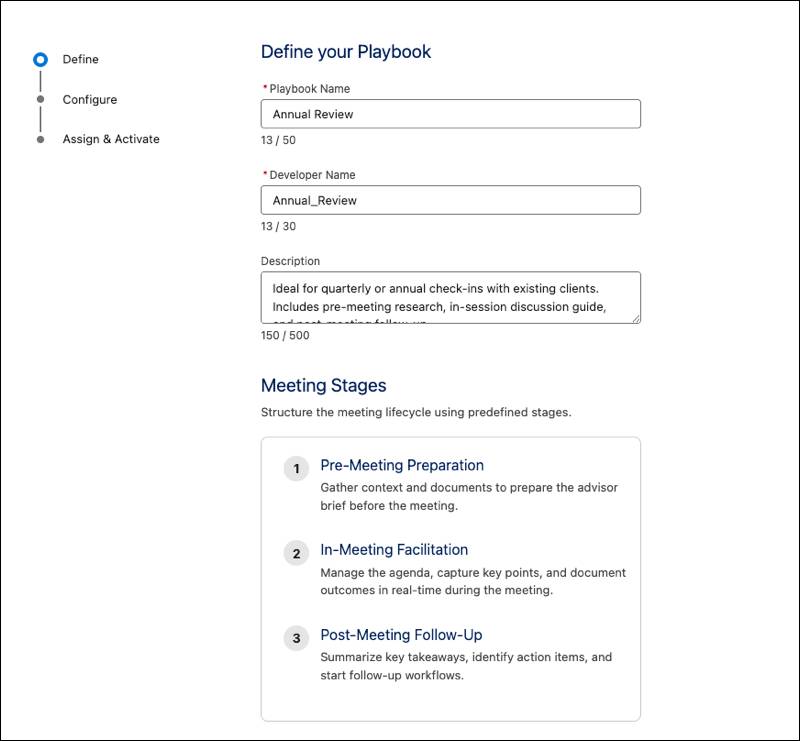
There are always three predefined stages: Pre-Meeting Preparation, In-Meeting Facilitation, and Post-Meeting Follow-Up.
Configure
In the Configure step, admins customize the components, prompt templates, action plan templates, and Agentforce actions for each stage. Admins use the Prompt Template Selector and Action Plans Selector to assign company-approved templates to the components.
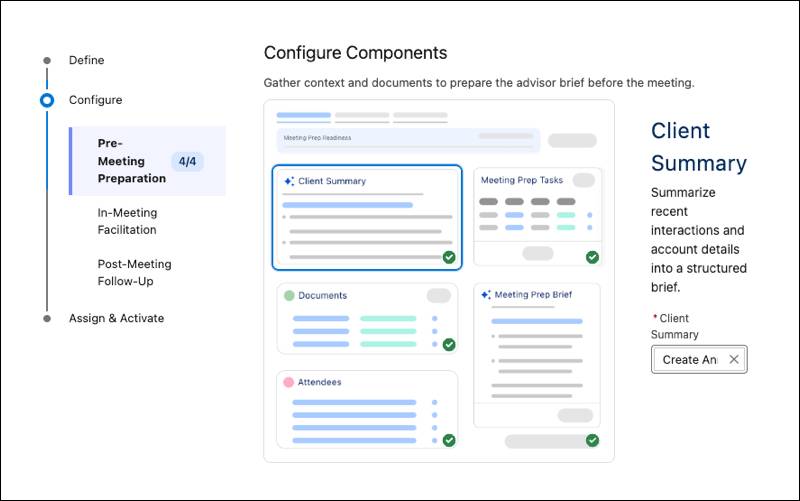
A visual editor shows how each stage appears to users. Admins can remove some stage components, but others are required.
Assign & Activate
In the final step, admins publish the playbook and grant access to specific permission sets. With the correct permission sets selected, users see only the meeting experiences that apply to their role. Admins can access all playbook definitions regardless of what permission sets are selected here.
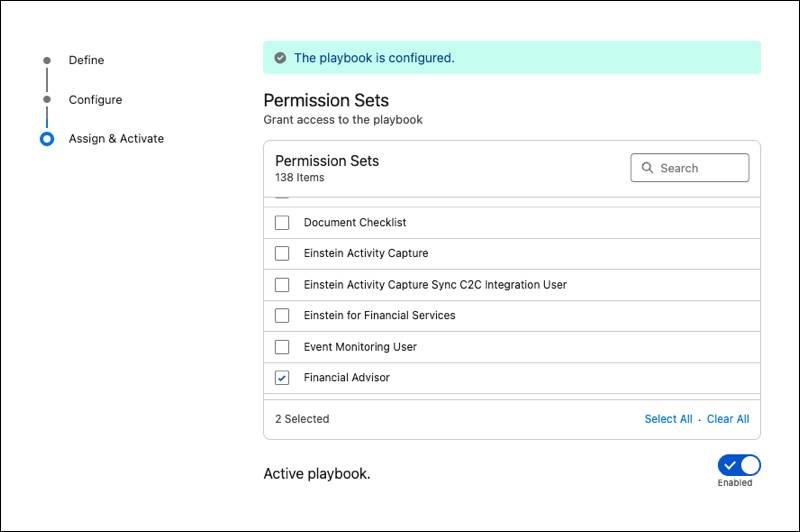
Users can’t create a meeting playbook from a meeting playbook definition until an admin fully configures and activates it.
Start from a Meeting Playbook Definition Template
Admins can build a meeting playbook definition from scratch to meet their organization’s requirements. Or they can take a shortcut and customize one of the meeting playbook definition templates included with Meeting Concierge.
For example, Agentforce for Financial Services includes these ready-to-use meeting playbook definitions.
-
Periodic Review simplifies annual and quarterly client meetings, and includes preloaded review-focused prompt templates and action plans.
-
Sales Prospecting supports new business meetings, and includes preloaded prospect-focused prompts and actions.
Admins can clone and customize these templates to match their organization's needs and workflows. Whether you start from scratch or use a template, the Playbook Builder guides admins quickly and safely through the process.
After configuring meeting playbook definitions, there’s one more critical setup task to consider.
Connect Meetings to User Calendars
Your users don’t want to spend time creating yet another record, even if that record saves them so much time on meeting prep. So, Meeting Concierge includes a template flow that can automatically create meeting playbooks based on a user’s calendar events. This automation spares your users the manual step of creating meeting playbooks for each client interaction.
How does it work? When a new event includes a client attendee, the Create Meeting from Event flow identifies the client’s associated household record, selects the appropriate meeting playbook definition, and creates a meeting playbook record automatically. That meeting playbook then appears on the Meeting Concierge home page.
To get started with this automation, admins clone and activate the Create Meeting from Event template flow included with Meeting Concierge. Customize the cloned flow to match your organization's event categories and household association logic. For example, admins can adjust how meeting types translate to meeting playbook definitions.
Wrap Up
In this badge, you explored how Meeting Concierge uses Agentforce to simplify the three stages of the meeting lifecycle.
You learned about the objects that support Meeting Concierge and then followed a financial advisor as they used the feature to manage a complete client interaction, through pre-meeting preparation, in-meeting facilitation, and post-meeting follow-up. You explored how Ryan and other financial advisors at Cumulus Wealth are powering through meetings and bringing in more business.
Finally, in this unit, you learned how admins build meeting playbook definitions and automate calendar connections to make the Meeting Concierge user experience possible.
Now, consider how your organization can put Meeting Concierge to work. Which meeting types can benefit from Agentforce summaries and guidance? How can the features that you learned about in this badge support your team at each stage?