Measure and Troubleshoot Email Engagement
Learning Objectives
After completing this unit, you’ll be able to:
- Review email performance using dashboards and reports.
- Analyze delivery and engagement results using dashboards and reports.
- Identify common causes of delivery and engagement issues.
- Share campaign results and insights with your team.
Turn Email Results into Next Steps
Like Isabelle at Northern Trail Outfitters (NTO), you just launched your first campaign using Marketing Cloud Next. Now it’s time to understand what happened and what you can improve. In this part of the process, you review the results of your send so that you know what worked, what needs attention, and what to refine next. You explore dashboards, analyze engagement data, and spot common delivery issues so that you can learn from every send and continually improve your email strategy.
Track Campaign Performance
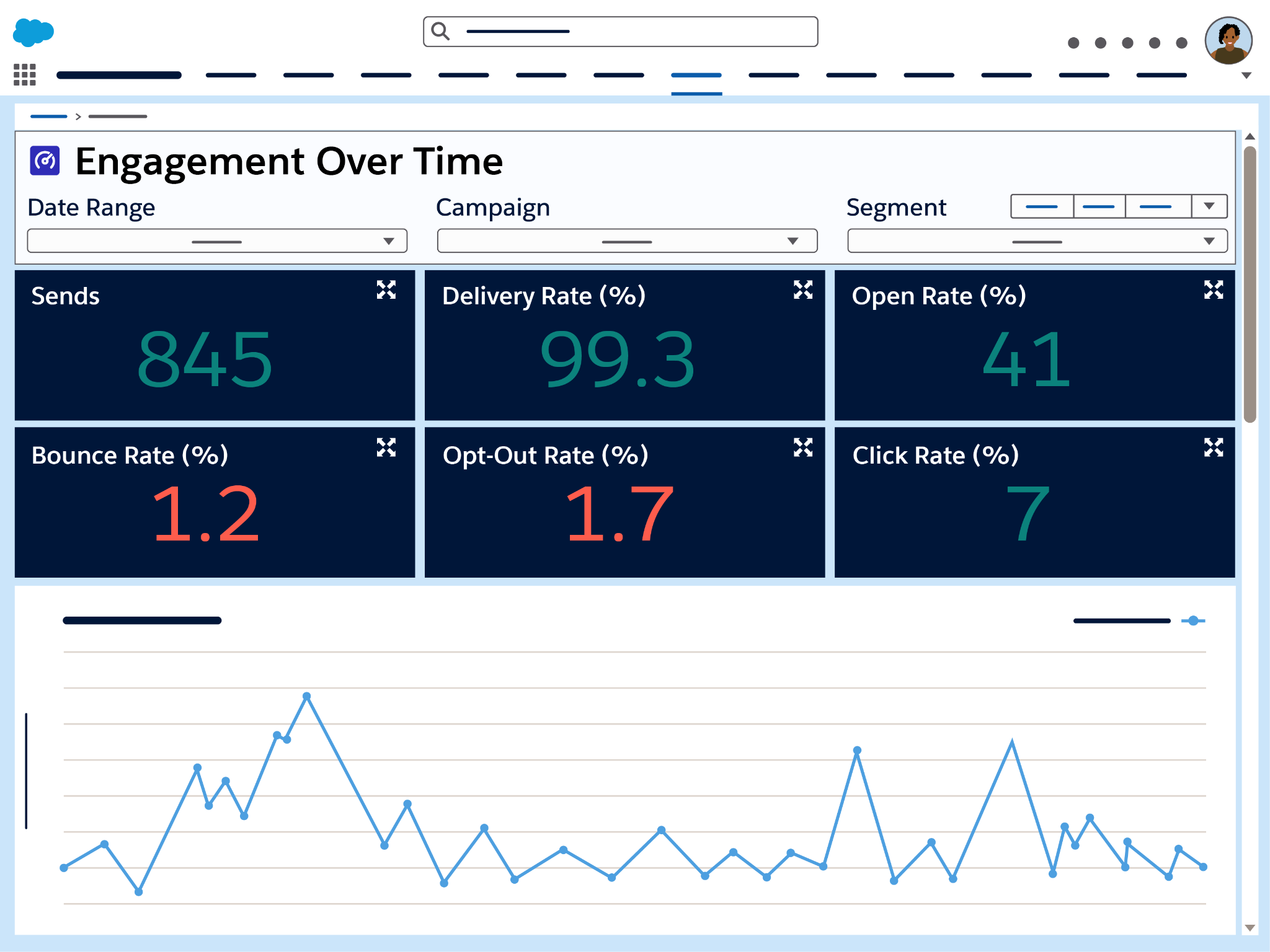
After your email goes out, you want to see how it performed. Marketing Cloud Next includes dashboards that give you a quick, visual snapshot of how subscribers interacted with your email.
Follow these steps to access and review campaign results.
- In the Marketing app, open the Marketing Performance tab to view cross-campaign performance dashboards. (These dashboards are not enabled in your playground.)
- Select either the Insights or Deliverability dashboard.
- In these dashboards you can review aggregate performance across campaigns.
- After a campaign sends and data is available, you may also find Insights and Deliverability views on individual campaign records.
- In these dashboards you can review aggregate performance across campaigns.
- Review key metrics such as Sends, Delivered, Opens, Clicks, and Unsubscribes to get an immediate sense of engagement.
- You can filter by campaign name or date range to compare performance across different sends.
- You can filter by campaign name or date range to compare performance across different sends.
When you finish this review, you’ll have a clear, high-level view of how successful your campaign was with your audience.

Review Results and Investigate Issues
After you send an email campaign, the next step is understanding what happened. Delivery and engagement metrics show how your message performed in real inboxes and how subscribers interacted with it. Reviewing these results helps you see what worked, spot anything unexpected, and decide what to adjust next.
Follow the guidance here to review performance, investigate delivery or engagement issues, and use what you learn to improve future campaigns.
Analyze Delivery and Engagement
After your campaign sends, use dashboards and reports to review how the message performed in real inboxes.
Look for these kinds of patterns.
- Email reaches inboxes and recipients open them. This shows that sender setup and subject lines are effective.
- Recipients click links in the message. This shows that the content and calls to action are relevant.
- Limited opens or clicks may point to timing, content, or audience selection that needs adjustment.
A review like this helps you understand what to repeat and what to refine in future sends.
Investigate Issues When Results Aren’t What You Expect
If results don’t match your expectations, review delivery and engagement details.
Common signals to investigate include:
-
Messages not sent: Review Send Status events and failure reasons such as Consent Not Given or Invalid From Address.
-
High bounces: Check domain authentication and sender configuration.
-
Unexpected unsubscribes: Revisit audience targeting or message relevance.
You can find these details in deliverability dashboards and engagement reports, where failure reasons and send outcomes help explain what happened.
Build Custom Reports for Deeper Analysis
For more detailed analysis, build a custom report using Marketing Performance data.
To do this:
- Go to Analytics and click Create Lightning Report.
- From the Category list, select Semantic Data Model.
- Choose Marketing Performance Semantic Data Model.
- Build your report using fields such as SendStatus, Bounce, or Unsubscribe.
- You can also track sends that fail validation in the Deliverability dashboards using the Email Failed to Send metric, where Failure Reasons help explain why a message didn’t send.
- You can also track sends that fail validation in the Deliverability dashboards using the Email Failed to Send metric, where Failure Reasons help explain why a message didn’t send.
If you see recurring issues—for example, repeated Invalid From Address or Consent Not Given messages—review your domain authentication, consent setup, or campaign configuration to correct the underlying problem.
This combined view helps you confirm whether your campaign was ready to send, understand how it performed in real inboxes, and troubleshoot common delivery challenges.
Share Results
Once you understand how your campaign performed, the next step is making sure your team reviews those insights. Sharing results helps everyone stay aligned, celebrate wins, and adjust strategy based on real engagement.
Here’s how to share those campaign insights.
- In the Analytics tab, open the dashboard or report you want to share.
- Select Share to copy a link or Download to export a file version.
- Share the report with teammates who have access, or include charts and metrics in a presentation or recap.
When you circulate campaign results, you help your team make informed decisions about what to improve, repeat, or test next.
Wrap Up
You’ve now learned how to interpret key metrics, diagnose common delivery issues, and share insights with your team. These skills help NTO learn from every send and continually refine its email strategy. With a strong understanding of performance, you’re ready to make each campaign more effective than the last.
Summary
In this module, you acted as both the admin and the marketer to get Marketing Cloud Next ready for email sending—from turning it on and connecting data, to authenticating domains, managing consent, and protecting engagement metrics. You built and sent an NTO campaign from start to finish, then learned how to read results, troubleshoot issues, and share insights with your team. With these skills in place, you’re ready to apply the same process in your own org so that every send is trusted, targeted, and always improving.