Coordinate Intake, Quoting, and Scheduling
Learning Objectives
After completing this unit, you’ll be able to:
- Describe how Home Health organizes referrals, documents, and tasks for intake teams.
- Explain how quoting and budgeting use configured catalog, pricing, and benefit data.
- Show how accepted quotes convert into a visit series that aligns with authorizations and capacity.
From Referral to Approved Visit Plan
In the first unit, you explored how Home Health supports the full home health lifecycle. Next, step into the day-to-day work of building a safe, realistic plan for a patient.
Meet Charles Green, a retiree recovering from hip surgery who needs physical therapy at home. His goal is to regain mobility and remain independent.
At Cumulus Health, a home health agency using Salesforce, several team members help Charles reach that goal.
- Jane, an intake specialist, manages referrals, quoting, and scheduling.
- Ahmed, a physical therapist, conducts in-home visits.
- Cara, a care coordinator, monitors progress and handles changes.
In this unit, you follow Jane’s work from intake to scheduling. You see how she starts with Charles’s referral, qualifies it, gathers and tracks required documentation, builds a financial plan by using quoting and budgeting tools, and converts the accepted plan into a visit schedule that aligns with coverage and capacity.
Along the way, discover how Agentforce supports intake teams by summarizing workloads and records, helping staff focus on the correct set of patients. The next unit picks up as Ahmed delivers the first visit and Cara tracks Charles’s evolving needs.
See Workload and Referrals in One Place
For a home health program to run smoothly, intake teams need a single view of demand and capacity, not scattered lists and inboxes. Home Health brings this together on one homepage before anyone starts reviewing individual referrals.
Jane begins her day by opening the Home Health app. The homepage displays dashboards that summarize how Cumulus is performing.
One dashboard shows care professional utilization, including how start of care and recurring visits are distributed. Another highlights service distribution and authorization status across patients. Jane quickly sees where capacity is tight and which stages might be causing delays.
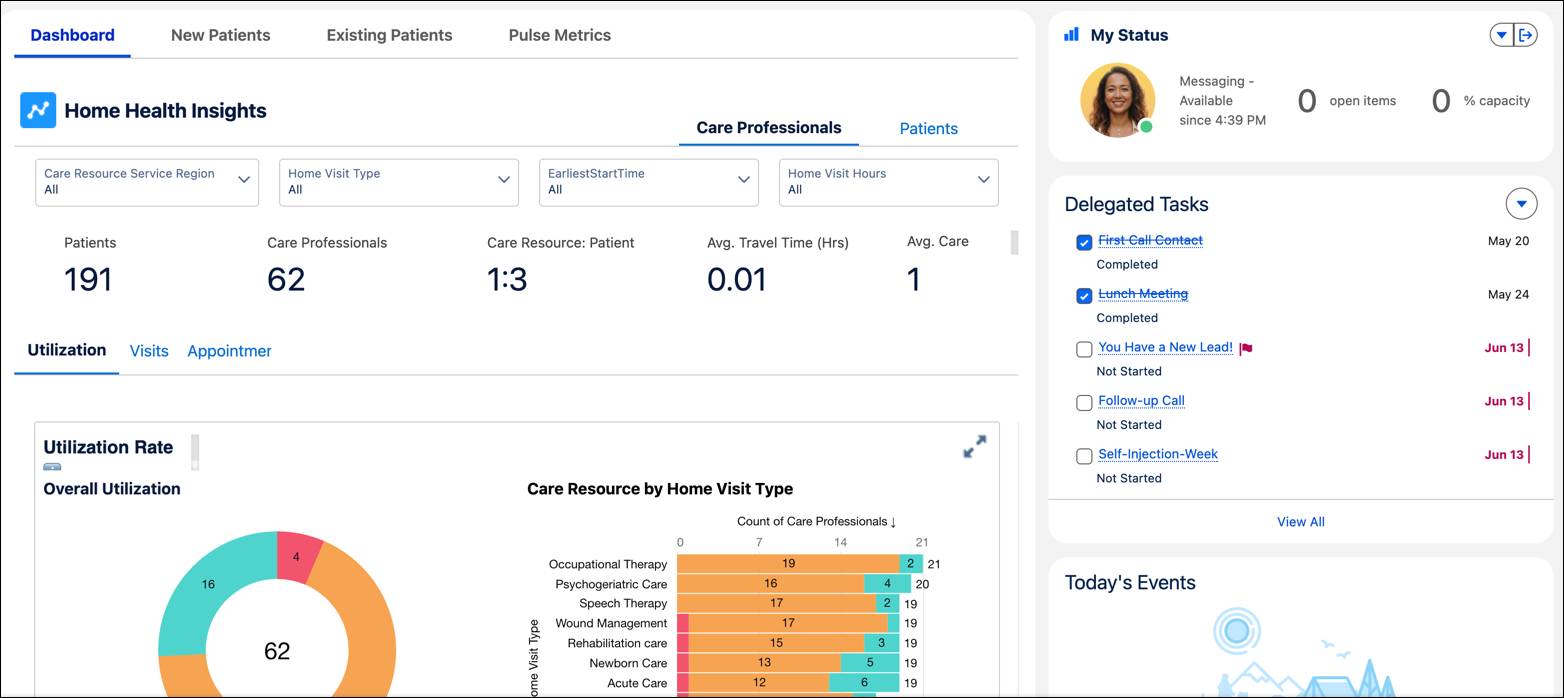
Under the dashboards, Jane scrolls to her referral and task lists. Names of patients appear with clear indicators of referral status, including a record for Charles Green.
Jane asks the Agentforce assistant to summarize his account and surface any issues needing attention.
For intake teams, this unified view turns a growing referral queue into a prioritized, structured workspace.
Qualify Referrals and Capture Requirements
After referrals arrive, intake teams need a consistent way to qualify them, gather required documentation, and ensure that the correct steps are followed. Structured paths and checklists help standardize the process.
Jane opens Charles’s clinical service request. A path at the top shows each stage, such as qualification, benefits verification, and clinical review, with reminders under each stage about what must be completed before moving forward.
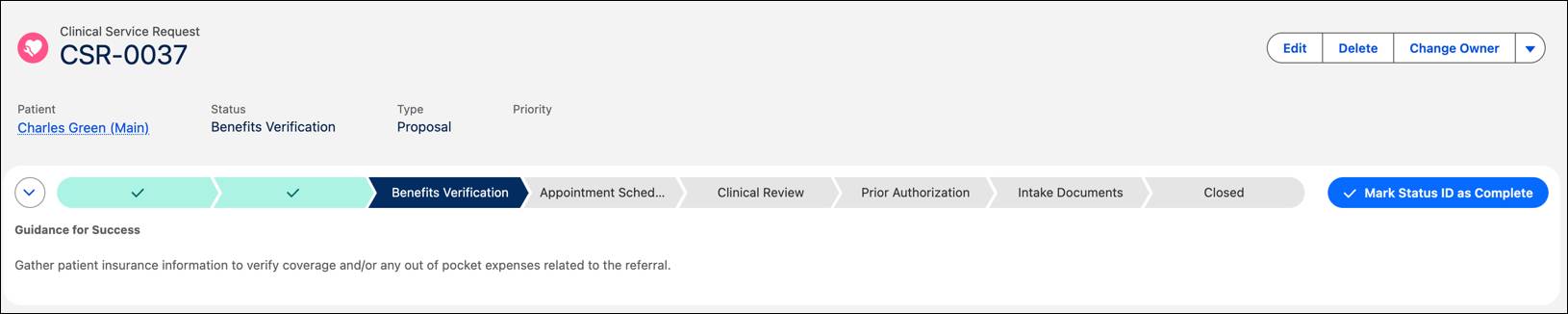
A checklist confirms that Cumulus has already received Charles’s insurance card and provider referral. All documents stay with the record, and validation rules can enforce completion before moving ahead.
Jane then opens Charles’s person account to review important information: medications, conditions, authorizations, benefits, and prior interactions.
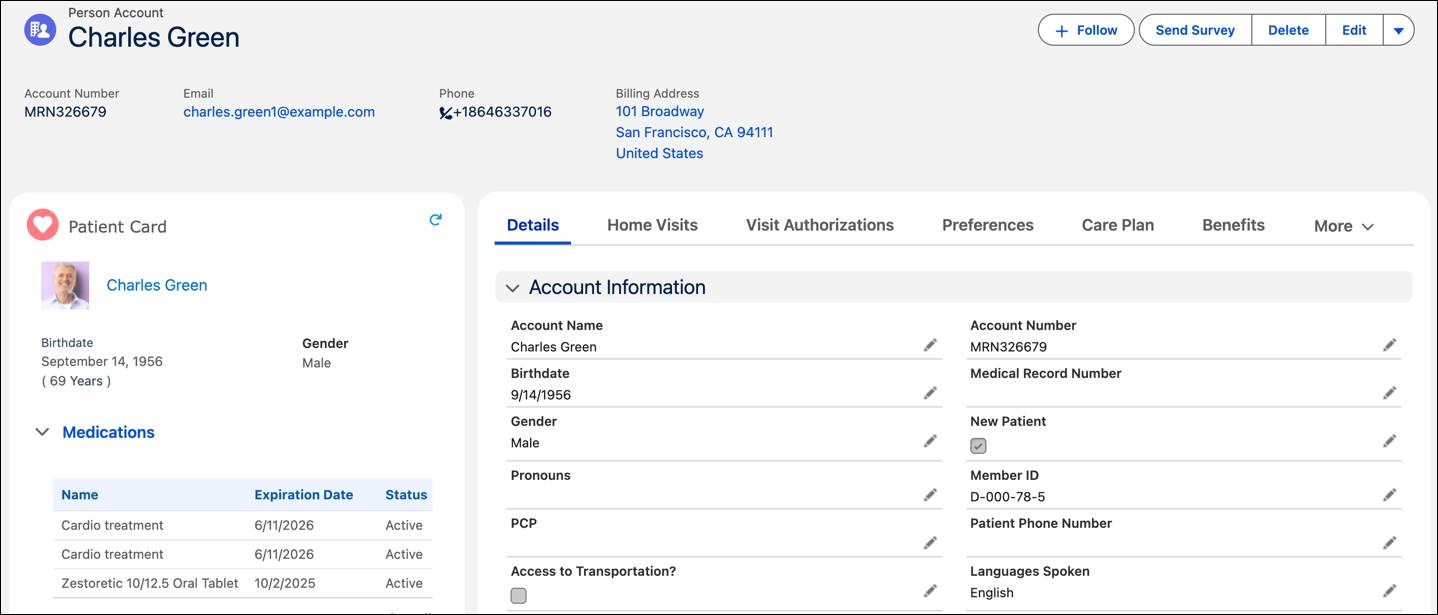
She calls Charles directly from the record to confirm his preferences: He prefers a male provider, speaks English, and has a large dog at home. Jane captures these so the scheduling engine can match Charles with a suitable physical therapist and avoid surprises.
With structured steps and shared records, intake becomes a consistent, traceable process instead of a random one.
Build Quotes and Budgets Patients Understand
Before care begins, patients and providers need clarity on what services are planned and how they are approved. Home Health supports this by capturing an approved scope of care that intake and scheduling teams can rely on before visits are created. Depending on the market, that approval might be defined through quoting or prior authorization. In all cases, the outcome is the same: a clear, approved plan that can be turned into scheduled visits.
At Cumulus, Jane uses quoting and budgeting tools to confirm the approved scope of care before scheduling begins.
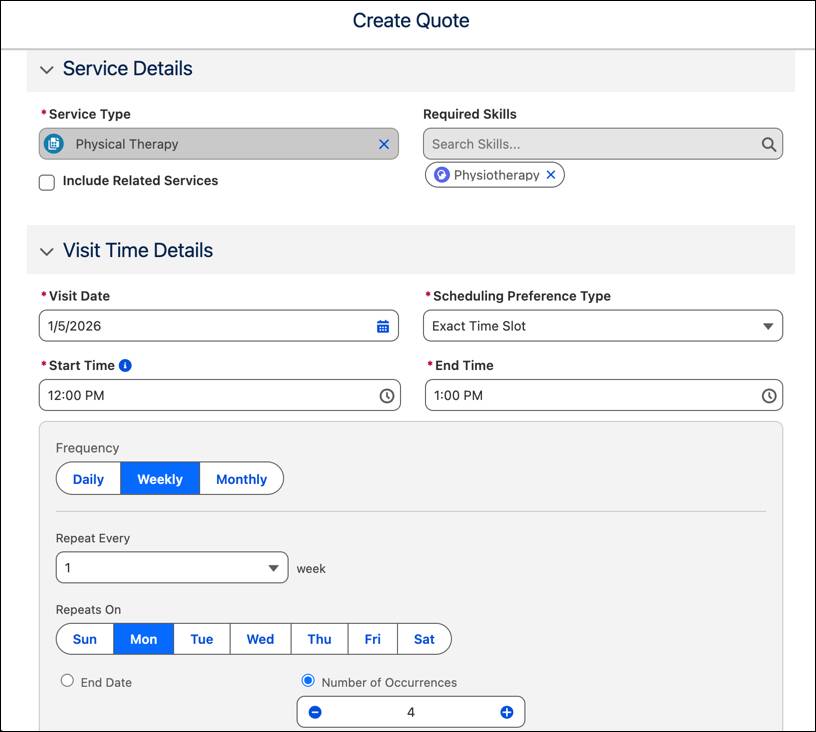
Jane opens the Quotes tab from Charles’s person account and creates a new Home Health quote by using the appropriate price book. Behind the scenes, Revenue Lifecycle Management ensures consistent products and pricing.
She selects a recurring visit type–weekly physical therapy for four weeks–and confirms the required skill and territory.
Next, she opens the Budget tab, selects Charles’s plan, and retrieves benefits and quotes. Configured benefit details, such as home health coverage limits, appear automatically. Jane adds the correct benefit item, and the budget view updates to show:
- Available coverage
- Estimated visit costs
- Remaining budget after the proposed care
Jane emails the budget to Charles, who receives a one-time password and a link to the document. After Charles reviews and accepts the plan, Jane marks the quote as approved.
By capturing approval in a structured record, intake teams establish a shared source of truth. Patients understand what care to expect, and downstream teams can move forward with confidence.
Turn Plans into Visit Schedules
Even the best plan fails if it can’t be turned into a realistic schedule. Home Health connects financial approval to visit scheduling, ensuring that the plan respects benefit coverage, provider capacity, and patient preferences from the start.
After the quote is approved, Jane selects Schedule Home Visits from the quote line. A guided flow walks her through important details, such as visit frequency, day of week, required skills, and territory. After Jane completes the flow, the system creates an initial start-of-care visit, followed by a series of recurring visits based on the approved plan.
These visits appear in the Home Visits tab on Charles’s record, assigned to a qualified physical therapist who matches his preferences. Cumulus has configured automatic assignment rules to match based on skill, availability, and territory.
If needed, Jane or a dispatcher can instead assign visits manually by using a filtered list of available care professionals. The scheduling flow supports both approaches using the same structured inputs.
Because the schedule is generated directly from an approved quote and benefits, Jane can be confident that:
- Visits align with authorizations and benefit limits.
- The care team understands what services are planned.
- Everyone is working from the same shared plan.
Whether assignments are made automatically or manually, Home Health keeps the process aligned from referral through scheduled visits.
Wrap Up
In this unit, you saw how Home Health supports intake and scheduling teams as they move patients from referral to an approved, scheduled plan. Dashboards, structured checklists, quoting tools, and guided scheduling flows help teams build plans that are clear, complete, and aligned to both care and capacity.
With one connected process, patients know what to expect and staff can focus on delivering care, not tracking down paperwork.
In the next unit, follow what happens after the plan is in place, when visits begin, needs change, and coordination becomes continuous.