Get Started with Hierarchical Relationships
Learning Objectives
After completing this unit, you’ll be able to:
- Explain the difference between hierarchical and nonhierarchical relationships in Supplier 360 SaaS.
- Navigate the Hierarchies page to view active, draft, and pending hierarchy instances grouped by hierarchy model.
- Use the Hierarchies tab on a supplier record to identify the record’s position within assigned hierarchies.
How Supplier 360 SaaS Connects Your Data
At NovaBridge Procurement, supplier records exist as separate islands of data. No one can easily answer: Who is the primary contact for Walter and Sons? Does Walter and Sons work with any subsuppliers? The Supplier 360 SaaS system holds records for suppliers, contacts, and subsuppliers, but without a way to connect them, the relationships between those records are invisible. It’s a problem Maria, a data operations specialist at NovaBridge, must solve.
That changes when the team starts using hierarchies. In this unit, Maria explores what hierarchies are, how they differ from nonhierarchical relationships, and how to navigate the interface that surfaces all that relationship data.
Understand Relationships in Supplier 360 SaaS
Supplier 360 SaaS supports two fundamentally different kinds of relationships between records.
Hierarchical relationships represent parent-child structures. They show that one record is subordinate to or contained within another. For example, a supplier record for Walter and Sons serves as a parent node, and a contact record for its regional account manager serves as a child node. Hierarchies also support multilevel nesting: Walter and Sons has a subsupplier, Adams Inc, which in turn has its own contacts.
Nonhierarchical relationships are peer connections between records. They use predefined relationship types—such as Supplier to Contact or Supplier to Supplier—and link records that are related but not in a top-down structure. For example, a contact record for a logistics coordinator is related to a supplier record through a peer association, without being a direct child node in a hierarchy.
The key difference: Hierarchical relationships convey structure and reporting lines, while nonhierarchical relationships convey associations.
What Is a Hierarchy Model?
A hierarchy model is the blueprint that defines the rules for a hierarchy. It specifies:
- Top-level business entity (for example, Supplier)
- Additional business entities that can appear as child nodes (for example, Contact, Subsupplier)
- Named relationships between those entities (for example, Supplier to Contact, Supplier to Supplier)
Think of the hierarchy model as the org chart template, and the hierarchy instance as the actual org chart filled in with real records.
For example, NovaBridge’s administrator has configured a Supplier Hierarchy model that allows two relationship types: Supplier to Contact and Supplier to Supplier. When Maria creates a hierarchy instance for Walter and Sons, she can only add child records using those two approved relationship paths.
Navigate the Hierarchies Page
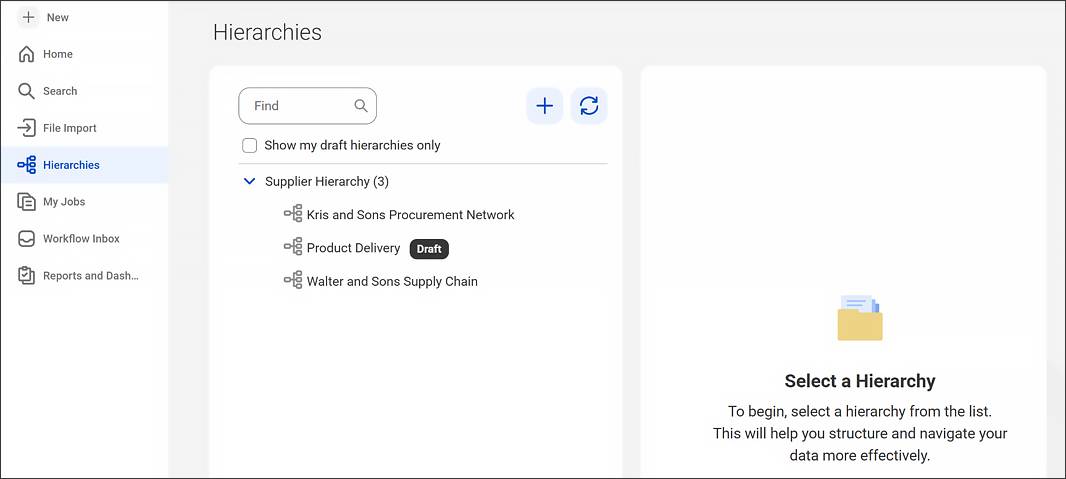
The Hierarchies page is the central workspace to create, view, and manage all hierarchy instances in Supplier 360 SaaS. To get there, click Hierarchies in the navigation pane.
On the Hierarchies page, the following hierarchy states are available.
- Active hierarchies: Published and in use
- Draft hierarchies: Created but not yet submitted
- Pending hierarchies: Submitted and awaiting approval in a workflow
Hierarchies are grouped by hierarchy model, making it easy to find all instances under the Supplier Hierarchy model. Maria can also filter the page to show only her own draft hierarchies—useful when working on something not yet ready for the rest of the team.
Navigate the Hierarchies Tab on a Record
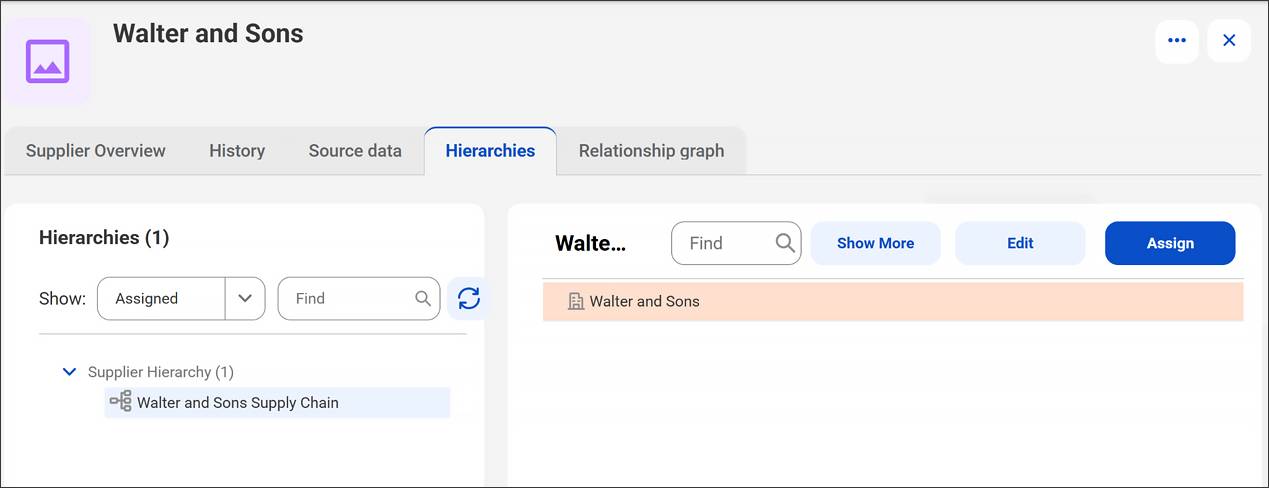
Every record in Supplier 360 SaaS has a Hierarchies tab that shows all the hierarchies that record belongs to. When Maria opens the Walter and Sons supplier record, she can click the Hierarchies tab to see:
- Which hierarchy models have instances containing Walter and Sons
- Whether Walter and Sons is a parent node, a child node, or both
- The child and parent records linked to Walter and Sons within each hierarchy
The tab groups hierarchies by model, just like the Hierarchies page does. This record-level view is especially useful when investigating a specific supplier to understand its position across all active structures.
Wrap It Up
In this unit, you learned how Maria distinguished between two relationship types. Hierarchical relationships define parent-child structures, where records are subordinate to and contained within one another. Nonhierarchical relationships capture peer associations through predefined relationship types. You discovered how she used the hierarchy model as the administrator-configured blueprint that controls which relationship types can be created.
You also followed along as Maria navigated the Hierarchies page to view all instances grouped by model and explored the Hierarchies tab on a record to see its position across all hierarchies. In the next unit, you put this knowledge to work by building a hierarchy instance for NovaBridge Procurement.