Refine Your Lightning App
Learning Objectives
After completing this unit, you’ll be able to:
- Extend the app with new fields, a validation rule, and a list view.
- Refine the Lightning web component's markup and JavaScript.
- Improve the app's styling and deploy the polished result.
Extend the App Data Model
Think of deploying your app as a milestone rather than the end of the road. Now that you've completed one loop in the agentic development lifecycle, you have a working app to iterate on. Because these updates build incrementally on your existing SFDX project, each prompt layers in a new refinement without discarding earlier work. Each improvement follows the same workflow that you're already familiar with: prompt, co-create, review and test, and deploy. In this unit, you run that loop three times by extending the data model, refining the Lightning web component, and polishing the app styling. Each pass ends with deploying the change to your org.
In Agentforce Vibes IDE, select Agentforce Vibes from the Activity Bar. In the same Agentforce Vibes chat, enter this prompt:
To the Tracked_Asset__c object, add Description__c (long text), Location__c (text), and Purchase_Cost__c (currency). Make Serial_Number__c a required field, and add a validation rule named Require_Serial_Number. . In the validation rule, make sure that the errorDisplayField field is set to Serial_Number__c and the errorConditionFormula field is set to ISBLANK(Serial_Number__c). Update the Asset Tracker User permission set so users can access the new fields, and add a list view named All Tracked Assets that shows status and location. Create the metadata in the project first. Do not deploy until I ask.
Review the new metadata by using the Metadata Visualizer. When you’re satisfied with the changes, deploy them:
Deploy the new and updated Tracked Asset metadata to my org, including the permission set changes. If the deployment fails, show the error messages and wait.
Because you deployed once already in the previous unit, Agentforce Vibes deploys only the new or changed metadata. Updating the permission set with the new fields is important. Without field access, lightning-record-edit-form can’t show those fields in the org even after you redeploy the Lightning web component.
Refine the Lightning Web Component
With the new fields in place, refine the assetForm component so that it includes them. In the Agentforce Vibes Chat interface, enter:
Update assetForm to include the new fields. Keep lightning-record-edit-form and lightning-input-field. Validate required fields and add a Reset button. Update the Jest tests for these changes. Do not deploy until I ask.
For this change and all future updates, also evaluate the code through three critical lenses to ensure the app remains healthy as it scales:
-
Accessibility: Ensure form fields have clear labels, the component is fully keyboard-navigable, and it meets standard accessibility guidelines so that the app reaches every user.
-
Performance: Look for inefficient patterns, such as redundant re-renders or unnecessary data fetching, to keep the component responsive as data grows.
-
Code Quality: Verify that the generated markup and JavaScript adhere to Lightning web component best practices and remain readable for long-term maintenance. See Best Practices for Development with Lightning Web Components.
Finally, ask Agentforce Vibes to rerun your updated Jest tests to ensure the new logic and components are stable. Passing tests give you the confidence that your changes are safe to ship. After all tests pass, deploy the refined component to your org by entering this final command:
Deploy all new and updated metadata to my org. If the deployment fails, show the error messages and wait.
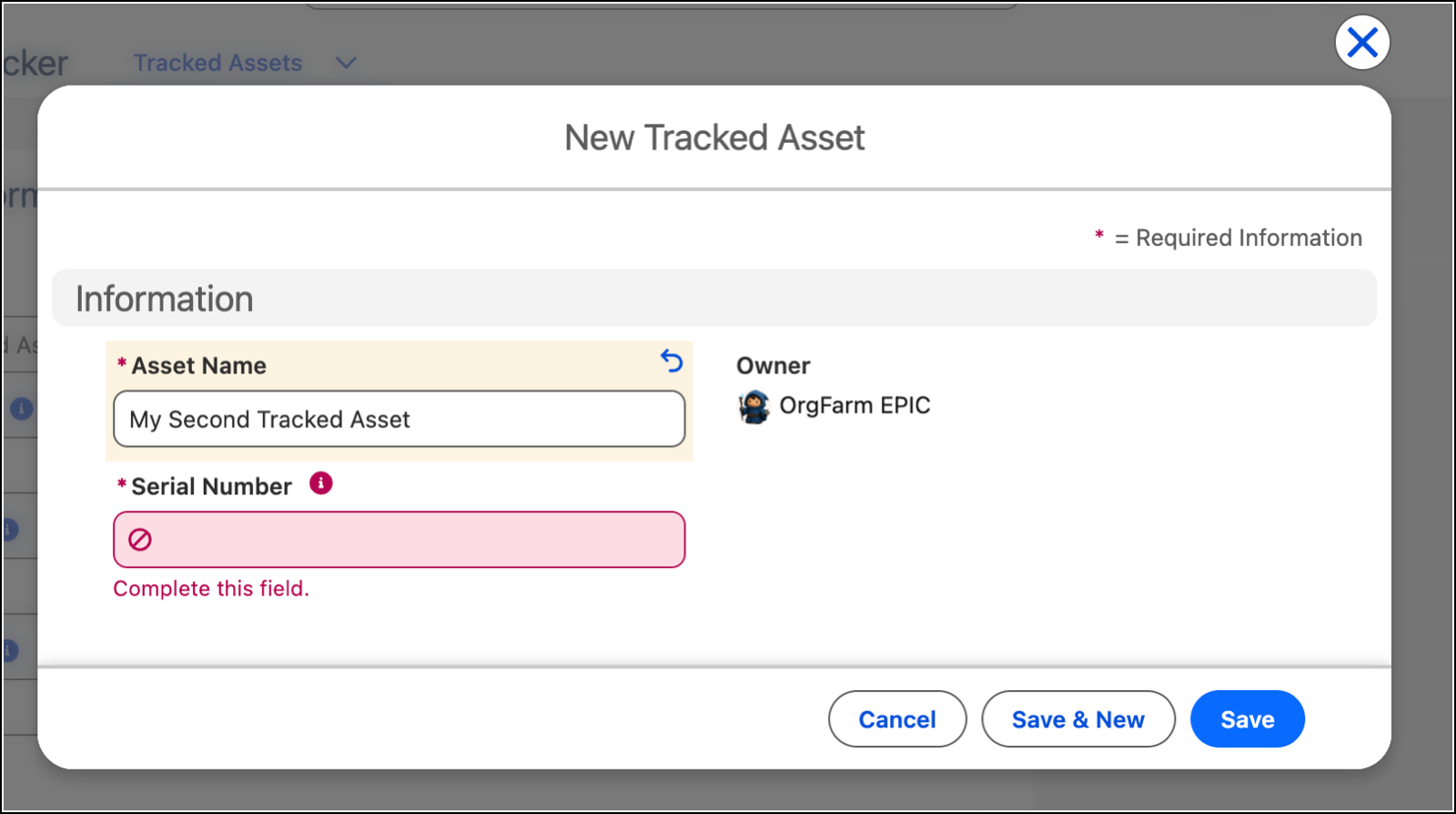
Just as before, Agentforce Vibes deploys only the modified components and reports the final deployment status. Now you can open a Tracked Asset record inside the live Asset Tracker app to review assetForm.


Customize the App Styling
With the app’s data model and core behavior locked in, the final step is to refine its visual presentation. Ask Agentforce Vibes to restyle the form by entering this prompt:
Update the styling of the assetForm component. Add section dividers with the slds-has-divider_top-space class and include section labels between the field groups. Make the form background gray. Adhere to Salesforce Lightning Design System 2 standards, and run SLDS Linter to confirm zero violations. Do not change object, field, or permission set API names. Do not deploy until I ask.
By requesting Salesforce Lightning Design System 2 (SLDS 2) standards, your form stays accessible and visually aligned with Lightning Experience. To fulfill this request, Agentforce Vibes runs SLDS Linter, a tool that analyzes your UI code against SLDS 2 rules. SLDS Linter can also apply the suggestions in bulk across your repository and automatically fix your code.
When you’re satisfied with the changes, deploy the changes so that users see the polished form in Lightning Experience.
Use this prompt.
Deploy the updated assetForm styling to my org.
If the styling changes don’t appear immediately, perform a hard page refresh by pressing Ctrl+Shift+R (Windows) or Cmd+Shift+R (macOS).

Wrap It Up
From prompts, you built an object, fields, a record page, a tab, a Lightning app, and a permission set. You tested and deployed a basic prototype, and then extended, refined, and restyled the result into a polished Asset Tracker app. The same agentic development lifecycle scales to whatever you build next, so try it on a Lightning app of your own!