Connect Products, Territories, and Users
Learning Objectives
After completing this unit, you’ll be able to:
- Identify how products connect to accounts to support compliant engagement.
- Describe how territories organize account coverage and field execution.
- Explain how user alignment structures ownership, collaboration, and access around accounts.
Beyond the Profile
Provider profiles form the base of the data model, but commercial engagement depends on more than who the provider is. Every interaction must also reflect what can be promoted, where it is allowed, and who is responsible for carrying it out. Agentforce Life Sciences links these dimensions directly to the account foundation so that visibility, eligibility, and permissions remain consistent across teams.
These three questions guide the model:
- What products can be discussed or sampled?
- Where is each provider eligible for engagement?
- Who is authorized to engage them?
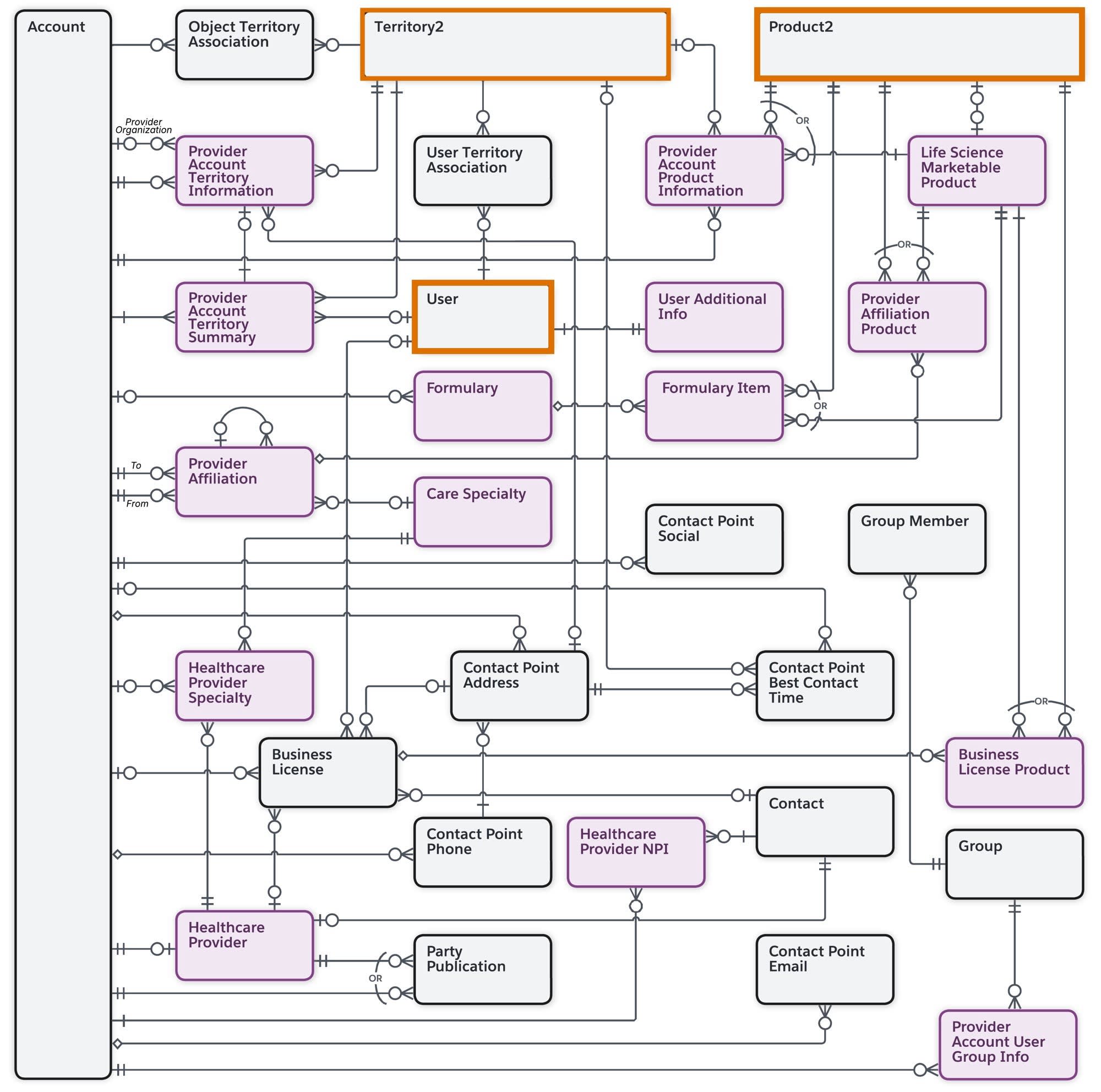
In this unit, you explore each dimension—territories, users, and products—as standalone concepts, then see how they connect back to the account model to shape real-world engagement.
Let’s start with the where.
Define Your Markets with Territories
Territories establish the geographic or organizational boundaries where engagement occurs. They determine which accounts belong to which field teams and help enforce regional compliance. Agentforce Life Sciences territories build on Salesforce’s Territory2 object and can be nested into national, regional, and local structures. Alignment rules then determine which accounts belong to each territory based on geography, affiliation, role, or specialty. Because these rules can apply across different dimensions, a provider can be assigned to multiple territories at once, such as both a primary care territory and a specialty-focused territory.
Here’s the data model that defines how territories are assigned to accounts.

These objects define how accounts are assigned to territories and how coverage is maintained, including how providers like Dr. Aaron Morita are aligned to the right regions.
The table below identifies the key territory objects.
Object |
Description |
Example |
|---|---|---|
Territory2 (1) |
Represents a defined geographic or organizational market segment. |
Cumulus Pharma creates a Bay Area territory nested under the West Coast. |
Territory Geo Assignment Rule (2) |
Represents a geography-based territory alignment rule. |
All accounts with a Bay Area ZIP code are assigned to the Bay Area territory. |
Territory Provider Affiliation Alignment Rule (3) |
Represents rules that align affiliated accounts to a territory based on role, specialty, or organization-level relationships. |
If a hospital is aligned to the Bay Area territory, its affiliated cardiology clinic is also aligned. |
Provider Account Territory Information (4) |
Represents the relationship between an account and a territory, storing territory-specific attributes that support visibility and later engagement logic. |
Dr. Morita’s record within the Bay Area territory shows the field reps' next visit and other engagement details. |
By linking accounts to territories, you ensure that users only see the providers they’re responsible for and that product availability and compliance rules apply consistently within each region.
Next, let’s learn more about how users and groups play a role in the data model.
Organize Your Teams with Users and Groups
Once territories define where engagement occurs, the next step is identifying who is responsible within those boundaries. In practice, organizations also structure teams around specific products and initiatives. For example, Cumulus Pharma may organize a launch team for a product like Immunexis, bringing together field reps and specialists aligned to that effort. Agentforce Life Sciences uses standard Salesforce User, Group, and Group Member objects to represent individual field reps, managers, Medical Science Liaisons (MSLs), and specialized teams.
These records then connect to the territory framework and to accounts, forming a complete picture of coverage and collaboration.

These objects define how users and teams are connected to territories and accounts, including product-aligned groups such as an Immunexis launch team supporting providers like Dr. Morita.
This table describes the key user and group objects and how they’re used.
Object |
Description |
Example |
|---|---|---|
User (1) |
Represents an individual system user such as a field rep or manager. |
Sofia Martin is a field rep user at Cumulus. |
User Territory Association (2) |
Links a user to a territory; users can belong to multiple regions. |
Sofia is assigned to the Bay Area territory. |
Group (3) |
Represents a collection of users organized by role, region, or brand. |
“Bay Area – Immunexis Launch Team.” |
Group Member (4) |
Adds a user to a group. |
Sofia is assigned to the launch team group. |
Provider Account User Group Info (5) |
Associates a user group to an account. |
The Bay Area launch team is linked with Dr. Morita’s account. |
Together, these relationships determine visibility, coverage, and collaboration. When Sofia views Dr. Morita’s account, the system checks her user–territory association and group membership to ensure she sees only permitted accounts and product information.
This gives organizations two levels of alignment:
-
Territory assignment, which defines broad geographic coverage
-
Team association, which supports coordinated work and role-specific priorities
Now that you understand how users and groups connect to your Account Management objects, let’s turn to the objects for storing your product portfolio.
Model Your Product Portfolio
Products define the “what” of commercial activity, such as the brands, indications, and therapeutic areas that shape engagement. Agentforce Life Sciences uses a layered structure that separates marketable concepts from physical items while connecting both back to territories and accounts for compliance.
Here’s a look at the product model and how it relates to territories and accounts.

These objects define what can be promoted, sampled, or restricted across territories and accounts, including which products are available for providers like Dr. Morita.
Let’s go over the key objects of the product model.
Object |
Description |
Example |
|---|---|---|
Life Sciences Marketable Product (1) |
Represents a promotable product, indication, or therapeutic area. |
“Immunexis” as a Brand, with a child record for “Immunexis for Chronic Inflammation. |
Product2 (2) |
Represents tangible products that can be sampled, ordered, or inventoried; must link to a Marketable Product. |
“Immunexis 50 mg Tablet (Sample).” |
Product Guidance (3) |
Stores approved messages and objectives for field engagement. |
Guidance emphasizes dosage safety and clinical outcomes. |
Product Territory Availability (4) |
Defines where a product is included and whether that availability applies to child territories. |
Immunexis is included for the West Coast territory and all subterritories. |
Life Science Product Account Restriction (5) |
Defines where a product is excluded, overriding general availability. |
Dr. Morita’s hospital is temporarily restricted from Immunexis sampling. |
Product Territory Detailed Availability (6) |
Stores the final, system-resolved availability after inclusion, exclusion, and inheritance rules are applied. |
Immunexis is available in the Midwest territory via Territory and Subordinates Inclusion, but explicitly excluded from one child territory due to local restrictions. |
This structure ensures that reps only see and promote products allowed in their assigned territories and for specific accounts. It also powers downstream workflows such as sampling eligibility and visit planning.
Finally, let’s see how products connect to licenses and affiliations.
Connect Products to Provider Data
In the previous unit, you explored how Affiliations and Licenses describe provider networks and credentials. Agentforce Life Sciences extends these relationships into the product layer to show who collaborates on a product, who is authorized to receive or discuss it, and where the product is available. The key objects for provider data are Provider Affiliation Product and Business License Product.

These objects connect product eligibility back to provider data, linking affiliations and licenses to what can be discussed or sampled for providers like Dr. Morita.
Here’s more about each object.
Object |
Description |
Example |
|---|---|---|
Provider Affiliation Product (1) |
Links a provider affiliation to a product, highlighting shared brand or therapeutic focus. |
Dr. Morita’s collaboration with Metro Medical’s Cardiology team is linked to Immunexis, reflecting his role as a local opinion leader for that therapy line. |
Business License Product (2) |
Links a provider’s license to the products it covers and governs sampling permissions. |
Dr. Morita’s California license includes Immunexis, confirming eligibility for sampling. |
Affiliations reflect influence and collaboration. Licenses confirm legal authorization. Together, they ensure product visibility, sampling rights, and compliance derived from verified provider data.
Bringing It Together
Connecting products, territories, and users back to provider accounts turns the data model into a coherent engagement framework. Each dimension contributes a boundary—what can be promoted, where it applies, and who is responsible—so field teams operate within clear, enforced constraints.
These relationships also power downstream workflows such as planning, visit preparation, and sampling, ensuring day-to-day activity follows the structure defined in the model.
In the next unit, you explore how organizations layer strategic intelligence on top of this foundation through Ratings, Lists and Filters, Segmentation, and Data Change Requests.