Build Your Ownership Blueprint
Learning Objectives
After completing this unit, you’ll be able to:
- Describe the role of the business in a cloud-based platform.
- Evaluate the business risks of relying on default security configurations.
- Analyze how business-aligned security controls can improve operations.
Return on Investment of Ownership
Moving beyond generic defaults and compliance minimums is essential. Configuring security controls based on your actual business priorities unlocks new capability, efficiency, and growth. Here’s an example.
Consider a typical front door lock. The lock that comes with a new home is the default setting. It meets the minimum requirement for security by keeping intruders out and securing what’s inside. But imagine a complex reality where your job keeps you away from the home for extended periods, you need to grant daytime access to family members and service workers, and you have teens that must be in the home by curfew.
A smart lock keeps intruders out and secure what’s inside, but it also lets you:
- Grant or revoke access without being home.
- Set automated rules that match the curfew and visitor requirements.
- See who comes and goes.
- Provide a more secure alternative to traditional keys that can be lost or duplicated.
That’s what intentional configuration does in a digital system: It keeps you secure, and it gives you more freedom.
Digital controls in your business work the same way when aligned with how your business actually operates.
ROI Scenario
A growing consulting firm with 150 employees, distributed teams, and a steady flow of client work uses a popular Software-as-a-Service (SaaS) platform for productivity, file storage, and project collaboration. The company is compliant with security requirements and is generally healthy, but it’s starting to feel friction.
- Contractors wait days for file access, delaying projects and frustrating customers.
- Remote staff waste hours resolving login issues, draining productivity and driving up support costs.
- Project managers reenter report data into two systems every week, increasing errors and slowing decisions.
Individually, these seem like small issues. But together, they add up to lost time, delayed outcomes, and risky workarounds. Now let’s see what becomes possible when this business configures its tools to match how it actually works.
Friction Point 1: Slow File Access for Contractors | |
|---|---|
Default/compliance configuration: |
Files can only be shared internally (limiting risk, but slowing down work). |
What becomes possible with aligned configuration: |
Sharing permissions are set for secure external access. Guest accounts expire on their own, sharing is limited to approved domains, and audit logs track all activity. |
What this looks like: |
|
Friction Point 2: Login Issues for Remote Staff | |
|---|---|
Default/compliance configuration: |
Phone-based SMS codes are required for every login to enforce multi-factor authentication (MFA) and reduce the risk of unauthorized access. |
What becomes possible with aligned configuration: |
Authentication is adapted based on user context and risk. Options like biometrics, hardware tokens, offline access, and SSO reduce friction while keeping access secure. |
What this looks like: |
|
Friction Point 3: Data Integration Issues for Project Managers | |
|---|---|
Default/compliance configuration: |
Third-party integrations are disabled (limiting risk). |
What becomes possible with aligned configuration: |
Secure APIs (application programming interface) use scoped tokens, Open Authorization (OAuth), rate limits and authenticated webhooks to allow trusted systems to automatically share data. |
What this looks like: |
|
The business still used the same SaaS platform, but instead of relying on default or compliance-only settings, they reconfigured them to match how their people actually work. These changes opened the door to new customers, faster delivery, and higher profits without increasing overhead.
Defaults are general-purpose and compliance settings meet the baseline. Business-aligned configurations are where a business becomes intentional. And aligned doesn’t mean expensive. Research from theCenter for Internet Security and the Trailhead badge The Value of Security Controls demonstrate that implementing essential controls, even across large enterprises, can be done within typical IT and cybersecurity budgets.
Understand Your Responsibility
In the upcoming activity, you map your space within a SaaS cloud environment. In a SaaS environment, the vendor manages nearly everything behind the scenes: servers, infrastructure, software updates, and security at the platform level. However, the business customer still controls use of the space, including:
-
Data: What data is created, used, stored, shared, archived, and destroyed.
-
Connections: What’s connected.
-
Access: Who gets access.
-
Operation: How teams operate on the platform.
-
Configuration: How security is configured.
Retaining this responsibility means you also retain authority to make decisions. The shared responsibility model ensures the vendor secures the platform, but it gives you the authority to configure your space to align with your specific context, risk tolerance, and goals. If you want a deeper overview of how responsibilities shift across cloud platforms, take the Cloud Security Engineering Trailhead badge.
Design Your Space for Business Success
If you live in a house, apartment, or any type of dwelling, you already understand how to map physical boundaries. For a house, you would sketch your property line, then mark vulnerable points like doors and windows. At each point, you have controls like curtains, alarms, locks, latches, and cameras. Some of these controls came with the house, others you added based on your environment, needs, or comfort and budget.
Now do the same for your digital boundary.
Your control over your settings is a chance to intentionally design how your system works. Security professionals call this design planning threat modeling, which is the strategic process of looking ahead to define the secure conditions your business needs to act with speed and reduce operational risk.
Activity Setup
Pick one SaaS tool that’s central to how your business operates, like a productivity suite, collaboration platform, or data storage system. You can do this exercise on your own or walk through it with someone from your cloud or cybersecurity team. You can also use a technical report or set up a short meeting with someone who manages your system day-to-day.
Grab paper and a marker, or use a digital drawing tool, then follow the directions below. This should take no more than 10 minutes.
Here’s an example similar to what you create.
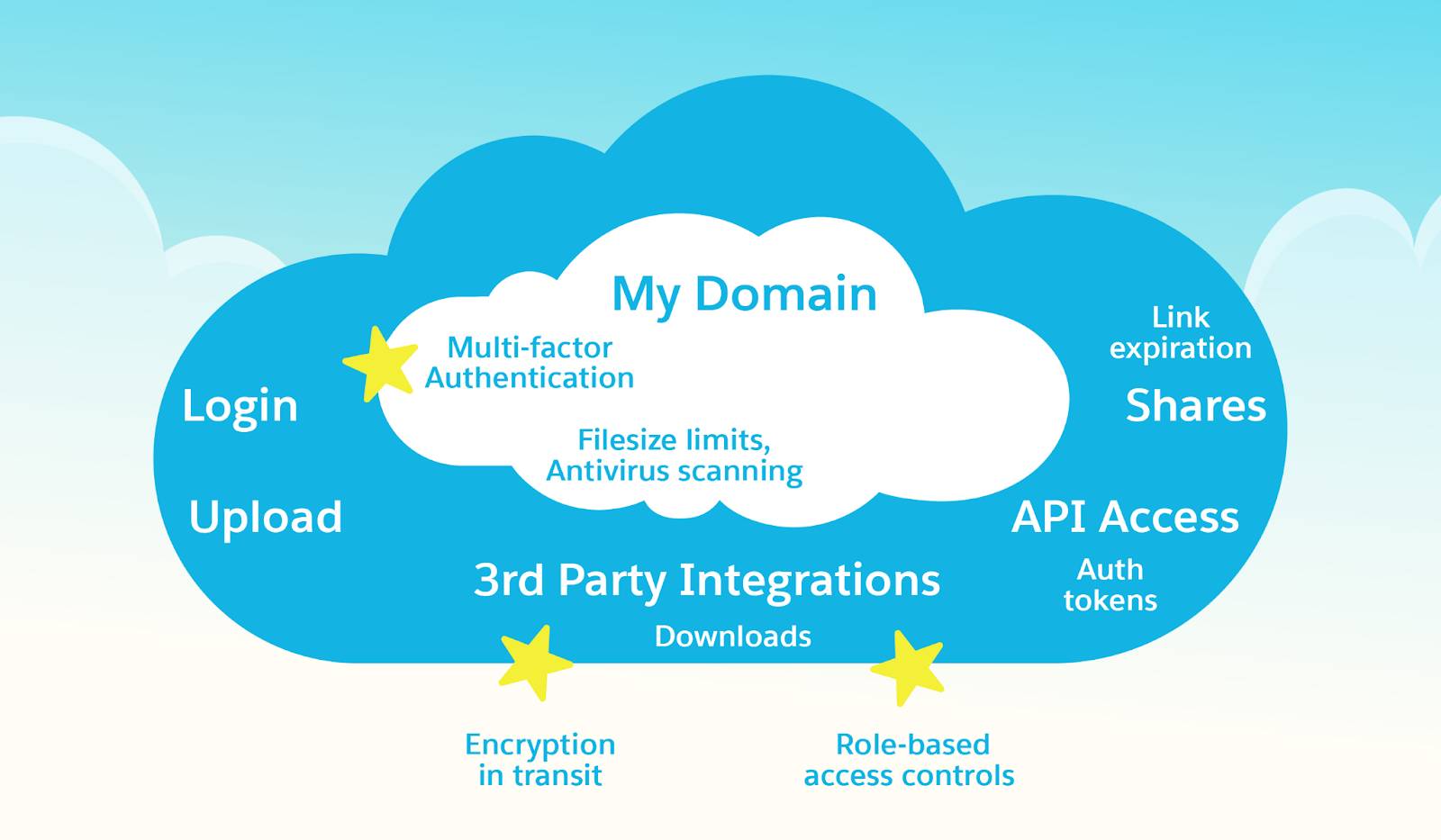
STEP 1: Draw the Cloud Platform
Draw a large cloud or large rectangle to represent your SaaS platform. Label it with the name of the SaaS Tool.
STEP 2: Draw Your Domain
Inside it, draw a smaller cloud or box. This is your domain or the part you're responsible for. Label it MY DOMAIN and list what's inside. For example:
- Your business goals
- Your rules (for example, risk appetite, policies)
- Your staff and their roles
- Your data and files
- Your integrations and connected apps
- Your workflows and automation
STEP 3: Identify Your Boundary
Your domain lives inside the vendor’s infrastructure. Your boundary is where your responsibility starts and where data moves in and out. To identify your boundary, look at the edges of your domain box and ask the following.
- Where does data come in? (Logins, uploads, API connections)
- Where does data leave? (Shares, exports, downloads, third-party integrations)
Label those points in your drawing. These are the “doors and windows” of your system. This is also where your controls have the most visible impact. Important control points also exist inside your system like access levels, data handling rules, and automated responses. Feel free to indicate those as well, but it isn’t required for this activity.
STEP 4: Mark Your Controls
On your boundary line, list 3–5 key security controls your business uses to observe, control, adjust, or automate how your system behaves. These tools empower you to sense what’s happening so you can act and respond when changes occur in the digital world.
Capability |
Control Examples |
What It Helps You Do |
Example Event/s |
|---|---|---|---|
Observe (Sight) |
Audit logs, data retention policies, activity dashboards |
See what’s happening |
File access, modified settings, and deleted data |
Listen (Hearing) |
Security alerts, anomaly detection |
Hear signals and patterns |
Excessive failed login attempts |
Interact (Touch) |
Authentication methods (MFA, SSO), sharing permissions, admin roles (RBAC), API access tokens |
Feel friction and know where you can move |
Document downloads and sharing permissions outside of the platform |
STEP 5: Ask Yourself
For each control in your drawing, ask yourself: Is this configured for my business priorities? Or is it still on default/compliance-only settings?
If any of the following are true, star that control.
- It reflects the vendor's assumptions, not yours.
- It meets compliance but doesn’t enable your workflow.
- It hasn’t been reviewed since setup.
- You’re not sure how it’s configured.
The starred controls show where someone else’s assumptions may be navigating your business. They might be right, but trustworthiness is your responsibility. Even if the system makes it easy to stick with defaults or just comply, cybersecurity becomes a business enabler when you reclaim the decisions that were made on your behalf.
You already have the authority to configure these controls. The platform gave it to you when you signed up. The question is: What becomes possible when your configuration reflects your priorities and not someone else’s baseline?
Your Next Action
Choose one starred control. Go to that setting in your platform. Look at what's enabled, read the options, and notice how it’s configured. Then ask:
“If this matched my business speed, risk tolerance, and workflow, what would be different?”
You’re not changing anything; yet you’re identifying the gap between the default map and the real world your business moves through. Start with one control and look at it through your business lens. Configure it to match your priorities, then move to the next. Every control you reconfigure removes friction, and every aligned setting expands what you can see, choose, and do. This is how you claim your authority in the digital world.
Sum It Up
In this unit, you moved beyond default settings and compliance checklists. You mapped your space, identified your control points, and saw where your authority still matters in a shared cloud platform. You also saw how misalignment can create friction, delays, and risk and what becomes possible when controls are configured to reflect how your business actually works.
But how do you know your configuration changes are working? In the next unit, you learn how to measure the value of intentional security, track what matters most, and effectively communicate those results.