Manage Apps and User Onboarding
Learning Objectives:
After completing this unit, you’ll be able to:
- Maintain apps in Slack.
- Support onboarding and new workspace requests.
Follow Admin Standards and Best Practices
In this unit, you dive into managing app requests and new user onboarding. These responsibilities follow similar approaches to the other admin tasks you’ve explored in this badge, with recommended best practices and automation through workflow.
Manage App Requests
Within Slack, there are standard apps and custom apps that help with user's productivity. Standard apps can be found in the Slack App Directory. Custom apps need to be built or installed. To help manage the volume of requests to install new apps, we recommend that your clients preapprove several apps at the org level that are installed in each workspace. These should be the tools that are used org-wide, like a calendar, file storage, or email. Users can go to the Apps section of their workspace to browse or search for apps currently approved. If the desired app is on the list, they can select Add to Slack to install it.
We also recommend that Workspace Owners preapprove or restrict certain apps for their specific workspace. Preapproving apps will help limit the volume of user requests to install new apps. To create structure and add predictability to what apps get approved or restricted, advise that your client translate internal security practices into guiding principles for why an app should get approved or rejected.
Apps request permission to view information, post information, and perform actions in Slack. You should guide your client to consider these permissions with their internal security policies when creating their app management policies. App requests should be reviewed and assessed based on app management best practices and company policies.
Build a Workflow to Support App Requests
You should support your client to create an app request process in the case that a user wants to use an app that isn't on the preapproved list. A request workflow in the #plz-admins channel should include the following.
- Name of the app
- Slack App directory URL
- Purpose of app
- Business justification
- Is login required to use the app?
Building a workflow is one option for managing app requests.
Manage New User Onboarding
During a Slack launch engagement, employees at your client’s organization will be onboarded to Slack through live training and on-demand resources that you deliver. Additionally, users will be asked to navigate to the #help-slack channel where Slack admins and champions should post Slack etiquette guides, tips and tricks, and videos to get up to speed on how to use Slack.
We recommend providing weekly Slack tips for at least the first 3 months after launch to make new user onboarding an ongoing process. A channel like #help-slack is an ideal spot to encourage users to post Slack questions so that the answers are searchable and shared publicly with other employees.
However, what happens when new employees join an organization after Slack is launched? Admins should create a flexible process to enable new employees on Slack. Organizations can set up a workflow in an organization’s default channels so that as new users are provisioned they’re personally messaged with Slack onboarding and enablement guidance. Slack also has an AI feature that helps onboard new users.
The types of requests we’ve covered so far are quite common for admins to receive. Let’s turn our attention to a slightly less common request, but one that you should still be prepared to advise admins on how to manage.
New Workspaces
In some cases, admins will get a request to create a new workspace. For example, if a client originally designed its grid to be relatively simple with just two workspaces (Global and Social), employees may find that over time these two workspaces aren’t meeting their needs. For example, the executive team is working on many mergers and acquisitions, and they realize that they need their own hidden workspace to best manage this sensitive work away from the broader employee base. In this case, the request for a new workspace needs to be submitted to and reviewed by admins.

We recommend your clients create a workspace decision tree like the one you see here. This will help make the request process simpler for both the user and admin. Admins can use logic as you see outlined in this tree to decide whether a new workspace should be created.
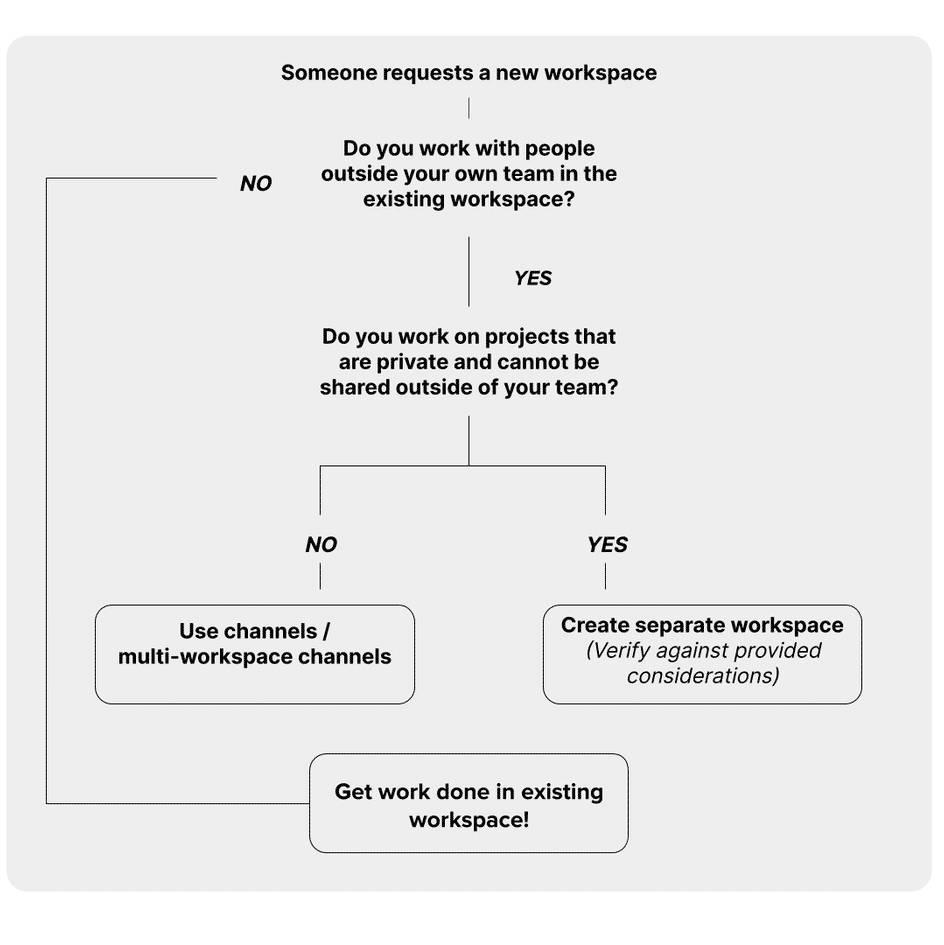
Remember that if the decision tree leads an admin to create a new workspace, they should verify the decision against the following considerations.
- Members of the new workspace work independently of the existing workspace population.
- There's a high level of privacy required. Many channels need to be restricted to a specific set of employees.
- New workspace administration (permissions, apps, profiles, status) needs to be handled uniquely from the existing workspace.
- Security exceptions are required. For example, retention settings or app access should be restricted beyond the broad organization settings due to external members or international restrictions.
- There's a dedicated admin team to support this new workspace.
Recap
To set up robust support models in Slack, you learned how to use channels and workflows to simplify request management for various admin tasks. You explored essential practices for app management and new user onboarding in Slack. Key strategies included preapproving standard and custom apps at the org level. This reduces user requests and aligns with internal security policies. For apps not on the preapproved list, you discovered how to create a workflow in the #plz-admins channel to standardize the request process.
Additionally, you covered strategies for onboarding new users. And you examined the process for handling requests to create new workspaces. These skills will help you advise clients on maintaining a secure and efficient Slack environment. They ensure smooth user onboarding and workspace management. This approach enables admins to efficiently manage requests, reduce overhead, and improve overall admin productivity.
Resources
- Slack Help: Understand guest roles in Slack
- Slack Help: An introduction to sharing channels and guest accounts
- Slack Help: Slack Marketplace
- Slack Help: Manage app approval for your workspace
- Slack Help: 5 steps to managing apps securely and at scale
- Slack Help: Conversations: Welcome new hires in Slack
- Slack Help: Add a channel to multiple workspaces in your Enterprise Grid organization