Build a Secure Headless Experience
Learning Objectives
After completing this unit, you’ll be able to:
- Explain your role in governing and monitoring AI experiences.
- Identify the seen and unseen layers that secure Salesforce headless interactions.
- Describe the "open access, not open bypass" principle.
Build Trust into Every Headless Experience
Headless capabilities expand access to Salesforce data and processes beyond the traditional Salesforce interface. That flexibility introduces new places where users, apps, and agents can request access. Giving up control can be scary without proper governance. The good news is that admins don’t need to become security engineers or governance experts. The same questions you already use to manage Salesforce access still apply: Who needs access, at what level, and what can they do? In this badge, we cover the concepts of AI security and governance within headless experiences, how to determine access, how to monitor activities, and finally create a response plan.
Your Role in Headless Security
In the world of headless functionality, the traditional Salesforce roles have shifted and any user can choose to be a builder, even those users who identify themselves as an admin. While admin builders don’t have to code or investigate every part of a headless experience themselves, all users need to ask the right questions, establish governance and monitoring processes, and address issues if they occur. Regardless of your role, it’s a good idea to understand the mechanics and tools available that support a secure, trusted headless experience (for both your personal and professional use cases).
Governance and Monitoring
Let's define governance and monitoring. Governance and monitoring for headless use cases is the set of rules and tools used to manage, track, and secure disconnected front-end apps and back-end services. Governance sets the policies for data access and who accesses it, whether a human or an agent. Monitoring observes the processes to catch and fix issues quickly. Here is a simple approach.
-
Know the task: Understand the use case, owner, users, data, and actions.
-
Limit access: Grant only the access the use case or task needs.
-
Monitor: Watch the task, know what’s normal, and identify which critical steps require review.
-
Stop issues: Know how to stop a task, who to contact, and how access can be cut off, if needed.
Grow a Strong Tree
Regarding AI and AI security, you might think first about what you can see: the tool interface, the responses, the actions the agent takes on behalf of a user. But the visible pieces are only a small aspect of security. Let’s imagine your headless architecture as a newly planted tree. A tree can look visually healthy, but if the roots are weak, it can’t withstand a strong wind. It’s important to consider all aspects of growing a strong tree, the limbs and leaves, the solid trunk, and the roots. Similar to a tree, headless architecture needs to focus on all aspects of the experience.
-
Visible surface (limbs and leaves): The user-facing touchpoints, such as Slack, conversational chat interfaces, and visible user actions, represent the outer canopy where day-to-day work occurs safely.
-
Trust Layer (trunk): The Einstein Trust Layer forms the central pillar, mediating all traffic, enforcing data masking, and guaranteeing secure execution between hidden policies and surface-level requests.
-
Underground foundation (roots): The back-end security controls, such as role-based policies, access rules, and fundamental user permissions, anchor the entire system below the surface to keep data grounded and compliant.
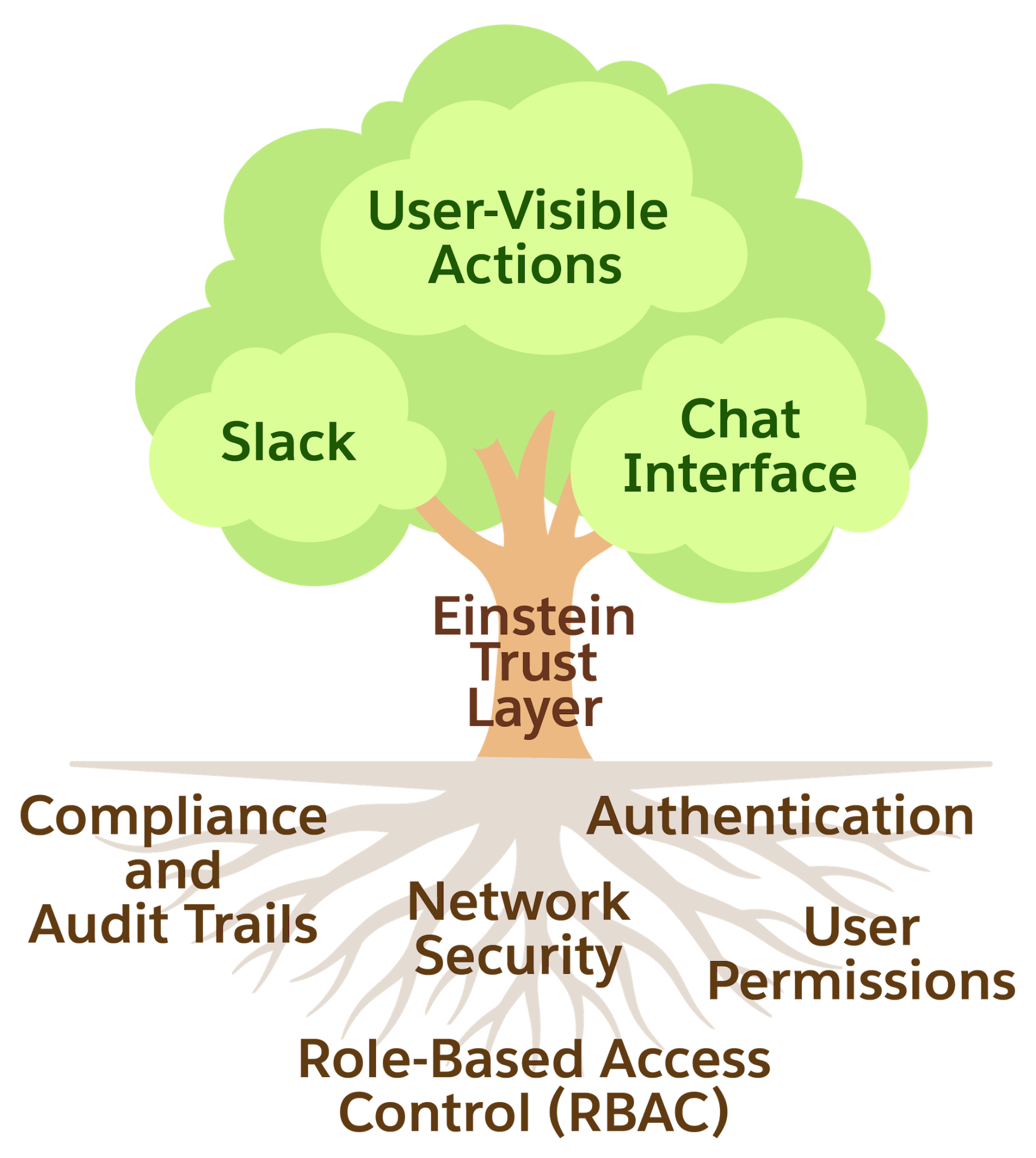
That underground foundation includes many elements that are unseen and mostly invisible. This includes:
-
Identity and authentication—who the caller is and how they proved it
-
Access controls and permissions—what data the user can only read or write
-
Field-level security (FLS)—which specific fields within a record are visible
-
Role-based access control (RBAC)—what actions that a role can perform
-
Compliance and audit trails—a record of every access event for regulatory purposes
-
Data lineage and traceability— the ability to track where data originated
-
Real-time monitoring—detection of anomalous access patterns
-
Network security—encryption in transit, network isolation
-
Data loss prevention—controls that stop sensitive data from leaving approved boundaries
When these elements are missing, failures and issues compound and can appear in unexpected ways, for example, an agent shares or deletes data it shouldn't. When you create a do-it-yourself (DIY) integration that connects external AI tools to Salesforce data, you can build beautiful trees. However, you must also create the security and governance controls in order to establish healthy, strong roots. It’s possible, but what if just one of those roots is missing or too shallow? The good news is that the Salesforce Platform provides these capabilities for traditional and headless Salesforce deployments based on two principles focused on access and controls. Let’s start with the first principle.
Principle 1: Open Access, Not Open Bypass
The principle that defines headless architecture is “open access, not open bypass.” A headless call from Claude Code or from any external agent inherits the exact same governance as a traditional Salesforce call. The connection or surface changes, but the security model and credential checks are identical. Salesforce Hosted MCP Servers are disabled by default. Admins explicitly enable the servers that agents can access. Nothing is exposed until an admin makes a deliberate decision to open it. When an agent calls a Salesforce Hosted MCP Server to retrieve a customer record, it goes through the same identity verification, the same field-level security checks, and governance enforcement as a Salesforce user clicking a button in the UI.
Curious about the technical details? Our MCP server uses External Client Apps (ECAs), not Connected Apps, with a dedicated mcp_api OAuth scope. The authorization flow is an OAuth 2.0 Authorization Code with Proof Key for Code Exchange (PKCE), giving admins a clean, purpose-built control surface for headless access. There are three tools for controlling exactly what agents can access through those MCP servers:
-
Read-only servers: Expose data without allowing write operations, limiting the blast radius of any agent error.
-
Named queries: Parameterized query expressions scoped to what the agent needs.
-
Custom Apex actions: Expose only specific operations, defined as @InvocableMethod, to give precise control over what agents can do in the system.
Dive deeper into some of the MCP server security best practices.
Up Next
In this unit, you explored AI security and governance concepts, the “open access, not open bypass” principle, and why DIY integrations can be risky. In the next unit, you move from governance concepts to actionable security, covering the principle of least privilege and how to scope permissions for your headless agents.
Resources