Access Next Gen Features
Learning Objectives
After completing this unit, you’ll be able to:
- Create a unified marketing strategy across platforms.
- Identify best practices for hybrid campaign management.
- Explore ways to navigate to Marketing Cloud Next from within the Marketing Cloud Account Engagement interface.
- Implement your roadmap with the proper technical setup sequence.
Build a Unified Strategy
Having access to both Account Engagement and Marketing Cloud Next is powerful, but the real value comes from using them together. Before diving into execution, you need to thoughtfully plan how to use these capabilities together. Let’s explore.
Build on What You Already Have
You don't start from scratch. Data 360 connects your existing engagement data, lead scoring history, and campaign performance across Account Engagement and Marketing Cloud Next. It also unifies data from multiple sources — CRM data such as accounts and opportunities, product usage, service data, commerce history, and external signals such as website analytics. Together, these create richer customer profiles so you can personalize campaigns based on full customer context, not just email behavior. Salesforce CMS serves as a shared content workspace, so you can reuse emails and assets without rebuilding them.
Reimagine Your Approach
Marketing Cloud Next gives you an opportunity to rethink how you operate. Consider which Engagement Studio programs could benefit from multi-channel outreach, what manual tasks Agentforce or Flow could automate, what data would unlock better personalization, and where marketing should hand off customers to sales or service.
Prioritize and Start Small
Organize your strategy by assessing what's working and identifying your pain points. Determine where multi-channel, connected data, or AI will make the biggest impact, then prioritize quick wins and define success metrics. Start small with one pilot use case, prove value, then expand.
A unified strategy starts with identifying where Marketing Cloud Next enhances your existing Account Engagement programs. Use your historical data, integrate sources such as CRM data, product usage, service history, and website analytics. Then follow the proper setup sequence covered later in this unit. Your proven email programs stay intact - you're adding new dimensions of data, channels, and intelligence to meet modern buyer expectations.
With your strategic foundation in place, let’s get practical about how to use both platforms together.
Plan Your Hybrid Approach
When you activate Marketing Cloud Next alongside Account Engagement, you’ll be using both products together for different marketing needs. This results in hybrid campaign management across both applications. Here are a few examples of how the platforms work together.
Use Case |
Description |
|---|---|
Reporting |
Continue using B2B Marketing Analytics in Account Engagement for detailed campaign, prospect, and account insights. Use Data Cloud reporting to view how campaigns across both Account Engagement and Marketing Cloud Next contribute to overall performance. Keep using Engagement History Dashboards to understand how customers engage with campaigns. |
Channels |
When getting started, continue sending promotional emails in Account Engagement and using your existing Engagement Studio Programs. At the same time, begin collecting opt-ins for SMS and WhatsApp, and start sending SMS and WhatsApp messages through Marketing Cloud Next. This helps you expand into new channels without disrupting proven email nurtures. |
Content |
Create emails and landing pages using the latest CMS-powered Account Engagement builder. These assets can also be used in Marketing Cloud Next from the same CMS workspace, letting you reuse content across platforms. You can also use the CMS workspace to build new landing pages directly in Marketing Cloud Next. |
AI |
Use Account Engagement's predictive Account Scoring and Campaign Influence to identify top accounts and understand campaign impact. In Marketing Cloud Next, use Agentforce to build campaigns, generate content, and automate workflows, including campaign performance summaries through the Campaign Creation Agent. Use Distributed Marketing & Alerts (DM&A) to enable sales teams to send personalized, marketer-approved content while maintaining brand consistency and compliance. |
Now that you understand how to use these capabilities strategically, let's explore how to navigate between them.
Navigate to Next Gen Features
Account Engagement and Marketing Cloud Next are part of the same Salesforce ecosystem. You don't need to log in and out of different systems constantly or manually sync data between disconnected tools. You can move between them smoothly without leaving your workflow. Let's see how it works.
Marketing Cloud App Launcher
If you are working within the Salesforce Platform (Sales or Service Cloud), you can find your marketing tools just like any other app. Just click the App Launcher and search for Marketing.
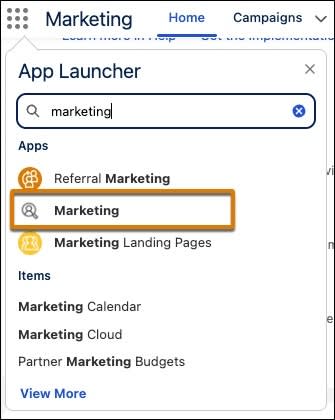
This takes you to Marketing Cloud Next capabilities such as Campaigns, Segments, Flow Builder, and Content Builder.
Navigation Bar
When you're working in Salesforce, the navigation bar provides quick access to both Account Engagement and Marketing Cloud Next features. Your Account Engagement assets such as emails, forms, and landing pages remain accessible through the Account Engagement app. Marketing Cloud Next capabilities such as SMS messages, journeys, and Data 360 segments are available through the Marketing Cloud app. You can switch between them without logging out.
Campaign Canvas and Flow Builder
When building campaigns, you can incorporate Marketing Cloud Next actions. In Engagement Studio, add a step that routes leads to a Salesforce Flow. Within Flow Builder, you can trigger Marketing Cloud Next actions such as sending SMS messages, updating Data 360 profiles, or adding contacts to cross-channel journeys. This creates connected experiences without manual handoffs.
Data 360 Integration Points
Access customer profiles and segments from within your Account Engagement workflows. When creating email lists, you can pull segments built in Data 360 that include cross-platform data. Lead scoring in Account Engagement can be enhanced with behavioral signals tracked in Data 360. Dashboards show activity across platforms in one view.
Bookmark key Marketing Cloud Next pages such as Flow Builder or Content Builder for quick access.
Implement Your Strategy
After you’ve planned your strategy, it's time to put it into action. Following a structured approach ensures success without disrupting what's already working. Work with your admin team to follow this specific setup sequence:
-
Set up or update Marketing Cloud Account Engagement configuration: Ensure your Account Engagement instance is properly configured with existing data, forms, emails, and Engagement Studio programs.
-
Set up Marketing Cloud Next: Configure Data 360, SMS and WhatsApp channels, business units, users, and permissions.
-
Configure the Data Cloud Connector: This connector brings Account Engagement and Marketing Cloud Next together through Data 360. Only configure this after both platforms are set up individually.
This sequence helps keep data consistent and prevents configuration conflicts.
Next Up
In this unit, you learned how to build a strategy across Account Engagement and Marketing Cloud Next, navigate between platforms, and plan your implementation roadmap.
Next, explore how to set up key Marketing Cloud Next capabilities.