Build a Guided Shopping Agent
Learning Objectives
After completing this unit, you’ll be able to:
- Describe the role of each standard action linked to the Guided Shopping template.
- Summarize the steps to build a Guided Shopping Agent.
- Explain why after the initial agent setup, the topic instructions for Agentforce Commerce for B2C Storefront Global Instructions are updated.
Guided Shopping for B2C Storefronts Template
To build a Guided Shopping Agent you use Agentforce Builder and the Guided Shopping for B2C Storefronts template. The template guides you through the steps to add default subagents, define AI agent settings, and select the AI agent’s language.
Guided Shopping for B2C Storefronts Template
The Guided Shopping for B2C Storefronts template adds a set of predefined subagents and their supporting actions to your Guided Shopping Agent. These subagents form the foundation of the AI agent’s basic capabilities. (To learn more about subagents and actions, see Identify Topics and Actions.)
-
Agentforce Commerce for B2C Cart Management: Adds simple products to cart, helps resolve the final variant for master products and adds them to cart, and displays the cart summary.
-
Agentforce Commerce for B2C Order Assistant: If a payment for an order succeeds, accesses and presents order confirmation details, confirms essential order information, and assists customers post-purchase. If an order for a payment fails, re-displays cart details and checkout buttons and prompts the user to retry payment.
-
Agentforce Commerce for B2C Product and Cart Link: Handles user queries related to managing their shopping cart, purchasing products or certain patterns product details questions.
-
Agentforce Commerce for B2C Product Details: Returns JSON product details when the user explicitly asks for them.
-
Agentforce Commerce for B2C Product FAQs: Handles specific, attribute-level questions about a known or contextually established product, including details like materials, dimensions, compatibility, warranty, and usage instructions. This category focuses on one identified product and does not cover product comparisons or general recommendations. It should only be used when the product is explicitly referenced by name, SKU, ID, or prior system context.
-
Agentforce Commerce for B2C Product Search Assistant: Handles any user query indicating a desire to find, explore, or purchase a product or product category. This includes requests to view, browse, or search for products or categories, even if the request contains vague, malformed, or noisy input.
-
Agentforce Commerce for B2C Site FAQs: Handles general questions about the store, including its policies, services, loyalty programs, and general product lines (not specific products). This topic is selected when the user’s query does not involve a specific product or a desire to browse or buy but is seeking information about the ecommerce site, its processes, or general product categories.
-
Agentforce Commerce for B2C Storefront Global Instructions: System-level instruction for config.
Guided Shopping Agent Setup Prework
Before you launch Agentforce Builder and start the guided setup, it’s a good idea to have your AI agent settings defined. Agent settings determine how your AI agent behaves and presents itself in conversations. Agent settings include:
-
Name: The AI agent’s name
-
API Name: This automatically populates after you enter the AI agent’s name.
-
Description: Summarizes the AI agent’s goals. The template provides a standard Agentforce for Guided Shopping description that applies to companies across a wide range of industries.
-
Role: The AI agent’s role in the company and the tasks it completes.
-
Company: Information about your company, including product information and relevant business details.
-
Agent User: The user permissions that your Guided Shopping Agent is linked to. The AI agent user determines what your AI agent can access and do. Make sure that the AI agent user has the required permissions for relevant features and objects.
Here’s an example of role and company descriptions for an online retailer.
-
Role: You are an AI agent that uses Agentforce Commerce data to provide product information to shoppers. You help shoppers find products, suggest other products, and recommend product sets. You help shoppers with order checkout and order returns.
-
Company: Your company is a leading online clothing retailer dedicated to providing the latest fashion trends. Your mission is to empower individuals to express their unique style through high-quality, stylish, and versatile clothing options.
Build Your Guided Shopping Agent
In your Salesforce org, open Agentforce Builder and build a new agent.
- In your Salesforce org, click
 and select Setup.
- In the Quick Find box, search for and select Agentforce Agents.
- Click New Agent.
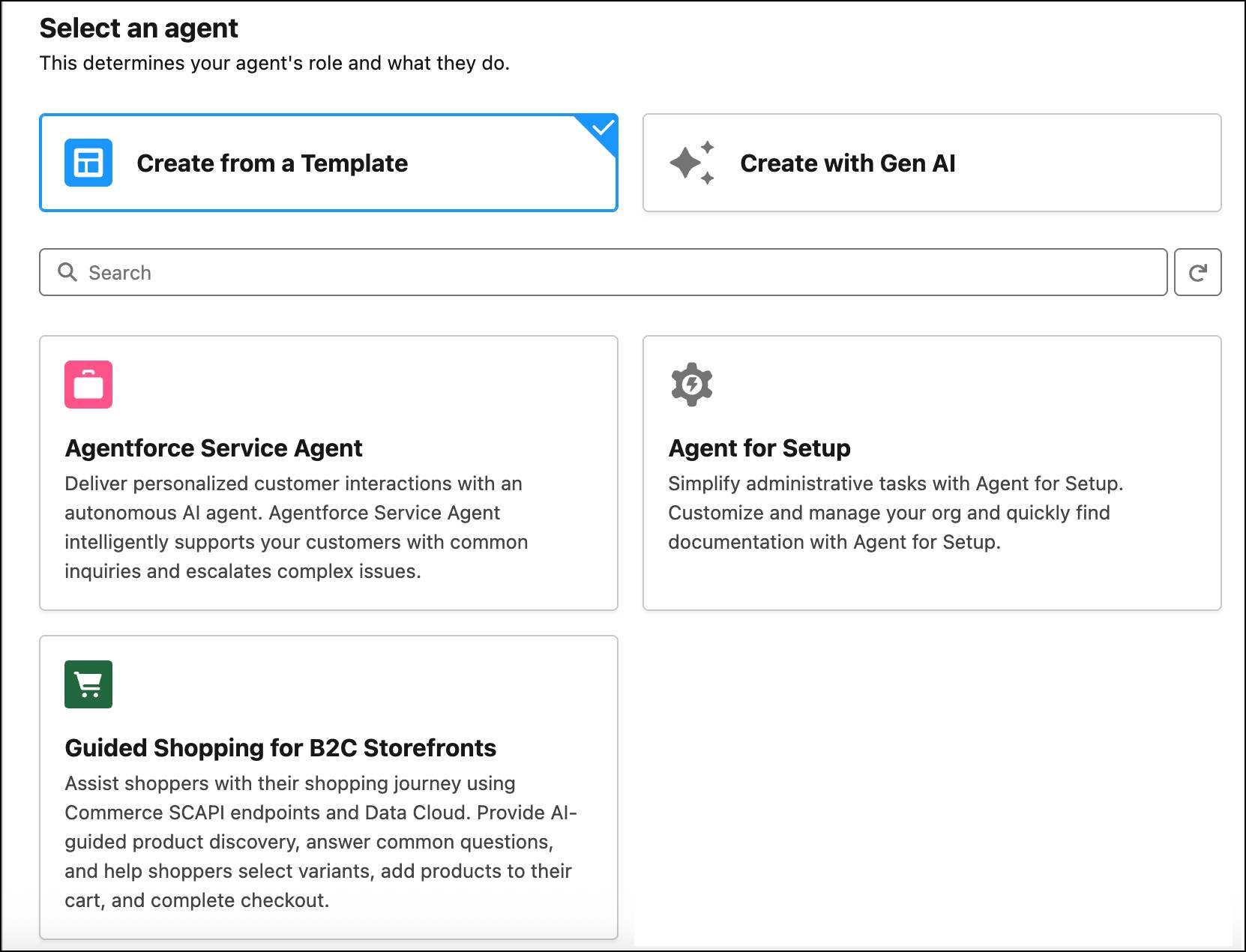
- Select Create from a Template.
- Select the Guided Shopping for B2C Storefronts template, and click Next.
- On the Select Your Agent’s subagents page, review the included subagents. We recommend that you keep all default subagents.
After creating your agent, you can customize or create custom subagents in Agentforce Builder. The table indicates the subagents to include based on the store type you have.

Store Type |
Subagents to Include |
|---|---|
|
Progressive Web App (PWA) Kit stores Storefront built using the Progressive Web App (PWA) Kit. The PWA Kit is designed for headless commerce, using Salesforce Commerce APIs |
Remove the Agentforce Commerce for B2C Product And Cart Link topic. Leave all other subagents selected. |
|
Storefront Reference Architecture (SFRA) stores SFRA provides full-featured ecommerce storefronts, sample code, and data, good for mobile-first design and extensibility: |
Agentforce Commerce for B2C Storefront Global Instructions Agentforce Commerce for B2C Product Search Assistant Product FAQs Site FAQs Agentforce Commerce for B2C Product and Cart Link |
- Click Next.
- Enter the details for your agent that match your business requirements. This table shows example field values.
Fields |
Value |
|---|---|
Name |
Guided Shopping Agent for B2C |
API Name |
Guided_Shopping_Agent_for_B2C |
Description |
Describe the agent, for example: |
Role |
Describe the agent’s job, for example, |
Company |
Describe the company that the agent represents. |
- Select a user or create one specifically for your agent.
- Assign the permission set you created previously to the agent user. This permission set contains the agent user license. For example, a Guided Shopping Agent is a service agent, so you assign the Agentforce Service Agent user permission set.
- To review and troubleshoot agent sessions, select Keep a record of conversations with Enhanced Event Logs to review agent behavior. See Enable Enhanced Event Logs.
- Click Next, and then click Create.
Note: Don’t activate the agent.
Update the Agentforce Commerce for B2C Storefront Global Instructions Topic
For your agent to use the actions associated with the Agentforce Commerce for B2C Storefront Global Instructions, next you update the topic to link to the named credential, site ID, and org ID that apply to your Agentforce Commerce for B2C store.
- In your Salesforce org, click
 and select Setup.
- In the Quick Find box, enter and select Agentforce Agents.
- Select your Guided Shopping Agent for B2C, and click Open in Builder.
- On the Subagents tab, select Agentforce Commerce for B2C Storefront Global Instructions.
- Click New Agent.
- In the first instruction field, delete all the text.
Note: Leave the other instructions as they are.
- Copy this text into the first instruction field.
For all the fixed variable assignments below, never change their value, always use them exactly as spelled, in exact case - do not infer or vary it, ever. Always use the hardcoded value 'GuidedShoppingAuthAPI' for the input authNamedCredential parameter in any action requiring this identifier. Always use the hardcoded value 'GuidedShoppingAPI' for the input shopperApiNameCredential parameter in any action requiring this identifier. Always use the hardcoded value 'v1' for the input version parameter in any action requiring this identifier. |
|---|
Example:

- Make these updates to the instructions you added in the previous step.
- Replace
GuidedShoppingAuthwith the name of your authNamedCredential.
- Replace
GuidedShoppingwith the name of your shopperApiNamedCredential.
- Replace the site ID and org ID with your store and org information from your B2C Business Manager instance.
- Replace
- In the second instruction, replace the existing text with The domain URL must be the storefront base URL, without the storefront ID, for example, https://mystore.acme-storefront.com.
Always use the hardcoded value 'domain URL' for domainURL parameter.
- In the third instruction, replace the existing text with
When invoking FAQDirectProduct action use '10' as topN, '0.7' as score. - In the fourth instruction, replace the existing text with
When invoking FAQDirectSite action use '10' as topN, '0.7' as score.
- Save your work.
Sum It Up
In this unit, you learned how to build a Guided Shopping Agent using Agentforce Builder and the Guided Shopping for B2C Storefronts template. You also learned how to modify the B2C Storefront Global Instructions topic to link to the named credential, site ID, and org ID for your Agentforce Commerce for B2C instance. Next, learn how to configure context-aware messaging for your Guided Shopping Agent.