Discover the Multi-Year Program Strategy
Learning Objectives
After completing this unit, you’ll be able to:
- Describe the multi-year program strategy.
- Explain how to configure learning data model components according to the multi-year program strategy.
- Review important considerations and best practices for modeling academic data in primary and secondary education.
Choose the Multi-Year Program Strategy
Now that you’ve learned about the one-program-per-year curriculum modeling method, let’s take a look at the approach more commonly used in secondary education institutions, such as high schools.
In secondary education settings, academic requirements often span multiple years. For example, students might be required to complete three years of a foreign language but may choose when to start and how far to advance, or even switch languages. Similarly, students might need to earn a certain number of sciences credits and have options to fulfill them through different pathways.
To accommodate this flexibility, we recommend setting up one program that spans multiple years. This learning program represents the overall graduation requirements that students work toward during their time at the institution. This way, students can choose courses based on subject requirements and credits rather than following a single, fixed set of requirements each year.
Let’s now dive into the multi-year program strategy and tips for configuring this model.
Set Up the Multi-Year Program Model
This approach uses the same objects as the OPY method but applies them differently to support credit-based requirements that span multiple academic years. The main differences are how you structure your program, group requirements, and track completion over time.
Academic Calendar
Just like with the OPY model, create your academic calendar by setting up academic year, academic term, and academic session records. As before, we recommend creating a session for each grading period.
Learning Courses
Use the Learning Wizard to create a learning course for each subject your school offers, including both core and elective courses. In this model, it’s especially important to create separate learning courses for different levels, such as standard, honors, advanced placement (AP), or International Baccalaureate (IB) courses. That way, you can accurately track credit fulfillment and student choice across years.
Learning Programs and Learning Program Plans
Next, use the Learning Wizard to create a single learning program that spans multiple years, such as Graduation Requirements. Unlike under the OPY model, students remain enrolled in this program throughout their time at your institution.
Then, create an associated learning program plan that captures all the requirements for graduation, including core curriculum and elective courses. If your graduation requirements change from year to year, create a new program plan for each incoming class to reflect those updates.
In the Program Plan Builder, use the Category component to group requirements by subject area. Then, within each category, use the Required Group Component for mandatory courses, and an Elective Group for elective courses. When a required subject has different levels, such as biology, honors biology, or AP biology, you can organize the courses into an elective group to ensure that students take one of the three to fill the overall requirement.
By using this grouped structure, you can track credit fulfillment over time. A student might meet a 3-year science requirement by taking biology in grade 9, chemistry in grade 10, and physics in grade 11, even if the courses vary in level or sequence.
Course Offerings and Course Participants
As with the previous model, you create course offerings for each learning course in each academic session. Offerings define instructors, class sections, schedules, and capacity. What’s different in the multi-year model is how offerings relate to program enrollment. Students remain in a single graduation program, and each course offering they complete helps fulfill long-term requirements, rather than advancing them through a yearly program.
See the Multi-Year Program Model in Action
Now, let’s turn to an example of the multi-year program strategy in action. Here, a high-school registrar is creating the curriculum model for the new academic year. At this school, students must satisfy a full set of requirements over the course of four years in order to graduate. Students receive one credit for each course they complete.
This table lists the requirements for each high school subject.
Subject |
Requirements |
|---|---|
English |
Four credits in Upper School |
Mathematics |
Four credits in Upper School |
World Languages |
Three credits over three years in the same language in the Upper School, with four years recommended |
Science |
Three credits total and two credits in chemistry and biology, with four years recommended |
First, the registrar configures the academic calendar and then creates one learning course for each class that’s offered, including English I Honors and English II Honors. Then the registrar creates a learning program named Upper School Graduation Requirements, and a learning program plan for the current academic year that stores and defines the learning requirements, including the core curriculum and electives. Remember that while the learning program spans multiple years in this model, you can create a new learning program plan each year to reflect evolving requirements.
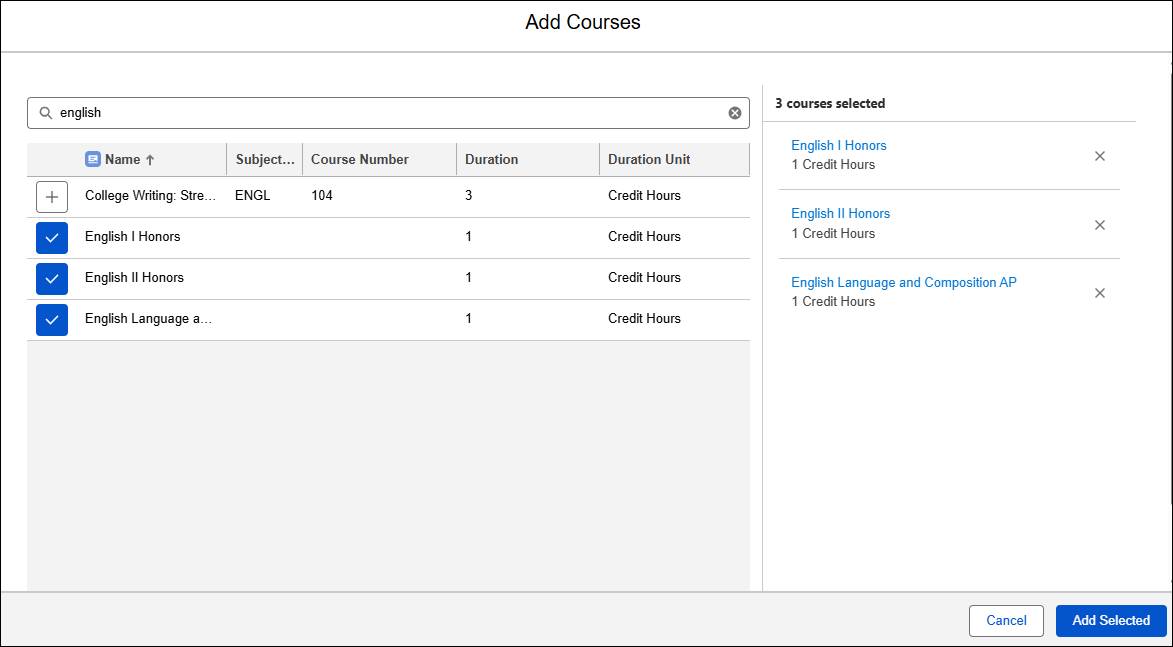
Using the Program Plan Builder, the registrar adds three English courses to the Upper School Graduation Requirements 2025–2026 learning program plan.
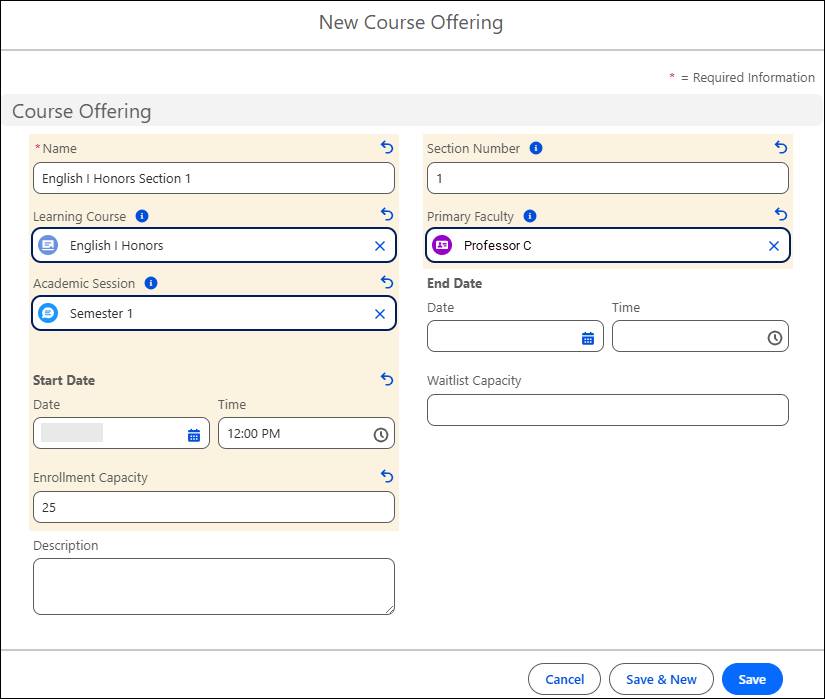
After including all the courses in the learning program plan, the registrar creates the course offerings, for example, a course offering for English I Honors Section 1, setting the teacher as Professor C.
She then creates a course schedule to define the course recurrence and location, including the building and room number.
To track student enrollments in each section, the registrar creates course offering participant records to map each student to the course offerings they’re enrolled in. In this example, we assume that student schedules are created by assigning students to nonoverlapping sections of courses that they choose with the help of an advisor or guidance counselor.
These records culminate in a comprehensive curriculum model.
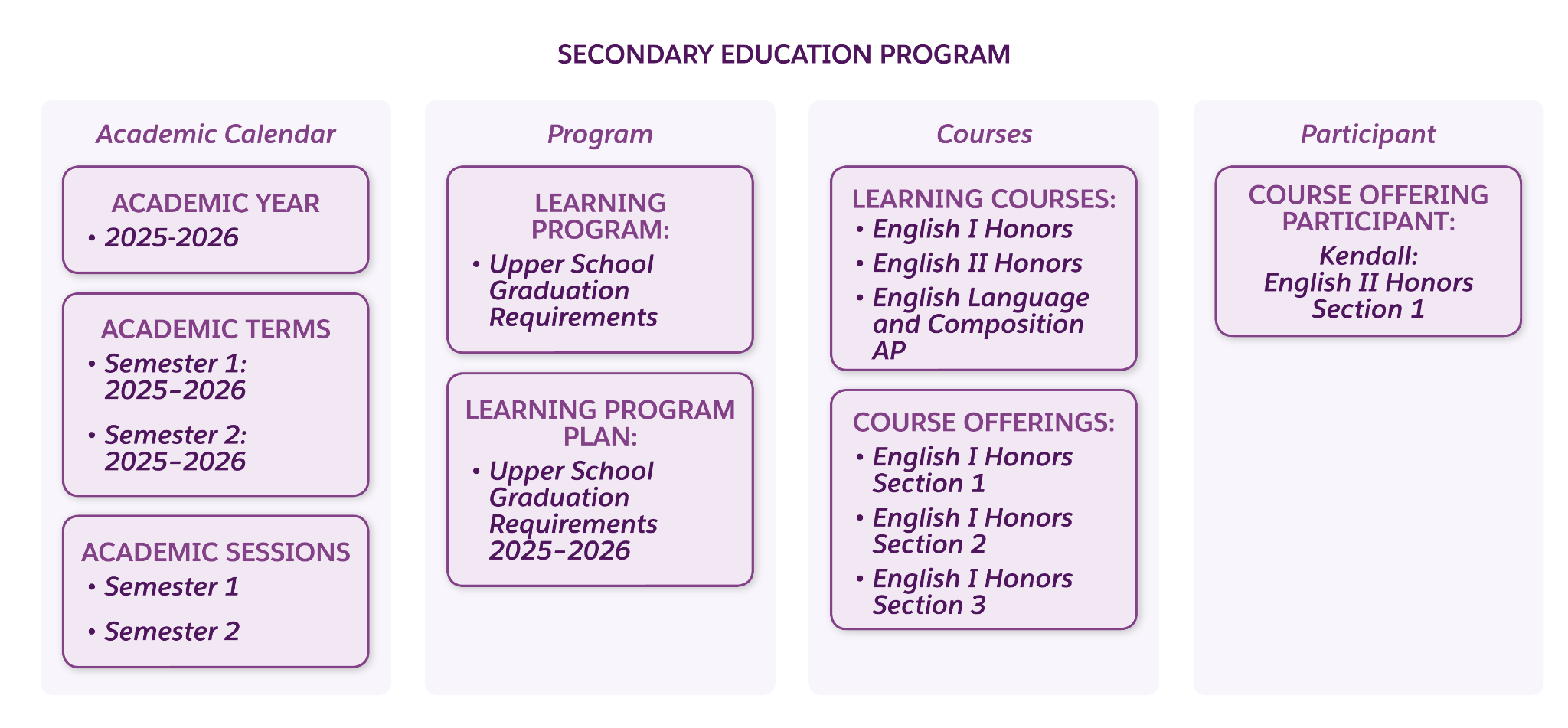
This table lists the records that the registrar creates using the multi-year program model.
Object |
Records |
|---|---|
Academic Year |
2025—2026 |
Academic Term |
Semester 1 2025—2026, Semester 2 2025—2026 |
Academic Session |
Semester 1, Semester 2 |
Learning Course |
English I Honors, English II Honors, English Language and Composition AP |
Learning Program |
Upper School Graduation Requirements |
Learning Program Plan |
Upper School Graduation Requirements 2025—2026 |
Course Offering |
English I Honors Section 1, English I Honors Section 2, English I Honors Section 3 |
Course Offering Participant |
Kendall, an enrolled student, is a participant in English II Honors Section 1 and other course offerings. |
Now that you’ve discovered the most common primary and secondary education modeling strategies, let’s round out your knowledge with some important considerations and tips for successful deployment.
Important Considerations and Best Practices
Before setting up your curriculum model, review these best practices grouped into four focus areas: strategic design, system setup, operations, and registration.
Strategic Design
Balance your institution’s immediate needs with future scalability.
-
Hybrid approaches: Some schools find a hybrid approach works best, using one-program-per-year for earlier grades and switching to a multi-year graduation model for upper grades.
-
Change management: Anticipate how you’ll manage future program updates, such as new electives, revised requirements, or policy shifts.
-
Flexibility: Design your learning program structure to accommodate changes in curriculum without disrupting current enrollments.
-
Scalability: Contemplate how your structure will scale to account for the introduction of new campuses, grade levels, or specialized programs.
System Setup
Establish strong data standards and testing protocols.
-
Record naming: Establish consistent naming conventions for consistency.
-
Data governance: Create and maintain program plans so you can report on them later.
-
Testing: Always test out your curriculum configurations before launch.
Operations
Consider how to use automation and external data to round out your solution.
-
Automation and self-service: Explore how flows and other built-in automation tools in Agentforce Education can minimize manual data entry, and explore the self-service options for registration.
-
Data integration: When deciding on the granularity of your courses and sessions, factor in your integrations with external systems, such as learning management systems (LMS) or reporting tools.
Registration
Along with these best practices, you should also consider your options for managing registration.
Registration Model |
Description |
|---|---|
First-Come, First-Serve |
If your institution uses a first-come, first-serve registration method, enable Course Search and Registration in Experience Cloud so that students can self-register from the portal. |
Administrator-Driven |
If your registration is administrator-driven, create course offering participant records manually or by using automation. |
Hybrid |
As an alternative, you can combine these registration methods, such as enrolling students in core or required classes through CRM, and then using the student portal to facilitate first-come, first-serve registration for elective courses. |
By following these best practices, your institution can deliver flexible, efficient, and scalable academic operations.
Wrap Up
Agentforce Education includes a powerful combination of tools, standard objects, and features to help you structure your curriculum with precision, flexibility, and scalability. With the correct structure in place, you can streamline operations, enhance the student experience, and ensure your academic catalog stands the test of time.
In this badge, you explored some of the common structures that primary and secondary institutions use to organize their learning, but the optimal solution is the one that meets the unique needs of your institution. Now, it’s your turn to develop the model that best supports your faculty, staff, and students.