Solve the Case of the Missing Diaper Bag
Learning Objectives
After completing this unit, you’ll be able to use an agent to:
- Create a case to find the missing diaper bag.
- Reassign a case to the proper team.
The Case of the Missing Diaper Bag
By early afternoon, the guests have relaxed into the day, and you see them splashing in the waves and snoozing in the sand. You make your rounds to introduce yourself to the staff at the various stations around the resort.
At the pool, the attendant enthusiastically shows you around and tells you he’s already used the new employee agents twice! Once to create a case to have maintenance retrieve a guest’s sunglasses from the bottom of the pool, and then again to assign a case to housekeeping to restock the towels.

As you walk down the beach, you meet the Beach Bootcamp Challenge experience coach who is raking the sand after a workout. She tells you about the bootcamp and some of the guests who come to compete against each other. She remarked about how the employee Guest Agent made it so seamless to instantly book drop-in guests into sessions. Previously, she had to send them back to the front desk to register for a session before they could join.
Just then, a woman holding a toddler races up to you, out of breath, and tells you that she’s missing her diaper bag. She said she left it in the beach cabana while she went for a swim and her partner was busy building sandcastles with the baby. They left the cabana to return to their room, neither noticing the diaper bag had been left behind. When they went back to look for it, a new family occupying the cabana said they hadn’t seen their bag. “Trust me, we need that diaper bag, asap!” she pleaded, holding her nose. She holds up a picture of her family and zooms in on the bag at their feet. “It looks like this,” she says.

“Well, this is definitely urgent,” you agree. “I’ll make sure the staff looks for your diaper bag right away.” “In the meantime,” you say, pointing just behind you, “the front desk has a stash of all sizes of diapers and supplies, and we can be sure you have what you need until we locate your bag.” The woman thanks you and heads over to the desk.
You remember seeing a housekeeping team cleaning beach cabanas between guests. You know you can use the new Customer Service employee agent to create a high-status case for the housekeeping staff to find the diaper bag.
Create a Case to Find the Missing Diaper Bag
- In the Coral Cloud Resorts app, click
 to expand the Employee Agent panel if it’s not already visible.
- Click the arrow next to Guest Agent to expand the Select Agent menu. Select the Customer Service Agent from the menu, then click Select. Make sure the correct agent is selected.
- In the Agentforce panel, copy and paste:
Create a case to find the lost blue and white striped diaper bag.
- The agent responds to tell you the case was successfully created. (Note: If you don’t see the case information, ask the agent to show you the case.)

Assign the Case to Housekeeping
Assignment Rules are not set up in this org, so the Case Owner is currently set to you. You need to reassign the case to the Housekeeping team.
- In the agent response, click the case number, 00001068, to open the Case Feed.

- In the agent conversation window, copy and paste:
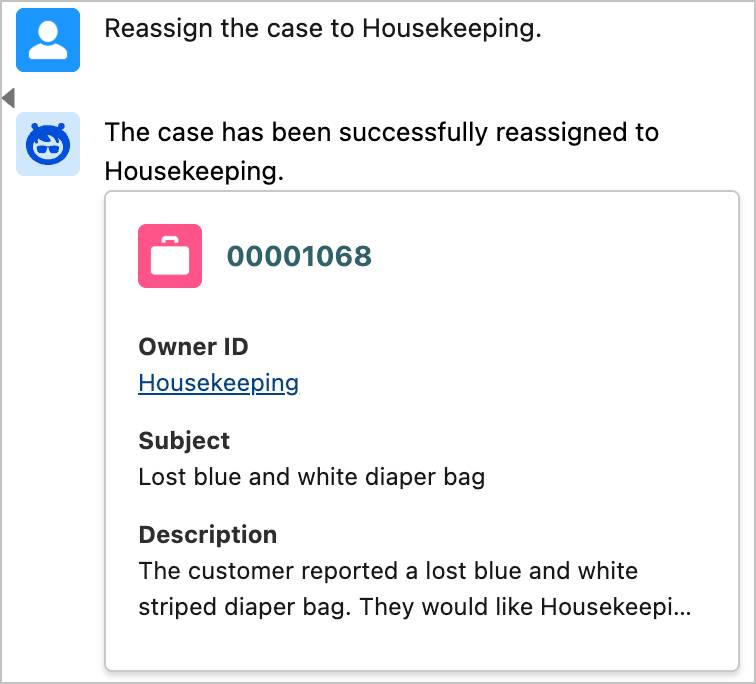
Reassign the case to Housekeeping. - The agent responds to tell you that the case has been successfully reassigned to Housekeeping.
- Since this needs immediate attention, let's escalate the case so it gets the response it needs. In the agent conversation window, copy and paste:
Change the Status to Escalated.
- The agent tells you that the case status has been updated. If the agent is having trouble changing the status, try prompting it again.
- If the Case Owner or the Status field on the Case Feed does not automatically update, in the Agentforce panel, click the case number again to refresh the Case object and view the update.

Wrap Up
You’re confident that someone on the Housekeeping staff will turn in the diaper bag and that the case will be resolved quickly. Check the following challenge so you can continue helping guests.