Analyze Member Activity
Learning Objectives
After completing this unit, you’ll be able to:
- Identify power users and potential Slack champions using member activity metrics.
- Evaluate employee engagement trends based on message activity and active days.
- Assess progress toward business objectives like employee retention and satisfaction using member analytics.
It’s time to review some data in action. You can use the analytics and data around member usage to make more informed decisions about managing Slack inside your company.
Discover Member Activity with Analytics
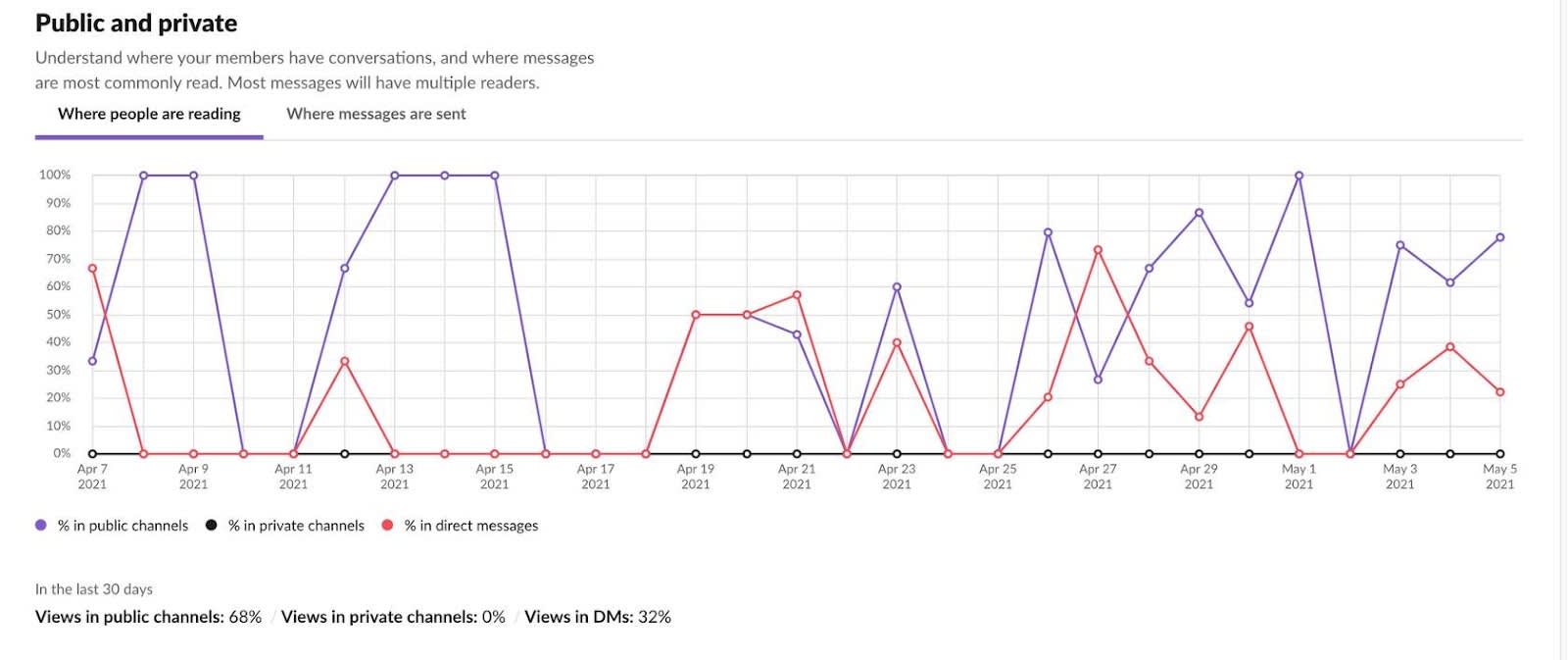
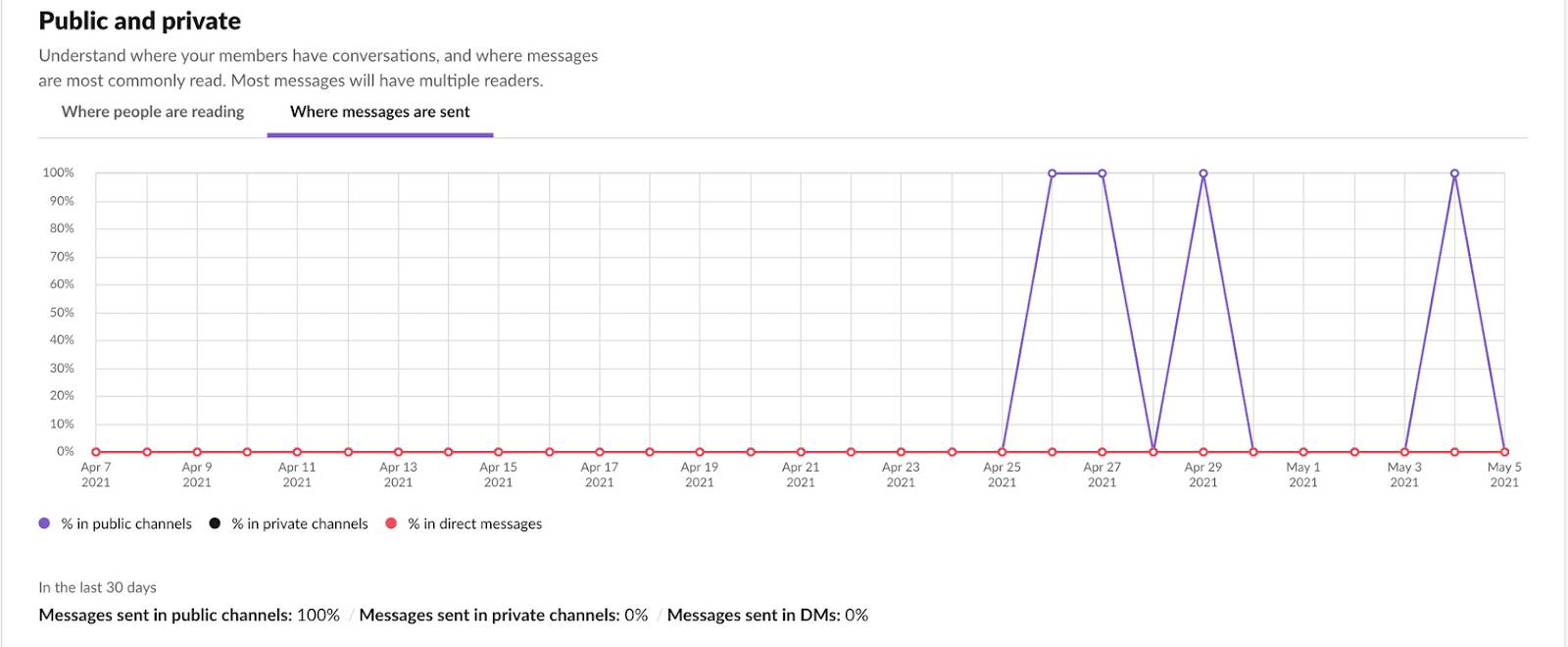
Using Slack's analytics dashboard, you can access data that tells you exactly where your members spend most of their time. The data is broken down by where people are reading messages and where they’re sending messages.
Imagine your members are sending a lot of direct messages (DMs) akin to office chatter. This behavior can signify healthy relationships among your teams. However, if most of your organization’s time is spent both sending and reading DMs, this indicates that most work is being done via DM rather than in channels. Sometimes, siloing information in DMs can contradict the very reasons your organization moved to Slack in the first place. It can also stifle your organization's ability to realize the true value and power of Slack’s search capability.
Take a moment to check member activity in your Slack analytics dashboard. Where are most conversations happening? How might you encourage members to work more in channels?
Make Informed Decisions Using Data
Review the Latest Trends
Because channels are often dedicated to specific subjects, gaining visibility into your most active public channels clues you in to trending topics. This helps you identify issues that need attention, such as a spike in customer support tickets, or topics that are sparking conversations. Conversely, sorting by the lowest number of messages sent can point you toward inactive channels that can be archived to keep your team’s channel list tidy and relevant.
Anticipate Emerging Trends
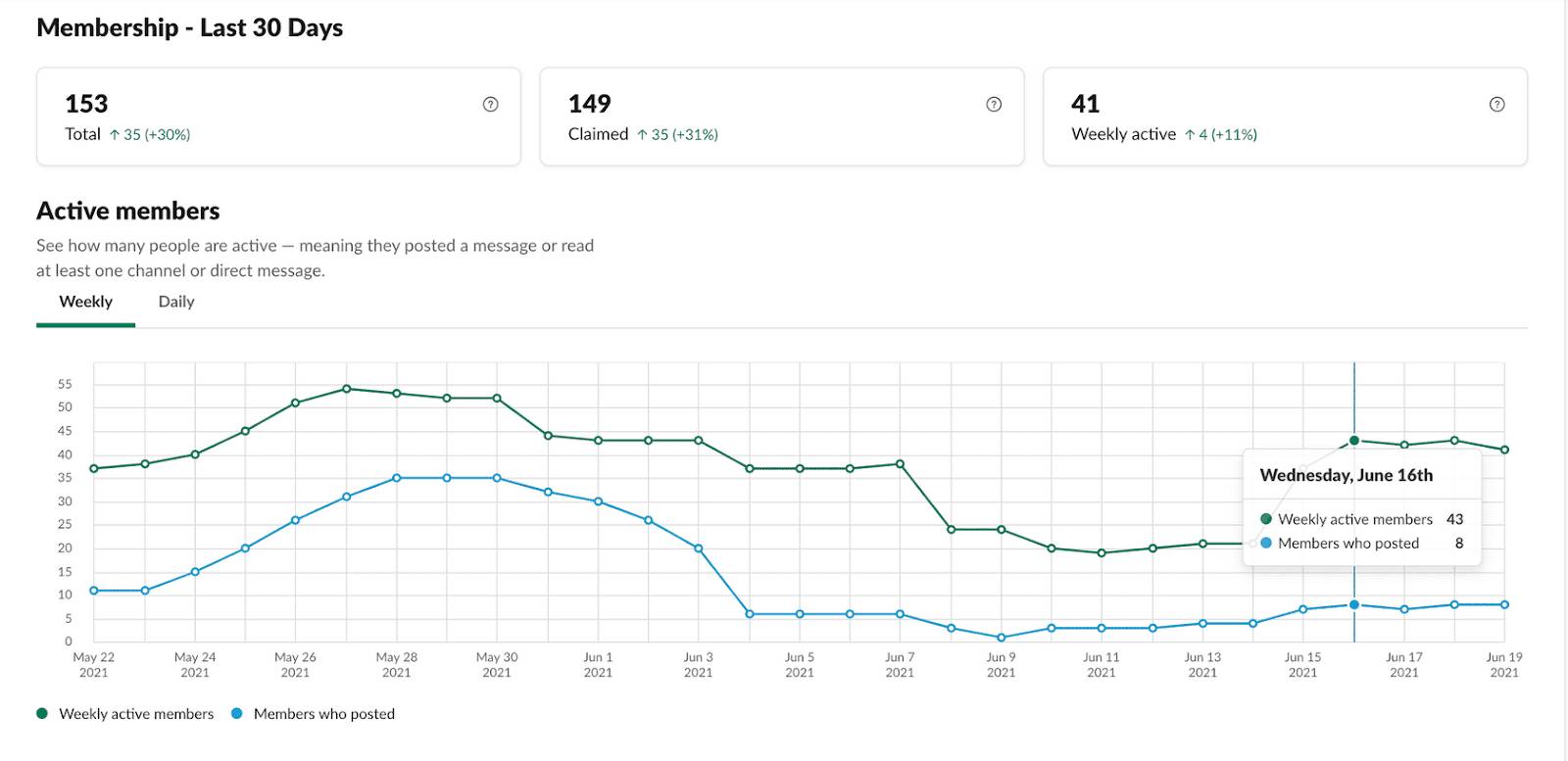
Perhaps you’ve noticed an uptick in new members who recently joined your organization’s Slack instance. When you inspect where these new members are sending messages, do you notice a shift in where they’re sending messages? If there’s a shift toward DMs, consider offering a training session to make sure everyone understands the value of working “out loud” in public channels. This helps new members feel comfortable working in public channels.

Identify New Slack Champions
When you’re introducing Slack to new departments, peer training can go a long way in helping new team members understand how Slack fits into their daily workflows. Use the members section of the dashboard to find early adopters and highly active users—power users—whose knowledge can benefit others in your company. Ask whether they'd like to become a champion for Slack in your organization.
Track the Reach of Your Announcements
With Business+ and Enterprise+, you can reach hundreds or thousands of employees with a single message. Using message activity analytics, you can measure the reach, impact, and engagement of important messages such as announcements or internal comms campaigns. On certain messages, you can review engagement data such as views, top replies, and viewers. If you’ve configured teams via SCIM, you can even review metrics by department.
Keep in mind that data is only one part of the story. When it comes to understanding how Slack can improve your team’s work, consider these metrics along with other observations and conversations to get the full story.
Many admins set up sentiment surveys using Slack Workflow Builder to survey users, gather feedback, and understand how Slack is working for them. Consider asking about their training requirements, the amount of time it takes to search for information, or to switch between apps they commonly use for work. This feedback can be extremely helpful in identifying gaps where users might benefit from additional Slack training or valuable use cases that can be used across your organization.
Measure Success
Remember your success goals? How do you plan to measure your organization’s progress against the specific objectives you outlined?
If you're stuck, start with the metrics identified by the admin at the beginning of this lesson. Of course, every organization is different. While some of these metrics might be helpful, you might want to come up with specific lists for your organization.
Business Goals |
What This Looks Like in Slack |
Ways to Measure in Slack |
|---|---|---|
|
Build a Strong Culture Engage and inspire employees to do their best work. |
Make valuable work searchable across the organization by working “out loud” in public channels. |
|
|
Financial Discipline Use technology to deliver more effective outcomes at lower costs. |
Deploy 10 Slack app integrations that reduce context switching, increase productivity, and deliver better business outcomes. |
|
|
Employee Satisfaction and Retention Modernize the toolset to attract and retain the best in class talent. |
Encourage managers and employees to use Slack in their daily roles. Identify power users and role models for recognition. Build a champion network. |
|
Before you get started, remember to identify business objectives and goals for Slack, recommend metrics to measure progress, and recall available data and analytics through workspace and org-level dashboards. With the full story available, you can use that data to make informed decisions that increase success with Slack.