Clean Up the Text Variable
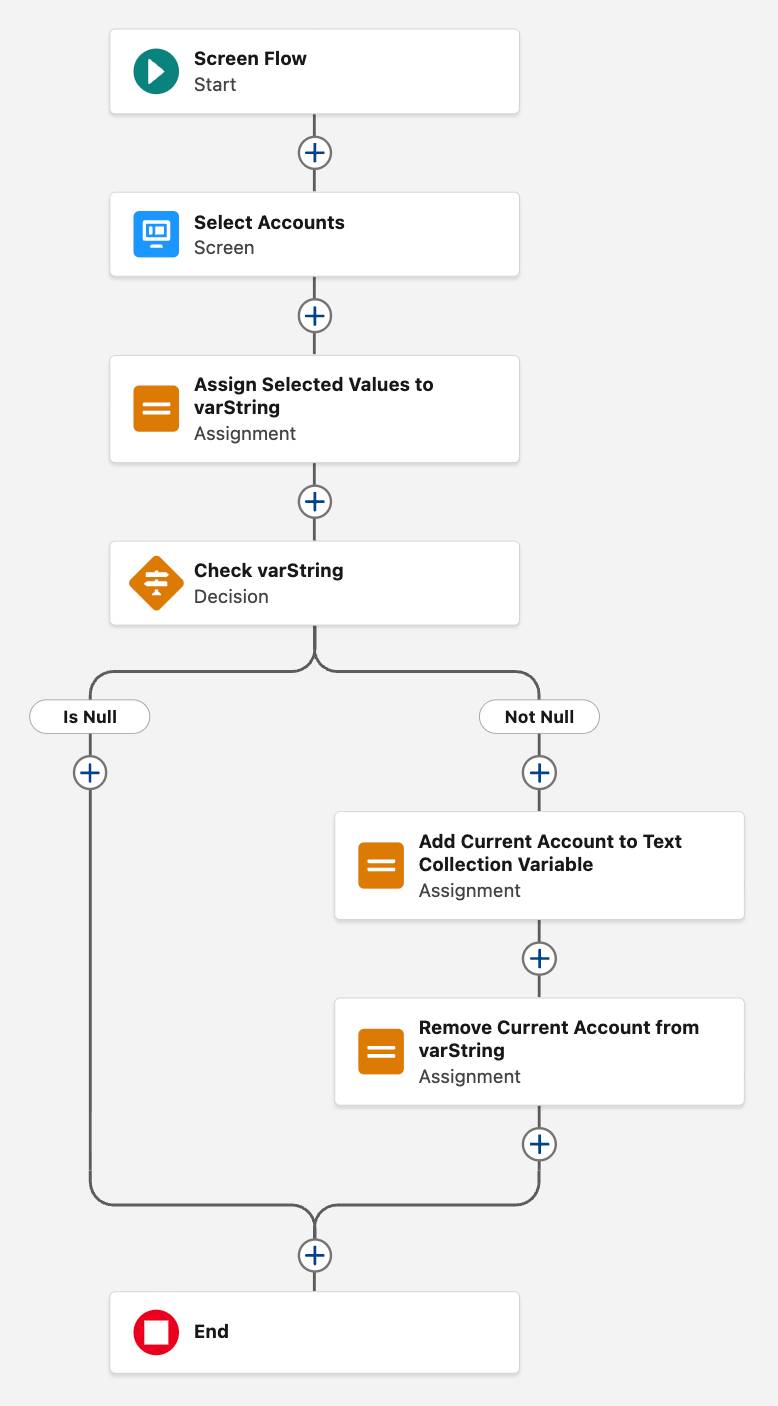
Now that the flow has captured the selected account ID in an actual text collection variable, the flow needs a way to remove that account ID from the varStringOfSelectedAccounts variable. That way, when the flow runs this loop again, it won’t process any account IDs that it’s already looped through. Removing the current account ID is a three-step process.
First, create a formula (frmStringWithoutCurrentAccount) that calculates what remains of varStringOfSelectedAccounts after removing varCurrent’s current account ID. (Because the flow copied the first selection to the text collection, that text isn't needed in the full list of selections anymore.)
Second, create an Assignment element that overwrites varStringOfSelectedAccounts with the contents of frmStringWithoutCurrentAccount. In effect, this element removes the current account ID from varStringOfSelectedAccounts, completing the first run of the loop.
Third, use the Connect to Element function to create a Go To connector from the last Assignment element back to the Decision element at the start of the loop. The flow follows this connection back to the start of the loop and repeats the formulas and assignments until all Account selections have been processed.
- Create a formula that removes the current account selection from varStringOfSelectedAccounts.
- For Resource Type, select Formula.
- For API Name, enter
frmStringWithoutCurrentAccount.
- For Data Type, select Text.
- For Formula, enter:
SUBSTITUTE( {!varStringOfSelectedAccounts}, {!varCurrentAccount} & ";", "" ).
- Click Check Syntax to make sure the formula is valid.
- Click Done.
This formula uses the same SUBSTITUTE function that you used earlier to eliminate characters by replacing them with nothing. The trick here is the “&” in the second argument; the “&” character concatenates two text strings together. So this function removes both the first record ID and its trailing semicolon from the varStringOfSelectedAccounts variable.
- For Resource Type, select Formula.
- After the Add Current Account to Text Collection Variable element, create an Assignment element that removes the current account from varStringOfSelectedAccounts.
- For Label, enter
Remove Current Account from varString.
- Make sure the API Name is
Remove_Current_Account_from_varString.
- For Variable, select varStringOfSelectedAccounts.
- For Operator, select Equals.
- For Value, select frmStringWithoutCurrentAccount.
- For Label, enter
- Connect the Not Null path back to the Check varString element.
- On the Not Null path, after the Remove Current Account from varString element, click
 .
.
- Select Connect to element.
- Click the Check varString element.
The Not Null path should now end with a connection to Check varString, and the Check varString element should say +1 connections.
- On the Not Null path, after the Remove Current Account from varString element, click
- Save the flow.