Review Loan Applications
Learning Objectives
After completing this unit, you’ll be able to:
- Explain straight-through processing.
- Summarize how the Underwriter Console helps you review loan applications.
- Describe how loan processors triage applications and verify details.
- Explain how to validate an applicant's profile and documents.
- Identify tools to collaborate and manage application review tasks.
Post-Submission Steps
When a loan applicant submits their application, they expect a quick decision. However, your financial institution must first perform checks to verify the accuracy of submitted information and maintain compliance.
Digital Origination for Lending includes tools to automate qualified applications instantly, and a dedicated console designed to speed up the work of loan processors and underwriters when human supervision is necessary.
In this unit, you discover how straight-through processing works. Then, explore the Underwriter Console for validating documents, managing collateral, and coordinating automated and manual verifications. You also discover how Stage Management and Compliant Data Sharing facilitate team collaboration for faster reviews.
Start with straight-through processing, when an application is automatically processed, qualified, and approved by the system without review.
Straight-Through Processing
Digital Origination for Lending achieves straight-through processing with built-in tools that instantly evaluate and approve loan applications that meet your predefined criteria.
How? First, set up Business Rules Engine to determine whether a submitted application qualifies for straight-through processing immediately.
Then, open APIs and Integration Definitions, such as a credit-reporting integration, perform the necessary checks for instant decisions. Integration Orchestration provides end-to-end visibility for these automations and manages external callouts for tasks such as credit checks and Know Your Customer (KYC) verification.
If an application doesn’t qualify for straight-through processing, your loan processors and underwriters review the application to decide whether to approve the loan.
But what about applications that don’t qualify for straight-through processing? Enter the Underwriter Console.
The Underwriter Console
In Digital Origination for Lending, the review process happens in the Underwriter Console.
The Underwriter Console is a unified workspace for loan processors and underwriters. It minimizes manual processes to reduce the time to gather information, decide, and close loans.
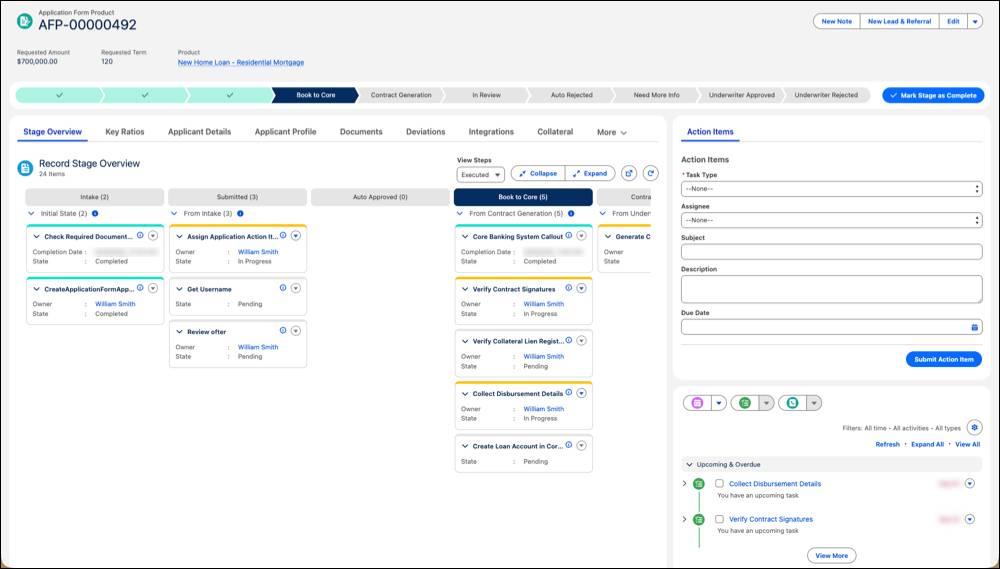
The console provides a single, comprehensive view of a loan application and its related data. It includes tabs and components to view information, such as:
- An applicant’s profile with Know Your Customer (KYC) details, such as their credit profile, employment, income, assets, and liabilities.
- Loan documents uploaded with an application.
- Offers, including the pre-qualified offer selected by the applicant.
- Collateral details for secured loans.
But these details aren’t visible to everyone in your organization. Digital Origination for Lending manages access to information with Compliant Data Sharing, which helps you set up advanced data sharing rules throughout the loan process.
You define that process, from intake through closing, by using Stage Management to simplify complex loan processes and external data needs.
Stage Management defines a comprehensive workflow for application form product records through each stage, coordinates external verification processes, and guides your team with stage transition criteria for manual tasks. You learn more about external verification processes in a later section.
Now that you understand where your team does their work and how to define stages, learn more about the tools you can use for each task.
Document Validation
Loan processors can use the document checklist items in the Underwriter Console to confirm whether the uploaded documents on an application are valid.
By using the Validate Document feature, loan processors can even compare documents against application forms, applicants, party profiles, and application form products in a split-screen view.
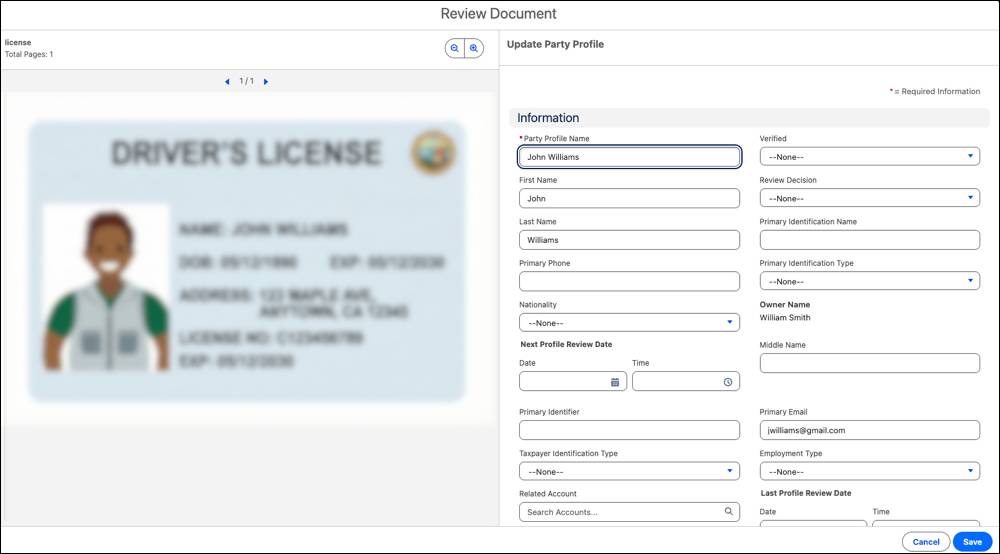
For example, for identification and address verification, loan processors can compare the data in the CRM records against an uploaded image of a government identification, such as a driver’s license.
Next, learn how loan processors manage external verification processes.
Verification Processes with Stage Management
Stage Management helps you coordinate complex verification processes. These processes can include both manual and automated tasks and the tasks performed by your team and outside partners.
Automated Tasks
For automated tasks, Stage Management handles callouts to third-party APIs and other systems through Integration Definitions and Integration Orchestration.
Your team can monitor the status of external checks in real time, with components such as the Integration Execution Status Lightning Web Component and the related IntegrationOrchestrationShowIntegTimelineDetails Flexcard. These components visualize the progress of external callouts and show the status of each data integration process.
This information helps your loan processors confirm and verify the results of automated checks before passing the application ahead for a final decision. For example, a loan processor can review the history of the credit check and report integration to see whether it failed.
If an integration does fail, Integration Orchestration can try the callout again. This step makes sure that temporary network or system failures with external service providers don’t halt the review process for a long time, which in turn can reduce cycle times.
Manual Tasks
Use Stage Management to coordinate manual verification processes stored in the Information Verification object, such as address verifications, employment verifications, and property reviews for collateral.
These manual tasks can be dependent on each other. For example, you can configure an initial appraisal of collateral followed by an in-person visit to inspect that collateral for final valuation.
If you work with an external partner for these tasks, you can also use Stage Management to assign these tasks to those agencies.
Collateral Management
For secured loans, loan processors and underwriters use Collateral Management to track pledged assets by using the Party Financial Asset and Application Form Product Collateral objects.
Collateral Management connects a party financial asset to an application form product record, and then manages liens and tracks deviations of key collateral-evaluation metrics, such as loan-to-value.
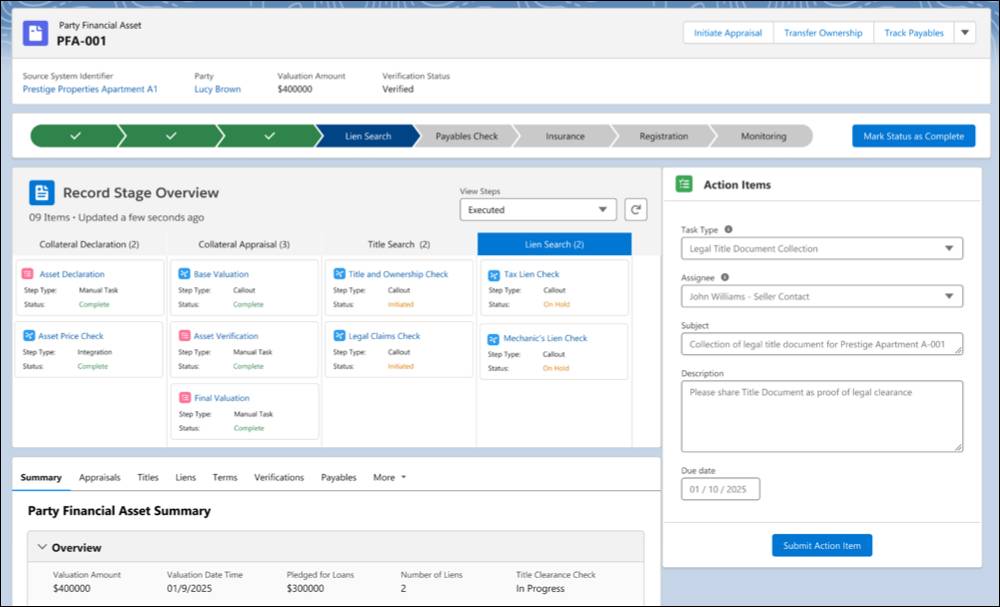
Collateral Management can also:
- Track the appraisal process, including initial appraisals, final appraisals, and adjustments.
- Use one asset as collateral for multiple loans, also called cross-collateralization.
- Pool several assets as collateral.
- Track liens, also known as charges or security interests, plus due diligence processes and tasks with Stage Management workflows.
- Track terms and covenants related to collateral assets.
See the collateral management link in the Resources section for more details.
Collaboration and Task Management
As an application moves through the approval process, it’s important for your team to monitor progress and work together.
At each stage of the loan process, your loan processors, underwriters, and managers can review the status of the automated and manual steps by using the Record Stage Overview component.
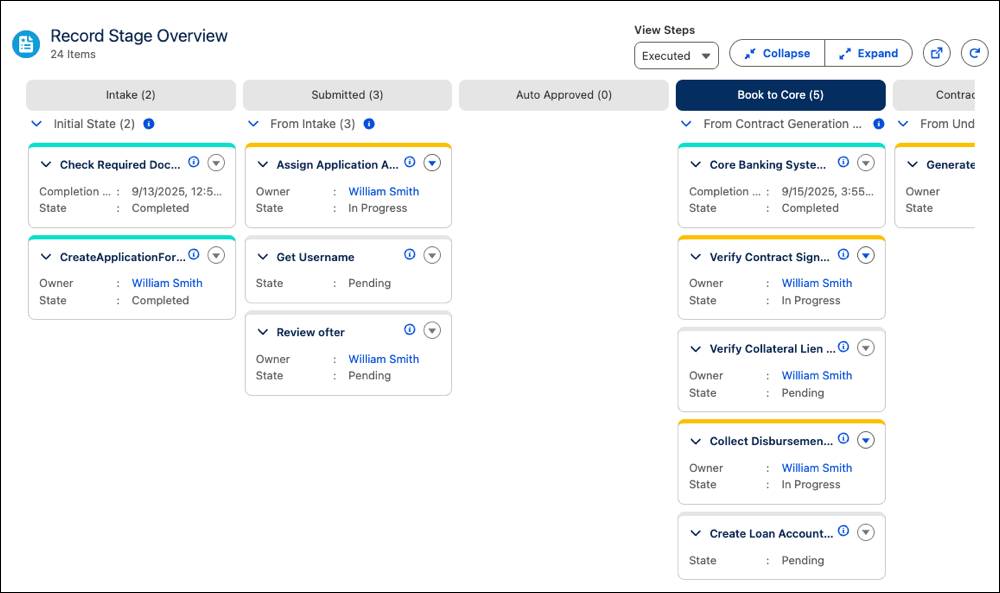
The component provides a comprehensive view of the stages and the tasks in each stage of the loan origination workflow. This view helps your team quickly triage applications and prioritize work.
You can assign a task directly to a particular user or applicant by using the Application Action Item object. You can assign tasks to anyone with access to the application through Compliant Data Sharing. For example, assign an employee to verify an applicant's employment details or assign the applicant to upload missing documents.
What’s Next?
In this unit, you learned how straight-through processing can automate approval of an application.
If an application doesn’t qualify for straight-through processing, your team can use the Underwriter Console as a unified workspace to review applications, validate documents, and manage collateral. You learned that Compliant Data Sharing manages access control and Stage Management defines your workflows. Plus, Digital Origination for Lending uses Integration Orchestration to handle external verifications, and the Record Stage Overview component to facilitate collaboration and display task progress.
After the review tasks are complete, it’s time to decide. In the next unit, you learn how to approve and close applications.
Resources
- Salesforce Help: Underwriter Console for Digital Lending
- Salesforce Help: Applicant Eligibility Check by Using Business Rules Engine for Digital Lending
- Salesforce Help: Stage Management for Digital Lending
- Salesforce Help: Know Your Customers
- Salesforce Help: Access Credit History with Equifax® Integration Definition Template
- Salesforce Help: Validate Documents in Document Checklist Items
- Salesforce Help: Collateral Management in Digital Lending