Compare Grid Design Models
Learning Objectives
After completing this unit, you’ll be able to:
- List five grid design best practices.
- Describe some benefits and considerations for the two main grid design models.
Grid Design Best Practices
As you think through potential grid design options for your client, keep in mind five core best practices.
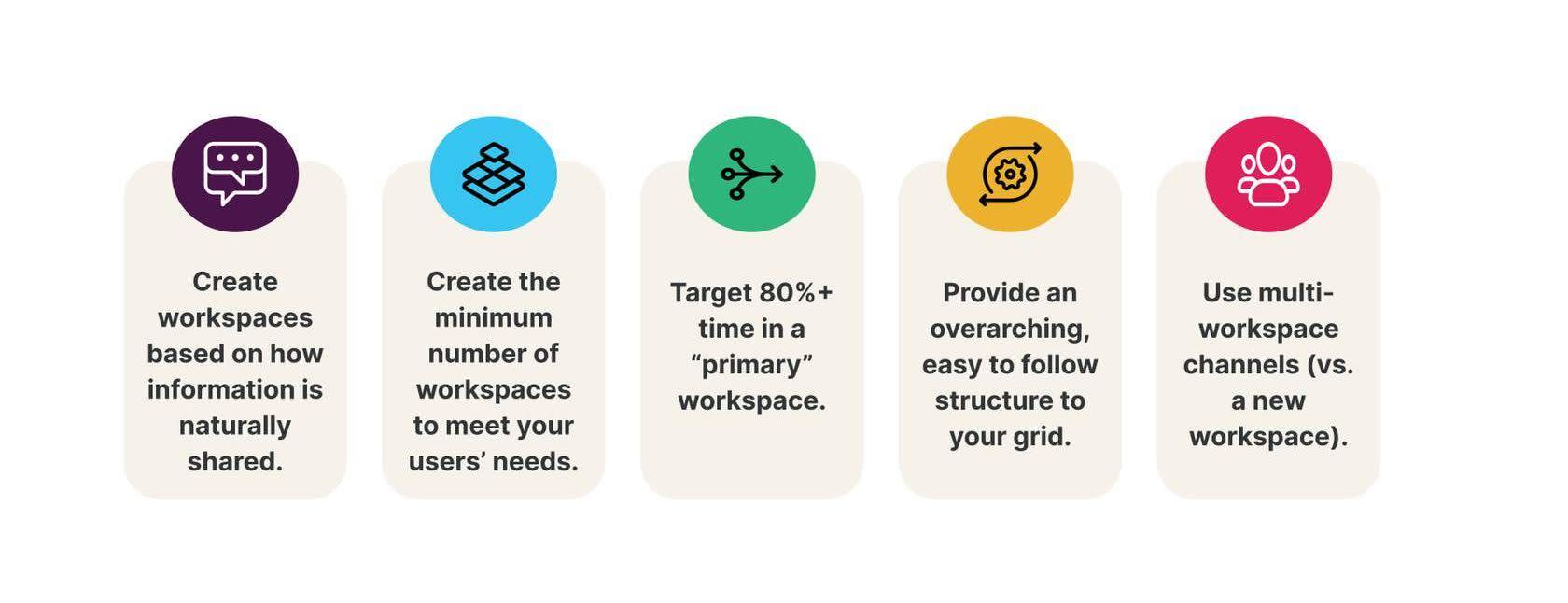
1. Create workspaces based on how information is naturally shared.
First, identify the client’s existing information and collaboration networks. These networks form the foundation of their workspace structure and strategy. Think beyond the org chart, and consider how employees collaborate. Often, employees work with people outside of immediate teams and across departments, so the grid design should promote cross-collaboration.
2. Keep grid design simple.
It’s tempting to create many workspaces, but starting with fewer is better for admins and team members. You can always add more as the company grows. A simple, broad, and inclusive design makes it easier to adapt to changes. Managing multiple workspaces takes time and effort, so each one should bring real value.
3. Target 80%+ time spent in a “primary” workspace.
Make sure every member has a primary workspace to get core work done. To keep things simple, know how many workspaces users jump between. This is achieved by assigning each employee to (on average) two or three workspaces maximum. Fewer workspaces make the grid easier to navigate. We recommend that users spend 80% of the time working in their primary workspace.
4. Make your grid structure simple.
Build an easy-to-follow grid structure based on how information flows naturally. This helps members find the right places and people, even across departments and units. Take the time to plan a workspace structure and workspace naming conventions now, just in case your client adds more workspaces.
5. Use multi-workspace channels (vs. a new workspace).
Multi-workspace channels allow users to connect with groups outside their workspace without creating a new one. Not every project or department requires its own workspace. Use multi-workspace channels for cross-functional projects instead. Encourage your client to be thoughtful about creating new workspaces to avoid overwhelming users. Review the new workspace decision tree at the end of this module for guidance on when to create new workspaces strategically.
Use these best practices when you design the client’s grid, and be sure to educate the client about them so they understand why you’re making your recommendations.
Grid Design Models
There are two base models for Enterprise Grid structure: centralized design and distributed design. Let’s take a look at centralized design first.
Centralized Design
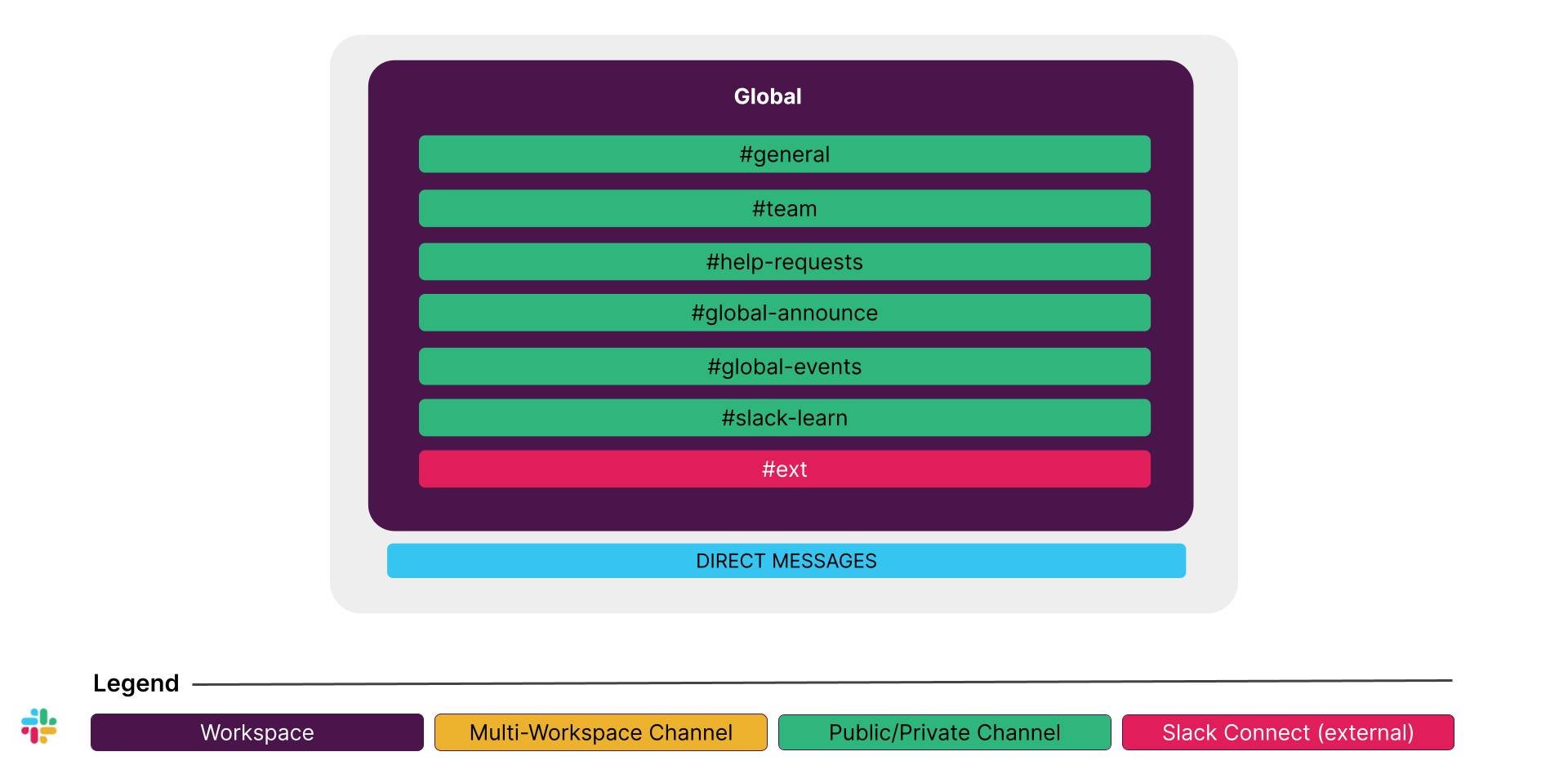
Description:
The organization has a single workspace, and all employees participate in this one workspace. Multi-workspace channels are not used since there’s only one workspace available.
Variations:
Adapt the centralized workspace for unique needs. For example, you start with a centralized design but find that one business unit requires different policies and settings in Slack. In this case, create a separate workspace just for that team with a designated admin.
Benefits:
- There’s no context switching for employees, which helps them maintain focus and productivity.
- Administration is simpler with a single, central admin team, reducing the complexity of managing multiple workspaces.
- Lower effort is required to maintain incoming requests, such as app, guest, emoji, and channel requests, over time.
- The setup also ensures minimal governance overhead and more straightforward admin roles and responsibilities.
- It promotes cross-functional collaboration and helps break down silos within the global function.
Considerations:
This model lacks the ability for granular workspace control over policies and settings, such as data retention, guest management, and channel management. It requires thoughtful process-building and training upfront to enable self-sustaining success over time. For example, channel naming guidelines, private channel policies, Slack etiquette, and other best practices need to be implemented.
Often used by:
This model is best for organizations that want to break down silos for a more unified user experience, and customers transitioning from Free, Pro, and Business+ plans to Enterprise+.
Distributed Design
Description:
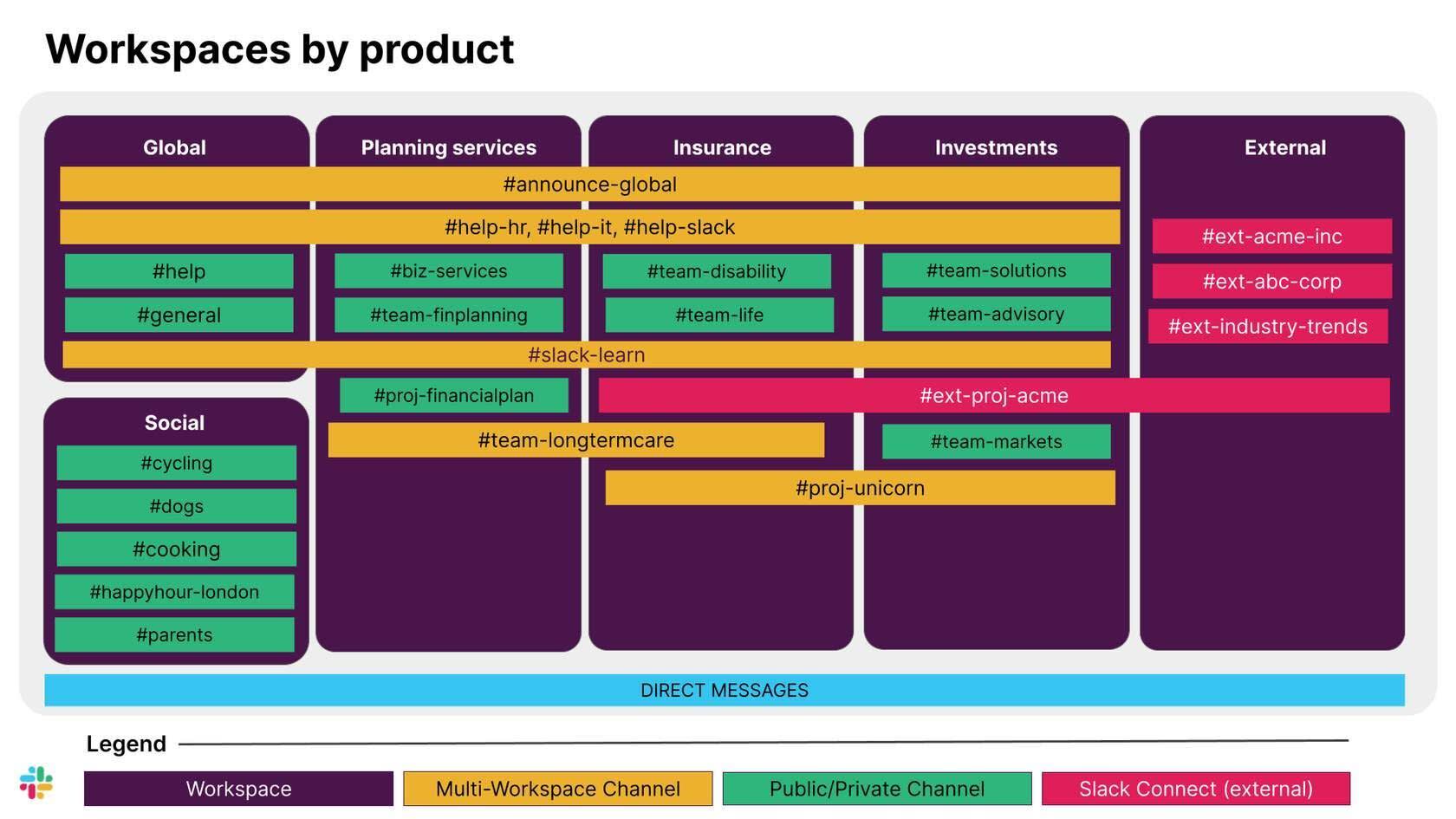
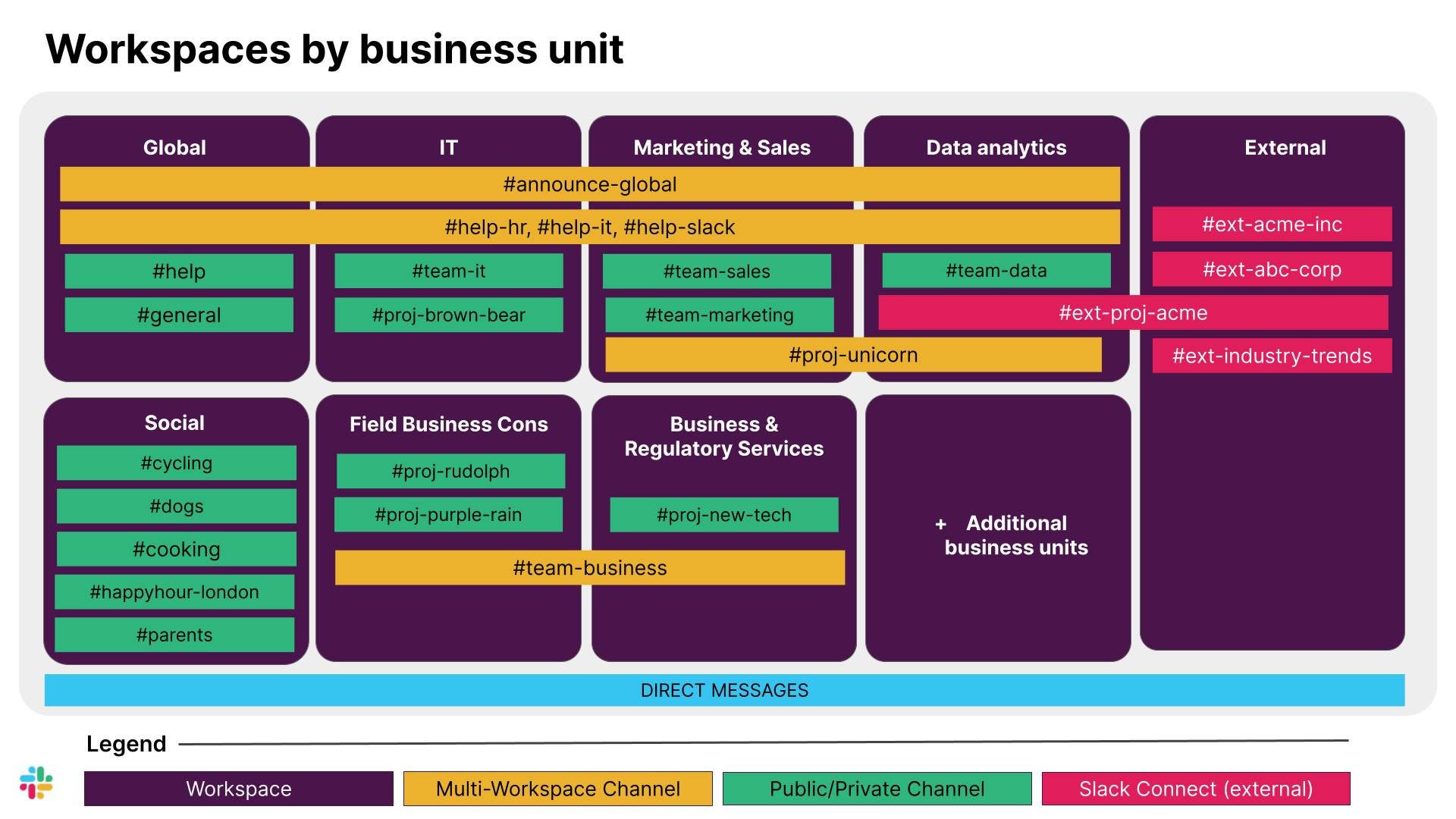
The organization has two or more workspaces, each based on different policies, privacy requirements, or the need to segment teams. Employees can participate in one or multiple workspaces. Multi-workspace channels are used to connect employees from different workspaces.
An effective grid design doesn’t always match your client’s org chart, unless that fits their needs. Rather than building workspaces to exactly mirror the structure, consider how people work together. Groups that interact frequently, on many topics, belong in the same workspace. Some clients might need their workspaces organized by product, while another might need it by business unit.

Benefits:
This model balances simplicity with specific requirements, giving the organization the flexibility they need. For example, it supports data retention policies and approval processes for apps and managing channels. It can also create information barriers if needed.
Considerations:
With this model, the grid design needs to be very intentional or users can have trouble navigating multiple workspaces. Too many workspaces can cause collaboration silos and an increased number of admin requests.
Often used by:
Organizations that need to implement different collaboration policies based on teams, such as preventing the finance team from uploading files on Slack, while allowing the rest of the organization to do so. This also applies to organizations with distinct lines of business or departments that require privacy of information or that should be separated from the rest of the organization. Additionally, it suits organizations that want a dedicated space to promote special interests and social communications in a separate workspace, and those that need a separate workspace to collaborate with external vendors and affiliates.
Other Workspace Designs
Think of these two models as the initial skeleton or the foundation of your designs. There are additional building blocks you can use on top of these models, depending on your client’s needs. Some additional workspaces to consider include social and external workspaces. If your client follows a distributed design structured around their business units, you can speak to the value of a global workspace–in addition to their workspaces for business units.
A Social Workspace |
Example Channels in a Social Workspace |
|---|---|
|
|
An External Workspace: |
Example Channels in an External Workspace |
|---|---|
|
|
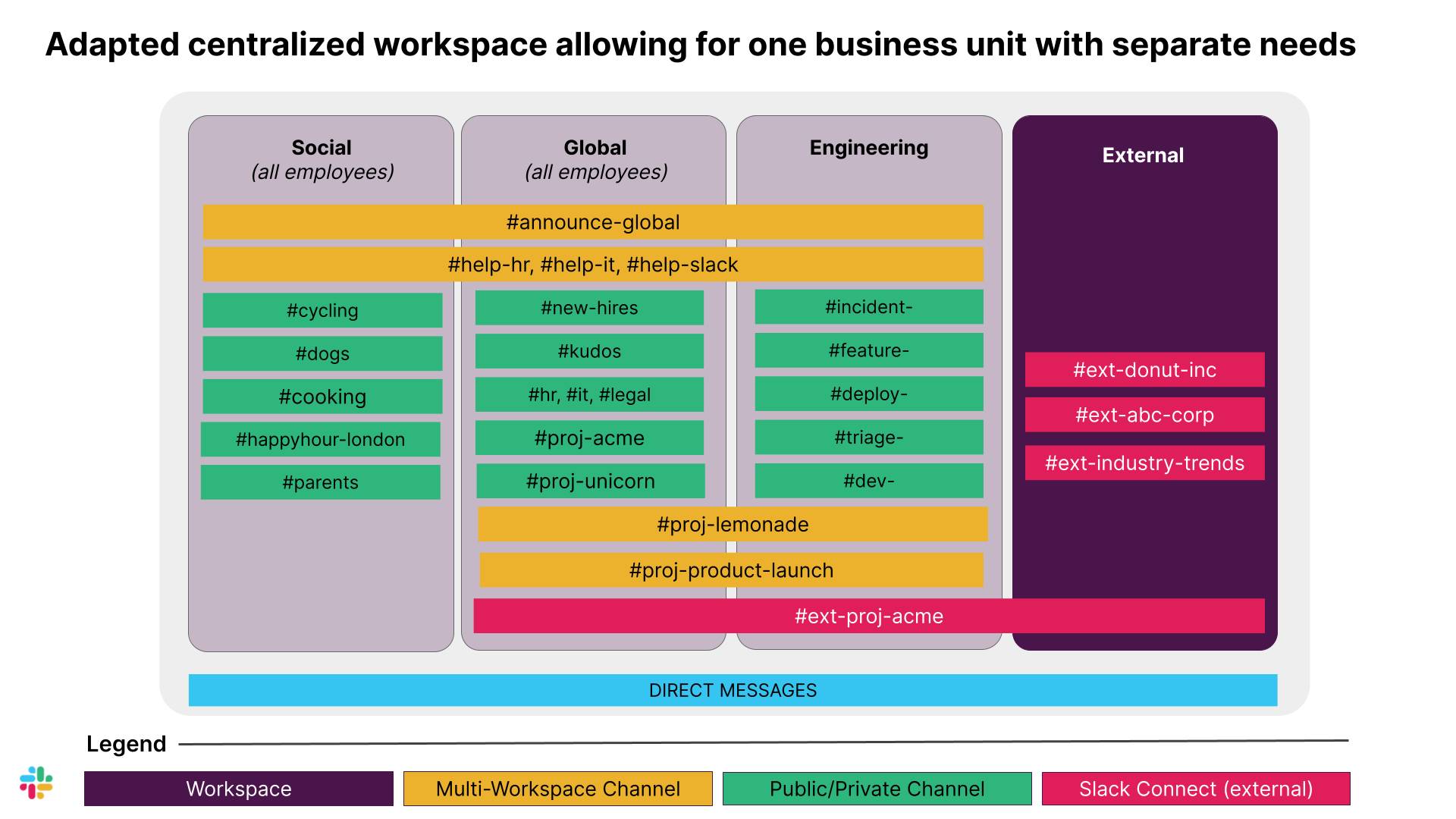
A Global Workspace |
Example Channels Found in a Global Workspace |
|---|---|
|
|
Put It All Together
Now that you know what to consider as you’re creating grid design options for a client, next explore how to put it all together by creating some grid design options for an example client.